FMD Release Highlights November 2025
Fabric Meta DataDriven Framework – November Release Highlights
I’m excited to announce the November update for the Fabric Meta DataDriven Framework! This release introduces powerful new capabilities, improved automation, and enhanced governance features to help you scale your Fabric implementation with confidence and ease.
Whether you’re already running the framework or just getting started, make sure to download the latest Setup Notebook and apply the necessary configurations to take full advantage of these new features.
Key Highlights
Domain & Business Domain Support
- Business Domains replace Sub Domains
Based on feedback, sub domains are now renamed as Business Domains and defined under a Domain. This change provides greater flexibility for future Data Mesh approaches, empowering Data Products and Data Agents in Microsoft Fabric. - Setup Notebook Enhancements
- Automatically creates Domains and Business Domains.
- Assigns all workspaces to the correct Domain.
- Requires Fabric Admin role to create Domains.
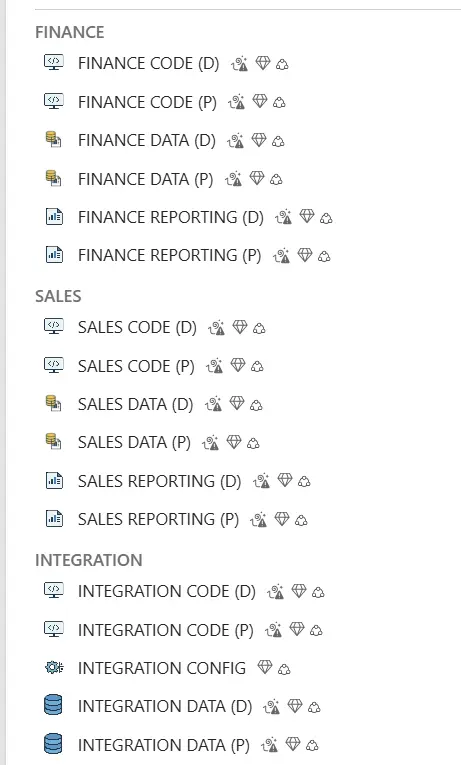
Workspace Structure per Business Domain
Each Business Domain now includes three dedicated workspaces:
-
- Code: Stores all notebooks and pipelines for data loading.
- Data: Hosts Semantic Models, Lakehouse, optional Warehouse or Fabric Database.
- For Materialized Lake Views, store notebooks here.
- Recommended: Use shortcuts from your Silver Layer in the Integration Domain to avoid duplicating data.
- Reporting: Contains all reports for the specific domain.
Enjoy a clear overview of all domains and their workspaces in Fabric!
Flexible Naming Conventions
- Parameter Changes
- Removed: framework_name
- Added: framework_post_fix
- New Naming Logic
Previously:
framework_name + ‘ DATA (D)’ + FMD
Now:
domain_name + ‘ DATA (D)’ + framework_post_fix
Tip: To keep existing naming, set domain_name as your previous Framework_Name and framework_post_fix as ‘ FMD’.
This update allows organizations to define their own naming standards for better alignment.
New Roles
This release introduces optional business-domain specific role lists for improved governance and flexibility. You can now define roles per workspace type within a Business Domain:
- Assign specific groups to Code, Data, and Reporting workspaces.
- Maintain consistent access control across domains.
- Easily customize roles for different organizational needs.
Notebooks
Added spark.conf.set(‘spark.databricks.delta.properties.defaults.enableChangeDataFeed’, True) to NB_FMD_LOAD_BRONZE_SILVER to support optimal refresh for materialized lake views in a lakehouse
Check out the documentation to learn more.
Updated Documentation
All documentation pages have been refreshed to reflect the latest features and improvements. Whether you’re configuring domains, setting up pipelines, or customizing icons, the docs have you covered.
Bug Fixes & Community Contributions
A big thank you to the community for reporting issues and submitting pull requests! This release includes several minor bug fixes and quality-of-life improvements based on your feedback.
Video Resource
Check out last month’s recording with (263) Matthias Falland -The Trusted Advisor- Fabric & AI – YouTube, where you can see the Fabric Metadata Driven Framework in action.
Final Notes
Make sure to:
- Re-download the Setup Notebook.
- Verify your Fabric Admin permissions.
- Review the updated documentation.
- Stay tuned—more features are on the way!
Github

Feel free to leave a comment
Discover more from Erwin | Data & Intelligence
Subscribe to get the latest posts sent to your email.

0 Comments