Creating Notebook Connections in Microsoft Fabric Just Became a Lot Easier (and Automatable!)
For a long time, creating a Notebook connection in Microsoft Fabric was surprisingly limited.
If you wanted a Notebook to run under a Workspace Identity or Service Principal, you only could configure this directly in the DataPipeline UI. In fact, the Connections pane didn’t even allow creating Notebook connections at all.
Instead, the only workaround was:
- Create a Data Pipeline
- Add a Notebook activity
- Create the connection from the pipeline activity dialog
Not only was this clunky, it also meant:
- ❌ No way to create Notebook connections via REST API
- ❌ No way to create Notebook connections via the Fabric CLI
- ❌ Impossible to automate
- ❌ Notebooks always ran in the context of the current user
- ❌ You couldn’t use a Service Principal or Workspace Identity to access external services (like Azure Key Vault)
But that’s now history.
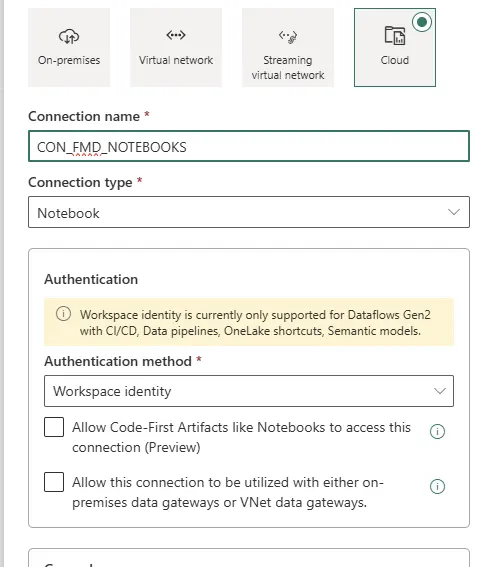
New: Create Notebook Connections Directly in the Connection Pane
Microsoft Fabric has rolled out support for creating Notebook connections directly from the Connection Pane.
You can now:
✔ Go to the Connections pane
✔ Create a new Notebook connection instantly
No pipeline workaround.
No hidden dialogs.
No friction.
Now Also Available via REST API and Fabric CLI
Even better: Notebook connections are now fully API‑enabled.
You can now create Notebook connections programmatically, enabling:
- CI/CD
- Environment provisioning
- Automated workspace setup
- Secure, identity‑based compute execution
Here’s an example using the fabric-cli:
fab create .connections/CON_FMD_NOTEBOOKS.Connection \
  -P connectionDetails.type=Notebook \
  -P connectionDetails.creationMethod=Notebook.Actions \
-P credentialDetails.type=WorkspaceIdentityWhy This Matters
This change unlocks several important scenarios:
1. Run Notebooks using a Service Principal or Workspace Identity
Previously, Notebooks always ran in the context of the interactive user, which meant:
- No headless automation
- No scheduled jobs under a service principal
- No secure, non-human execution
Now, a Notebook can run using:
- ✔ Workspace Identity
- ✔ Service Principal (with credentials in Key Vault)
Prerequisite:
Sign in to the Fabric admin portal. You need to be a Fabric admin to see the tenant settings page.
Select the switch for the type of admin APIs you want to enable: Developer settings:
- Service principals can create workspaces, connections, and deployment pipelines
In case you need to use a security group add the security group to above settings Add Workspace identity(after deployment) or Service Principal to the security groups
2. Access Azure Key Vault Securely
Because the Notebook now runs under an identity and not the user who executes the activity, you can:
- Get secrets from Azure Key Vault
- Access Azure Storage
- Access SQL / Fabric data sources
- Interact with other Azure services
This was not possible before unless you manually authenticated as yourself.
Final Thoughts
This seemingly small change removes a major blocker in Fabric’s engineering story.
By enabling Notebook connection creation in:
- the Connections pane,
- the REST API, and
- the Fabric CLI,
Microsoft Fabric is now far more automation‑friendly and enterprise‑ready.
Running Notebooks using a Service Principal or Workspace Identity unlocks secure patterns that were previously impossible.
If you’re building production pipelines, automated deployments, or secure identity-aware workloads, this is a huge step forward.


Feel free to leave a comment
Discover more from Erwin | Data & Intelligence
Subscribe to get the latest posts sent to your email.

0 Comments