Fabric Metadata-Driven Framework (FMD): Simplifying Enterprise Data Integration
Why FMD
- Metadata‑driven by design: Configuration tables drive ingestion, transformation, and orchestration, minimizing custom code while enforcing consistency and auditability.
- Fabric‑native: Uses Fabric SQL Database, Lakehouse, Data Pipelines, and Notebooks, so your platform, security, and governance stay unified.
- Fabric CLI‑first deployment: End‑to‑end setup is automated via the Microsoft Fabric CLI (fab) for fast, consistent provisioning across environments.
- Business Domain Support: Easily add domains like Sales, HR, Finance, each with separate code and data workspaces and delivered with examples for building Gold layers.
Architecture at a Glance
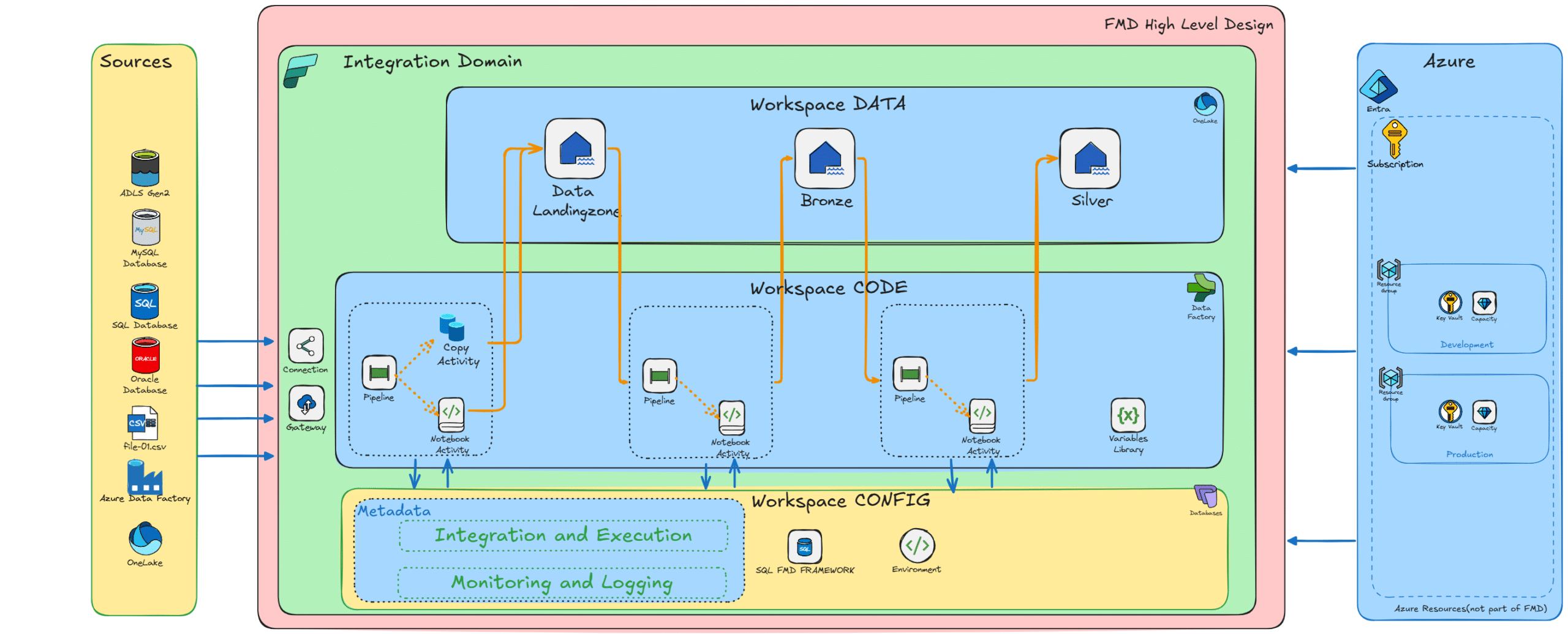
FMD implements the Medallion Lakehouse pattern in Fabric with Delta as the canonical table format.
Layers
Landing Zone: file landing and raw ingestion into Lakehouse files/tables.
Bronze: deduplication/structural normalization into Delta tables.
Silver: historical tracking, validations, and SCD‑oriented patterns.
Gold: (Business Domains) semantic/BI models if your solution scope requires it.
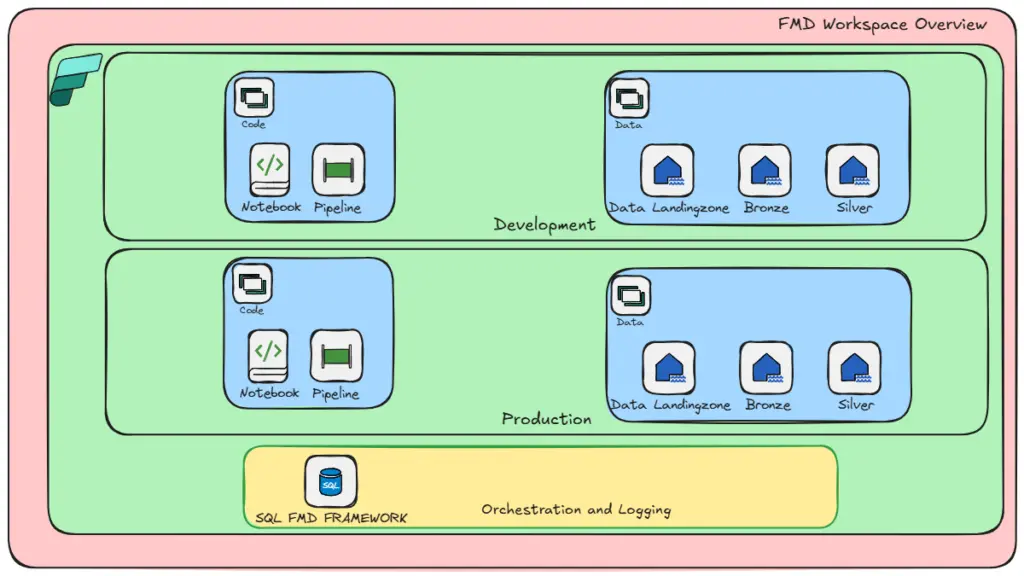
Workspaces & Separation of Concerns
Configuration: central Fabric SQL DB with metadata model, logging, and audit tables.
Data: Landing, Bronze, Silver Lakehouses per environment.
Code: Pipelines, Notebooks, and Spark artifacts per environment.
Business Domains & Gold Layer
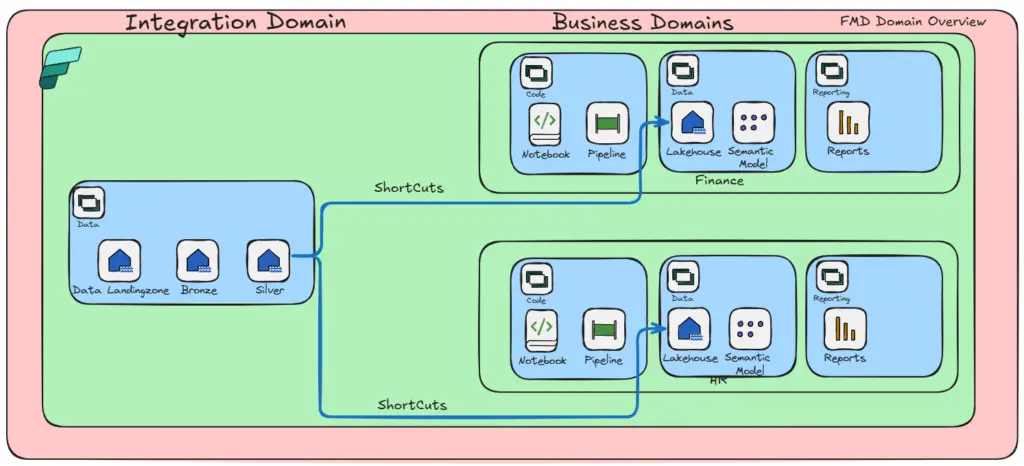
FMD enables domain‑driven design for analytics:
Domain Separation: Each business domain (e.g., Sales, HR, Finance) gets its own data workspace (Gold) and code workspace (pipelines, notebooks).
Gold Layer Examples: Delivered templates show how to:
- Create dimension tables (e.g., DimCustomer, DimEmployee).
- Build fact tables (e.g., FactSales, FactPayroll).
Customizable: Extend templates for additional domains.
Metadata Model (Core Tables)
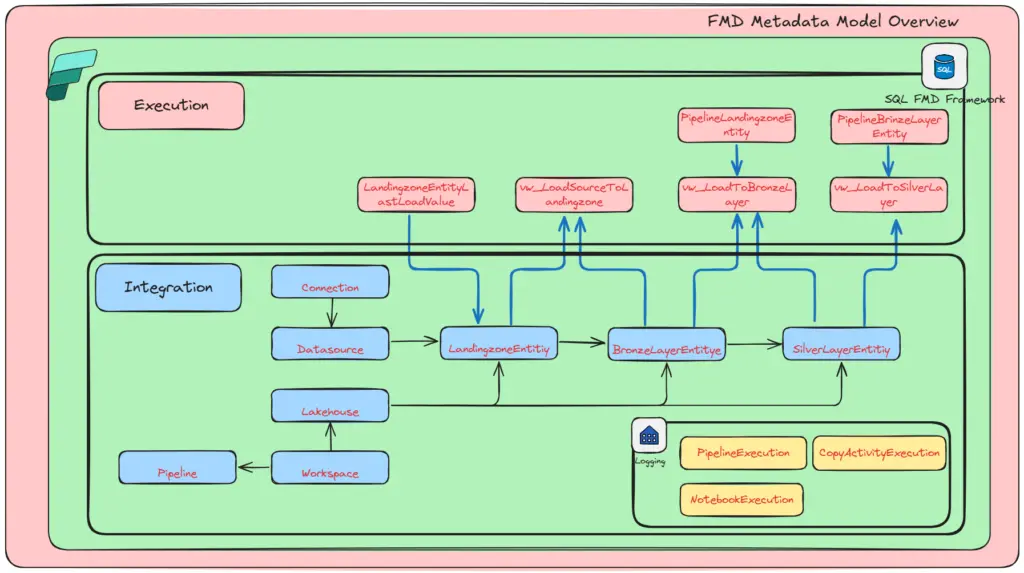
FMD’s configuration lives in a Fabric SQL Database (Integration + Execution schemas). Below are representative entities: [github.com]
[integration].Connection – Fabric connections (GUID, type, gateway type, datasource reference).
[integration].DataSource – systems/domains (name, namespace/prefix, type such as ASQL_01, ADLS_01, ADF, ONELAKE_*).
[integration].LandingzoneEntity – source schema/name, file type/path, incremental flags/columns.
[integration].BronzeLayerEntity – target schema/name, PK(s), cleansing rules, Delta as default file type.
[integration].SilverLayerEntity – downstream table metadata and cleansing rules.
[execution].LandingzoneEntityLastLoadValue & [execution].PipelineLandingzoneEntity – last‑load bookmarks and pipeline/file processing ledger.
Stored procedures (e.g., sp_UpsertLandingzoneEntity, sp_UpsertBronzeLayerEntity, sp_UpsertLandingZoneEntityLastLoadValue) are included for reliable metadata mutation and incremental bookkeeping.
More details can be found in WIKI
Orchestration & Processing Patterns
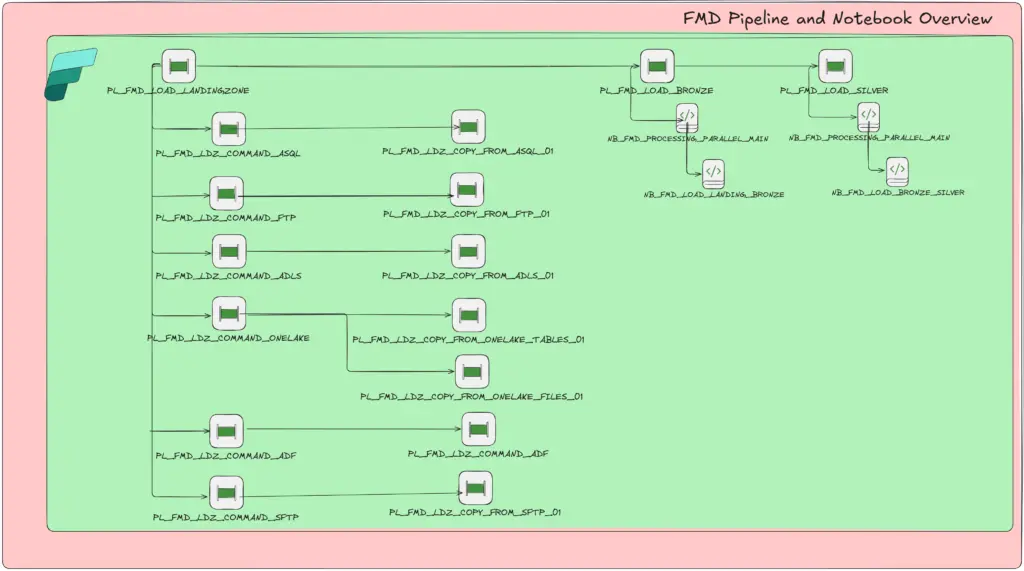
Orchestrator Pipelines resolve what to run via metadata lookups and call child pipelines / notebooks for Landing → Bronze → Silver progression.
Supported Activities include Lookup, Copy, Get Metadata, Delete, Script, Stored Procedure—standardizing execution across sources.
Bulk Onboarding: PL_TOOLING_POST_ASQL_TO_FMD extracts table metadata from SQL sources and populates FMD metadata tables
Logging & Observability
Out‑of‑the‑box audit tables capture execution across pipeline runs, notebooks, and Copy activities:
audit.PipelineExecution (start/end/fail per pipeline run).
audit.CopyActivityExecution (start/end/fail per copy activity).
audit.NotebookExecution (start/end per notebook).
You can wire these tables into your monitoring solution or build custom Fabric semantic models on top.
Supported Sources & Patterns
- SQL Server (on-prem/cloud/Azure SQL)
- Azure Data Lake Gen2
- SFTP / FTP
- Azure Data Factory
- Oracle
- OneLake tables and files
- API via Custom notebooks
(More sources coming soon)
Deployment (CLI‑First)
What “CLI‑First” means in FMD
FMD leverages the Microsoft Fabric CLI to provision workspaces, assign capacity, import items, and apply permissions, enabling repeatable, scriptable deployments (ideal for GitHub Actions/Azure Pipelines).
Ready to accelerate your ingestion & standardize your pipelines?
Explore the repo and bootstrap your first environment today. Fabric CLI‑first, metadata‑driven, and built for enterprise scale.
The Fabric Metadata-Driven Framework (FMD) is the ultimate solution for organizations seeking streamlined, scalable, and secure data integration. By leveraging metadata-driven orchestration, FMD reduces complexity, accelerates deployment, and ensures compliance.
Explore the GitHub repository for implementation details and start transforming your data workflows today.
Getting Started & Deployment Guide
To deploy the framework:
- Review the Deployment Guide – Walks through prerequisites and setup steps, can be found in the GitHub repository.
Video’s
Video with Patrick LeBlanc @Fabric Tech Talk Fridays
Video with Matthias Falland -The Trusted Advisor
Video with the Data Factory Team
FMD Release Highlights – March 2026
FMD Release Highlights – March 2026 The March 2026 update delivers several important improvements to the Fabric Metadata Driven Framework (FMD), focused on reliability, better data lineage, easier notebook automation, and smoother ingestion experiences. This release...
FMD Release Highlights – February 2026
Fabric Metadata‑Driven Framework (FMD) — February 2026 Release Notes Accelerating Performance, Flexibility, and Data Quality in the Fabric Metadata‑Driven Framework February brings another round of enhancements to the Fabric Metadata‑Driven Framework (FMD), focusing...
FMD Release Highlights January 2026
Fabric Metadata‑Driven Framework (FMD) — Early January 2026 Release Notes What Else Should You Do During the Holiday Period Besides Spending Time with Family? While the holiday season is perfect for family time, it’s also a great opportunity to work on side projects...
FMD Release Highlights December 2025
Fabric Metadata‑Driven Framework (FMD) — December 2025 Release Notes End‑of‑year edition Looking back on an incredible year. As we wrap up 2025, I’m grateful for the momentum around the Fabric Metadata‑Driven Framework. A personal highlight was the conversation during...
FMD Release Highlights November 2025
Fabric Meta DataDriven Framework – November Release Highlights I'm excited to announce the November update for the Fabric Meta DataDriven Framework! This release introduces powerful new capabilities, improved automation, and enhanced governance features to help you...
FMD Release Highlights October 2025
Fabric Meta DataDriven Framework – New Release Highlights I'm excited to announce a major update to the Fabric Meta DataDriven Framework! This release brings powerful new capabilities, improved automation, and enhanced governance features to help you scale your...
Missing any features let me know. I will do my best to add them as soon as possible.
You can always add them trough by Github Repo, edkreuk/FMD_FRAMEWORK · Discussions · GitHub
0 Comments