Control my Nest Thermostat on my Domoticz Server running on a Synology DiskStation

Control my Nest Thermostat on my Domoticz Server running on a Synology DiskStation

Domoticz

by Erwin | Apr 14, 2020

by Erwin | Apr 14, 2020

Control your Nest Thermostat  in Domoticz

Normally I always write Azure related, but today I’m writing about something different, on how I can control my Nest Thermostat on my Domoticz Server (Home automation).

A while ago I have upgraded my  Nest Thermostat to login with Google. What happened after the upgrade, my Nest was not showing any new data anymore in my Domoticz. The reason for that is, Google stopped the developer program “Works with Nest”.​ The new platform will be available by the end of this year . Till then we need a workaround to get our data.

My Domoticz is running the latest Version: 2020.1 on my Synology ds218. After some research on the internet I came across a Nest Api solution build by Roland Breedveld for a Raspberry Pi. You find all the code and the readme here:

To run the code on my Synology I needed to change some of the code and the setup.

Please follow the steps below to get the Nest Api working on your Synology:

Before you start make sure have installed the PHP and the Git Server Package:

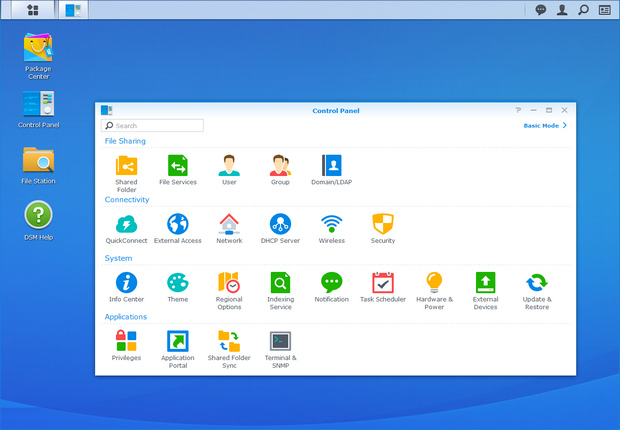
Enable SSH in your Synology Control Panel – Terminal & SNMP

Login in to your Synology with SSH, I’m using Bitwise SSH Client to connect to my Synology.

After you’re logged in, log in to Root

Sudo-i  and Password

Installation

Change to your script location of your Domoticz(in my case and probally for most of the Synology users)

Cd /usr/local/domoticz/var/scripts

git clone https://github.com/rolandbreedveld/nest-api.git

Update

To update it to the latest version:

Cd /usr/local/domoticz/var/scripts/nest-api

git pull

Configuration

Copy nest.auth.php_example to nest.auth.php and change the issue-token and cookie in nest.auth.php
to get both values take these steps: (thanks FilipDem for this info)
READ THESE STEPS CAREFULLY !

  • Open a Chrome browser tab in Incognito Mode (or clear your cache).
  • Open Developer Tools (View/Developer/Developer Tools).
  • Click on Network tab. Make sure Preserve Log is checked.
  • In the Filter box, enter issueToken
  • Go to https://home.nest.com, and click Sign in with Google. Log into your account.
  • One network call (beginning with iframerpc) will appear in the Dev Tools window. Click on it.
  • In the Headers tab, under General, copy the entire Request URL (beginning with https://accounts.google.com, ending with nest.com). This is your $issue_token.
  • In the Filter box, enter oauth2/iframe
  • Several network calls will appear in the Dev Tools window. Click on the last iframe call.
  • In the Headers tab, under Request Headers (be shure it’s the request header not the other ones!!), copy the entire cookie value (include the whole string which is several lines long and has many field/value pairs – do not include the Cookie: prefix). This is your $cookies; make sure all of it is on a single line.
    Be shure, the cookie and token values are placed between ” and the row ends with a ;

Create virtual Devices in Domoticz:

If you don’t have created any Dummy Virtual Sensors before make you sure add the dummy Hardware first:

Click on create Virtual Sensors, to add all sensors as below:

  • for Temp : Temperature LaCross TX3
  • for Hum : Humidity LaCross TX3

or if you want the combined virtual device for Tem and Hum :

  • for TempHum : Temp+Hum THGN122/123/132
  • for SetPoint : Thermostat SetPoint # I Named this device Nest, To acticate it easy from my iPhone with Siri
  • for ECOMode : a regular Light/Switch and change the icon tosomething nice
  • for AwayMode : a regular Light/Switch and change the icon tosomething nice
  • for Heat : a regular Light/Switch and change the icon tosomething nice

Nest Devices Configuration

Move file nest_devices.cfg-example to nest_devices.cfg note the idx nrs, as find in the devices tab, and change them below in the nest_devices.cfg file.

Example: SETPOINT 41<<< change this as example for the SETPOINT to your idxremove or place a # for lines you don’t want to use.

Domoticz => Your Domoticz server and port  (8080;8084)

Edit in Domoticz the ECO Mode switch:

On Action: script:///usr/bin/php /usr/local/domoticz/var/scripts/nest-api /set_nest_eco_mode.php

Off Action: script:///usr/bin/php /usr/local/domoticz/var/scripts/nest-api /unset_nest_eco_mode.php

Edit in Domoticz the Away Mode switch:

On Action: script:///usr/bin/php /usr/local/domoticz/var/scripts/nest-api /set_nest_away_mode.php

Off Action: script:///usr/bin/php /usr/local/domoticz/var/scripts/nest-api /unset_nest_away_mode.php

Domoticz Events

In the Domoticz event gui, create a new event->dzvents->device
cut-and-paste the content of the example file dzVents_script_Nest_Setpoint.txt in it.
My setpoint device is called “Nest”, so you perhaps you need to change it.
Better don’t use spaces in the device names if you call them from dzvents event’s.
I had a couple of times problems with this, removing the spaces solved it.

Domoticz Settings

In the Domoticz configuration add 127.0.0.* and your ip (or range) to local networks.

Schedule

Add the following cron-entry, to get every 5 minutes the last values from Google: (crontab -e)

*/5 * * * *  root /usr/local/domoticz/var/scripts/nest-api/get_nest.sh >/dev/null 2>&1

Schedule with Logging enabled

*/5 * * * *  root /usr/local/domoticz/var/scripts/nest-api/get_nest.sh >/var/log/nest-api.log 2>&1

In the file get_nest.sh change the location to /usr/local/domoticz/var/scripts/nest-api(or to your Domiticz Directory)

You can create a schedule to run for every minute, but I don’t know if Google has limitation’s how much call’s per hour are allowed, 5 minutes is save I think, also Domoticz stores it’s data every 5 minutes, so it only effects the user interface.
I you are using logging for a longer time you need to avoid the log-file became to big, by activate log-rotating:

Of course you can schedule it every minute, but I don’t know if Google has limitation’s how much call’s per hour are allowed, 5 minutes is save I think, also Domoticz stores it’s data every 5 minutes, so it only effects the user interface.

Log-Rotating

I you are using logging for a longer time you need to avoid the log-file became to big, by activate log-rotating:

  • create a file: /etc/logrotate.d/nest-api :
    /var/log/nest-api.log {
    weekly
    missingok
    rotate 52
    compress
    notifempty
    create 640 root root
    sharedscripts
    }
  • If nest-api not is running as root change the create row to:
    create 640 user-name group-name

In case you do a 2nd schedule somewhere else, like in the Nest itself, they can conflict with each other when running exactly on the same time.
This will result as a 5 minutes toggle of values or states, you can simple solve it to add a little delay in the cron:

  • */5 * * * * sleep60; root /usr/local/domoticz/var/scripts/nest-api/get_nest.sh >/dev/null 2>&1

If you get this error:
PHP Fatal error: Uncaught exception ‘UnexpectedValueException’ with message ‘Response to login request doesn’t contain required access token. Response: {“error”:”USER_LOGGED_OUT”,”detail”:”No active session found.”}’ in /home/pi/nest-api/nest.class.php:1100

You have to regenerate the cookie and token again, see steps above, for some reason the token and cookie stopped working after running fine for 2 months in my case.

Errors

Check for common error message the original Readme

Most of the above blog corresponds to the original Readme, I only made the adjustments everywhere that where necessary for an installation on a Synology.

I’m happy that my Nest Thermostat is working again on my Domoticz, hopefully this blog helped you as well.


Using a Google Nest Api to load data to Domoticz running on a Synology Using a Google Nest Api to load data to Domoticz running on a Synology

In a couple of weeks I will write a blog about how I get the data from Domoticz and load it into Azure and create Power BI Reports on it. Let me know in the comments if you’re interested in such a blog. 


Feel free to leave a comment

Azure Purview March Updates

Domoticz Azure Purview updates Announcements Last week during SQLBITS, quite a few new updates were announced. I would like to include you in these announcements. March updates Support for SAP Business Warehouse (Preview) Blogpost:…

SQLBits session: Microsoft Purview Data Policy App

Domoticz SQLBits 2023 Thanks everyone for visiting my session during SQLBits. It’s great to see such a full room and that so many people have started using Microsoft Purview.   SLIDES The slides can be downloaded via the link below, so that you can view them…

10 Days of Azure Synapse Analytics

Domoticz 10 Days of Azure Synapse Analytics For the next 10 days, every day a different topic is explained about Azure Synapse Analytics. The shortest and easiest way to see how Azure Synapse Analytics can help you, to make decisions within your data landscape. Day 1…

Collection of all ADF Mapping Data Flow videos

Domoticz ADF Mapping Flow Did you use the Dataflow preview functionality in Azure Data Factory? This has recently be renamed to Mapping Data Flows.   All video’s which the ADF team has created, are collected. Start Here: ADF Data Flow: Overview ADF Data Flow:…

New Microsoft Azure Certifications

Domoticz Microsoft Certification by Solution Area Handy overview of the new Microsoft Azure Certifications. More details can be found here Feel free to leave a comment

LEAP 2018

Domoticz Lead Enterprise Architect Program From the 4th of December until the 6th of December I’ve joined the LEAP (Lead Enterprise Architect Program) 2018 Data/AI from Microsoft NL. Three  days on the Microsoft Campus in Redmond joining business and technical…

Creating Notebook Connections in Microsoft Fabric Just Became a Lot Easier (and Automatable!)

Domoticz For a long time, creating a Notebook connection in Microsoft Fabric was surprisingly limited. If you wanted a Notebook to run under a Workspace Identity or Service Principal, you only could configure this directly in the DataPipeline UI. In fact, the…

Yeah My website is Finally Live

Domoticz Yeah, m y first built website is LIVE The last couple of weeks I’ve been working hard to design my website and finally the moment is there. My website live and I’m really proud.   Building my own website The last couple of weeks/months I’ve been working…

How to check your SQL Server Quota in Azure?

Domoticz Azure Subscription Usages for SQL Server   Last week we reached our Logical server Quota in Azure. By default you’re only allowed to add 20 Logical Servers, but we wanted to have some more for testing purposes. Microsoft Support You can submit a support…

Goodbye 2021, Hello 2022

Domoticz Goodbye 2021 Recap First of all, I would like to wish everyone a very beautiful and healthy 2022. We are now 3 days on the road into the new year and it is always good to look back at what happened last year. It’s certainly been an eventful year, topped off…