Bringing Column-Level Lineage from Microsoft Fabric to Microsoft Purview with FMD

Framework
Table of Contents
One of the questions I receive most often from customers is:
"How can we get column-level lineage from Microsoft Fabric into Microsoft Purview?"
Microsoft Purview can scan Microsoft Fabric and visualize item-level lineage, but column-level lineage for Lakehouse transformations is still not available out of the box. This has been one of the most requested governance capabilities from customers. Today, FMD closes a large part of that gap by automatically generating and publishing column-level lineage to Microsoft Purview.
Over the past few weeks, I have been working on a solution during evenings and weekends to bridge that gap. Today, I'm excited to share that the Fabric Metadata-Driven Framework (FMD) now includes functionality to automatically extract column-level lineage from Fabric Lakehouses and publish it directly into Microsoft Purview.
Even better, I've also made the core lineage extraction capabilities available in a standalone repository so the broader community can benefit from it as well.
Why Column-Level Lineage Matters
Table-level lineage is useful, but it only tells part of the story.
Most organizations need answers to questions such as:
- Which source column feeds this KPI?
- Where does a specific attribute originate?
- What happens if I rename a column upstream?
- Which reports and data products are impacted by a change?
- How does data move through my Bronze, Silver, and Gold architecture?
Without column-level lineage, answering these questions often requires manually reviewing notebooks, pipelines, SQL scripts, mapping documents, and transformation logic.
As data platforms grow, this quickly becomes difficult to manage.
The Current Challenge
Microsoft Fabric provides powerful capabilities for building modern data platforms.
Microsoft Purview provides enterprise-grade governance and lineage visualization.
The challenge is that there is currently no out-of-the-box solution that automatically generates column-level lineage for Fabric Lakehouse transformations. While metadata and item-level lineage are supported, column-level relationships for Lakehouse processing are not automatically available today
Many customers have asked for:
- End-to-end traceability
- Better impact analysis
- Improved governance
- Regulatory compliance support
- Automated documentation
- Visibility into how columns move across the platform
This is exactly the problem this new functionality aims to solve.
The FMD Approach
The new functionality leverages metadata already available within the Fabric Metadata-Driven Framework.
Because FMD already knows:
- Source entities
- Target entities
- Data movement patterns
- Transformation metadata
it becomes possible to generate lineage automatically rather than documenting it manually.
The lineage extraction process identifies relationships between source and target columns and publishes them into Microsoft Purview, allowing organizations to visualize and govern lineage using familiar Purview capabilities.
The result is significantly richer lineage visibility across your Fabric environment.
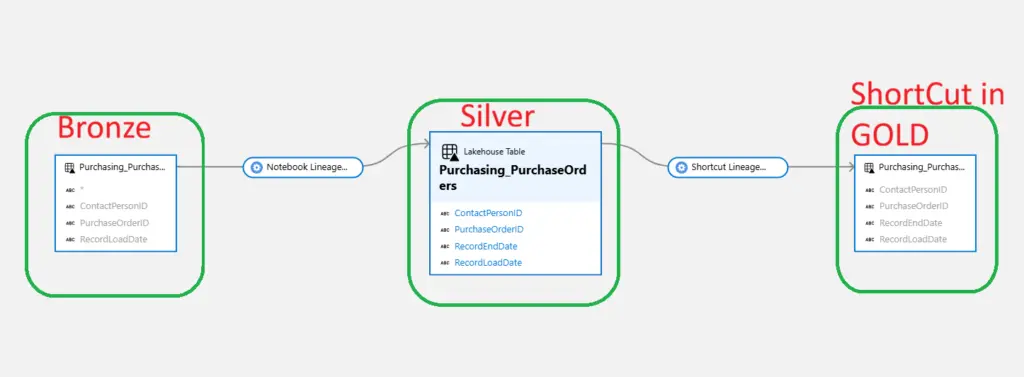
Column-Level Lineage from Microsoft Fabric to Microsoft Purview
Not Every Lineage Scenario Can Be Automated
Let's be realistic.
No lineage solution can automatically solve every possible lineage scenario.
Organizations often have:
- Complex business logic
- Custom transformations
- External applications
- Manual enrichment processes
- Proprietary calculation engines
These scenarios may still require manual lineage definitions.
However, the good news is that the majority of a typical Lakehouse architecture follows predictable patterns that can be automated.
With this solution you can automatically generate lineage for:
- Landing Zone to Bronze
- Bronze to Silver
- Renamed Tables
- Metadata-driven transformations
- Lakehouse-to-Lakehouse relationships
- Shortcut-based lineage scenarios
This means that for many organizations, most of the lineage effort can be automated, while the remaining exceptions can simply be maintained manually in Purview.
Rather than documenting everything by hand, you automate the majority and focus only on the edge cases.
A Practical Example
Consider a common Fabric architecture:
Landing Zone → Bronze → Silver
| Landingzone | Bronze | Silver | Shortcut in Gold |
| Filename | wwi.v_customers | wwi.customers | dbo.customers |
Traditional lineage often shows relationships between the same tables.
With the new FMD lineage extraction process, it becomes possible to capture and publish the actual table and schema relationships so users can understand exactly how data elements move through the platform.
This dramatically improves:
- Impact analysis
- Data discovery
- Governance
- Auditability
- Trust in analytical outputs
Not Using FMD? You Can Still Use It
While this capability is fully integrated into FMD, I also wanted to make it available to the wider community.
That's why I created a separate repository containing a standalone notebook that can be used independently from FMD.
The notebook can be adapted to:
- Custom Fabric implementations
- Other metadata-driven frameworks
- Lineage enrichment scenarios
- Shortcut lineage implementations
- Custom source-to-target mapping scenarios
Repository:
Fabric to Purview Lineage extractor
The repository contains everything needed to get started and can serve as a foundation for building your own lineage generation process.
Already using FMD?
If you're already using the Fabric Metadata-Driven Framework, getting started is very easy.
Simply:
- Download the latest FMD version or
- Run the NB_SETUP_FMD notebook again to deploy the latest components.
If you choose not to update to the latest version, make sure to add the following parameter to your existing configuration:
purview_account_name = "val_purview_account_name"This parameter is required by the new lineage extraction functionality when publishing lineage into Microsoft Purview.
Configuring Authentication
To publish lineage into Microsoft Purview, the notebook requires a Service Principal with the appropriate permissions in both Microsoft Fabric and Microsoft Purview.
Important: Before running the lineage extractor, configure a Service Principal with access to both Microsoft Fabric and Microsoft Purview. See the README for the required permissions and setup instructions.
The repository README includes step-by-step guidance for:
- Creating a Service Principal
- Granting permissions in Fabric
- Granting permissions in Purview
- Configuring authentication
- Running the lineage extraction notebook
Before getting started, make sure to review the setup instructions in the repository:
These improvements further strengthen FMD as a platform‑engineering foundation for Microsoft Fabric.
Built for the Community
This feature started as a side project driven by customer demand.
Time and again I heard the same request:
"We love Fabric and Purview, but we need better column-level lineage."
Instead of waiting for the capability to appear natively, I decided to see how far we could get using metadata, automation, and the Microsoft Purview APIs.
The result is a practical solution that helps organizations significantly improve governance visibility while leveraging investments they have already made in Microsoft Fabric and Microsoft Purview.
Final Thoughts
This solution won't automate every possible lineage relationship—and that's okay.
What it does do is automate a very large portion of your Lakehouse architecture, dramatically reducing the effort required to maintain lineage information.
For most organizations, that means:
- Less manual documentation
- Better governance
- Faster impact analysis
- Increased trust in data
- Greater visibility across the platform
After several weeks of development, I'm happy to finally share this capability with the community.
I hope it helps close an important governance gap and enables more organizations to build truly governed, metadata-driven data platforms on Microsoft Fabric.
As always, feedback, ideas, and contributions are welcome.
Happy governing!
Stay Connected
GitHub Repository:
FMD Framework:
WIKI:
Hit Subscribe to get future release notes delivered straight to your inbox!
- Fabric Metadata Driven Framework July 2026 Release Notes

- Bringing Column-Level Lineage from Microsoft Fabric to Microsoft Purview with FMD
- Fabric Metadata Driven Framework update May 2026
- FMD Framework Update April 2026: Identity Improvements, SCD2 Fixes & Stability Enhancements
- FMD Framework March 2026 Update: Data Lineage, Notebook Automation & Ingestion Improvements

- Fabric Metadata Driven Framework July 2026 Release Notes
- Reassigning Microsoft Fabric Capacities in Bulk: Don’t Let an Expiring Trial Catch You by Surprise
- Bringing Column-Level Lineage from Microsoft Fabric to Microsoft Purview with FMD
- My first experience: Building a Fabric App
- Fabric Metadata Driven Framework update May 2026