Fabric Meta DataDriven Framework – New Release Highlights
I'm excited to announce a new release of the Fabric Metadata-Driven (FMD) Framework, now with full Fabric CLI integration and several powerful enhancements to streamline deployment and governance.
What’s New
Fabric CLI-Based Setup The entire setup process is now powered by the Fabric CLI, enabling faster, more consistent deployments. Special thanks to @Edgar Cotte for the collaboration and support!
Default Descriptions All deployed items now include default descriptions for improved clarity and documentation.
Lakehouse Schema Support Optionally enable Lakehouse schemas, unlocking support for:
Materialized Views
One Security model
Workspace Identity Enabled by Default Enhances security and simplifies access management by enabling workspace identity automatically.
Direct GitHub Deployment Items can now be deployed directly from GitHub — no need for a separate deployment file.
Open Source Hosting The full source code is now hosted on GitHub, making it easier for the community to contribute and collaborate.
Documentation
Refer to the updated README for setup instructions, configuration options, and usage examples.
Community
This release is dedicated to our amazing community — and yes, it’s open source! We welcome your feedback, issues, and contributions.
In my previous blog I explained that Microsoft Purview for Data Governance has a new pricing model, in this blog we will dive a bit deeper on how you set the different SKU's
Microsoft Purview offers a comprehensive data governance solution that helps organizations manage, protect, and understand their data across various environments. One crucial aspect of optimizing Purview's performance is configuring the appropriate SKUs for different tasks, especially for Data Quality (DQ) jobs within Data Health Management. This blog post will guide you through the process of selecting and configuring SKUs to enhance your data governance experience.
Understanding SKUs in Microsoft Purview
SKUs in Microsoft Purview determine the level of resources allocated to your data governance tasks. Higher SKUs provide more processing power, which can significantly speed up data quality jobs, especially those with high data volumes, complex rules, or frequent scans.
How can I set my SKU?
In Purview select the Settings tab followed by the Unified Catalog
Select the the Usage Settings to get to see the following option:
Now you can set the SKU Type
Data Health Management:
Basic: €14.40 per Data Governance Processing Unit
Standard: €57.57 per Data Governance Processing Unit
Advanced: €230.28 per Data Governance Processing Unit
Steps to Configure SKUs for Data Quality Jobs
Access Data Quality Monitoring:
Use the Data Quality Monitoring functionality within Microsoft Purview to view and understand your data quality jobs. This tool provides insights into the performance and status of your DQ jobs, helping you identify areas that may benefit from higher SKUs.
Select Higher SKUs for Faster Processing:
For jobs with high data volumes, complex rules, or very frequent DQ scans, consider selecting a higher SKU. Higher SKUs allocate more resources, resulting in faster processing times and more efficient data quality management.
Understand the Impact on Your Bill:
Before upgrading to a higher SKU, it's essential to understand the impact on your bill. Navigate to your billing section in the Azure portal, ensuring you have the required permissions to view and manage billing information. Higher SKUs will incur additional costs, so it's crucial to balance performance needs with budget considerations.
Correlate with Your Consumption Report:
Review your consumption report to understand how different SKUs affect your overall usage and costs. This report provides detailed insights into your resource consumption, helping you make informed decisions about SKU selection.
Additional Tips for Data Health Management
Upgrade SKU for Faster Processing: Regularly assess your data quality jobs and upgrade SKUs as needed to maintain optimal performance.
Data Quality Management: Start with the basic SKU for initial setups and gradually move to higher SKUs as your data governance needs grow.
Governance Health Controls: Implement governance health controls to monitor and resolve issues proactively.
Actions and Resolutions: Use self-serve analytics and reports to take informed actions and resolve data quality issues efficiently.
By carefully selecting and configuring SKUs, you can enhance the performance of your data quality jobs within Microsoft Purview, ensuring a robust and efficient data governance framework.
Conclusion
Configuring the appropriate SKUs for Microsoft Purview Data Governance is essential for optimizing the performance of your data quality jobs. By understanding the different SKUs available and how to set them, you can ensure that your data governance tasks are handled efficiently and effectively. Regularly monitoring your data quality jobs and adjusting SKUs as needed will help maintain optimal performance and manage costs effectively.
By leveraging the insights provided by Data Quality Monitoring and correlating your consumption reports, you can make informed decisions about SKU selection. This proactive approach will enable you to maintain a robust and efficient data governance framework, ensuring that your organization can manage, protect, and understand its data across various environments.
Microsoft Purview’s New Pay-As-You-Go Pricing Model for Data Governance
Starting January 6, 2025, Microsoft Purview is set to revolutionize its Data Governance capabilities with the introduction of a new pay-as-you-go pricing model. This change is designed to provide more flexibility and cost-efficiency for organizations managing their data governance needs.
What’s New?
The new pricing model is based on two key metrics:
Number of Unique Governed Assets per Day: This metric counts the unique technical assets, such as tables, files, datasets, and reports, that are actively managed and curated within the Microsoft Purview Unified Catalog. Only assets associated with governance concepts, like data products or critical data elements, are considered governed assets.
Data Governance Processing Units (DGPU) per Run: DGPUs are fully managed compute units used for running compute-heavy capabilities, such as data quality and data health management. Each DGPU represents 60 minutes of compute time, which can be run across varying sets of nodes based on the workload needs.
Why This Matters
This pay-as-you-go model allows organizations to scale their data governance efforts according to their specific needs and usage patterns. By only paying for the assets they actively govern and the compute resources they use, businesses can achieve greater cost efficiency and flexibility.
Understanding Data Governance Processing Units (DGPUs)
DGPUs are a crucial component of this new pricing model. They are designed to handle compute-intensive tasks within Microsoft Purview, such as:
Data Quality Management: Ensuring the accuracy, completeness, and reliability of data.
Data Health Management: Monitoring and maintaining the overall health of data assets.
Each DGPU provides 60 minutes of compute time, which can be distributed across different nodes depending on the specific requirements of the task. This flexibility allows organizations to efficiently manage their compute resources and optimize their data governance processes. DGPU is available in three different performance options: Basic, standard, and advanced. By default any data management rule or health control is run on the Basic SKU. A customer can switch SKU’s based on the speed of compute suitable for their organization.
Microsoft Purview Data Governance | Enterprise Data Catalog
Microsoft Purview Data Governance Enterprise Catalog is billed based on a single meter, the data catalog, which is initiated when customers govern unique data assets. Data assets such as tables, views, AI models, semantic models, and many others that are linked to governance concepts in the product, such as data products and critical data elements, are counted as governed assets. Assets collected in the Purview Data Map but not linked to governance concepts aren't counted as governed assets.
For example, if an organization has 500 tables, views, stored procedures, resource sets, and AI models in their data map, but only 200 unique governed assets in the data catalog, the monthly cost for 30 days would be €95.947 (without discounts). The 300 assets that aren't linked to data products or critical data elements aren't considered governed assets and therefore not counted. Data catalog managed assets are priced uniformly across regions. This pay-as-you-go model for a managed asset is prorated based on days governed within the monthly billing cycle.
Pricing Details
Data Catalog:
Standard: €0.0159 per asset per day or ~€0.48 per month
Data Health Management:
Basic: €14.40 per Data Governance Processing Unit
Standard: €57.57 per Data Governance Processing Unit
Advanced: €230.28 per Data Governance Processing Unit
For example, if a customer runs 100 Data Management rules and controls in a single day, and each run produces 0.02 DGPU with the Basic SKU, then the total DGPU for that day would equal two DGPU, costing the customer €28.784. Pricing example is based on the US East pricing. Currently the Azure Price calculator is not updated yet.
In the cost analysis in Azure you will see now 2 new meters:
Service Name:
Microsoft Purview
Meters:
Data Management Basic Data Governance Processing Unit Data Catalog Standard Asset
Oh yeah finally Azure Purview has now been renamed to Microsoft Purview.
Getting Started
To take advantage of this new pricing model, organizations need an Azure subscription and an Azure resource group within the same tenant as Microsoft Purview. If these resources are already in place for other purposes, they can be utilized for Microsoft Purview as well.
Consent
Make sure you have consent to the new Billing Model more details can be found here.
Conclusion
Microsoft Purview’s new pay-as-you-go pricing model is a significant step forward in making data governance more accessible and cost-effective. By aligning costs with actual usage, organizations can better manage their data governance expenses while ensuring robust data management practices.
Stay tuned for more updates and detailed pricing information as we approach the launch date! After the launch I will get back to with some more Pricing Examples.
Microsoft Announces Public Preview of SQL Database in Microsoft Fabric
Microsoft has announced thePublic Previewof the SQL database in Microsoft Fabric, a significant step towards simplifying and accelerating AI app development. This new service is designed to be simple, autonomous, secure, and optimized for AI, making it easier for developers to build AI applications. Today i had a quick look and was very impressed.
Key Highlights:
Simplicity: The SQL database in Fabric is designed to be user-friendly, reducing the complexity typically associated with database management.
Autonomy: It offers autonomous features that handle routine tasks, allowing developers to focus more on innovation.
Security: Enhanced security measures ensure that data is protected, meeting the highest standards.
AI Optimization: The service is optimized for AI, providing the necessary tools and infrastructure to support AI-driven applications.
Benefits:
Faster Development: Developers can build AI apps up to 71% faster and more effectively.
Unified Platform: Fabric evolves from an analytics platform to a comprehensive data platform, integrating operational databases seamlessly.
Hands-On Experience:
Today, I took the opportunity to get some hands-on experience with this new database in my environment. Setting up the database was incredibly easy and took less than a minute. Here’s a quick guide to get you started:
Click on "New Item".
Select "SQL Database" and define a name (I always start with SQL_).
After 60 seconds, your database is ready to use.
To connect to the database, if you are using tools like SSMS, make sure to add the database name to the connection pane to avoid errors related to the master database.
Once connected, you can perform your day-to-day SQL server tasks with ease. Additionally, you can use the database as a source or sink in Data Flows and Pipelines with copy activity and stored procedures activities in Microsoft Fabric or start building an API on top of your data.
I deployed my database project file from Azure Data Studio to the newly created database and that took only like 5 seconds. Next is to copy the data over. I tried to restore a dacpac or bacpac file, but did not succeed yet so far. After that, I connected my database to Git and you know what, all my objects from the database are in there. Awesome!"
For more details, including demo videos and customer testimonials, check out the full blog post here.
Conclusion:
The Public Preview of the SQL database in Microsoft Fabric is a game-changer for developers looking to build AI applications. Its simplicity, autonomy, security, and AI optimization make it an invaluable tool for accelerating development and enhancing productivity. As Microsoft continues to innovate and expand its offerings, the SQL database in Fabric stands out as a testament to the company's commitment to providing cutting-edge solutions for the modern developer. I'm definitely going to use this new database for my Meta Data driven Framework, no Azure SQL Deployment, network setup, Private endpoint setup anymore, just start and connect.
SQL database in Fabric will be free until January 1, 2025, after which compute and data storage charges will begin, with backup billing starting on February 1, 2025.
This is a live learning session where you can ask questions and learn all of the basics of SQL database and Microsoft Fabric in one course, register here.
New Features in Microsoft Fabric Data Factory: Import, Export, and Use Templates in Data Pipelines
The latest enhancements in Fabric Data Factory that will significantly streamline your data integration processes. The new features—Import, Export, and Use Templates—are now available, making it easier than ever to manage and automate your data pipelines.
Import Data Pipelines
The Import feature allows you to bring in existing data pipelines from other workspaces or projects. This is particularly useful for teams that need to replicate successful data workflows across different departments or for those migrating from other data integration tools. With a few clicks, you can import your pipelines, ensuring consistency and saving valuable time.
How to Import a Data Pipeline:
Navigate to the Data Pipelines section in Data Factory.
Click on the “Import” button.
Select the file or source from which you want to import the pipeline.
Follow the prompts to complete the import process.
Export Data Pipelines
Exporting your data pipelines is now a breeze. This feature enables you to back up your pipelines, share them with colleagues, or move them to different workspaces. Exporting ensures that your data integration processes are portable and can be easily restored or replicated.
How to Export a Data Pipeline:
Go to the Data Pipelines section.
Select the pipeline you wish to export.
Click on the “Export” button.
Complete the export process by following the on-screen instructions.
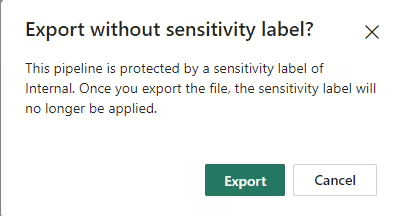
Sensitivity labels will be removed
Your Pipeline will be saved as .zip file in your default download folder.
Use Templates
Templates are a powerful addition to Data Factory, allowing you to standardize and accelerate the creation of data pipelines. Whether you are setting up a new ETL/ELT process or automating data transfers, templates provide a starting point that can be customized to meet your specific needs.
How to Use Templates:
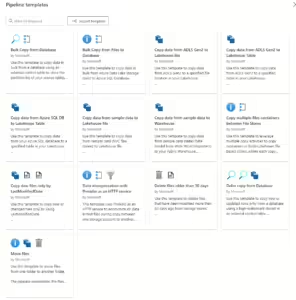
In the Data Pipelines section, click on the “Templates” button.
Browse through the available templates or search for a specific one.
Select a template and click “Use Template.”
Configure the required inputs
Click on Use this Template, the required activities will now be deployed to your pipeline.
Import Data Pipelines from Azure Data Factory or Synapse Workspace is not supported. Migration steps will follow later.
The main difference between Microsoft Fabric and ADF or Synapse is, that we use in Fabric connections and ADF/Synapse datasets and Linked services
Conclusion
The new Import, Export, and Use Templates features in Data Factory are designed to enhance your productivity and ensure seamless data integration. By leveraging these tools, you can simplify your workflows, maintain consistency across projects, and accelerate the configuration of data pipelines.