My first experience: Building a Fabric App on top of my FMD Framework
At Microsoft Build 2026, Microsoft introduced Rayfin a major step forward in how we build applications on Microsoft Fabric.
If you’ve been working in the Fabric ecosystem, this is big.
Rayfin is an open‑source SDK + CLI that lets you define and deploy a complete, governed application backend directly on Microsoft Fabric.
No more stitching together databases, APIs, authentication, and governance yourself.
Instead:
You define your backend in code → Rayfin provisions everything → Fabric runs it with enterprise-grade governance by default.
So when Rayfin was introduces I couldn’t resist trying it out immediately.
So I did what I always do…
I plugged it into something real.
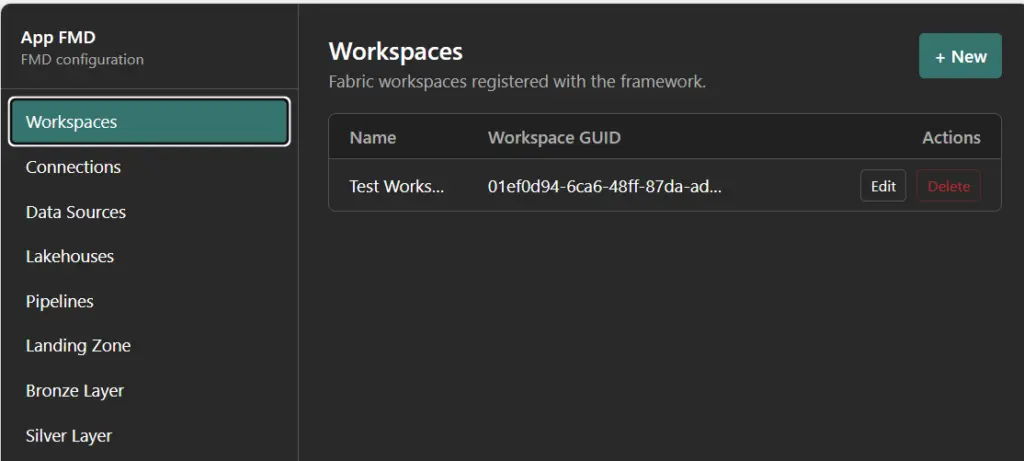
I built a simple web configuration portal on top of my Fabric Metadata-Driven (FMD) Framework to manage metadata not through notebooks or pipelines, but through a clean UI.
What I built (in a few hours)
I created a lightweight metadata management app:
A web interface to fill metadata through a portal
A light master data app using static tables
But with the flexibility to:
Add new tables
Add new columns
Extend the model yourself
Basically:
A dynamic metadata-driven admin UI on top of Fabric
Was it production-ready? No, just a mockup.
Was it powerful?
Absolutely.
What surprised me most
The speed.
Normally, building something like this requires:
Backend APIs
Database configuration
Authentication setup
Access policies
Deployment pipelines
With Rayfin?
None of that was manual anymore
I just:
Defined the data model
Added some logic
Ran the deployment
And Fabric handled the rest:
Database
APIs
Auth
Governance
This aligns exactly with what Rayfin is designed to do:
Define your backend in code and deploy it directly to Fabric as a governed app.
What else did I try
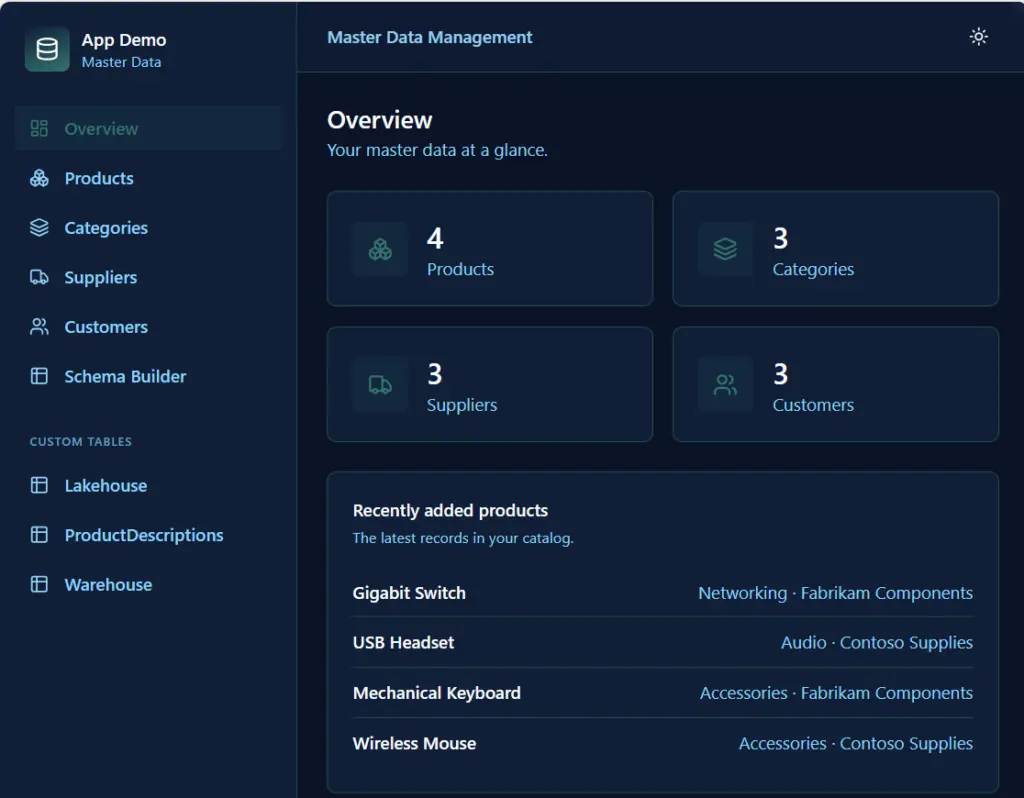
I build a master data management web app mockup, just as a try.
The master data management web app combines predefined tables with full flexibility to extend the model yourself. Core entities like products, categories, suppliers, and customers are available out of the box, providing a solid starting point for managing standard master data. At the same time, the app introduces a powerful capability: users can create custom tables and add new columns dynamically, effectively evolving the data model without needing to redeploy or change backend code.
Just try outs, but amazing fast. I will explore the Fabric app the coming weeks/months much more.
The essential Rayfin docs (bookmark this)
If you want to go hands-on, these are the core docs you’ll actually use:
The May update of the Fabric Metadata‑Driven (FMD) Framework focuses on security simplification, identity best practices, and improved data consistency in hashing logic. This release builds on the continued evolution towards native Microsoft Fabric patterns, reducing complexity while improving reliability across Bronze and Silver layers.
Following Microsoft Fabric advancements, this release removes the dependency on Service Principals for optional Key Vault access.
Workspace Identity as the standard
What’s changed
Service Principal support for optional Key Vault scenarios has been removed Workspaces now use Workspace Identity as the default authentication model
What this means
Cleaner and more secure setup aligned with Fabric best practices No need to manage additional secrets or credentials Reduced operational
This aligns directly with the broader shift in Fabric towards Workspace Identity for notebooks and pipelines
Seamless Integration with Notebooks & Data Pipelines
Workspace Identity is now fully supported across:
Notebook connections Data Pipeline connections Key improvement Unified authentication model across orchestration and execution layers
Required action
To enable secure Key Vault access:
Add the Workspace Identity to a security group
Assign the security group to Key Vault with role: Key Vault Secrets User
This ensures secure and controlled access without introducing additional credentials.
Improvements in Hashing Logic (Bronze & Silver)
Several fixes have been introduced to improve data consistency and correctness in hashing behavior.
Bronze Layer
HashedPKColumn is now excluded when generating the hash for HashedNonKeyColumns
Silver Layer
HashedNonKeyColumns is excluded from its own hash generation RecordLoadDate is excluded from hash calculations
🛠️ Notebook Stability Fixes
Additional fixes were applied to improve reliability when loading and executing Bronze and Silver notebooks:
Improved notebook loading behavior Better handling of edge cases during execution
These changes contribute to more predictable and stable pipeline runs, continuing the focus on robustness seen in previous releases
🙌 Community Contribution
Special thanks toNick De Zeeuwfor identifying and raising the hashing issue, a great example of how community feedback directly improves the framework.
These improvements further strengthen FMD as a platform‑engineering foundation for Microsoft Fabric.
Bug Fixes & Community Contributions
A huge thank‑you to the community for reporting issues and submitting pull requests! This release includes:
Minor bug fixes
Stability improvements
Quality‑of‑life enhancements informed by your feedback
Your contributions directly shape and refine the framework.
The April update of the Fabric Metadata‑Driven (FMD) Framework focuses on robustness, identity alignment with Microsoft Fabric and improved operational stability. This release contains important fixes and hardening changes based on real‑world usage, parallel workload execution and production feedback.
🔐 Workspace Identity Support for Notebook Activities
With Microsoft Fabric now supporting Workspace Identity in Notebook activities, the FMD Framework has been enhanced to fully align with this model.
Previously, the Workspace Identity used by Notebook activities did not automatically have access to the Data workspace, potentially causing authorization issues during execution.
What’s new? The Workspace Identity is now explicitly granted access to the Data workspace, ensuring that metadata‑driven pipelines can execute securely without additional manual permission steps.
This enables a cleaner, more secure identity setup that matches modern Fabric best practices.
🛠️ Fix for SCD2 Logic in the Silver Notebook
A rare but critical edge case was identified in the Silver Notebook SCD2 process:
Records that were deleted
And later reintroduced with updated data
Were not always recognized correctly as new versions
This has now been fixed. The SCD2 logic correctly handles delete‑and‑reinsert scenarios, ensuring accurate historical tracking and reliable slowly changing dimension behavior.
⚡ Reliable Queueing for Parallel Dev & Prod Loads
Running Development and Production loads in parallel surfaced an issue where the queuing mechanism did not behave as expected.
Root cause: The queueing process lacked workspace-level isolation.
Fix implemented: The Data Workspace GUID is now explicitly passed as an input parameter. This guarantees proper separation of Dev and Prod workloads, resulting in deterministic and predictable execution behavior when environments run concurrently.
Notebook updates
✅ Notebook Improvements & Fixes
Notebook Improvements & Fixes
This release includes a significant set of targeted fixes and robustness improvements across core FMD notebooks.
✅ NB_SETUP_FMD.ipynb – Demo Data Guard Fixed
Added an explicit if load_demo_data: check before deploying demo SQL
Prevents accidental deployment of demo artifacts in non-demo environments
Fixes the critical issue identified during framework validation
✅ NB_FMD_CUSTOM_DQ_CLEANSING.Notebook
Multiple fixes applied:
Corrected code block formatting (markdown comment syntax) Fixed typo in registration logic: fun → func
✅ NB_FMD_LOAD_BRONZE_SILVER.Notebook
Improved error resilience:
Merge logic wrapped in try/except Audit logging added on failure More explicit error handling for operational visibility
✅ NB_FMD_LOAD_LANDING_BRONZE.Notebook
Stability improvements:
Removed duplicate TotalRuntime assignment
Replaced bare except with except Exception as e
Fixed incorrect error message variable reference
✅ NB_FMD_PROCESSING_PARALLEL_MAIN.Notebook
Enhanced error handling:
Merge wrapped in try/except with audit logging Fixed malformed except clause
✅ NB_UTILITIES_SETUP_FMD.Notebook
Improved robustness and clarity:
Simplified execute_with_outputs logic
Better exception handling throughout
Improved error messages in set_workspace_icon and fill_svg
Fixed status code check: == 201 or 202 → in (201, 202)
Branding
I also worked with help of AI on the branding, so you will see as of today some new logo's. Please let me know your thought.
Documentation & Wiki Updates
The April release also includes updated documentation and Wiki pages:
Notebook behavior now aligned with the latest fixes
Improved explanations around identity, queueing, and execution patterns
Content refined based on practical implementation feedback
✔️ Summary
The April FMD Framework release is all about making the framework more production‑ready:
Secure Workspace Identity integration
Correct and resilient SCD2 behavior
Reliable parallel Dev/Prod execution
Stronger error handling across all core notebooks
Cleaner templates and safer demo data handling
Improved and up‑to‑date documentation
These improvements further strengthen FMD as a platform‑engineering foundation for Microsoft Fabric.
Bug Fixes & Community Contributions
A huge thank‑you to the community for reporting issues and submitting pull requests! This release includes:
Minor bug fixes
Stability improvements
Quality‑of‑life enhancements informed by your feedback
Your contributions directly shape and refine the framework.
FabCon Atlanta 2026 made one thing unmistakably clear: Microsoft Fabric has crossed the line from promise to production.
This was not a conference full of “what’s coming next.” It was a conference about what is ready.
With roughly 80% of announced capabilities reaching General Availability (GA), Fabric is no longer approaching enterprise readiness. It is an enterprise platform, designed, secured, and governed for the AI era.
What mattered most was not the number of announcements, but which capabilities went GA: centralized security, enterprise networking patterns, OneLake governance, and platform-grade CI/CD. These are not nice-to-haves. These are the foundations enterprises require before scaling analytics and AI responsibly.
Let’s unpack why this matters.
Enterprise AI Starts With Secure, Governed Data
AI amplifies everything, value and risk.
As models become more capable, the importance of controlled data access, policy enforcement, and end-to-end governance becomes non‑negotiable. At FabCon, Microsoft made a clear architectural statement:
OneLake is the enterprise data backbone for AI and security is enforced once and applied everywhere.
This represents a fundamental shift. Not tool-level security. Not fragmented enforcement. But platform-level control.
For enterprises moving beyond experimentation into AI at scale, this distinction is critical.
Network Security: Designed for Enterprise Boundaries
Real enterprises do not operate in open, internet-exposed architectures. They operate in hybrid, regulated, and security-sensitive environments and Fabric is increasingly aligned with that reality.
Fabric’s enterprise networking direction became unmistakable, reinforcing principles such as:
Alignment with Zero Trust networking models
Private endpoints and private links
Outbound access protection for external shortcuts
Workspace IP firewalling
Resource instance rules restricting access to designated Azure resources
Rather than forcing customers into overly permissive designs, Fabric is evolving toward network-aware data platform patterns that fit inside enterprise boundaries.
This matters even more for AI workloads, where sensitive data is accessed by notebooks, agents, pipelines, and downstream applications at scale.
Microsoft is deliberately avoiding security sprawl, but the direction is clear: Fabric is designed to live inside enterprise networks, not around them.
OneLake: One Logical Data Estate, Not Another Copy
OneLake has matured rapidly into the single logical data layer for Microsoft Fabric and by extension, for enterprise AI.
What makes OneLake enterprise-grade is not unification alone, but how that unification is achieved:
Zero-copy shortcuts and mirroring reduce data duplication
Data remains in place while becoming analytics and AI accessible
Enterprises avoid the classic sprawl of unmanaged data copies
Microsoft reinforced that OneLake is not a convenience feature. It is the governed foundation upon which analytics, BI, and AI agents operate.
AI models do not just need data. They need trusted, current, policy-compliant data.
OneLake is how Fabric delivers that trust at scale.
One of the most important GA milestones announced at FabCon was OneLake Security.
For years, enterprises have struggled with an obvious question:
Why does the same dataset require different security definitions for Spark, SQL, and Power BI?
OneLake Security directly addresses this problem.
With OneLake Security:
Access policies are defined once
Enforcement is consistent across Spark, SQL, Power BI, and AI workloads
Governance moves from tool-specific configuration to platform-wide control
This “secure once, enforce everywhere” model is foundational for enterprise AI where the same data is reused across multiple engines, workloads, and autonomous agents.
Additional signals of maturity:
Mirrored databases are already in Preview
Eventhouse integration is coming
OneLake Security APIs are on the roadmap, enabling any engine to integrate with the same security model
This is not incremental improvement. This is platform consolidation.
OneLake Governance: From Discovery to Responsible AI
Enterprise AI rarely fails because the model is weak.
It fails because governance is fragmented or invisible.
Microsoft made it clear that OneLake is not just a storage abstraction, it is a governed data foundation designed for responsible AI adoption at scale.
With key governance capabilities now generally available, governance is no longer an afterthought or an external dependency.
Governance Embedded in the Data Experience
A major step forward is the OneLake Catalog Govern experience, which brings governance signals directly into data discovery and consumption.
Instead of asking users to check governance elsewhere, Fabric surfaces context by default, including:
Clear ownership and accountability
End-to-end lineage across ingestion, transformation, and consumption
Sensitivity labels and policy inheritance across Fabric workloads
This closes a long-standing enterprise gap.
The question is no longer: “Can I find the data?”
It becomes: “Can I safely use this data for this purpose?”
That shift is essential for AI.
Data Sovereignty: Customer Managed Keys at Platform Scale
With Customer Managed Keys (CMK) available across almost every Fabric workload, Microsoft Fabric now meets a core requirement for enterprise data sovereignty. Encryption keys remain fully under customer control, enabling organizations to meet regulatory, contractual, and regional sovereignty requirements without fragmenting the platform.
CMK everywhere removes one of the last structural blockers for adopting Fabric in highly regulated and security‑sensitive environments.
Fabric CI/CD: From Analytics to Platform Engineering
Another strong indicator of Fabric’s enterprise maturity is its evolution toward platform engineering and CI/CD.
At FabCon Atlanta, it became clear that Fabric is no longer optimized solely for interactive development. It now supports:
Source-controlled artifacts
Repeatable, automated deployments
Clear environment separation (dev / test / prod)
Alignment with existing enterprise DevOps practices
The new release of the Fabric CLIv1.5 introduces the deploy command, which wraps the fabric-cicd Python library and exposes it as a single CLI operation. The CLI integrates with fabric-cicd so deploying items from a Git-connected workspace to a target workspace
This is critical for AI scenarios, where experimentation must transition into governed, auditable production pipelines.
With Fabric CI/CD, data and AI assets are treated as first-class software products not ad-hoc analytics outputs.
From Features to Platform: Why GA Changes Everything
Preview features are exciting. GA features are trustworthy.
The fact that the majority of FabCon Atlanta announcements reached GA sends a strong signal to enterprise decision-makers:
Fabric is stable, supported, and ready for mission-critical workloads.
That matters even more in the AI era, where:
Data exposure risks are higher
Regulatory scrutiny is increasing
Operational reliability is non-negotiable
Fabric is no longer positioning itself as “the future.” It is positioning itself as the platform enterprises can standardize on today.
Conclusion: Microsoft Fabric Is Built for Enterprise AI
FabCon Atlanta 2026 marked a clear inflection point.
With enterprise-grade networking, OneLake as a unified data estate, centralized OneLake security, and CI/CD-driven platform engineering, Microsoft Fabric has evolved into a complete enterprise data and AI platform.
Not a collection of tools. Not an analytics add-on.
But a foundation for responsible, scalable AI.
And now that most of these capabilities are generally available, the conversation changes from:
“Is Fabric ready?”
To the only question that still matters:
“How fast can we adopt it responsibly?
This blog focused deliberately on the platform foundations of Microsoft Fabric. FabCon Atlanta 2026 included many more announcements and deep dives that go beyond the scope of this post.
For the complete set of updates, sessions, and demos, watch the full recording here:
The March 2026 update delivers several important improvements to the Fabric Metadata Driven Framework (FMD), focused on reliability, better data lineage, easier notebook automation, and smoother ingestion experiences. This release builds on real‑world feedback from the community and introduces new capabilities that make FMD more robust and easier to operate across environments.
Enhanced SCD Type 2 Merge Behavior (Silver Layer)
The SCD2 merge logic in the Silver Layer has been updated to more accurately detect deleted and reinserted records. This ensures:
Improved historical tracking
Better data consistency
Cleaner surrogate key handling for records that reappear after deletion
This enhancement is especially valuable in scenarios with complex data lifecycles or external systems that don’t provide soft-delete indicators.
Improved File Dependency Handling (Bronze Layer)
Incremental loading relies heavily on the correct ordering of file processing. In previous versions, if a file was not processed in an earlier load, downstream logic could be impacted.
With this release:
File dependency ordering is now enforced
Bronze ingestion validates whether required files were processed previously
Missing dependencies are now logged clearly for observability
This ensures consistent incremental loads without silent data gaps.
Bronze Processing Continues When Files Are Missing
Previously, the Bronze process could fail entirely when a file was missing. That behavior has now changed:
The pipeline continues gracefully
Missing files are clearly reported in the logs
Operational transparency is improved without interrupting ingestion flows
This is especially helpful when working with external or irregular sources.
Fabric Notebook Connections Now Supported
You can now automatically create Notebook Connections directly from FMD!
Ingestion of CSV and XLSX files has been enhanced with smarter datatype inference:
A ratio‑based algorithm now determines column datatypes automatically
The detected schema is used to create new Bronze tables
Existing tables remain unaffected to ensure backward compatibility
dfDataChanged = (
spark.read
.option("header", True) # first row has column names
.option("inferSchema", True) # ask Spark to infer types
.option("samplingRatio", 0.1) # sample 10% of rows; omit to scan fully
.csv(f"{source_changes_data_path}")
)
This results in cleaner schemas and fewer surprises in downstream layers.
New Setup Notebooks (Cleaner Architecture + Automation)
1. NB_SETUP_FMD – New Notebook connection creation Added
A new setup notebook has been introduced to support the creation of Notebook Connections. This is now the recommended place to initialize and configure all Fabric environment settings.
2. NB_UTILITIES_SETUP_FMD Converted to Python
The utilities notebook has been migrated to pure Python for better maintainability. Additionally:
A huge thank‑you to the community for reporting issues and submitting pull requests! This release includes:
Minor bug fixes
Stability improvements
Quality‑of‑life enhancements informed by your feedback
Your contributions directly shape and refine the framework.
Looking Ahead
The March 2026 release marks another strong step toward making FMD a more enterprise‑ready, automatable, and maintainable accelerator for Microsoft Fabric.
Whether you’re configuring ingestion, managing environments, or building scalable workloads, this release delivers meaningful improvements across governance, performance, and usability.
If you haven’t yet upgraded your notebooks or pipelines, now is a great time to explore the new capabilities.