Configuring SKUs for Microsoft Purview Data Governance

Configuring SKUs for Microsoft Purview Data Governance

Purview

by Erwin | Jan 19, 2025

In my previous blog I explained that Microsoft Purview for Data Governance has a new pricing model, in this blog we will dive a bit deeper on how you set the different SKU's

Microsoft Purview offers a comprehensive data governance solution that helps organizations manage, protect, and understand their data across various environments. One crucial aspect of optimizing Purview's performance is configuring the appropriate SKUs  for different tasks, especially for Data Quality (DQ) jobs within Data Health Management. This blog post will guide you through the process of selecting and configuring SKUs to enhance your data governance experience.

Understanding SKUs in Microsoft Purview

SKUs in Microsoft Purview determine the level of resources allocated to your data governance tasks. Higher SKUs provide more processing power, which can significantly speed up data quality jobs, especially those with high data volumes, complex rules, or frequent scans.

How can I set my SKU?

In Purview select the Settings tab followed by the Unified Catalog

Purview_SkU

Select the the Usage Settings to get to see the following option:

Now you can set the SKU Type

  • Data Health Management:
    • Basic: €14.40 per Data Governance Processing Unit
    • Standard: €57.57 per Data Governance Processing Unit
    • Advanced: €230.28 per Data Governance Processing Unit

Steps to Configure SKUs for Data Quality Jobs

  1. Access Data Quality Monitoring:
    • Use the Data Quality Monitoring functionality within Microsoft Purview to view and understand your data quality jobs. This tool provides insights into the performance and status of your DQ jobs, helping you identify areas that may benefit from higher SKUs.
  2. Select Higher SKUs for Faster Processing:
    • For jobs with high data volumes, complex rules, or very frequent DQ scans, consider selecting a higher SKU. Higher SKUs allocate more resources, resulting in faster processing times and more efficient data quality management.
  3. Understand the Impact on Your Bill:
    • Before upgrading to a higher SKU, it's essential to understand the impact on your bill. Navigate to your billing section in the Azure portal, ensuring you have the required permissions to view and manage billing information. Higher SKUs will incur additional costs, so it's crucial to balance performance needs with budget considerations.
  4. Correlate with Your Consumption Report:
    • Review your consumption report to understand how different SKUs affect your overall usage and costs. This report provides detailed insights into your resource consumption, helping you make informed decisions about SKU selection.

Additional Tips for Data Health Management

  • Upgrade SKU for Faster Processing: Regularly assess your data quality jobs and upgrade SKUs as needed to maintain optimal performance.
  • Data Quality Management: Start with the basic SKU for initial setups and gradually move to higher SKUs as your data governance needs grow.
  • Governance Health Controls: Implement governance health controls to monitor and resolve issues proactively.
  • Actions and Resolutions: Use self-serve analytics and reports to take informed actions and resolve data quality issues efficiently.

By carefully selecting and configuring SKUs, you can enhance the performance of your data quality jobs within Microsoft Purview, ensuring a robust and efficient data governance framework.

Conclusion

Configuring the appropriate SKUs for Microsoft Purview Data Governance is essential for optimizing the performance of your data quality jobs. By understanding the different SKUs available and how to set them, you can ensure that your data governance tasks are handled efficiently and effectively. Regularly monitoring your data quality jobs and adjusting SKUs as needed will help maintain optimal performance and manage costs effectively.

By leveraging the insights provided by Data Quality Monitoring and correlating your consumption reports, you can make informed decisions about SKU selection. This proactive approach will enable you to maintain a robust and efficient data governance framework, ensuring that your organization can manage, protect, and understand its data across various environments.

Let me know your thoughts

Useful Links:

Microsoft Purview Data Catalog

Microsoft Purview Data Catalog billing consent

Microsoft Purview data governance pricing concepts

Microsoft Purview data governance pricing announcement


Feel free to leave a comment

Configuring SKUs for Microsoft Purview Data Governance

Microsoft Purview’s new pricing model for Data Governance

Purview

by Erwin | Jan 6, 2025

Microsoft Purview’s New Pay-As-You-Go Pricing Model for Data Governance

Starting January 6, 2025, Microsoft Purview is set to revolutionize its Data Governance capabilities with the introduction of a new pay-as-you-go pricing model. This change is designed to provide more flexibility and cost-efficiency for organizations managing their data governance needs.

What’s New?

The new pricing model is based on two key metrics:

  1. Number of Unique Governed Assets per Day: This metric counts the unique technical assets, such as tables, files, datasets, and reports, that are actively managed and curated within the Microsoft Purview Unified Catalog. Only assets associated with governance concepts, like data products or critical data elements, are considered governed assets.
  2. Data Governance Processing Units (DGPU) per Run: DGPUs are fully managed compute units used for running compute-heavy capabilities, such as data quality and data health management. Each DGPU represents 60 minutes of compute time, which can be run across varying sets of nodes based on the workload needs.

Why This Matters

This pay-as-you-go model allows organizations to scale their data governance efforts according to their specific needs and usage patterns. By only paying for the assets they actively govern and the compute resources they use, businesses can achieve greater cost efficiency and flexibility.

Understanding Data Governance Processing Units (DGPUs)

DGPUs are a crucial component of this new pricing model. They are designed to handle compute-intensive tasks within Microsoft Purview, such as:

  • Data Quality Management: Ensuring the accuracy, completeness, and reliability of data.
  • Data Health Management: Monitoring and maintaining the overall health of data assets.

Each DGPU provides 60 minutes of compute time, which can be distributed across different nodes depending on the specific requirements of the task. This flexibility allows organizations to efficiently manage their compute resources and optimize their data governance processes. DGPU is available in three different performance options: Basic, standard, and advanced. By default any data management rule or health control is run on the Basic SKU. A customer can switch SKU’s based on the speed of compute suitable for their organization.

Microsoft Purview Data Governance | Enterprise Data Catalog

Microsoft Purview Data Governance Enterprise Catalog is billed based on a single meter, the data catalog, which is initiated when customers govern unique data assets. Data assets such as tables, views, AI models, semantic models, and many others that are linked to governance concepts in the product, such as data products and critical data elements, are counted as governed assets. Assets collected in the Purview Data Map but not linked to governance concepts aren't counted as governed assets.

For example, if an organization has 500 tables, views, stored procedures, resource sets, and AI models in their data map, but only 200 unique governed assets in the data catalog, the monthly cost for 30 days would be €95.947 (without discounts). The 300 assets that aren't linked to data products or critical data elements aren't considered governed assets and therefore not counted. Data catalog managed assets are priced uniformly across regions. This pay-as-you-go model for a managed asset is prorated based on days governed within the monthly billing cycle.

Pricing Details 

  • Data Catalog:
    • Standard: €0.0159 per asset per day or ~€0.48 per month
  • Data Health Management:
    • Basic: €14.40 per Data Governance Processing Unit
    • Standard: €57.57 per Data Governance Processing Unit
    • Advanced: €230.28 per Data Governance Processing Unit

For example, if a customer runs 100 Data Management rules and controls in a single day, and each run produces 0.02 DGPU with the Basic SKU, then the total DGPU for that day would equal two DGPU, costing the customer €28.784. Pricing example is based on the US East pricing. Currently the Azure Price calculator is not updated yet.

In  the cost analysis in Azure you will see now 2 new meters:

Service Name:

Microsoft Purview

Meters:

Data Management Basic Data Governance Processing Unit
Data Catalog Standard Asset

Oh yeah finally Azure Purview has now been renamed to Microsoft Purview.

Microsoft Purview Billing Overview

Getting Started

To take advantage of this new pricing model, organizations need an Azure subscription and an Azure resource group within the same tenant as Microsoft Purview. If these resources are already in place for other purposes, they can be utilized for Microsoft Purview as well.

Consent

Make sure you have consent to the new Billing Model more details can be found here.

Conclusion

Microsoft Purview’s new pay-as-you-go pricing model is a significant step forward in making data governance more accessible and cost-effective. By aligning costs with actual usage, organizations can better manage their data governance expenses while ensuring robust data management practices.

Stay tuned for more updates and detailed pricing information as we approach the launch date! After the launch I will get back to with some more Pricing Examples.

Useful Links:

Microsoft Purview Data Catalog

Microsoft Purview Data Catalog billing consent

Microsoft Purview data governance pricing concepts

Microsoft Purview data governance pricing announcement

Feel free to leave a comment

How to Discover and Govern Your Data with Microsoft Purview and Microsoft Fabric

How to Discover and Govern Your Data with Microsoft Purview and Microsoft Fabric

Purview

by Erwin | Nov 29, 2023

How Microsoft Purview and Microsoft Fabric work together to empower data discovery and governance

Microsoft Purview is a unified data governance service that helps you manage and govern your on-premises, multi-cloud, and software as a service (SaaS) data. Microsoft Fabric is a new cloud-based data platform that enables you to create, share, and collaborate on data-driven insights with your team. Together, Microsoft Purview and Microsoft Fabric offer a seamless integration that allows you to browse and search Fabric items, access metadata from Fabric items, and apply data policies and classifications to Fabric items.

New Portal Experience

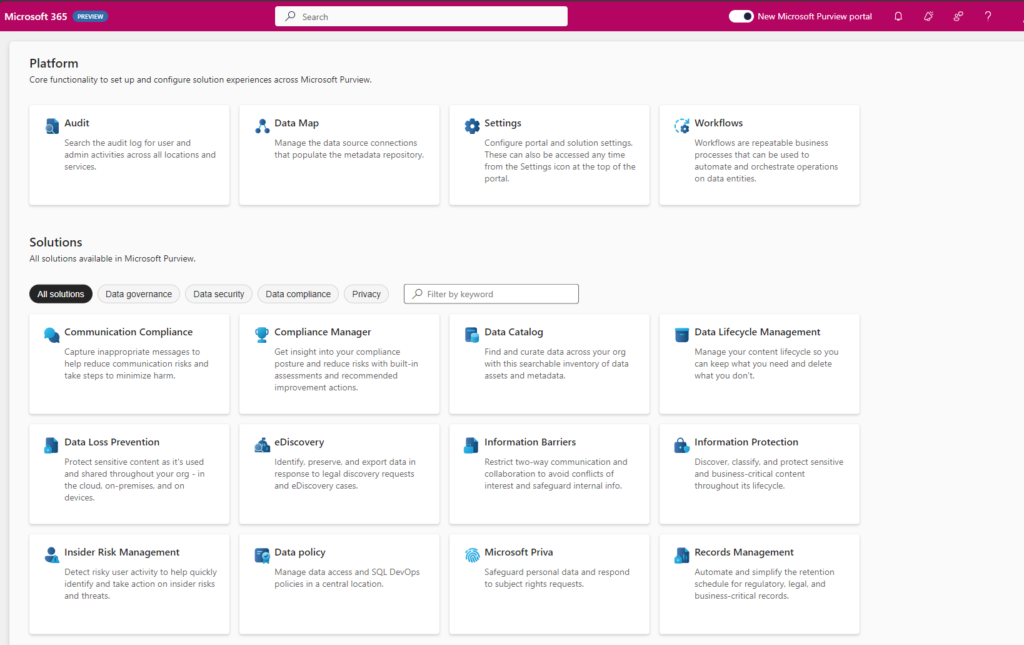
A few months ago, Microsoft announced the new portal Experience in Microsoft Purview as it offers a range of exciting new features and capabilities. Data Governance, Risk and Compliance are increasingly integrating into a unified experience. Microsoft Fabric will have a native integration with Microsoft Purview.

Purvew-New-Portal

Browse and search Fabric items

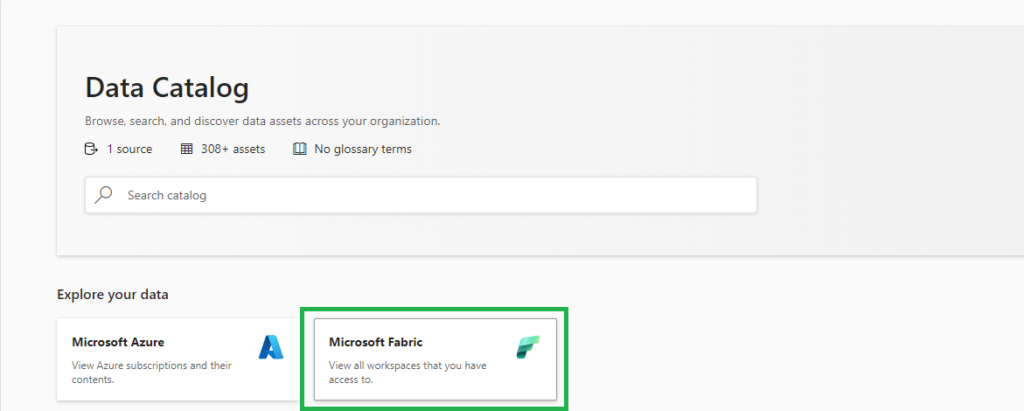
Just like Microsoft Azure, Microsoft Fabric is a new source for Microsoft Purview. Since Microsoft Purview is attached to every Fabric instance by default, you can click on the tile “Microsoft Fabric” on the front page of Microsoft Purview Data Catalog to start browsing your Fabric items. Automatically, any user can see the workspaces and Fabric items based on the permission setting they have in Fabric. You can also use the search bar to find Fabric items by keywords, filters, or facets.

Purview-Fabric-DataCatalog

Access metadata from Fabric items

In the coming weeks, Microsoft Purview Enterprise customers can provide broader access to metadata from Fabric items by scanning Fabric. When a Fabric is scanned, Microsoft Purview writes information about Fabric items to the Purview data map, and access to that metadata is governed by Microsoft Purview access control. This allows administrators to give users metadata access for data discovery or governance, without requiring those users to have read permissions on the underlying data sources.

Purview-Integration0Fabric

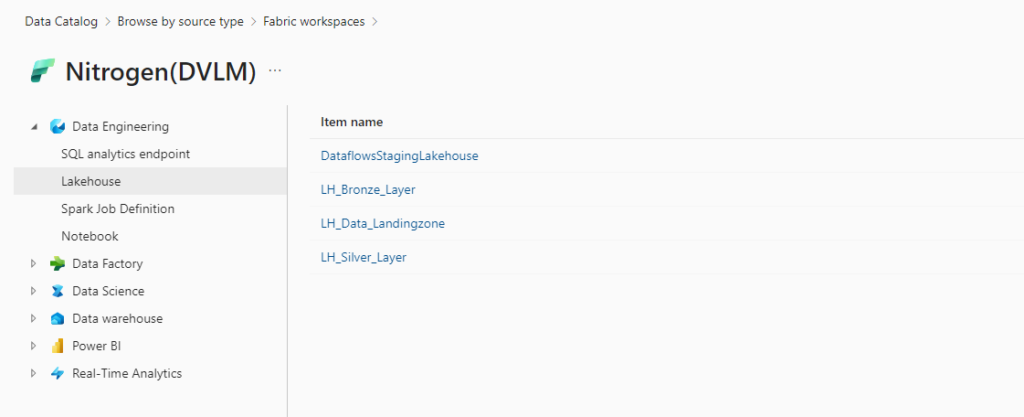
Live view in Microsoft Purview

Resources in live view in the Microsoft Purview Data Catalog automatically have this metadata available:

  • Name
  • Properties
  • Schema
  • Lineage

Creating a new workspace in Fabric will automatically appear in Microsoft Purview.

Purview-LiveView

Available resources

The following Fabric items will be available in Microsoft Purview as part of this public preview release.

Experiences Fabric items
Real-Time Analytics KQL Database
KQL Queryset
Data Science Experiment
ML Model
Data Factory Data pipeline
Dataflow Gen2
Data Engineering Lakehouse
Notebook
Spark Job Definition
SQL analytics endpoint
Data Warehouse Warehouse
Power BI Dashboard
Dataflow
Datamart
Dataset
Report
Paginated report*

* Only available by scanning

Conclusion

Microsoft Purview and Microsoft Fabric are two powerful services that work together to empower data discovery and governance. By integrating Microsoft Purview and Microsoft Fabric, you can leverage the benefits of both services, such as:

  • Browse and search Fabric items in the Microsoft Purview Data Catalog
  • Access metadata from Fabric items without requiring data access permissions

If you want to learn more about Microsoft Purview and Microsoft Fabric, you can visit the following links:

I hope you find this blog post helpful. Please let me know if you have any feedback or questions.

Feel free to leave a comment

Microsoft Purview new Experience is coming

Microsoft Purview new Experience is coming

Purview

by Erwin | Jun 28, 2023

Get ready for the next enhancement in Microsoft Purview

Get ready for the next enhancement in Microsoft Purview, as it brings a range of exciting new features and capabilities. To ensure the best experience with Purview, it is recommended that you tag your existing Microsoft Purview accounts appropriately.

Mark your Purview accounts with the proper tags

In short, mark each Purview account with the following tags: Name: "Purview Environment," Value: "Production."

In the long story, you have several tag options available to you. The table below outlines the different tags and their purposes:

In all purposes the tag name is "Purview Environment"

Production - This tag signifies that the account is or will be used for cataloging and governance requirements in a production environment. It is a candidate to be selected as the primary account for the tenant.

Pre-production - This tag indicates that the account is or will be used to validate cataloging and governance requirements before making them available in production. It is a candidate to be merged as a domain or can be deleted.

Test - This tag suggests that the account is or will be used for testing capabilities in Microsoft Purview Governance. It is a candidate to be merged as a domain or can be deleted.

Dev - This tag signifies that the account is or will be used to test capabilities or develop custom code and scripts in Microsoft Purview Governance. It is a candidate to be merged as a domain or can be deleted.

Proof Of Concept - This tag indicates that the account is or will be used to test capabilities or develop custom code and scripts in Microsoft Purview Governance. It can be deleted in the future.

Deprecate - This tag is for accounts that were created a while back but are not in use today. They can be deleted in the future.

Create tag

The following instructions will allow you to successfully tag your Purview account(s) with the desired classification:
1. Sign in to the Azure portal using your Azure account credentials.
2. Use the search bar to find and select your Microsoft Purview account.
3. Locate the Tags (edit) section on the left of the Purview account overview page.
4. Click on the Tags (edit) link to open the tags editor.
5. Add a new tag with a Name and Value according to the provided options (e.g., Name: "Purview Environment," Value: "Production").
6. Click on Save to apply the tag to your Purview account.

What's Next!

The next Microsoft Purview enhancement is coming to you in a few weeks. Along with the features you've enjoyed with Microsoft Purview so far, this enhancement will provide these additional capabilities:
Centralized organization-wide data governance that automatically gives you visibility across your Microsoft Cloud.
Configuration and set up is no longer required to capture metadata for Microsoft Cloud - Microsoft Purview is auto-attached to Microsoft Fabric and Azure SQL.
A clean, crisp, and more intuitive user interface to navigate the platform and apps.
These new features will be turned on automatically and added to your existing capabilities.

How can you use our new experience?

These new features will be turned on automatically and seamlessly integrated with your existing capabilities. The new experience will be available once your organization has been enabled. The exact steps to get started will depend on your organization's current structure, and more information will be provided in the coming weeks.

Follow one of these guides below:

More information will be available in the coming weeks.

You can learn more about the enhancements by going to https://learn.microsoft.com/azure/purview/account-upgrades.
I'm looking forward to new the experience with hopefully an even better integration with Microsoft Fabric.
If you have any further questions, feel free to ask them in the comments below.

Feel free to leave a comment

Microsoft Purview Pricing and Applications

Microsoft Purview Pricing and Applications

Purview

by Erwin | Apr 25, 2023

Microsoft Purview Pricing and introduction of Purview Applications

The Microsoft Purview pricing page has been updated. Below I have listed most of the changes. The most important changes are the introduction of the Microsoft Purview Applications and the pricing of the Insights Generation. The standard level of 1 capacity unit of 2 GB metadata storage and 25 operations per sec has been increased to 10 GB.

Post has been updated on April 25th.

Microsoft Purview Data Map

The Microsoft Purview Data Map stores metadata, annotations and relationships associated with data assets in a searchable knowledge graph.

Data Map is billed across three types of activities:

  • Data Map Population– examples include metadata & lineage extraction or classification based on metadata & content inspection.
  • Data Map Enrichment– examples include use of resource sets to optimize storage of data lake assets, or aggregation of classifications to generate insights
  • Data Map Consumption- examples include serving up search results or rendering lineage graph. This also includes the use of Apache Atlas API to build apps on Data Map.

Data Map Population

Automated Scanning, Ingestion & Classification

Data Map population is serverless and billed based on the duration of scans (includes metadata extraction and classification) and ingestion jobs. Automated scans using native connectors trigger both scan and ingestion jobs. Push based updates from a Microsoft Purview client (e.g., lineage push from Azure Data Factory or Azure Synapse Analytics) only trigger ingestion jobs.

Price
For Power BI online Free for a limited time
For SQL Server on-prem Free for a limited time
For other data sources €0.582 per 1 vCore Hour

Data Map Enrichment

Advanced Resource Set

Advanced Resource Set is a built-in feature of the Data Map used to optimize the storage and search of data assets associated with partitioned files in data lakes. Billing for processing the resource set data assets is serverless and based on the duration of the processing, which can vary based on the change in partitioned files and resource set profile configured. In the Management Center you have an option to toggle on or off.

Note:  By default, the advanced resource set processing is run every 12 hours for all the systems configured for scanning with resource set toggle enabled.

Price
Advanced Resource Set €0.194 per 1 vCore Hour

Insights Generation

Insights Generation aggregates metadata and classifications in the raw Data map into enriched, executive-ready reports that can be visualized in the Data Estate Insights application and granular asset level information in business-friendly format that can be exported. Report visualization and export incurs charges from Insights Report Consumption in the Data Estate Insights application.

Price
Report Generation €0.758 per 1 vCore Hour

Insight Generation is new for me, currently it looks like around 70,00.

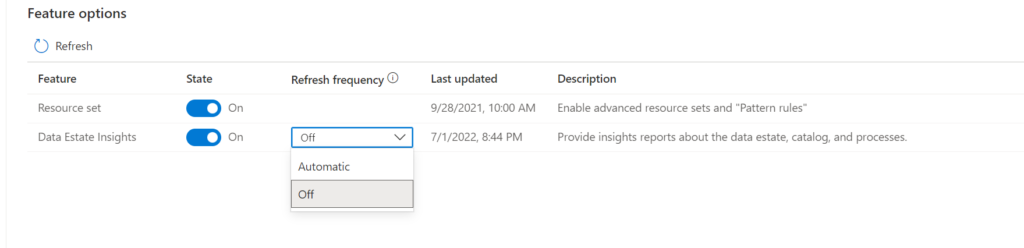
Note: By default, Insights Generation is enabled and provisioning and can be turned off in the Management center of Microsoft Purview governance portal. In the Management Center you have now an option to toggle on  or off the Insight Generation. If the  toggle is on and the report frequency is off than you can still see the reports with the latest report generation. If set to automatic your reports will refreshed based on your scanning and activities in de Portal. Currently the automatic refresh is weekly.

Microsoft Purview Data Estate Insights Feature enabling


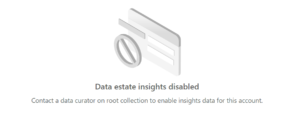
If the toggle is off the Insight Generation activity will you give you the following warning:

Microsoft Purview Data Estate Insights Feature disabled

Data Map Consumption

Elastic Data Map

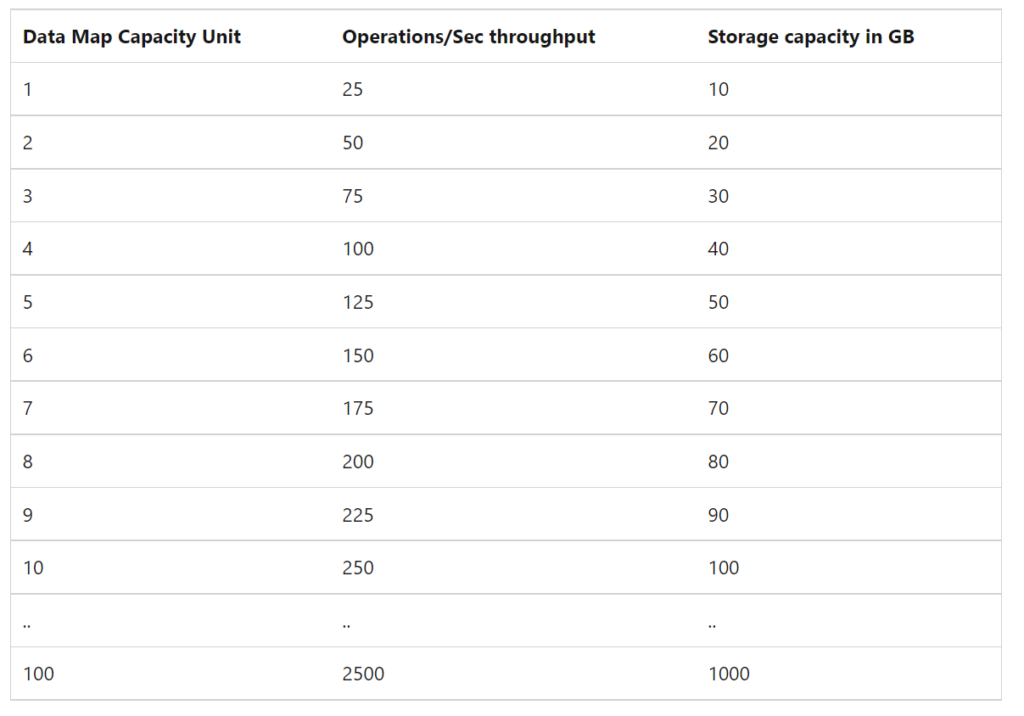
By default, a Microsoft Purview account is provisioned with a Data Map of at least 1 Capacity Unit. 1 Capacity Unit supports requests of up to 25 data map operations per second and includes storage of up to 10 GB of metadata about data assets.

Price
Capacity Unit €0.380 per 1 vCore Hour

Note: The storage size was until last week 2 GB for 1 capacity Unit and has been resized to 10 GB. so that is a major change.

Microsoft Purview Data Map Capacity Unit

Microsoft Purview Applications

Microsoft Purview Applications are replacing the C0, C1 and D0 options which we had previously. Microsoft Purview Applications are a set of independently adoptable, but highly integrated user experiences built on the Data Map including Data Catalog, Data Estate Insights and more. These applications are used by data consumers, producers, data stewards and officers that enable enterprises to ensure that data is easily discoverable, understood, high quality, and all use is per corporate and regulatory requirements.

Data Catalog

Data Catalog is an application built on Data Map for use by business users, data engineers and stewards to discover data, identify lineage relationships and assign business context quickly and easily.

Price
Search and browse of data assets Included with the Data Map
Business Glossaries Included with the Data Map
Lineage Visualization Included with the Data Map
Self-Service Data Access Free in preview

Data Estate Insights

Price
Insights Consumption €0.194 per API call

Note: Insights consumption is billed per API call. One API call returns up to 10,000 rows of tabular result. Like Insight Generation I've no idea yet what this will do with the cost. As soon this is available I will update this article.

Data Access Policies for SQL and Data Lakes(preview)

Data owners can centrally manage thousands of SQL Servers and data lakes to enable quick and easy access to data assets mapped in the Data Map for performance monitors, auditors, and data users.

Price
SQL DevOps access Free in preview
Data Lake data asset access Free in preview

Workflows(Preview)

Data owners and stewards can automate commonly used repetitive tasks associated with business processes like glossary curation and approval tracking using workflow management.

Price
Business Workflows Free in preview

Data Sharing(Preview)

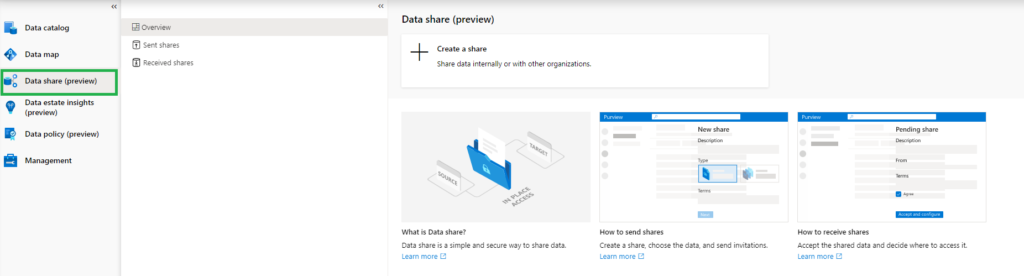
In-place Data Sharing lets users share data easily from within Microsoft Purview governance portal both within and between organizations, providing near real-time access to data without duplication.

Price
In place sharing for Azure Blob Storage and Azure Data Lake Storage (ADLS Gen2) storage accounts Free

Purview Data Share

More details on data sharing in Microsoft Purview can be found here.

Pricing Example

Based on the example which is published on the pricing page, I've done a Calculation:

Example Scenario:
Data Map can scale capacity elastically based on the request load. Request load is measured in terms of data map operations per second. As a cost control measure, a Data Map is configured by default to elastically scale up to a peak of 8 times the steady state capacity.

For dev/trial usage:

Data Map (Always on): average of 2 capacity unit x Price per capacity unit per hour x 730 hours per month

Scanning (Pay as you go): Total duration (in minutes) of all scans in a month / 60 min per hour x 32 vCore per scan x €0.582 per vCore per hour

Resource Set: Total duration (in hours) of processing resource set data assets in a month * Price per vCore per hour

The total cost per month for Azure Purview = cost of Data Map + cost of Scanning + cost of Resource Set

Assuming above Scenario that we only use 1 Capacity Unit and use not more then 10 GB of Metadata storage and we scan our data once a week for 2 hours.

Data Map 2 CU x €0.380 X 730 hours = €554

Scanning 4 scans x 4 hours x 32 VCore x €0.582 per vCore per hour = €297

Resource Set 30 days x every 12 hrs x 8 Vcore x €0.194 per vCore per hour €93

In Total €944 including 4 scans, Data Estate Insight excluded. If you leave Microsoft Purview as is and no scanning you base fee will be €277 for 1 CU and Resource Set toggle need to be switch off

Data Estate Insights   every week(4) x 8 Vcore x 4 hours x €0.758 = €97

Like always, in case you have questions, leave them in the comments or send me a message.

Useful links


Feel free to leave a comment