My 2023: A Year of Learning, Sharing and Growing

My 2023: A Year of Learning, Sharing and Growing

Synapse Data Science

by Erwin | Jan 2, 2024

As the year 2023 comes to an end, I want to take a moment to reflect on some of the amazing experiences I had in the past 12 months. It was a year full of learning, sharing and growing, both professionally and personally. I had the opportunity to attend, speak and help at various events, meet new people, visit new places, and become a part of the Microsoft Fabric community. Here are some of the highlights of my 2023:

My first MVP Summit in person in Redmond in April

One of the most memorable events of the year was attending the MVP Summit in person in Redmond, Washington. Visiting the Microsoft headquarters and meeting some of the brilliant minds behind the products and services I use every day. I learned a lot from the sessions, workshops and networking opportunities, and I also had a lot of fun exploring the campus and the city. It was an honor and a privilege to be part of this incredible community of MVPs.

Becoming a Microsoft Fabric Feature Partner in November

Another milestone of the year was becoming a Microsoft Fabric Feature Partner in November. Microsoft Fabric is a new SaaS data platform, I got early access to the platform and provided feedback and suggestions to the product team. I also got to showcase some of the features and benefits of Microsoft Fabric at various events.

Lauched the Microsoft Fabric Content Hub

With the Public review announcement of Microsoft Fabric there was so much content. With this Content hub I try to Stay up-to-date with the latest and most valuable content about Microsoft Fabric, all in one place! From insightful articles and tutorials to engaging videos and community blogs, you’ll find a treasure trove of resources to deepen your understanding. It is one of my best visisted pages this year on my blog

Microsoft Fabric Content Hub - Erwin & Data Analytics (erwindekreuk.com)

Attending and helping during Microsoft Ignite in Seattle in November

Microsoft Ignite is one of the biggest and most exciting events of the year for anyone who is passionate about technology. I had the chance to attend and help during the event in Seattle, Washington. I was amazed by the scale and the quality of the event, and I enjoyed learning from the experts, meeting new and old friends, and discovering the latest innovations and trends in the industry. One of the highlights of the event was the announcement of Microsoft Fabric GA (General Availability), which marked the official launch of the platform to the public.

Speaking and visiting Legoland in June during Data platform Next Step

Data platform Next Step is a unique event that combines data and fun. It was held in June in Billund, Denmark, the home of Lego. I had the opportunity to speak at the event and share my experience and insights on Microsoft Purview. I also had a blast visiting Legoland, the original and largest Lego theme park in the world. It was like a dream come true for a Lego fan.

Helper/volunteer/speaker during SQLBits in March

SQLBits is the leading conference for data professionals to network, develop and share data knowledge in Europe, and it was held in March in Newport. I was happy to be a helper/volunteer at the event, and contribute to its success. I helped with the sessions and anything else that was needed. Besides helping, I had also one session on Microsoft Purview. I also learned a lot from the speakers, the sponsors, and the attendees, and I had a great time in Newport.

Did 2 sessions for SQLDay in May, my first time in Wroclaw, I’ve seen a lot of dwarfs

SQLDay is the biggest data platform conference in Poland, and it was held in May in Wroclaw, the fourth-largest city in the country. It was my first time visiting Wroclaw, and I was impressed by its beauty and history. I did two sessions for SQLDay, one on Microsoft Purview and one on Azure Synapse Analytics. I received positive feedback and questions from the audience, and I enjoyed sharing my knowledge and experience. I also had fun exploring the city and seeing a lot of dwarfs. Wroclaw is famous for its dwarf statues, which are scattered all over the city. There are more than 400 of them, and each one has a different story and personality.

Speaking at events like DataSaturday Stockholm, with an amazing speaker dinner

DataSaturday is a series of events organized by the data community for the data community. I had the chance to speak at several DataSaturday events throughout the year, in different countries and cities. One of them was DataSaturday Stockholm, which was held in May in the capital of Sweden. It was a well-organized and well-attended event, with a lot of interesting sessions and speakers. I spoke about Meta Data driven frameworks and how it can help data professionals to simplify and optimize their data pipelines. I also had an amazing speaker dinner, where I met and mingled with other speakers and organizers. It was a wonderful evening of food, drinks and conversations.

Visited Portugal for the first time to speak during the Iberian Summit

The Iberian Summit is a event from the Portuguese data community, and it was held in April in Olhao, Portugal. It was my first time visiting Portugal, and I was amazed by its culture, cuisine and scenery. I spoke at the event and shared my insights and tips on Azure Synapse Analytics. I also learned from other speakers and attendees, and I had a lot of fun in Olhao.

Had an awesome Inspiration weekend in June with my employer InSpark

InSpark is the company I work for, and it is the leading Microsoft partner in the Netherlands. In June, we had an awesome Inspiration weekend, where we went to a beautiful location and spent two days of learning, brainstorming, and fun. We had sessions and we also had activities, such as climbing. In the evening we had a great White party with beer and wine tastings. It was a great way to get inspired, motivated, and connected with my colleagues.

DataScotland in the Murrayfield Stadium in September

DataScotland is a data platform conference in Scotland, and it was held in September in Edinburgh, the capital of the country. It was a unique event, as it took place in the Murrayfield Stadium, the home of the Scottish rugby team. I spoke at the event and presented on Azure Synapse Analytics togehter with Mathias. I also enjoyed the sessions, the networking, and the atmosphere of the event.

Finally this year DataSaturday Holland was back again, where I spoke about Microsoft Fabric

DataSaturday Holland is the biggest data platform event in the Netherlands, and it was back again this year after a hiatus due to the pandemic. It was held in October in Utrecht, the fourth-largest city in the country. I spoke at the event and gave an overview of Microsoft Fabric and its features and benefits. I also attended some of the sessions, met some of the sponsors, and chatted with some of the attendees. It was a fantastic event, and I was glad to be a part of it.

Techorama Belgium and Techorama the Netherlands

This is year I Spoke at the Belgium and the Dutch Edition. I Belgium I spoke togehter with Marc on Power BI and Microsoft Purview. In Utrecht, the Netherlands I had 2 sessions, one on Microsoft Purview and one on Azure Synapse Analytics

Organized a customer event for all of Data and AI customers of InSpark, which was a really successful event

In September, I organized a customer event for all of the Data and AI customers of InSpark. The event was held in the DDX in Zoetermeer, and it was aimed to showcase some of the latest and greatest technologies and solutions in the data and AI space. I invited some of the experts from Microsoft and other partners to speak at the event, and I also spoke myself about Microsoft Fabric and how it can help customers to achieve their data goals. The event was a really successful one, with a lot of positive feedback and engagement from the customers.

Spoke at several community events

Besides the events I mentioned above, I also spoke at several other community events throughout the year, such as Power BI Gebruikersdag, Power BI gebruikersgroep and more. I always enjoy speaking at community events, as they are a great way to share my passion and knowledge, learn from others, and meet new and old friends. I am very grateful to the organizers, the speakers, and the attendees of these events, for making them possible and valuable.

On a personal level

On a personal level, I also had some achievements and experiences that I am proud of and happy about. One of them was participating in a training called Taking the Stage at the The Speech Republic, led by Natascha Jacobsz and Jantien Streefkerk-van der Meer. In four days, we learned how to take the stage and tell our own story. I do often stand on a stage, but my goal was to create an inspiring story that was not technical. The audience, consisting of family, friends and colleagues, could be themselves during my story. It was a nice step for myself, which was a goal of my training, but which I did not think possible at the beginning and until one of the last days.

Another personal experience that I enjoyed was closing the year with an amazing Christmask dinner with all my colleagues in het Rijk van Keizer in Amsterdam. It was a lovely evening of delicious food, drinks, and conversations. It was a perfect way to celebrate the end of the year and the start of the new one.

Conclusion

2023 was truly an amazing year for me. I learned a lot, shared a lot, and grew a lot, both professionally and personally. I had the opportunity to attend, speak and help at various events, meet new people, visit new places, and become a part of the Microsoft Fabric community. I want to thank everyone who was a part of my 2023, for making it a wonderful and memorable year. ❤️

Let’s celebrate the memories we’ve created and look forward to the adventures that await in 2024! May the new year bring joy, peace, and prosperity to you and your loved ones. Happy New Year!


Feel free to leave a comment

Microsoft Fabric Content Hub Update November

Microsoft Fabric Content Hub Update November

Fabric-Overview-Short

Synapse Data Science

by Erwin | Nov 30, 2023

Stay up-to-date with the latest and most valuable content about Microsoft Fabric, all in one place!  From insightful articles and tutorials to engaging videos and community blogs, you’ll find a treasure trove of resources to deepen your understanding.

This time there was so much content, sorry if I missed yours. Attending Ignite in Person with some lack of sleep due a jet lag and following sessions was the main reason for.

Microsoft Fabric is now generally available

One of the most anticipated announcements at Ignite 2023 was the general availability of Microsoft Fabric, a unified data platform that enables organizations to prepare their data for AI innovation. Microsoft Fabric was first introduced at Microsoft Build 2023 as “perhaps the biggest launch of a data product from Microsoft since the launch of SQL Server”, according to Satya Nadella, CEO and Chairman of Microsoft.

Microsoft Fabric integrates Power BI, Azure Synapse Analytics, and Azure Data Factory into a single service, with a common capacity pricing model and a unified user experience. With Microsoft Fabric, users can access, analyze, transform, and govern their data across multiple sources and formats, using familiar tools and languages. Microsoft Fabric also supports the creation and consumption of foundation models, which are large-scale AI models that can be customized and applied to various domains and scenarios.

Microsoft Fabric has been adopted by thousands of organizations around the world, including 67 percent of the Fortune 500, since its preview announcement

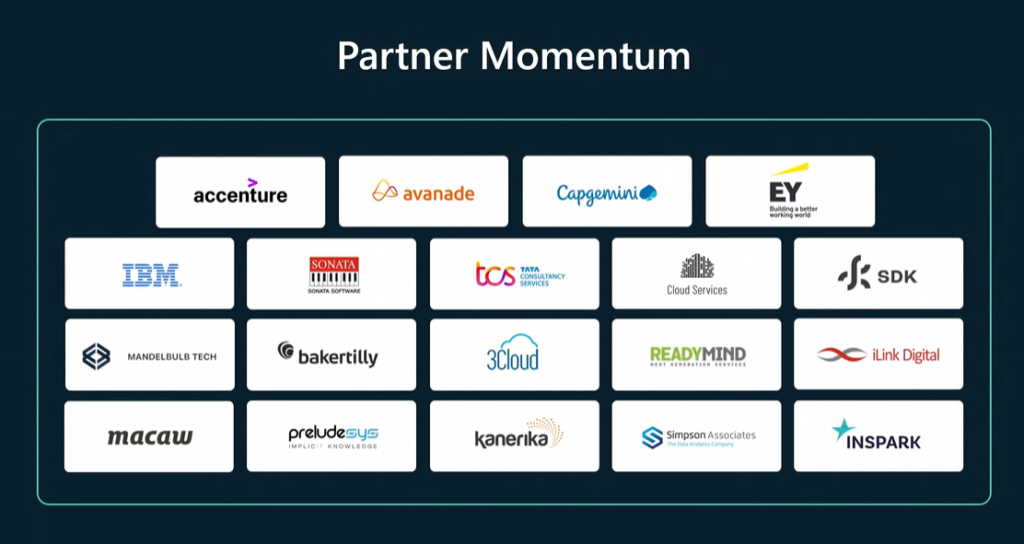
InSpark Feature Partner for Microsoft Fabric

Proud to announce that my employer  InSpark | Innovate to Accelerate has been recognized by Microsoft and named on their list of Partners. Our hard work and dedication to onboarding customers on MicrosoftFabric has paid off, and we’re excited to continue this amazing journey. Let’s keep pushing the boundaries and achieving great things together!Fabric-Feature-Partner-InSpark

Latest Community blog posts:

What is Fabric DWH Bursting  – Project Controls blog (datamonkeysite.com)

Bursting and Smoothing - Yin and Yang of the Fabric Capacity! - Data Mozart (data-mozart.com)

Programmatically Creating, Managing Lakehouses in Fabric

Visualizing JSON Structure In Fabric Notebook

Microsoft Ignite 2023 – Fabric Round-up — Advancing Analytics

Demystifying the Data Lakehouse in Microsoft Fabric – justB smart

dbt Cloud is now available for Microsoft Fabric (getdbt.com)

Controlling Direct Lake Fallback Behavior (fabric.guru)

Delta Lake Change Data Feed in Fabric Lakehouses (serverlesssql.com)

Measure Maze: Visualizing Measure Dependencies Using Semantic Link & Network Analysis (fabric.guru)

Fabric : Engines Resource Consumption. – Project Controls blog (datamonkeysite.com)

Fabric Lakehouse Loading using Data Pipelines & Notebooks – Inspired by MS End-to-End Tutorials (serverlesssql.com)

Services that I recommend when working with Microsoft Fabric - Kevin Chant (kevinrchant.com)

Thoughts about the DP-600 exam for the new Microsoft Fabric certification - Kevin Chant (kevinrchant.com)

Spreading your SQL Server wings with Microsoft Fabric Data Warehouses - Kevin Chant (kevinrchant.com)

Debunking Myths and Embracing Innovation with Microsoft Fabric – Data – Marc (data-marc.com)

Kusto Query Language (KQL) Databases in Microsoft Fabric (mssqltips.com)

Copy Activity, Dataflows Gen2, and Notebooks vs. SharePoint Lists (datameerkat.com)

Understanding Storage Costs for Microsoft Fabric – The White Pages (bifocal.show)

Brian Bonk | KQL Data live copy to OneLake

Working with tables in Microsoft Fabric Lakehouse - Everything you need to know! - Data Mozart (data-mozart.com

CHANGE (IN THE HOUSE OF LAKES) - It's Not About The Cell (itsnotaboutthecell.com)

Latest Video’s/ Podcasts:

(1302) Microsoft Fabric - YouTubee

Feel free to leave a comment

Microsoft Fabric Content Hub Update November

Microsoft Fabric Content Hub Update October

Fabric-Overview-Short

Synapse Data Science

by Erwin | Oct 16, 2023

Stay up-to-date with the latest and most valuable content about Microsoft Fabric, all in one place!  From insightful articles and tutorials to engaging videos and community blogs, you’ll find a treasure trove of resources to deepen your understanding.

Latest Community blog posts:

What Happens When You Clone A Fabric Warehouse Table? – Serverless SQL

Flatten Nested JSON in Microsoft Fabric – Turning data into direction (storybi.com)

What does it mean to refresh a Direct Lake Power BI dataset in Fabric? (crossjoin.co.uk)

Tear down walls, no data silos any longer using Microsoft Fabric, and finally, export to Excel will become a breeze - Mincing Data - Gain Insight from Data (minceddata.info)

Does it feel like too much? — DATA GOBLINS (data-goblins.com)

How do you set up your Data Governance in Microsoft Fabric? – Data Ascend (data-ascend.com)

Fabric, Power BI, Power Platform, Data Platform: Pausing a Fabric Capacity - What Does It Actually Mean? (nickyvv.com)

Understanding data temperature with Direct Lake in Fabric – Data – Marc (data-marc.com)

Exploring Direct Lake Framing and warm-up data using Semantic Link in Fabric Notebooks – Data – Marc (data-marc.com)

Microsoft Fabric: setting your spark compute pool size – Reitse's blog (sqlreitse.com)

Microsoft Fabric, capacity usage and a design – Reitse's blog (sqlreitse.com)

Lightening Fast Copy In Fabric Notebook

Fabric Semantic Link and Use Cases

Keep your existing Power BI data and add new data to it using Fabric (crossjoin.co.uk)

Connect Power BI and Spark notebooks with Microsoft Fabric Semantic Link – Seequality

Recommended Microsoft Learn material for Microsoft Fabric - Kevin Chant (kevinrchant.com)

Data Science in Microsoft Fabric - RADACAD

What is OneLake in Microsoft Fabric, and Why You Should Care? - RADACAD

Feel free to leave a comment

Microsoft Fabric Content Hub Update November

Microsoft Fabric Content Hub Update September

Fabric-Overview-Short

Synapse Data Science

by Erwin | Sep 20, 2023

Stay up-to-date with the latest and most valuable content about Microsoft Fabric, all in one place!  From insightful articles and tutorials to engaging videos and community blogs, you’ll find a treasure trove of resources to deepen your understanding.

Feel free to leave a comment

Azure Open AI and Microsoft Fabric

Azure Open AI and Microsoft Fabric

Synapse Data Science

by Erwin | Sep 14, 2023

Get ready for data enrichement in Microsoft Fabric

Azure OpenAI is fun and exciting and we can use it to do amazing stuff. In combination with Spark on Microsoft Fabric or Azure Synapse Analytics, we can transform and generate large amounts of text data and make use of OpenAI’s flexibility in defining the transformation. The SynapseML library that comes pre-installed on all Synapse Spark pools and Fabric workspaces includes an OpenAI module that allows you to perform OpenAI transformations on spark dataframes, enabling OpenAI at scale. Azure OpenAI is fun and exciting and we can use it to do amazing stuff. In combination with Spark on Microsoft Fabric or Azure Synapse Analytics, we can transform and generate large amounts of text data and make use of OpenAI’s flexibility in defining the transformation. 

Together with Floris Berends we had a look into the possibilities and wrote the post below

Requirements

To run this example you need to have:

  • An Azure OpenAI service
  • A model deployment
  • A Microsoft Fabric workspace Alternatively, a Synapse Analytics workspace
  • A Spark Notebook

Extracting text fields from raw social media posts

Let’s say we are scraping social media posts and are interested in some of the details. Usually, scraping text fields results in some pretty messy data. For this example, we are using the Scikit-Learn newsgroups open dataset.

Set up a Spark Dataframe

In order to load the open dataset into a spark dataframe, we first load it into a pandas dataframe. Of course if you are using your own data, you can load the data from anywhere, as long as it fits into a spark dataframe

import pandas as pd
from sklearn.datasets import fetch_20newsgroups
newsgroups = fetch_20newsgroups(subset="train", categories=['talk.politics.misc'])
pd_df = pd.DataFrame(newsgroups["data"], columns=["data"])
df = spark.createDataFrame(pd_df)

Set up our parameters

To prepare the OpenAI transformation, we need to provide the API with a number of connection and configuration parameters. These include the Azure OpenAI service name, the name of the model deployment, and a prompt that will specify our transformation. The parameters can be found in the Azure Portal, on your Azure OpenAI resource. If you have not yet deployed a model, do this now. Note that the prompt specifies what we want the model to do, but also specifies the format in which we want the model to respond. This is crucial in getting reliable results from the model and this is what enables us to use the transformation as part of a pipeline.

openai_service_name = "<YOUR SERVICE NAME>"
openai_deployment_name = "<YOUR DEPLOYMENT NAME>"
openai_key = "<YOUR SERVICE KEY>"
source_content_column = "data"
system_prompt = """
You will read the raw text of an e-mail and extract the senders e-mail
address and subject from the text. You will also list the topics of the email, provide a short one-sentence summary, and output the sentiment of the email. Ensure that the sentiment is one of the following: negative, neutral, positive.

Your response will be in the following format
{{
"EMAILADDRESS": "",
"SUBJECT": "",
"SUMMARY": "",
"SENTIMENT": "",
"TOPICS: []
}}
"""

Set up the prompt column

Because OpenAI needs a prompt in order to generate a completion, we need to setup a prompt column that includes both the instruction (system_prompt) we set up earlier and our data. The way that Azure OpenAI chat completions work, is that you can provide the ‘chat history’ as a message column. This column is what we will use as input for the transformation. Additionally, Azure OpenAI chat completion messages include a ‘role’ parameter. The role specifies who sent the message. In a normal chat interaction, there are 2 roles: the user and the assistant (i.e. the model). However, it is possible to provide a ‘system’ message that will instruct the model how to behave. We will use a ‘system’ message in order to instruct the model on how to transform our data. In order to do this, we need to set up the prompt column in the following way:

  1. A message with the ‘system’ role and our instruction as content.
  2. A message with the ‘user’ role and our data as content.
import pyspark.sql.functions as F

from pyspark.sql.types import ArrayType, StructType, StructField, StringType
df = df.withColumn("prompt", F.udf(
    lambda system_prompt, content: [{"name":"system", "role":"system", "content": system_prompt},{"name":"user", "role":"user", "content": content}],
        ArrayType(
            StructType([
                StructField("name", StringType(),False),
                StructField("role", StringType(),False),
                StructField("content", StringType(),False)
                ]
            )
        )
    )(F.lit(system_prompt),F.col(source_content_column)))

Calling the Azure OpenAI API

Now that we have the input dataframe with the data and prompt just how we want it, we can set up the call to the Azure OpenAI API. Note that Spark will not immediately execute the transformation, but will simply setup the plan for the dataframe. The API will only be called when we actually need the data (e.g. when we save or display the dataframe).

from synapse.ml.cognitive import OpenAIChatCompletion
completion = (
    OpenAIChatCompletion()
        .setSubscriptionKey(openai_key)
        .setDeploymentName(openai_deployment_name)
        .setUrl(f"https://{openai_service_name}.openai.azure.com/")
        .setMessagesCol("prompt")
        .setErrorCol("error")
        .setOutputCol("output")
        .limit(10)
)

Transforming the results

The OpenAIChatCompletion mehthod simply puts the completion results into the output column, but we want to have the results in separate columns. Before we can do this  we need to define the output schema.

output_columns = "EMAILADDRESS,SUBJECT,SUMMARY,SENTIMENT,TOPICS"
prompt_schema = StructType(
                   [StructField(col, StringType(), True)
                      for col in output_columns.split(",")
                   ])
df_result = completion.transform(df.limit(10)).withColumn(
                 "response",
                  F.from_json(
  F.col("output.choices.message.content").getItem(0)
  ,prompt_schema)
                  ).select("response.*","error")

Displaying and Verifying the results

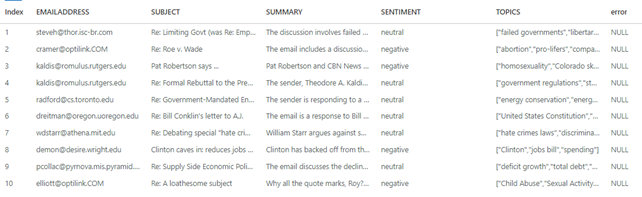
There are a number of things that can go wrong. For any row, errors returned by the API will be put into the error column that you provided by .setErrorCol. We can display the dataframe to inspect the results:

display(df_result)

Microsoft-Fabric-Open-AI

Final

It might seem that this setup is so versatile that you can use it to apply any transformation you desire on any column in any dataset. Although this might not be far from the truth, there are a couple of things you need to consider:

  1. Cost: Azure OpenAI transformations are more expensive then those that do not rely on external APIs (e.g. Spark Native transformation like map(), flatten(), explode(), or using regular expressions and the like).
  2. Complexity: This example applies a transformation with a simple output schema. It might very well be the case that asking a LLM to output data in a very complex schema will not turn out well.
  3. Language: This example applies a transformation that is primarily a language based transformation: extracting and summarizing information that is available as natural language. Using LLMs to apply math-based, logic-based, or code-based transformations might not show reliable results.


The main take-away is that using Azure OpenAI to transform text-fields though natural language operations like summarization, description and extraction can be done fast and reliable. We are looking forward to seeing where this technology will take us.

Learn more

Fabric (preview) trial

Data science in Microsoft Fabric

Azure OpenAI for big data

Questions

If you have any further questions, feel free to ask them in the comments below.

Feel free to leave a comment