Naming Conventions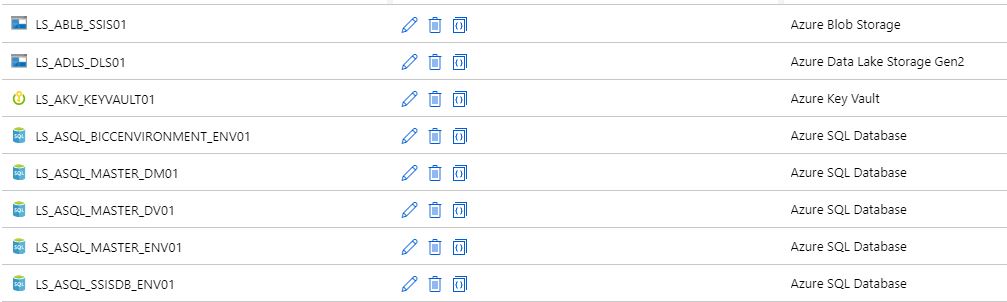

More and more projects are using Azure Data Factory and Azure Synapse Analytics, the more important it is to apply a correct and standard naming convention. When using standard naming conventions you create recognizable results across different projects, but you also create clarity for your colleagues. In addition to that, it is easier to add these projects to other services such as Managed Services, Azure DevOps, etc etc, because standards are used.
To start with these naming conventions, I have made a list of suggestions with most common Linked Services. The list is not exhaustive, but it does provide guidance for new Linked Services.
There are a few standard naming conventions that apply to all elements in Azure Data Factory and in Azure Synapse Analytics.
- *Names are case insensitive (not case sensitive). For that reason I’m only using CAPITALS.
- *Maximum number of characters in a table name: 260.
- All object names must begin with a letter, number or underscore (_).
- Following characters are not allowed: “.”, “+”, “?”, “/”, “<”, ”>”,”*”,”%”,”&”,”:”,””
These rules are also defined on the following link
This post has been updated on Feb 2nd, 2023 with the latest connectors.
Azure |
|||
| Abbreviation | Linked Service | Dataset | |
| Azure Blob Storage | ABLB_ | LS_ABLB_ | DS_ABLB_ |
| Azure Cosmos DB SQL API | ACSA_ | LS_ACSA_ | DS_ACSA_ |
| Azure Cosmos DB MongDB API | ACMA_ | LS_ACMA_ | DS_ACMA_ |
| Azure Data Explorer | ADEX_ | LS_ADEX_ | DS_ADEX_ |
| Azure Data Lake Storage Gen1 | ADLS_ | LS_ADLS_ | DS_ADLS_ |
| Azure Data Lake Storage Gen2 | ADLS_ | LS_ADLS_ | DS_ADLS_ |
| Azure Database for MariaDB | AMDB_ | LS_AMDB_ | DS_AMDB_ |
| Azure Database for MySQL | AMYS_ | LS_AMYS_ | DS_AMYS_ |
| Azure Database for PostgreSQL | APOS_ | LS_APOS_ | DS_APOS_ |
| Azure File Storage | AFIL_ | LS_AFIL_ | DS_AFIL_ |
| Azure Search | ASER_ | LS_ASER_ | DS_ASER_ |
| Azure SQL Database | ASQL_ | LS_ASQL_ | DS_ASQL_ |
| Azure SQL Database Managed Instance | ASQM_ | LS_ASQM_ | DS_ASQM_ |
| Azure Synapse Analytics (formerly Azure SQL DW) | ASDW_ | LS_ASDW_ | DS_ASDW_ |
| Azure Table Storage | ATBL_ | LS_ATBL_ | DS_ATBL_ |
| Azure DataBricks | ADBR_ | LS_ADBR_ | DS_ADBR_ |
| Azure Cognitive Search | ACGS_ | LS_ACGS | DS_ACGS_ |
| Azure Synapse Analytics | ASA_ | LS_ASA | DS_ASA |
| Azure Cognitive Service | ACG_ | LS_ACG_ | N/A |
Database |
|||
| Abbreviation | Linked Service | Dataset | |
| SQL Server | MSQL_ | LS_SQL_ | DS_SQL_ |
| Oracle | ORAC_ | LS_ORAC_ | DS_ORAC_ |
| Oracle Eloqua | ORAE_ | LS_ORAE_ | DS_ORAE_ |
| Oracle Responsys | ORAR_ | LS_ORAR_ | DS_ORAR_ |
| Oracle Service Cloud | ORSC_ | LS_ORSC_ | DS_ORSC_ |
| MySQL | MYSQ_ | LS_MYSQ_ | DS_MYSQ_ |
| DB2 | DB2_ | LS_DB2_ | DS_DB2_ |
| Teradata | TDAT_ | LS_TDAT_ | DS_TDAT_ |
| PostgreSQL | POST_ | LS_POST_ | DS_POST_ |
| Sybase | SYBA_ | LS_SYBA_ | DS_SYBA_ |
| Cassandra | CASS_ | LS_CASS_ | DS_CASS_ |
| MongoDB | MONG_ | LS_MONG_ | DS_MONG_ |
| Amazon Redshift | ARED_ | LS_ARED_ | DS_ARED_ |
| SAP Business Warehouse | SAPW_ | LS_SAPW_ | DS_SAPW_ |
| SAP Cloud for Customer (C4C) | SAPC_ | LS_SAPC_ | DS_SAPC_ |
| SAP Table | SAPT_ | LS_SAPT | DS_SAPT_ |
| SAP HANA | HANA_ | LS_HANA_ | DS_HANA_ |
| Drill | DRILL_ | LS_DRILL_ | DS_DRILL_ |
| Google BigQuery | GBQ_ | LS_GBQ_ | DS_GBQ_ |
| Greenplum | GRPL_ | LS_GRPL_ | DS_GRPL_ |
| HBase | HBAS_ | LS_HBAS_ | DS_HBAS_ |
| Hive | HIVE_ | LS_HIVE_ | DS_HIVE_ |
| Apache Impala | IMPA_ | LS_IMPA_ | DS_IMPA_ |
| Informix | INMI_ | LS_INMI_ | DS_INMI_ |
| MariaDB | MDB_ | LS_MDB_ | DS_MDB_ |
| Microsoft Access | MACS_ | LS_MACS_ | DS_MACS_ |
| Netezza | NETZ_ | LS_NETZ_ | DS_NETZ_ |
| Phoenix | PHNX_ | LS_PHNX_ | DS_PHNX_ |
| Presto (Preview) | PRST_ | LS_PRST_ | DS_PRST_ |
| Spark | SPRK_ | LS_SPRK_ | DS_SPRK_ |
| Vertica | VERT_ | LS_VERT_ | DS_VERT_ |
| Snowflake | SNWF_ | LS_SNWF_ | DS_SNWF_ |
| MongoDB Atlas | MONG_ATLAS_ | LS_MONG_ATLAS_ | DS_MONG_ATLAS_ |
| Amazon RDS for Oracle | RDSORAC_ | LS_RDSORAC_ | DS_RDSORAC_ |
| Amazon RDS for SQL Server | RDSSQL_ | LS_RDSSQL_ | DS_RDSSQL_ |
Files |
|||
| Abbreviation | Linked Service | Dataset | |
| File System | FILE_ | LS_FILE_ | DS_FILE_ |
| HDFS | HDFS_ | LS_HDFS_ | DS_HDFS_ |
| Amazon S3 | AMS3_ | LS_AMS3_ | DS_AMS3_ |
| FTP | FTP_ | LS_FTP_ | DS_FTP_ |
| SFTP | SFTP_ | LS_SFTP_ | DS_SFTP_ |
| Google Cloud Storage | GCS_ | LS_GCS_ | DS_GCS_ |
| Oracle Cloud Storage | OCS_ | LS_OCS_ | DS_OCS_ |
| Amazon S3 Compatible Storage | SMS3C_ | LS_SMS3C_ | DS_SMS3C_ |
Generic |
|||
| Abbreviation | Linked Service | Dataset | |
| Generic ODBC | ODBC_ | LS_ODBC_ | DS_ODBC_ |
| Generic OData | ODAT_ | LS_ODAT_ | DS_ODAT_ |
| Generic REST | REST_ | LS_REST_ | DS_REST_ |
| Generic HTTP | HTTP_ | LS_HTTP_ | DS_HTTP_ |
Services and Apps |
|||
| Abbreviation | Linked Service | Dataset | |
| Salesforce | SAFC_ | LS_SAFC_ | DS_SAFC_ |
| Salesforce Service Cloud | SAFCSC_ | LS_SAFCSC_ | DS_SAFCSC_ |
| Salesforce Marketing Cloud | SAFOMC_ | LS_SAFOMC_ | DS_SAFOMC_ |
| GitHub | GITH_ | LS_GITH_ | DS_GITH_ |
| Jira | JIRA_ | LS_JIRA_ | DS_JIRA_ |
| Web Table (table from HTML) | WEBT_ | LS_WEBT_ | DS_WEBT_ |
| Amazon Marketplace Web Service | AMSMWS_ | LS_AMSMWS_ | DS_AMSMWS_ |
| Xero | XERO_ | LS_XERO_ | DS_XERO_ |
| SharePoint Online List | SHAREPOINT_ | LS_SHAREPOINT_ | DS_SHAREPOINT_ |
| ServiceNow | SERVICENOW_ | LS_SERVICENOW_ | DS_SERVICENOW_ |
| Dynamics (Microsoft Dataverse) | DATAVERSE_ | LS_DATAVERSE_ | DS_DATAVERSE__ |
| Dynamics 365 | D365_ | LS_D365_ | DS_D365_ |
| Dynamics AX | DAX_ | LS_DAX_ | DS_DAX_ |
| Dynamics CRM | DCRM_ | LS_DCRM_ | DS_DCRM_ |
| Microsoft 365 | M365_ | LS_M365_ | Ds_M365__ |
| SAP Cloud for Customer (C4C) | SAPC4C_ | LS_SAPC4C_ | DS_LS_SAPC4C_ |
| SAP ECC | SAPE_ | LS_SAPE_ | DS_SAPE_ |
If your connector is not described(mostly connectors which are in Preview), please let me know. For more details for all the different connectors, check the connector overview
Pipeline
Even for Pipeline you can define naming conventions. I think the most important thing is that you always start your pipeline with PL_ followed by a Logic Name for you. You can for example use:
TRANS: Pipeline with transformations
SSIS: Pipeline with SSIS Packages
DATA: Pipeline with DataMovements
COPY: Pipeline with Copy Activities
Divers
NB: Notebook
DF: Mapping Dataflows
SQL: SQL Scripts
KQL: KQL Scripts
JOB: Spark job definition
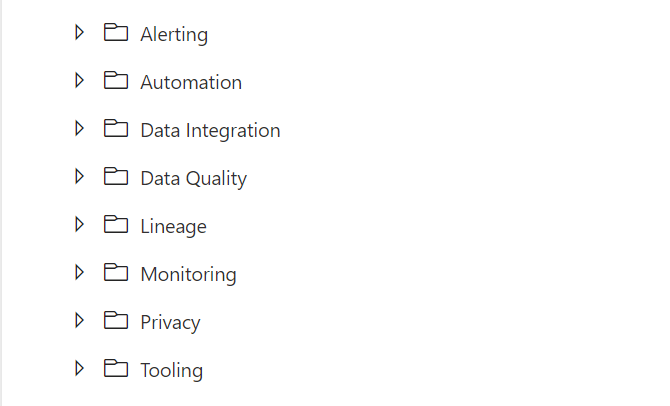
Once again these naming conventions are just suggestions. The most important thing is that you start using naming conventions and that you use the folder structure within the Pipelines (categories). Like the picture below as an example.

If you have suggestions just let me know by leaving a comment below.