How to use concurrency in Azure Synapse pipelines?
How to prevent concurrent pipeline execution?
Concurrency
This week I had a discussion with a colleague about how we can now make sure that a Pipeline does not start when it’s already started.
He then indicated, have you ever thought of the concurrency option? I’ve seen this option before but never paid attention to it.

How does the concurrency work?
If you read the Microsoft documentation it says the following:
The maximum number of concurrent runs the pipeline can have. By default, there is no maximum. If the concurrency limit is reached, additional pipeline runs are queued until earlier ones complete.
The concurrency option is working in Azure Synapse Analytics and in Azure Data Factory.
I started to test this functionality and there are certainly some nice use cases for that:
- If the Pipeline was started via a Schedule and someone else triggers this Pipeline Manually, the Pipeline is placed in a queue.
- Sometimes it happens that there is a delay in the processing of data or that more data is delivered. If you process this data every 30 minutes and the 1st run is not yet ready and the 2nd starts again, this could result in incorrect data. Also in this case the to be executed run is placed in a queue and only starts when the previous one is ready.
It is a fairly simple process but can be quite useful especially in the case of short loading windows.

Please pay attention, running the pipeline in a Debug modus has no effect on this and will run directly.
Check the monitoring regularly to check if this situation is not happening all the time, if so, you better change the recurrence of your Triggered Pipeline. You still have the option to cancelled a queued pipeline.
How to enable concurrency?
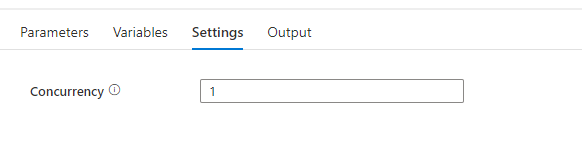
To enable concurrency in an Azure Synapse pipeline, you can use the Concurrency property in the pipeline settings. The default value is 1, which means that only one copy of the pipeline will run at a time. By default, there is no maximum. If the concurrency limit is reached, additional pipeline runs are queued until earlier ones complete. Setting the concurrency level to a higher value will cause multiple copies of the pipeline to run concurrently, which can improve performance if the pipeline is CPU-bound or if the data source can handle the increased load. If you leave the property blank the pipeline will not be queued.
When you have any questions regarding concurrency, please let me know.
Feel free to leave a comment
6 Comments
Leave a Reply
Discover more from Erwin | Data & Intelligence
Subscribe to get the latest posts sent to your email.

Thanks.
Quick question:
What happens if I have scheduled my pipeline to run every hour and the current run is taking longer than an hour and currently running?
Does the second run gets queued state?
Since its schedule based, the second run also gets running , performing the activities in it?
Hi Santosh,
If you have a hourly schedule, all scheduled pipelines will be queued, like you can see in the picture. With this option no scheduled runs are mixed up.
When you have a lot of queueing pipelines you should consider to change the trigger time. Hopefully this will solve your question.
Erwin
Hi Erwin,
I’m having a similar kind of use case running in ADF like I want to trigger my same pipeline concurrently with multiple value of same parameter so I’m using lookup to read my config from ADLS in json format and then using the list of that input parameter based on that I want to trigger my pipeline multiple times in parallel , for running parallel processing I’m using for each activity and executing sub activities in that such as .py script , notebook etc. so the issue I’m facing here is when I running my pipeline with concurrency count = 2 in general pipeline settings its still initiating 20 runs in parallel however I didn’t mention any batch count in foreach activity because with batch count my pipeline is taking lot of time to complete.
Can you please assist why concurrency count is not working ?
Thanks a lot!
Palak
Hi Palak,
The default setting for a For each activity is 20 ( if you leave it blank), so it looks like you haven’t set that one(https://learn.microsoft.com/en-us/azure/data-factory/control-flow-for-each-activity#type-properties).
Concurrency is only working only pipeline level. So If you execute the pipeline do you want it to be executed again? If not set concurrency to 1, but you cannot make any difference with setting different parameters.
With best regards
Erwin
Hi Erwin, thanks for your post.
QQ: I have 70 pipelines using the same pipeline template, and I left the concurrency setting to blank, but one strange thing was that each time there were 43 pipelines triggered first, and then once one of the 43 pipelines was done, a new pipeline would be triggered to run. Why only 43 pipelines were triggered instead of all 70 pipelines? Thanks.
Regards,
David
David,
It looks like to you reached the maximum of execution in the same time. I thought it was like 40, so the 43 is a strange value. Maybe it is another value, but you can check the resource below. I think it definitely has something to do with reaching the limits
https://github.com/MicrosoftDocs/azure-docs/blob/main/includes/azure-data-factory-limits.md
With best regards, Erwin