High Concurrency Notebook Activity in Microsoft Fabric
Microsoft Fabric is a cloud-based platform that provides integrated data engineering and data science solutions. One of the key features of Microsoft Fabric is the support for Apache Spark, a distributed computing framework that enables large-scale data processing and machine learning.
TooManyRequestsForCapacity
If you have ever built a Data Pipeline in Microsoft Fabric, you might have encountered this problem: using a For Each Loop container to run a Notebook with the Notebook Activity based on some input from Lookup or Web Activity, and getting this error message after running more than 4-5 Notebooks:
" [TooManyRequestsForCapacity] Unable to submit this request because all the available capacity is currently being used. Cancel a currently running Notebook or Spark Job Definition job, increase your available capacity, or try again later.HTTP status code: 430."This means that you have reached the limit of concurrent Notebook executions in Microsoft Fabric. There is a way to enable High Concurrency mode for Notebooks in Microsoft Fabric, which allows you to run more Notebooks on the same session at the same time.
To learn how to enable this mode, follow this link:
Configure high concurrency mode for notebooks
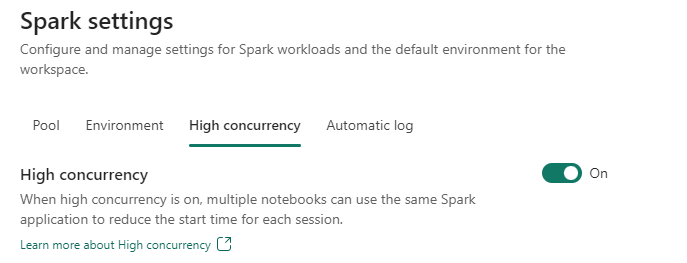
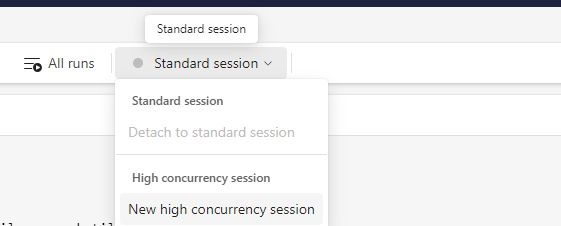
High Concurrency for Notebook Activity
However, this mode is not available when you use a Notebook Activity in a Pipeline. This feature is still on the roadmap.
In the upcoming blogs, I will show you different methods to achieve High Concurrency in Data Pipelines in Microsoft Fabric without using the For Each Loop Activity.
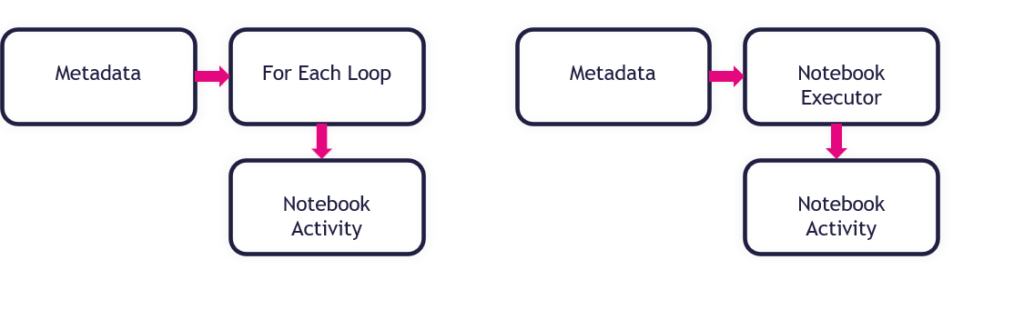
Find the different possibilities in the blogs below:
How to use the PySpark executor in Notebooks in Microsoft Fabric
How to use mssparkutils.notebook.runMultiple in Notebooks in Microsoft Fabric?
The choice between a Pyspark Executor or the mssparkutils.notebook.runMultiple depends on your use case and preference. Here are some factors to consider:
Pyspark Executor
A Pyspark Executor is designed to handle concurrent and parallel execution of notebook cells. This means that you can run multiple cells at the same time, without waiting for the previous ones to finish. This can be useful for interactive exploration and experimentation, as well as for speeding up long-running tasks.
mssparkutils.notebook.runMultiple
The mssparkutils.notebook.runMultiple method allows you to run multiple notebooks in parallel or with a predefined topological structure. The API uses a multi-thread implementation mechanism within a Spark session, which means the compute resources are shared by the reference notebook runs. This can be useful for orchestrating complex workflows and dependencies, as well as for reusing existing notebooks as modules.
Comparison and Trade-offs
Both options leverage the power of Spark to distribute the computation across multiple nodes and cores. However, they also have some limitations and trade-offs. For example, a Pyspark Executor may consume more memory and CPU resources than a single-threaded notebook, and the mssparkutils.notebook.runMultiple method may introduce some overhead and complexity in managing the notebook inputs and outputs.
Final Thoughts
In conclusion, there is no definitive answer to which option is better, as it depends on your specific scenario and requirements. You may want to try both options and compare their performance and usability for your use case. You can also refer to the documentation and examples of the Pyspark Executor and the Microsoft Spark Utilities (MSSparkUtils) for Fabric method for more details and guidance.
Thanks for reading


Feel free to leave a comment
Discover more from Erwin | Data & Intelligence
Subscribe to get the latest posts sent to your email.

0 Comments