Azure SQL Data Warehouse: Reserved Capacity versus Pay as You go

Azure SQL Data Warehouse: Reserved Capacity versus Pay as You go

How do I use my Reserved Capacity correctly?

Update 11-11-2020: This also applies to Azure Synapse SQL Pools.

In my previous article you were introduced, how to create a Reserved Capacity for an Azure SQL Datawarehouse (SQLDW). Now it’s time to take a look at how this Reserved Capacity differs from an already working environment with an Azure SQLDW Pay as You go model where we already scale up and down during certain time periods.
 
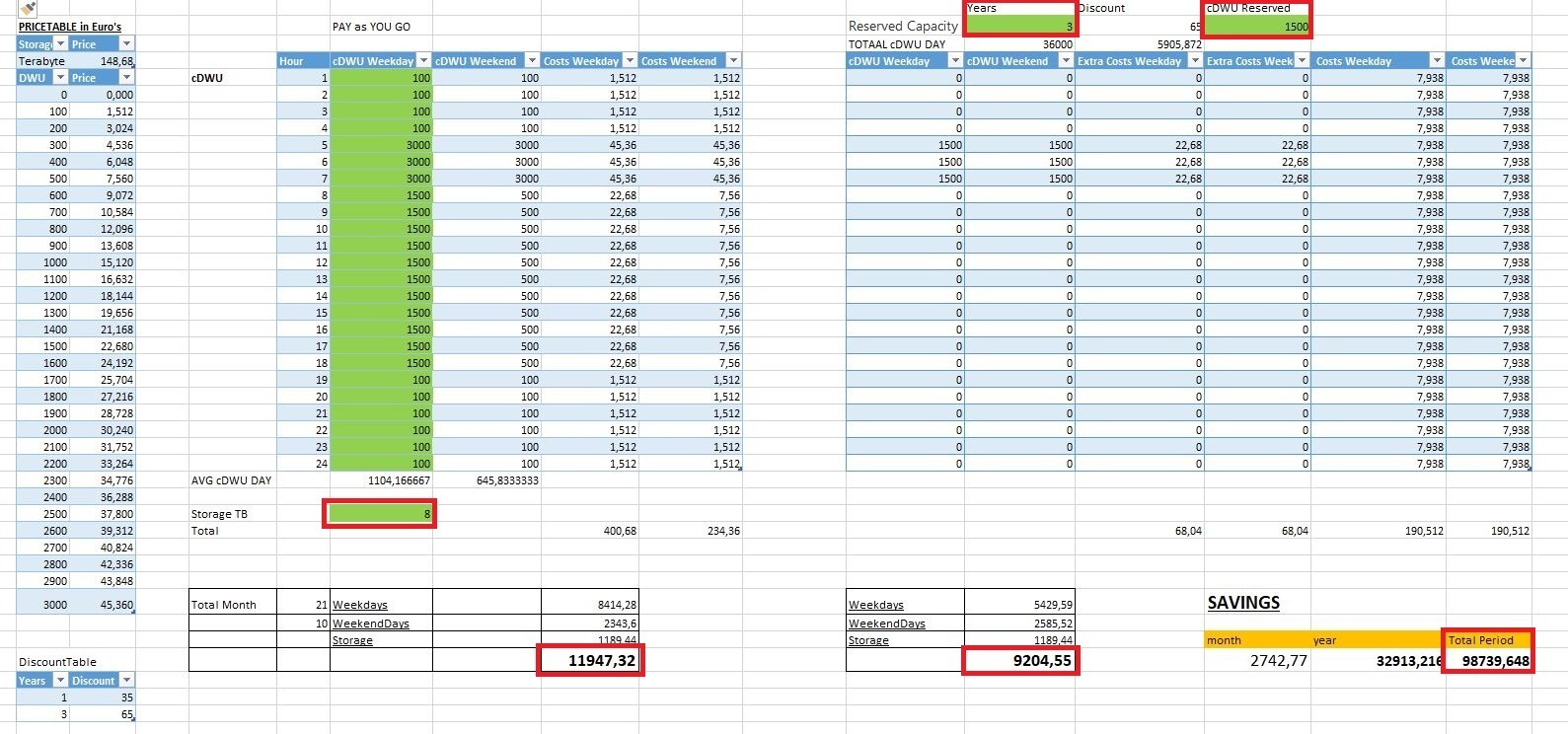
In the example below I’m running an Azure SQLDW with the following capacity during the day.
 
Weekdays:
12:00 AM 4:00 AM 100   cDWU
5:00 AM 7:00 AM 3000 cDWU
8:00 AM 6:00 PM 1500 cDWU
7:00 PM 12:00 AM 100   cDWU

Weekenddays:

12:00 AM 4:00 AM 100   cDWU
5:00 AM 7:00 AM 3000 cDWU
8:00 AM 6:00 PM 500   cDWU
7:00 PM 12:00 AM 100   cDWU

We have separated the weekdays from the weekend days. The SQLDW is used less heavily during the weekend than during the week.

In our calculation we assume that we will purchase a Reserved Capacity of 3 years with 15 units of 100 cDWU. On the left site you will see the Pay as You go model and on the right site the Reserved Capacity.

The amount of Storage will be 8 TB.

As you can see in the example below.
Azure SQL DataWarehouse Reserved Capacity

Conclusions:

In the example we see that we have to pay extra if we exceed our Reserved Capacity. These extras are billed with the normal Pay as You go rate.

If we use the Reserved Capacity, we have 1500 cDWU available throughout the day so we don’t longer need to turn it off or scale it down during weekends or outside office hours. Otherwise the Reserved Capacity is wasted for that hour, it doesn’t carry over.
So we actually get more capacity and we pay less for it, sounds great or not!  More details can be found here.

In this example, we save nearly 2,750 euros a month, which is almost 33,000 euros a year and 100,000 euros during the 3-year Reserved Capacity period. And that is a considerable amount that you can use to develop new solutions.


Reserved Capacity Years Discount Month Year  Total Period Reserved Capacity Year Discount month year Total Period
1500 cDWU 3 65 2742 32914 98739,648 1500 cDWU 1 35 -2319,41 -27832,9 -27832,896
1000 cDWU 3 65 2261,952 27143,42 81430,272 1000 cDWU 1 35 -1112,83 -13354 -13353,984

In this situation we achieve the largest saving with 1500 cDWU with a Reservation of 3 years. When purchasing 10 units of 100 cDWU, we still save but slightly less. When purchasing Reserved Capacity for 1 year, a Pay as You go model will be cheaper.


Calculation Sheet

Since every situation is different, you will have to play with these quantities/units yourself. I have added the Excel form so that you can download it, on which I have based this article. With this form you can fill in your own situation as well as possible. And finally you can take your own conclusions for your customer or environment.

In the sheet only change the Green Marked cells. Prices are in Euro’s.

SQLDWH_-_pay-as-you-go_vs_reservedcapcity

This form has been created together with my colleague Maurice Veltman and we have used it for a solid calculation for 1 of our customers.

If you have any questions or comments about this article or the form,  just let me know.
 

Azure SQL Data Warehouse: How to setup Reserved Capacity

Purchase your Azure SQL Datawarehouse Reservation


Since a few weeks you can buy Reserved Capacity for an Azure SQL Datawarehouse (SQLDW). This Reservation can save you up to 65% on the normal Pay as You go rates with a 3 year pre-commit. A pre-commit of 1 year will be discounted up to 35%.

These savings will only effect the compute power. You will charged separately for the storage with the normal Pay as You go rates.

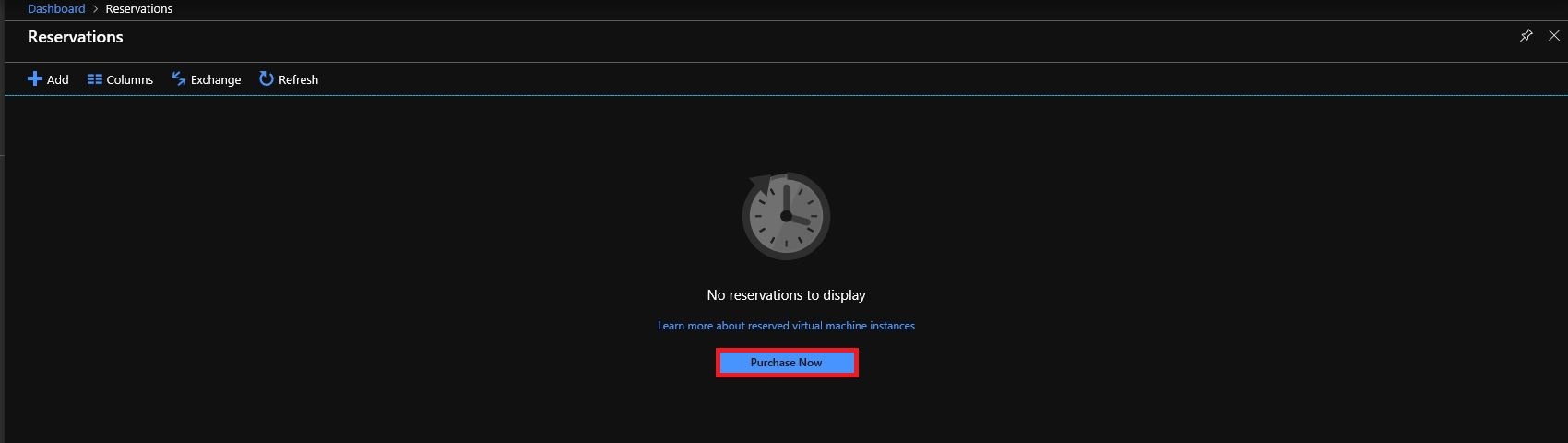
To purchase a reservation,  you need to sign-in to the Azure Portal first and then search for reservations.

Reserved Capacity Azure SQLDW

After you have clicked on Purchase Now, you will need to choose the Azure SQLDW option.

Reserved Capacity Azure SQLDW

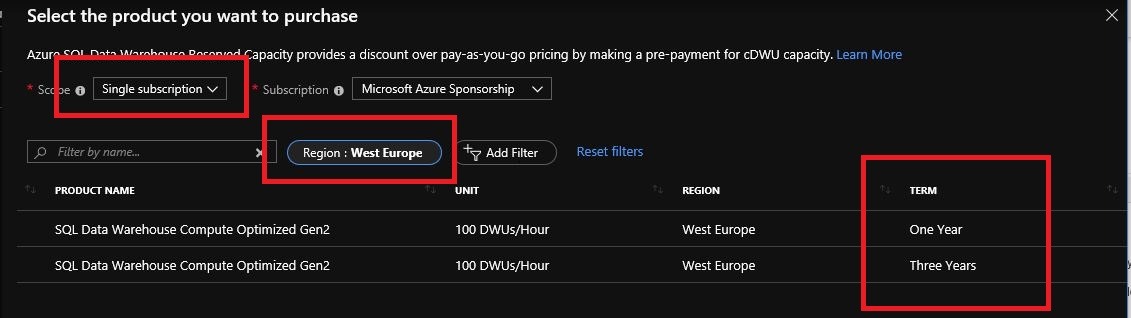
Select the Region, be aware that if you want to run Several SQLDW’s (Dev/Test/Prod) and you want to make use of the benefits of the reserved capacity that these SQLDW’s must all be created in the Region in which the reservation is made.

When you’re running a Enterprise Subscription and you have more then 1 Subscription you can change the Scope to  “Shared”. With this option selected you can use the Reserved Capacity across all subscription within the same EA Enrollment.

Reserved Capacity Azure SQLDW

Select 1 or 3 year Term.

Reserved Capacity Azure SQLDW

Choose a quantity. The reserved capacity is calculated by 100 cDWU(Data Warehouse units). Choose the quantity you want to reserved. In case you select 5 cDWU, you will have 500 cDWU of reserved capacity every hour.

Reserved Capacity Azure SQLDW


Reserved Capacity Azure SQLDW

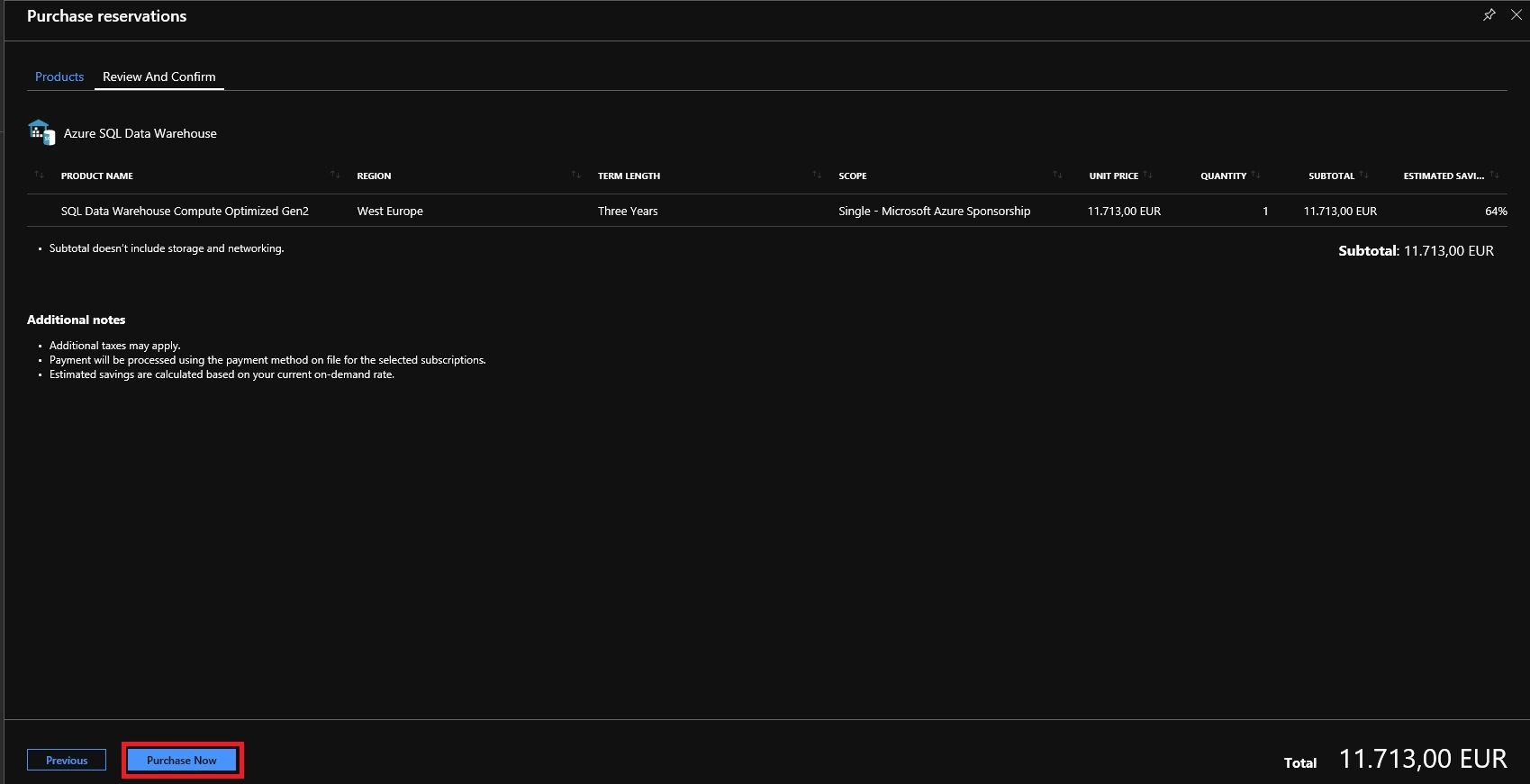
The last step is to Purchase your Reservation.

Reserved Capacity nice to know’s

Storage and Network are charged separately, for these Azure Services the Reserved Capacity Discount will not be applied.

The Reserved Capacity Discount is applied on running Azure SQLDW Instances on a hourly basis.

If you don’t have a Azure SQLDW Instance deployed for an hour, then the reserved capacity is wasted for that hour. It doesn’t carry over. Unless you have more then 1 Azure SQLDW Instance running, the reservation is automatically applied to other matching instances in that hour.

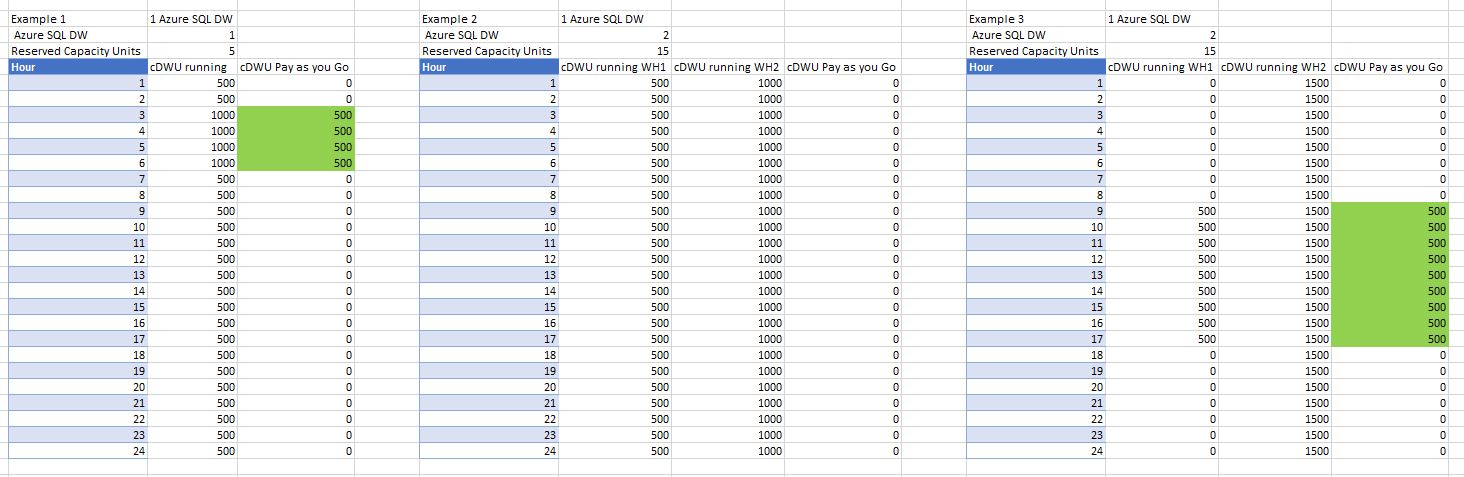
Some Examples:

1 – Running 1 Azure SQLDW Instance:

You have purchased 5 units of 100 cDWU.

On the moment you scale to 1000 cDWU, you will be charged with a Pay as You go rates for 700 cDWU.

2 – Running 2 Azure SQLDW Instances:

You have purchased 15 units of 100 cDWU.

1 Azure SQLDW Instance is running 500 cDWU and the other one 1000 cDWU.

No extra cost will be applied.

3 – Running 2 Azure SQLDW Instances:

You have purchased 15 units of 100 cDWU.

1 Azure SQLDW Instance is running 500 cDWU from 9 am to 5 pm  and the other one 1500 cDWU the whole day.

You will be charged for a Pay as You go rates for 500 cDWU from 9 am to 5 pm.

Reserved Capacity Azure SQLDW

Thank you for reading this article and hopefully it will make things clear to you.

Within a few days I will publish a new article in which I describe how much you could possibly save if you still want to scale up or down during certain periods of the day. If there are any questions left about this article, don’t hesitate to ask them to me.

UPDATE 6th May

Reserved Capacity versus Pas as You go

https://erwindekreuk.com/2019/05/azure-sql-data-warehouse-how-to-setup-reserved-capacity/