Calculate Workingdays including Holidays with T-SQL

by Dec 10, 2019

Calculate Workingdays between 2 Date columns

Recently I have been getting some questions from my customers, can I calculate the number of workdays between 2 dates? Of course my answer was, yes you can. But I do want certain closing dates and holidays of our company not to be included either. That became a little bit more difficult. Eventually I was able to solve this and would like to share that with you.
T-SQL

What do you need as a minimum.

A Date Dimension that includes the day of the week and a fact in which you want to calculate the number of workdays between 2 dates.
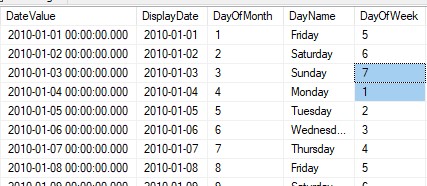
WeekendDay

First of all we need to create a table or view where we define our Holidays and Closing Days.

In my case I just created a simple view where I’ve defined my Holidays, there are more ways to achieve this functionality, but this works as well.
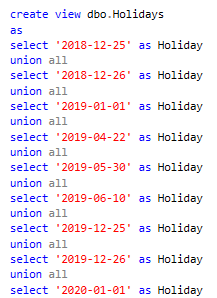
Holidays

After we’ve created our Holidays we need to create the the following Function:
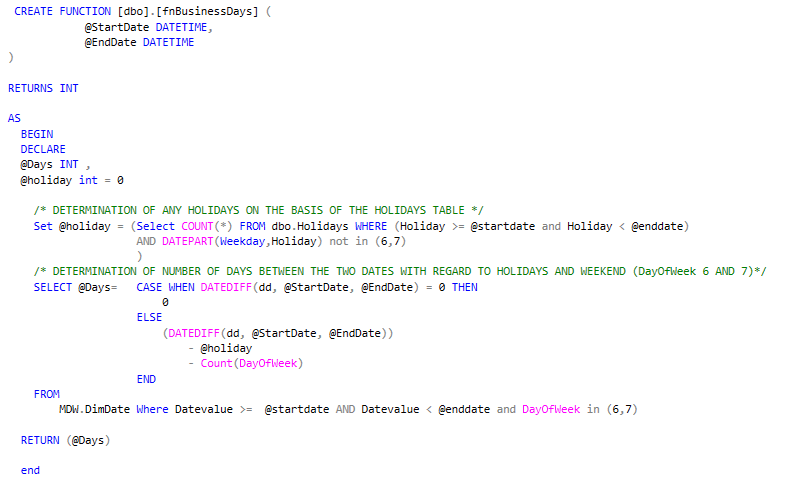
Businessdays

Finally include this function in your Query.

If we want to know how many workingdays there are between OrderDate 2019-05-29 and ExpectedDeliverydate 2019-06-18 we call the function dbo.fnBusinessday(OrderDate , ExpectedDeliverydate ), the result will be 12.

This is because we have defined 2019-05-30 and 2019-06-10 as Holidays and in between we have 3 weekends.
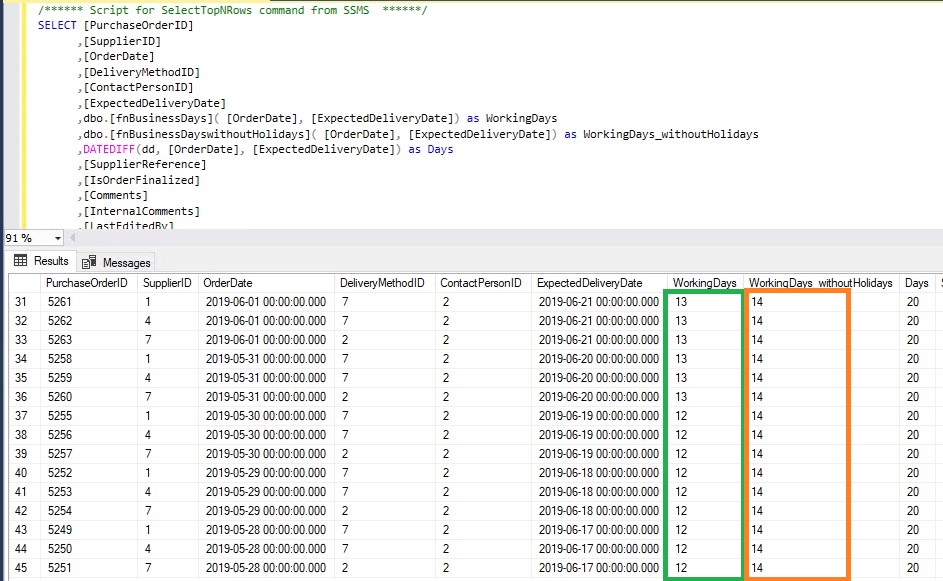
WorkingDays

If there are no holidays then only the weekend days are not included.
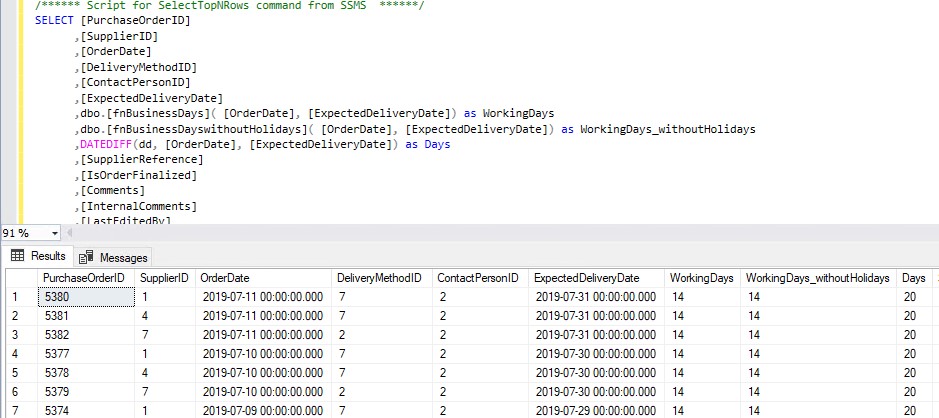
WorkingDaysNoHolidays

With the above method you can use the calculation dynamically every time.

If there are any questions, please leave them in the comments below.

The sample code can be found here.

Feel free to leave a comment

0 Comments

Leave a Reply

This site uses Akismet to reduce spam. Learn how your comment data is processed.

How to check your SQL Server Quota in Azure?

Azure Subscription Usages for SQL Server  Last week we reached our Logical server Quota in Azure. By default you're only allowed to add 20 Logical Servers, but we wanted to have some more for testing purposes.Microsoft Support You can submit a support ticket trough...

High Concurrency Notebook Activity in Microsoft Fabric

Microsoft Fabric is a cloud-based platform that provides integrated data engineering and data science solutions. One of the key features of Microsoft Fabric is the support for Apache Spark, a distributed computing framework that enables large-scale data processing and...

My Sessions at DataSaturdayNL 2019

DataSaturday NL 2019Date: 5 th October Location: Pathé Leidsche Rijn Data Saturday Holland is the new name for SQL Saturday Holland. A new start a new location and wow what a top location, Pathé Leidsche Rijn. A cinema with 7 screens and ranging from 180 to 668 seats....

Azure Synapse Analytics Code Repository has arrived

Azure Synapse Analytics Code repository‎I just opened my Azure Synapse Analytics Workspace and got a great surprise, the option Git Configuration is available as of today‎.    After a long wait, today the Git Configuration option became available in Azure Synapse...

Are you using Azure DevOps?

Azure DevOpsMore and more users are starting with Azure DevOps. Azure DevOps can be used for up to 5 users free of charge and is therefore a great start to start a project.    Build and Release I will not describe what Azure DevOps can do, because that is too much to...

How to use concurrency in Azure Synapse pipelines?

How to prevent concurrent pipeline execution?Concurrency This week I had a discussion with a colleague about how we can now make sure that a Pipeline does not start when it's already started. He then indicated, have you ever thought of the concurrency option?  I've...

Creating Notebook Connections in Microsoft Fabric Just Became a Lot Easier (and Automatable!)

For a long time, creating a Notebook connection in Microsoft Fabric was surprisingly limited. If you wanted a Notebook to run under a Workspace Identity or Service Principal, you only could configure this directly in the DataPipeline UI. In fact, the Connections pane...

Azure Purview March Updates

Azure Purview updatesAnnouncements Last week during SQLBITS, quite a few new updates were announced. I would like to include you in these announcements.March updates Support for SAP Business Warehouse (Preview) Blogpost:...

A new year with a new job

Changing jobsAfter almost 11 years and 4 months I have decided to leave Axians and to start a new adventure in the new year. On January 2, 2020 I will start my day as Lead Data and AI at InsparkThe past years have flown by. I started at Eniac BI, which was...

SQLBits session: Microsoft Purview Data Policy App

SQLBits 2023 Thanks everyone for visiting my session during SQLBits. It's great to see such a full room and that so many people have started using Microsoft Purview.  SLIDES The slides can be downloaded via the link below, so that you can view them again at...

Discover more from Erwin | Data & Intelligence

Subscribe to get the latest posts sent to your email.