My Virtual session at Data Toboggan

My Virtual session at Data Toboggan

An inaugural event specializing on Azure Synapse Analytics

Data Toboggan

This Saturday I've been speaking during Data Toboggan an inaugural event specializing on Azure Synapse Analytics. 12 Hours of sessions with amazing speakers.

Azure Purview

I presented a session about Azure Purview Microsoft's answer to Data Governance and Data Lineage

It was the first time ever that I presented this session in Public. I've been working on this session the last couple weeks. Presented several times to my colleagues. In any case, I was well prepared.
During the day I attended several sessions and all of them were of high quality.
My session started at 16:00 GMT and I explained in 45 minutes what Azure Purview can mean within a Data Estate. Personally, I was very satisfied with the presentation of my session.

A big applause for Mark, Richard and Victoria for the organization and of course for having me

 
Some useful links:


In case you have any questions left please feel free to ask them via the comment or Socials

Connect Azure Synapse Analytics with Azure Purview

Connect Azure Synapse Analytics with Azure Purview

Month: January 2021

How do you integrate Azure Purview in Azure Synapse Analytics?

This article explains how to integrate Azure Purview into your Azure Synapse workspace for data discovery and exploration. Follow the steps below to connect your Azure Purview account in your Azure Synapse Workspace.

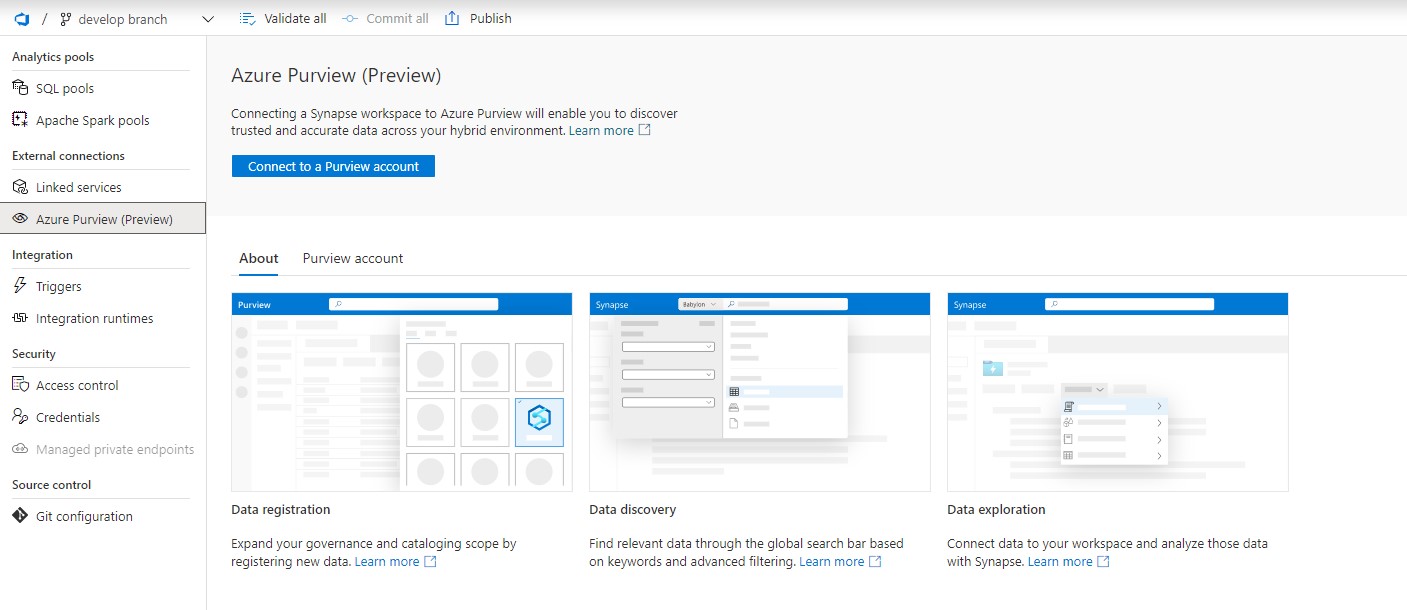
In the Management Hub you will see now a new option called Azure Purview.

Azure Purview Management HUb

Click on the option  “Connect to a Purview Account”. Please be aware that you need a Contributor role in your Azure Synapse workspace and access to your Azure Purview Account(Purview Reader or Purview Curator).

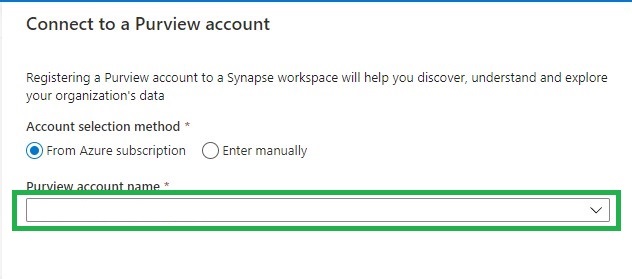
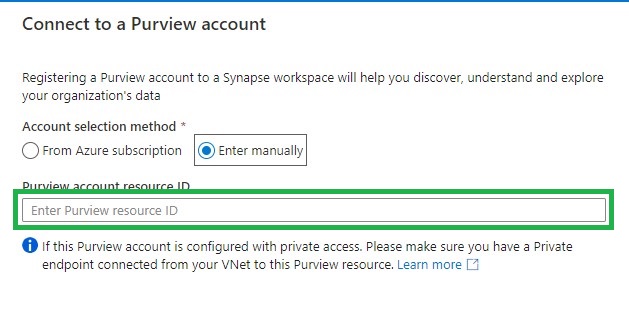
Find the Purview account you want to connect to from the drop down list or add it manually by adding the source ID.

Azure Puriew Connect Resource ID

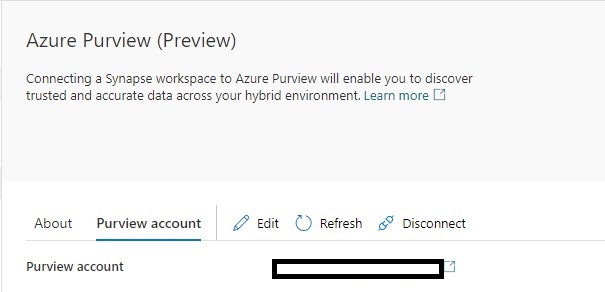
If the connection is successful, you will see the following screen. If not, make sure you have the correct role to connect to your Azure Purview account.

Azure Purview Connected


Data discovery:

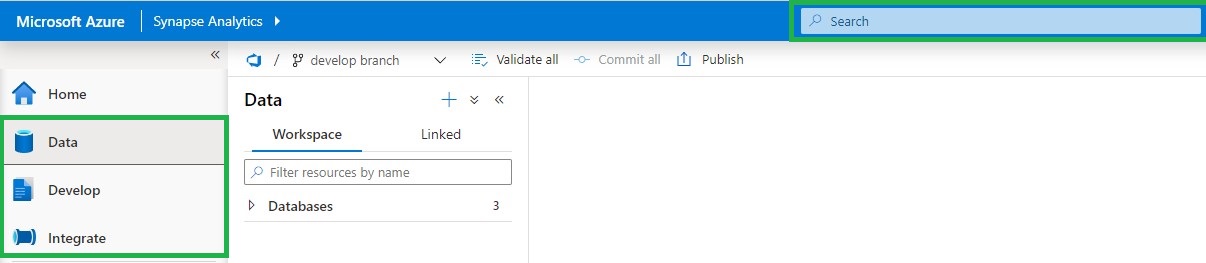
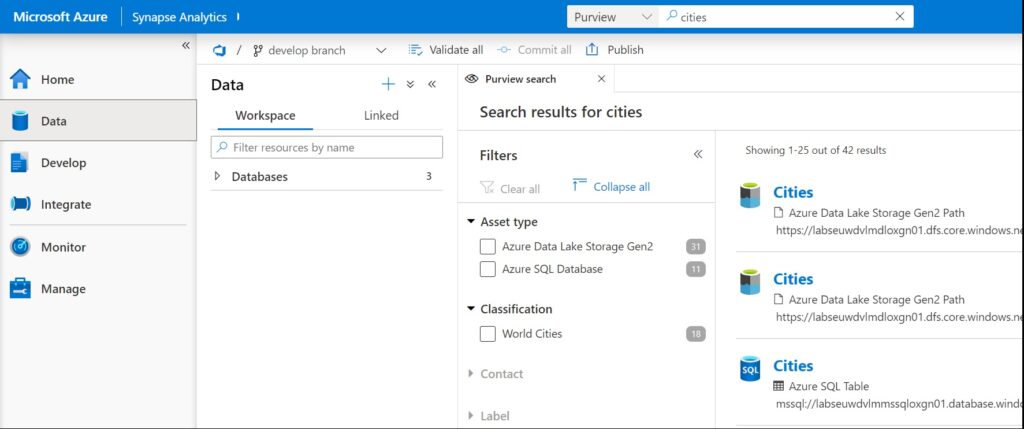
If you select your Data, Develop or Integrate HUB, you will see in the top center a Search bar.

Azure Purview Search

Using Azure Purview in Azure Synapse

To use Azure Purview in Azure Synapse it requires you to have access to the connected Azure Purview account. Azure Synapse will then passes-through the correct Azure Purview permissions.

Purview Reader role

  • Can read all content in Azure Purview

Purview Curator role

  • Can read all content in Azure Purview
  • Can edit assets, classification and glossary terms
  • Can apply classifications and glossary terms to assets.

Azure Purview actions

The following Azure Purview features are available in Azure Synapse Analytics(based on your role):

  • Overview of the metadata
  • View and edit schema of the metadata with classifications, glossary terms, data types, and descriptions
  • View lineage to understand dependencies and do impact analysis. For more information about, see lineage
  • View and edit Contacts to know who is an owner or expert over a dataset
  • Related to understand the hierarchical dependencies of a specific dataset. This experience is helpful to browse through data hierarchy.

Azure Purview Integration

Connect data to Azure Synapse

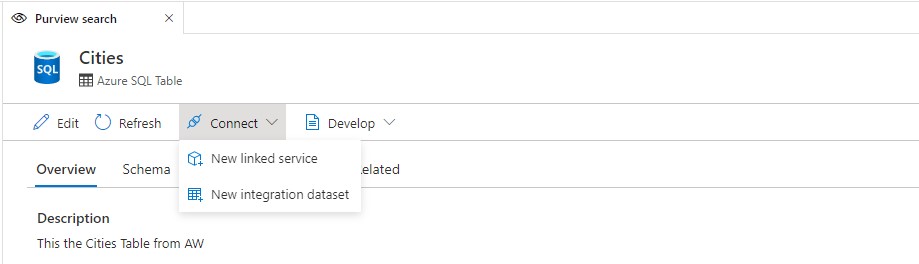
Add addition to above features, you can also connect directly to the assets you have searched.

Linked Service

  • Creating a new Linked Service will be required to copy data to Synapse or have them in your data hub (for supported data sources like ADLS Gen 2)

Integration Dataset

  • For objects like files, folders, or tables, you can directly create a new Integration Dataset and leverage an existing linked service if already created.

Develop in Azure Synapse

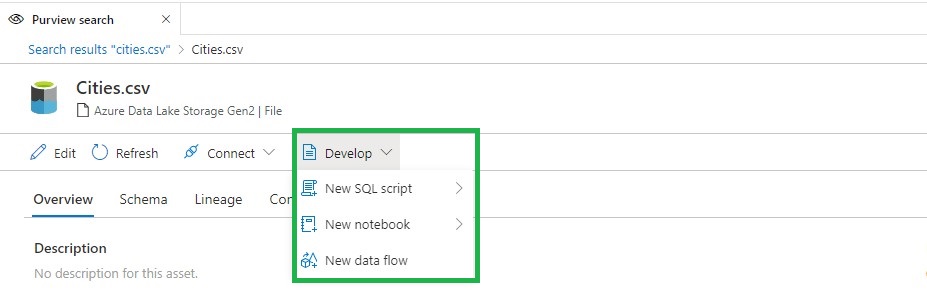
There are three actions that you can perform: New SQL Script, New Notebook, and New Data Flow.

SQL Script

  • View the top 100 rows in order to understand the shape of the data.
  • Create an external table from Synapse SQL database.
  • Load the data into a Synapse SQL database.

Notebook

  • Load data into a Spark DataFrame.
  • Create a Spark Table (if you do that over Parquet format, it also creates a serverless SQL pool table).

Data flow

  • Create an integration dataset that can be used as a source in a data flow pipeline.

Azure Purview Integration Develop

These new functionalities makes the integration between Azure Purview and Azure Synapse Analytics even more Powerful. More details can be found here.

Useful links

Create a Synapse workspace

Create an Azure Purview account

Thank you for reading, please feel free to ask questions and I’m more then happy to answer them.

Azure Purview Public Preview Starts billing

Azure Purview Public Preview Starts billing

Month: January 2021

by Erwin | Jan 18, 2021

Billing for Azure Purview(Public Preview)

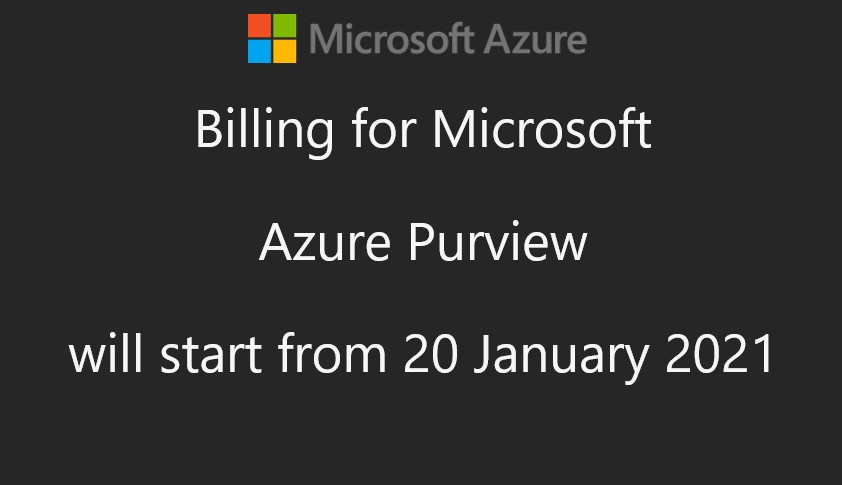
As of January 20th 2021 0:00 UTC Azure Purview will starts billing.

Preview

From January 20 ,2021 Azure Purview will start billing. During the Public Preview, you will only be billed if you exceed the 4 capacity units for Azure Data Map and 16 vCore hours for scanning. These 4 capacity units and vCore hours are free until February 28, 2021.
So keep an eye on this so that you will not be faced with surprises after February 28th. What the prices will look like after February 28 is not yet known.

Update on pricing as of 27 februari,2021 can be found here 

Below an overview

Azure Purview Data Map

  Price
Capacity Unit €0.289 per 1 Capacity Unit Hour
Provisioned API throughput. 1 capacity unit = 1 API/sec
Includes 4 capacity units for free until February 28, 2021*.
Metadata Storage Free


Scanning and Classification

  Price
Power BI online Free in preview
SQL Server on-prem Free in preview
Other data sources €0.532 per 1 vCore Hour
Includes 16 vCore-hours for Free every month until February 28, 2021**.

Please find below the updated detail for pricing, which has been updated on Azure Purview pricing page on 1st of February 2021

*The 4 free capacity units are only available for customers on the Pay-As-You-Go (MS-AZR-0003P), Microsoft Azure Enterprise (MS-AZR-0017P), Microsoft Azure Plan (MS-AZR-0017G), Azure in CSP (MS-AZR-0145P), and Enterprise Dev/Test (MS-AZR-0148P) offer types. Free quantities are applied at the enrollment level for enterprise customers. Free quantities are applied at the subscription level for pay-as-you-go customers.
**The 16 vCore-hours of free scanning are only available for customers on the Pay-As-You-Go (MS-AZR-0003P), Microsoft Azure Enterprise (MS-AZR-0017P), Microsoft Azure Plan (MS-AZR-0017G), Azure in CSP (MS-AZR-0145P), and Enterprise Dev/Test (MS-AZR-0148P) offer types. Free quantities are applied at the enrollment level for enterprise customers. Free quantities are applied at the subscription level for pay-as-you-go customers. Note: Azure Purview provisions a storage account and an Azure Event Hubs account as managed resources. This may incur separate charges that in most cases will not exceed 2% of charges for scanning. Refer to the Managed Resources section in the Azure portal within Azure Purview Resource JSON.

Note:

Be aware if you add a lot of Azure Data Sources and scan them every day, you will quickly reach the number of hours. Choose for weekly or manual scans will be my advice.

Azure Purview vCore overview

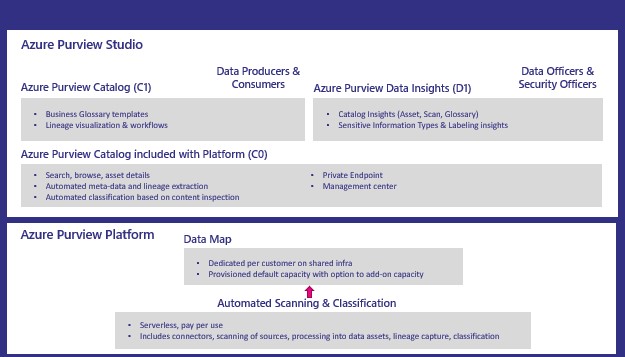
Azure Purview Data Catalog

  Price
C0 Included with the Data Map
Search and browse of data assets
C1 Free in preview
Business glossary, lineage visualization and catalog insights
D0 Free in preview
Sensitive data identification insights


Azure Purview Pricing Overview

More details on pricing Pricing - Azure Purview

Azure Purview Documentation  Documentation - Azure Purview

Azure Purview Q&A Q&A -Azure Purview


In case you have unanswered questions please do not hesitate to contact me.

Feel free to leave a comment

Goodbye 2020 Hello 2021

Goodbye 2020 Hello 2021

Month: January 2021

by Erwin | Jan 3, 2021

Goodbye 2020 

Started to work for InSpark

Last year was certainly an eventful year. Started with a new job at InSpark and after 10 weeks we all know what happened, the first intelligent lockdown. The Netherlands was partially locked, but our office was immediately closed. Fortunately, all our applications run in the cloud and we were able to switch easily. But building a team in these times is not easy. I am really very proud of all my colleagues in the Data and AI team and of course all my other colleagues  from InSpark, we made a great year together. 

Managed Oxygen

With Managed Oyxgen, our Data Platform as a Service, we've made such great improvements that I wouldn't have thought that it was possible at the beginning of this year. Really cool and compliments to ones who worked so hard on it. On top of our Managed Oxyen we have worked with the whole team on our Sparkhouse Data Accelerator, a Metadata Framework which we can use to automatically extract data from different sources, building history with Delta Lake and load data into an Azure SQL Database/Pool for further transformations of the data.

Cool and innovative projects

We worked closely with Microsoft NL and Corp, but also with our mother company KPN. We're now seeing the effect of this, we've done such great projects and we're on our way for 2021, Projects using the latest Azure Data Services, image and photo recognition, IOT, Azure Synapse Analytics and Power BI. And for the first quarter we will
In any case, enough to look forward to. We are still looking for reinforcements for our team, so if you want to be part of these super cool projects let me know for sure.
I'm happy with the step I made a year ago and can definitely recommend it to anyone.

And when I look at myself.

Blog

My intention was to write more blogs and articles this year, in the end this only succeeded partly. It turned out to be 24, which is an average of 2 per month. Sometimes I just lacked inspiration, hopefully this inspiration will come back in 2021.
My top post on my website still remains Azure Data Factory Naming Conventions . Nice to see that more and more people are implementing the right standards within their organization.

Certifications

This year I wanted to get my DP-200 and DP-201, it finally became AZ-900 and DP-200. It's been far too long since I've done a certification. Of all the questions everyone really knows the right answer, but still when you see it on a screen and you have to give the correct answer, it is secretly quite difficult.
In any case, the DP-201 is on my agenda this year.

Events

My last personal event this year was SQL Konferenz in Darmstadt, Germany, in early March. Wow, how I miss these personal events. In addition to exchanging knowledge, the personal contacts that you build with everyone, it is also very valuable. With the virtual events this is a lot more difficult.
I was quite proud to be selected for SQL Bits, it remains one of the biggest events in Europe. However, it was a disappointment that it ended up becoming virtual instead of physical. Obviously the correct decision of the organization. You had to record the session yourself beforehand. During the event itself it was broadcast and you had to moderate your own session. Very strange to do that, but in the end I was happy with the result. The platform they used was really good. Compliments to the organization and the volunteers who made it a success for a while.
In addition to SQL Bits, I have spoken on a number of Virtual SQL Saturdays, I only started speaking virtual at the end of the year, but finally there aren't that many. I didn't like virtual speaking in the first time, but eventually I started to like it anyway. Before 2021, I have registered for a number of DataSaturdays and will be speaking at the Scottish Summit. Nice things to look forward to.

Whatever a year looks like, the most important thing is that everyone is healthy and safe. I look forward to a great collaboration with everyone.


Feel free to leave a comment