Azure Synapse Pause and Resume SQL Pool
Pause or Resume your Dedicated SQL Pool in Azure Synapse Analytics
Azure Synapse Analytics went GA in beginning of December 2020, with Azure Synapse we can now also create a Dedicated SQL Pool(formerly Azure SQL DW). Please read this document to learn what a Dedicated SQL Pool is. This article describes how to Pause or Resume a SQL Pool within Azure Synapse Analytics. A SQL Pool(Former Azure SQL DW) linked to a SQL (Logical) Server has a slightly different approach.
A SQL Pool is a MPP Database (short for massively parallel processing) and has a different approach of loading data but also different kind of pricing. This are details for another Blogpost.

In this article, we are going to build a Synapse Pipeline which will call a REST API. The concept is based on an earlier post about Analysis Services: Use Global Parameters to Suspend and Resume your Analysis Services in ADF.
A SQL Pool can have different statuses:
- Pausing: SQL Pool is Pausing and we cannot change the status.
- Resuming: SQL Pool is Resuming, the SQL Pool starting and during this process and we cannot change the status.
- Scaling: SQL Pool is Scaling, the SQL Pool is scaling to a different compute level and during this process we cannot change the status.
- Paused: SQLPool is Paused, we can now change the status.
- Online: SQLPool is Online, we can now change the status.
To allow the Synapse workspace to call the REST API we need to give the Synapse workspace access to the SQL Pool. In the Access control (IAM) of the SQL Pool assign the contributor role to your Synapse Workspace.
Build Pipeline
Create a new Pipeline with the name PL_ACT_PAUSE_SQLPOOL
Add the following Parameters to the Pipeline:
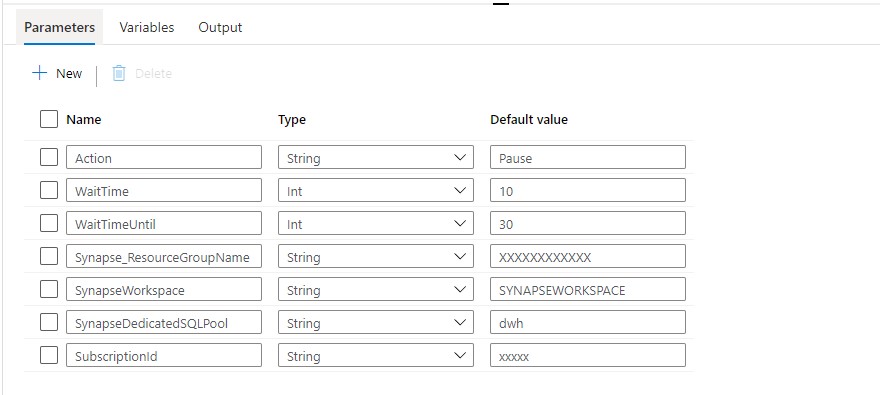
Above are the generic Parameters used within the Pipeline.
Action: PAUSE or RESUME
WaitTime: Wait time in seconds before the Pipeline will finish
WaitTimeUntil: Wait time in seconds for the retry process
Synapse_ResourceGroupName: Name of the ResourceGroup of the used Synapse Workspace
SynapseWorkspace: SynapseWorkspace
SynapseDedicatedSQLPool: Name of the dedicated SQL Pool
SubsriptionId: SubscriptionId of Synapse Workspace
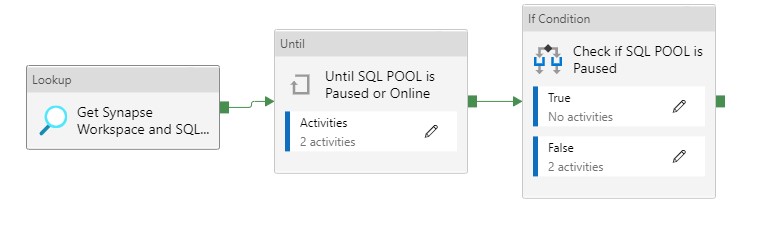
Until Activity
We can only change the status when the SQL Pool is Paused or Online That's why we need to add an Until activity to start the Pipeline. It executes a set of activities in a loop until the condition associated with the activity evaluates to true.
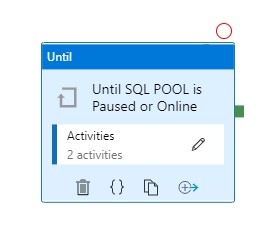
With this activity we can check the status of the SQL Pool and wait until it becomes Paused or Online. Let me explain how this works.
Web Activity
Within the Until Activity we need to create a new Web Activity. A Web Activity can be used to call a custom REST API endpoint from a Synapse Data pipeline.
Name = Check for changed SQLPool Status
URL= https://management.azure.com/subscriptions/XXX/resourceGroups/XXX/providers/Microsoft.Synapse/workspaces/XXX/sqlPools/XXX/?api-version=2019-06-01-preview
The <xxx> we need to replace with the Pipeline Parameters. The final Result will be:
https://management.azure.com/subscriptions/@{pipeline().parameters.SubscriptionID}/resourceGroups/@{pipeline().parameters.Synapse_ResourceGroupName}/providers/Microsoft.Synapse/workspaces/@{pipeline().parameters.SynapseWorkspace}/sqlPools/@{pipeline().parameters.SynapseDedicatedSQLPool}/?api-version=2019-06-01-preview
Method = GET
Resource =https://management.azure.com/
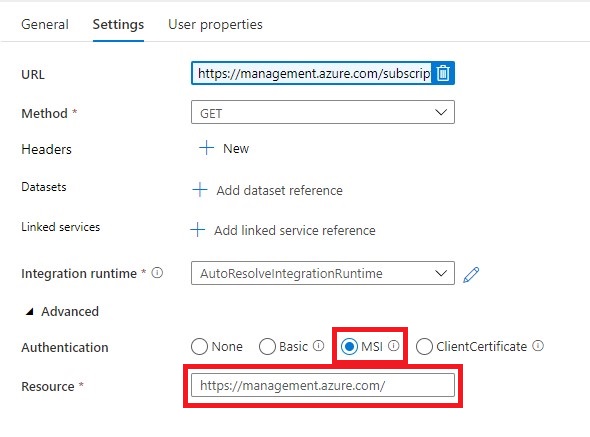
Once we have created the Web Activity, we can define the expression for the Until Activity.
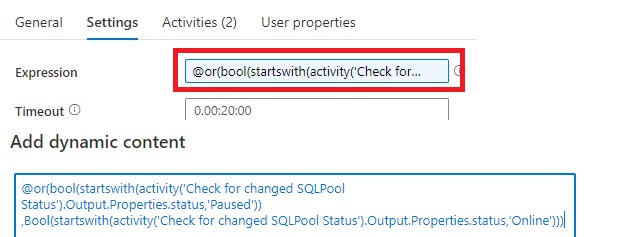
The Pipeline can only continue when the status is Paused or Online and not one of the other statuses. That's the reason we need to add these 2 two statuses to check for.
Expression: @or(bool(startswith(activity('Check for changed SQLPool Status').Output.Properties.status,'Paused')),Bool(startswith(activity('Check for changed SQLPool Status').Output.Properties.status,'Online')))
Time out: 0.00:20:00
The Until Activity will only continue, when the status from the above Web Activity output is Paused or Online, this can take a while and we don't want to execute the Web Activity every time. That’s why we add a Wait Activity.
Wait Activity
A Wait Activity waits for the specified period of time before continuing with execution of subsequent activities. Within the Wait Activity add an expression from above parameters for Wait time seconds.

After the Web Activity, Azure Synapse waits in this case 30 seconds to check if the status has changed before it will check again.
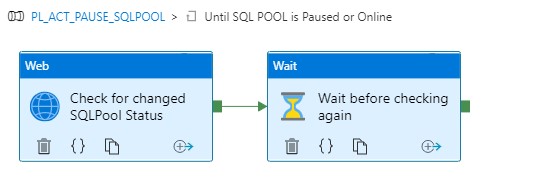
Check for the SQL Pool Status
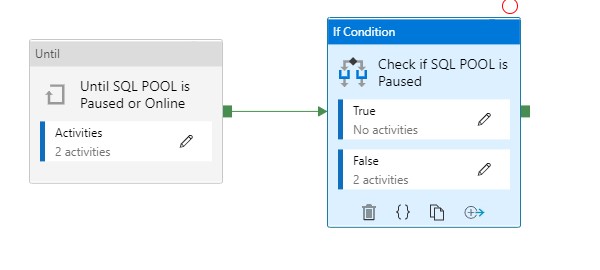
To check if the SQL Pool is paused, we’re adding an If Condition Activity (Name: Check if SQL POOL is Paused)
Add an Expression on the If Condition Activity @bool(startswith(activity('Check for changed SQLPool Status').Output.Properties.status,'Paused'))
This expression will check if the SQL Pool is Paused or not. In this situation we want to Pause our SQL Pool, to Pause the SQL Pool we need to add as Activity for pausing(see below) to False. In case the SQL Pool is already Paused we do nothing(True).
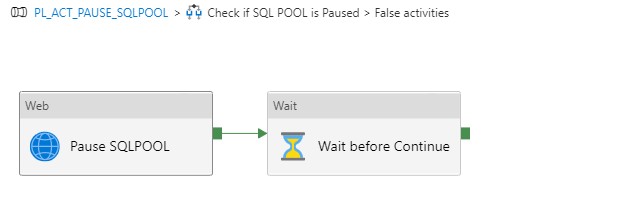
The following settings are set for the Web Activity:
URL: https://management.azure.com/subscriptions/XXX/resourceGroups/XXX/providers/Microsoft.Synapse/workspaces/XXX/sqlPools/XXX/{Action}?api-version=2019-06-01-preview
The <xxx> we need to replace with the Pipeline Parameters. The final Result will be:
https://management.azure.com/subscriptions/{pipeline().parameters.SubscriptionID}/resourceGroups/{pipeline().parameters.Synapse_ResourceGroupName}/providers/Microsoft.Synapse/workspaces/{pipeline().parameters.SynapseWorkspace}/sqlPools/{pipeline().parameters.SynapseDedicatedSQLPool}/@{pipeline().parameters.Action}?api-version=2019-06-01-preview
It is almost the same URL but we have to add the action option @{pipeline().parameters.Action}
Method = Post
Header = {"Nothing":"Nothing"}
Resource =https://management.azure.com/
Add a Wait Activity but this time with a different parameter @pipeline().parameters.WaitTime, the purpose of this activity is to wait a period before we start ingestion data(just to be sure the SQL Pool in online)
Create Pipeline to Resume your SQL Pool
Clone your PL_ACT_PAUSE_SQLPOOL and rename it to PL_ACT_RESUME_SQLPOOL. Change your action Parameter to "Online".
Within the IF Condition move the Web Activity Pause SQL Pool and the Wait Activity from False to True and rename to Resume SQL Pool.
You have now learned how to Pause and Resume your SQL Pool Dynamically with the use of Parameters. Both Pipelines can be easily transferred to different customers.
Please feel free to download the Pipeline code here
MetaData
If you're already using a database where you store your Meta Data, then you have also the possibility to store the necessary parameters in the database. The only thing you need to do is adding a Lookup Activity to get the parameters from your database(and replace the parameters with the output from the lookup activity)
A SQL Pool(Former SQL DW)
A SQL Pool(Former SQL DW) linked to a SQL (Logical) Server has a slightly different approach, use the settings below to create a Pipeline to Pause or Resume.
Action: PAUSE or RESUME
WaitTime: Wait time in seconds before the Pipeline will finish
WaitTimeUntil: Wait time in seconds for the retry process
SQLServer_ResourceGroupName: Name of the ResourceGroup of the used SQL(Logical) Server
SQLServer: SQL(Logical) Server name
SQLServerDedicatedSQLPool: Name of the dedicated SQL Pool
SubsriptionId: SubscriptionId of Synapse Workspace
Pause: https://management.azure.com/subscriptions/XXX/resourceGroups/XXX/providers/Microsoft.Sql/servers/XXX/databases/XXX/Pause?api-version=2020-08-01-preview
Resume: https://management.azure.com/subscriptions/XXX/resourceGroups/XXX/providers/Microsoft.Sql/servers/XXX/databases/XXX/Resume?api-version=2020-08-01-preview
Status: https://management.azure.com/subscriptions/XXX/resourceGroups/XXX/providers/Microsoft.Sql/servers/XXX/databases/XXX/?api-version=2020-08-01-preview
To allow the Synapse workspace to call the REST API we need to give the Synapse workspace access to the SQL(Logical) Server. In the Access control (IAM) of the SQL(Logical) Server assign the SQL DB Contributor role to your Synapse Workspace.
Hopefully this article has helped you a step further. As always, if you have any questions, leave them in the comments.