Microsoft (Azure) Purview Pricing example

Microsoft (Azure) Purview Pricing example

Azure Purview pricing?

Azure Purview is now Microsoft Purview as off April 2022

An updated post can be found here Updated Microsoft Purview Pricing and Applications


Note: Billing for Azure Purview will commence November 1, 2021.

Updated October 31st, 2021

Pricing for Elastic Data Map and Scanning for Other Sources are changed and updated in the blog below.

Since my last post on Azure Purview announcements and new functionalities  I got some questions regarding pricing. In the meantime the pricing page has been updated and I’ve created also a new Azure Purview instance in my subscription(after August 18th). Currently most of the Azure Purview components are still free until further Notice. To get more details I still recommend everyone to watch the Azure Purview event from September 28th 2021, https://azuredatagovernance.eventcore.com/

Updated September 29th, 2021

Yesterday Microsoft announced the General Availability of Azure Purview, more on the announcement can be found in the blog from Rohan Kumar

Since September 28, 2021, the price of Azure Purview has been adjusted. The main change is that the use of the Elastic Data Map will remain free until November 1, 2021. To encourage trial of the Elastic Data Map, we are providing all customers free usage of Data Map from August 16, 2021 to October 31, 2021. I’ve updated the pricing details below.

As a small recap:

Azure Purview Elastic Data Map

  Price
Capacity Unit €0.353 per 1 Capacity Unit Hour

Billing for Data Map capacity unit consumption will commence November 1, 2021.

When you have created your Azure Purview after Augusts 18th, you will see that you are currently not charged for the Data Map Units.
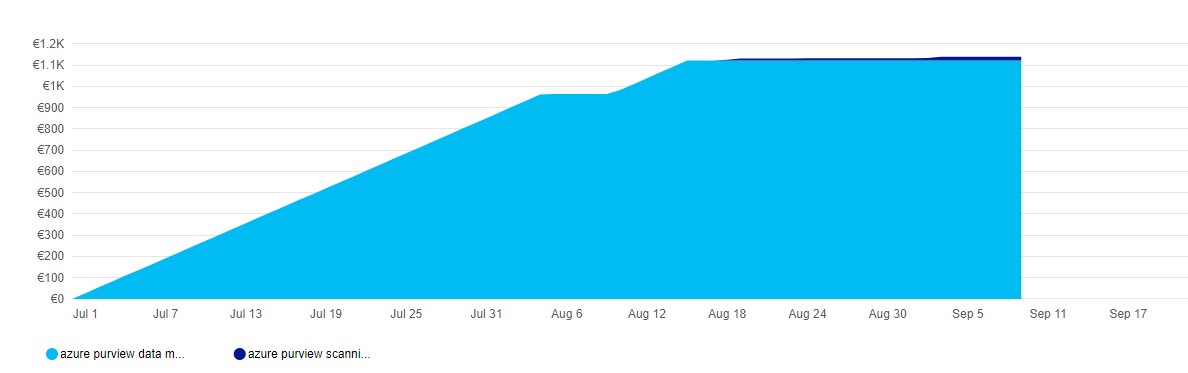
Azure_purview_pricing_datamap

As you can see, no charging anymore for Data Map, I’m only charged for my scanning, which I only do manually do save some costs.
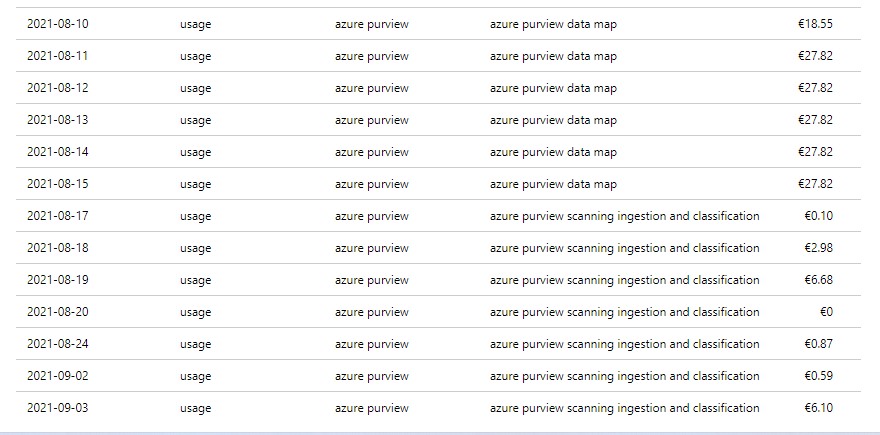
Azure_purview_pricing_details

Automated Scanning & Classification

  Price
For Power BI online Free for a limited time
For SQL Server on-prem Free for a limited time
For other data sources €0.540 per 1 vCore Hour


Other features

  Price
Resource Set €0.18 per 1 vCore Hour

Billing for scanning duration will commence November 1, 2021.

Pricing Example

Based on the example which is published on the pricing page, I’ve done a Calculation:

Example Scenario:
Data Map can scale capacity elastically based on the request load. Request load is measured in terms of data map operations per second. As a cost control measure, a Data Map is configured by default to elastically scale up to a peak of 8 times the steady state capacity.

For dev/trial usage:

Data Map (Always on): 1 capacity unit x Price per capacity unit per hour x 730 hours per month

Scanning (Pay as you go): Total duration (in minutes) of all scans in a month / 60 min per hour x 32 vCore per scan x €0.540 per vCore per hour

Resource Set: Total duration (in hours) of processing resource set data assets in a month * Price per vCore per hour

The total cost per month for Azure Purview = cost of Data Map + cost of Scanning + cost of Resource Set

Assuming above Scenario that we only use 1 Capacity Unit and use not more then 2 GB of Metadata storage and we scan our data once a week for 2 hours.

Data Map 1 CPU x €0.353 X 730 hours = €257,69

Scanning 4 scans x 2 hours x 32 VCore x €0.540 per vCore per hour = €138,24

Resource Set 4 scans x 1 hour x €0.18 per vCore per hour €0,72

In Total €396,65including 4 scans. If you leave Azure Purview as is and no scanning you base fee will be €257,69.

Like always, in case you have questions, leave them in the comments or send me a message.

Useful links


My Virtual Session DataSaturday #14 Oslo

My Virtual Session DataSaturday #14 Oslo

DATA SATURDAY #14 OSLO

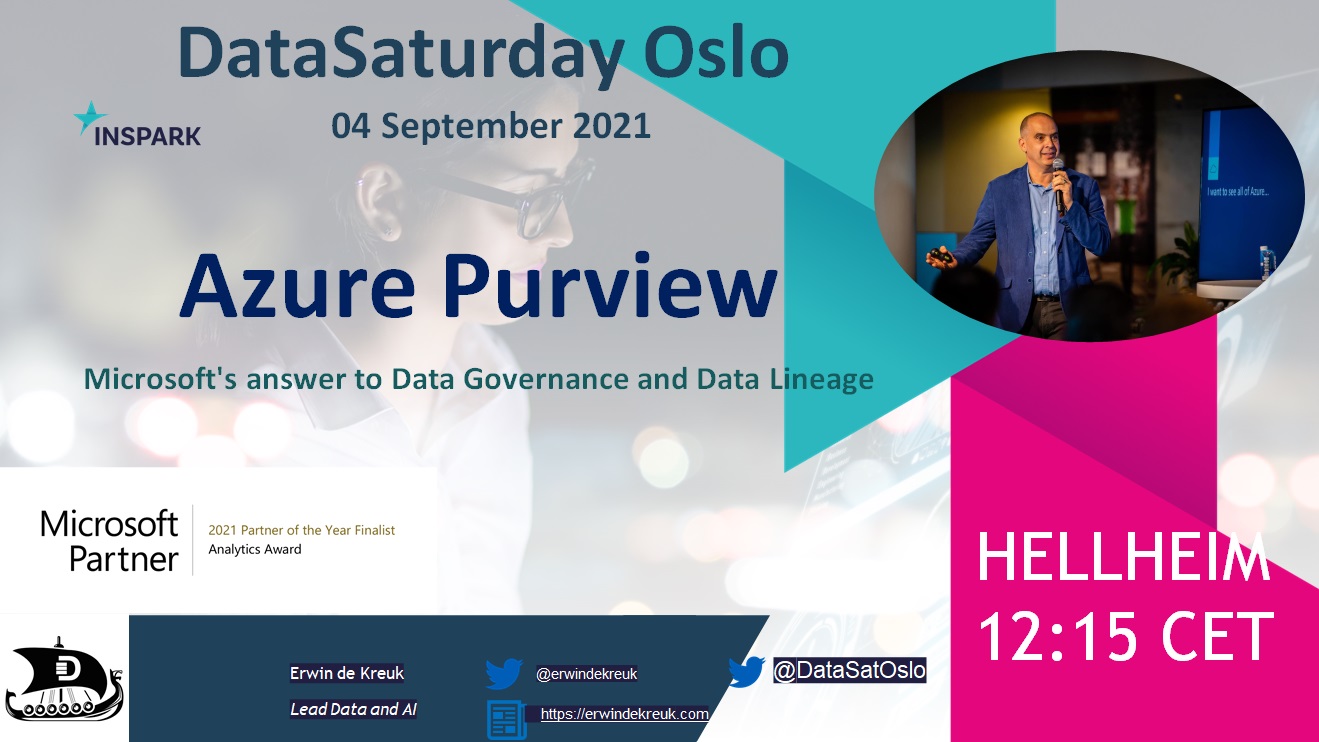
This Saturday I've been speaking during DataSaturday #4 Oslo. If you want to visit more Datasaturday events please visit the Data Saturdays event page.

Azure Purview

I presented a session on Azure Purview Microsoft's answer to Data Governance and Data Lineage

You can find my slides below on Slideshare:

Some useful links:


More clarity about pricing and when Azure Purview goes to GA is likely to become clear during the event on September 28. You can register for this event via the link below.

EVENT=>Achieve unified data governance with Azure Purview


Purview_Event


As always, in case you have any questions, please feel free to contact me.


In case you have any questions left please feel free to ask them via the comment or Socials

Azure Purview announcements and new functionalities

Azure Purview announcements and new functionalities

This week the Azure Purview Product team added some new functionalities, new connectors(these connectors where added during my holiday), Azure Synapse Data Lineage, a better Power BI integration and the introduction of Elastics Data Map. Slowly we are on our way to a GA status, on September 2021, 28th there will be a Digital Event. Please find below some of announcements in detail.

New connectors in Azure Purview

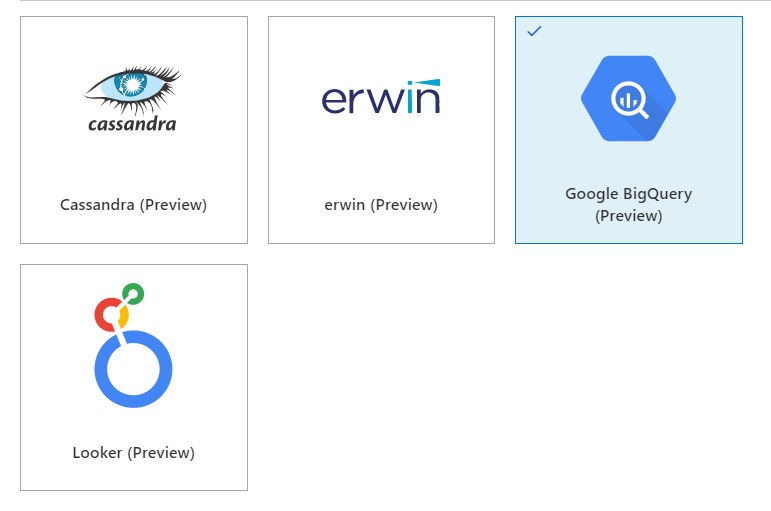
Over the past period, the Azure Purview team has worked hard, they have already added the necessary new connectors such as ERWIN, Looker, Cassandra and Google Big Query.Purview_NewSources

This week it was time for some new functionalities.

Azure Synapse Analytics Data Lineage:

This functionality currently only works for a copy activity, but the first step has been made. Where for Lineage from Azure Data Factory you still had to make a link in Azure Purview, for the Lineage from Azure Synapse, it is the other way around. You create the link to Azure Purview in Azure Synapse. How to create this link I described this a couple of months ago in one of my post and can be found here.

Some known limitations on copy activity lineage based on the docs.

Currently, if you use the following copy activity features, the lineage is not yet supported:

  • Copy data into Azure Data Lake Storage Gen1 using Binary format.
  • Copy data into Azure Synapse Analytics using PolyBase or COPY statement.
  • Compression setting for Binary, delimited text, Excel, JSON, and XML files.
  • Source partition options for Azure SQL Database, Azure SQL Managed Instance, Azure Synapse Analytics, SQL Server, and SAP Table.
  • Source partition discovery option for file-based stores.
  • Copy data to file-based sink with setting of max rows per file.
  • Add additional columns during copy.

In additional to lineage, the data asset schema (shown in Asset -> Schema tab) is reported for the following connectors:

  • CSV and Parquet files on Azure Blob, Azure File Storage, ADLS Gen1, ADLS Gen2, and Amazon S3
  • Azure Data Explorer, Azure SQL Database, Azure SQL Managed Instance, Azure Synapse Analytics, SQL Server, Teradata

Power BI

Power BI supports now  automated discovery of columns, measures and  datatypes of  the Power BI.

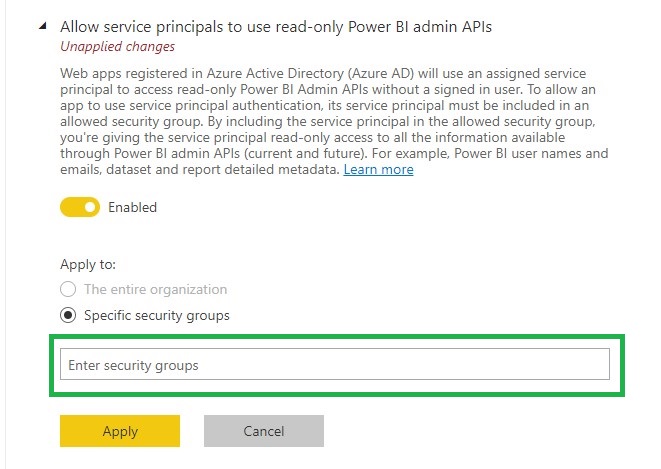
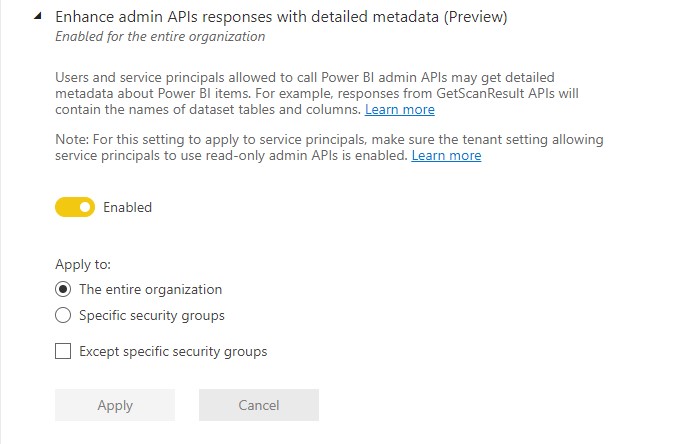
To enable this functionality you much enable the following settings in the Power BI tenant setting page(be aware that you need to be a Power BI Admin)

Allow service principals to use read-only Power BI admin APIs.

To use this setting create a Security group or use an existing one and add your Purview account to this SG.

Purview_PowerBI_API
Enhance admin APIs responses with detailed metadata
Purview_PowerBI_Metadata

Elastic data map in Azure Purview

All Purview account created after August 2021, 18th are now created with the new Elastic data map concept. With this new concept your Purview account will come by default  with one capacity unit and elastically grow based on usage. Each Data Map capacity unit includes a throughput of 25 operations/sec and 2 GB of metadata storage limit. So now when you’re not using Purview you’re not paying the default value of 4 capacity units.

Purview_Account

The Data Map is billed on an hourly basis. You are billed for the maximum Data Map capacity unit needed within the hour. At times, you may need more operations/second within the hour, and this will increase the number of capacity units needed within that hour. At other times, your operations/second usage may be low, but you may still need a large volume of metadata storage. The metadata storage is what determines how many capacity units you need within the hour. Please read the documentation for a more detailed explanation and some examples

All existing Azure Purview accounts will be migrated in September/October to the Elastics data map concept.

The big question that remains open is what exactly does this Capacity Unit cost? For the time being during the Preview, it is still free, which can be read from the updated  price page of Azure Purview..

More clarity about pricing and when Azure Purview goes to GA is likely to become clear during the event on September 28. You can register for this event via the link below.

EVENT=>Achieve unified data governance with Azure Purview


Purview_Event


As always, in case you have any questions, please feel free to contact me.

Azure Purview MSIgnite Spring 2021 Announcements

Azure Purview MSIgnite Spring 2021 Announcements

Data Discovery

by Erwin | Mar 3, 2021

Azure Purview Ignite 2021 Annoucement

Pricing

This week the Azure Purview announced that they will extend the Azure Purview offer to provision 4 Capacity Units of the Data Map for free till May 31, 2021! Charging will start on June 1, 2021. Great news for customer who start exploring Azure Purview

More detail on Azure Purview pricing can be found here

New Sources

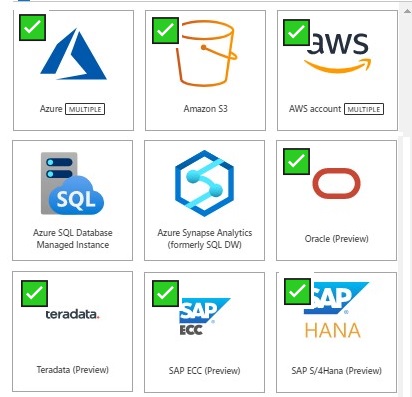
As you see above a lot of new Sources to scan have been announced and there will be more sources coming in the next months.

  • AWS Simple Storage Service (S3) data
  • SAP S/4 HANA
  • SAP ECC
  • Teradata
  • Oracle

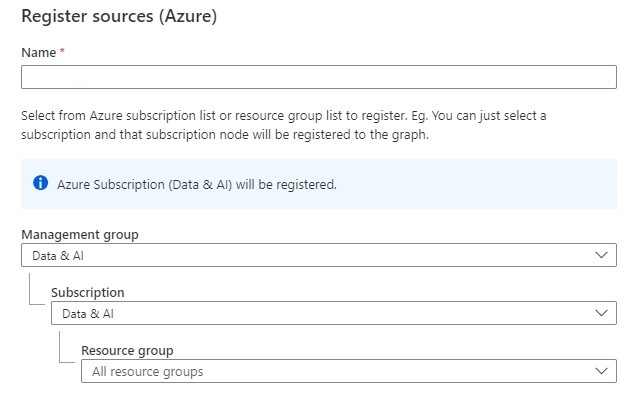
And last but least, Azure Multiple. With Azure Multiple you can now govern multiple Azure sources within Azure Purview by registering an entire Azure subscription or a resource group.

Azure Multiple

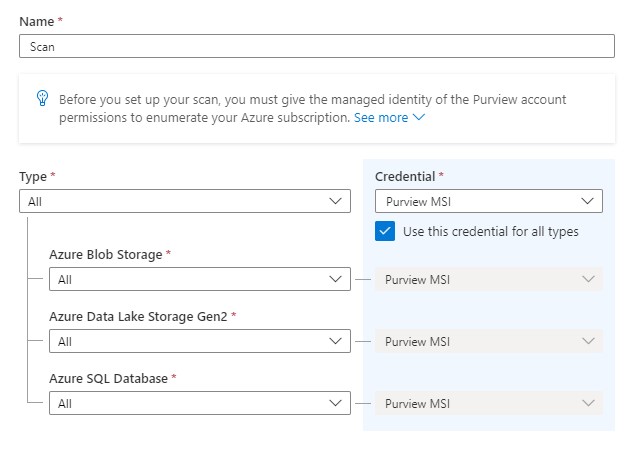
And you setup scan and triggers to the discover assets within your subscription.

Azure Multiple scan

More detail on how to setup Azure Multipe How to scan Azure multiple sources. 

Also for Azure Multiple more resource types are coming in the upcoming weeks

Private Endpoint

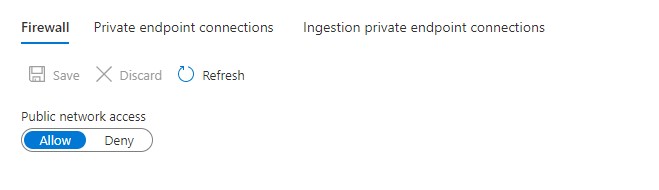
You can now set up scans on your on-premises and Azure data sources with ingestion private endpoints and a self—hosted integration runtime to ensure network isolation, and metadata traversing only via private networks end-to-end and block all access to your Purview instance from public internet.

Azure Purview Endpoint

More details on pricing Pricing - Azure Purview

Azure Purview Documentation  Documentation - Azure Purview

Azure Purview Q&A Q&A -Azure Purview


In case you have unanswered questions please do not hesitate to contact me.

Feel free to leave a comment

Connect Azure Synapse Analytics with Azure Purview

Connect Azure Synapse Analytics with Azure Purview

Data Discovery

How do you integrate Azure Purview in Azure Synapse Analytics?

This article explains how to integrate Azure Purview into your Azure Synapse workspace for data discovery and exploration. Follow the steps below to connect your Azure Purview account in your Azure Synapse Workspace.

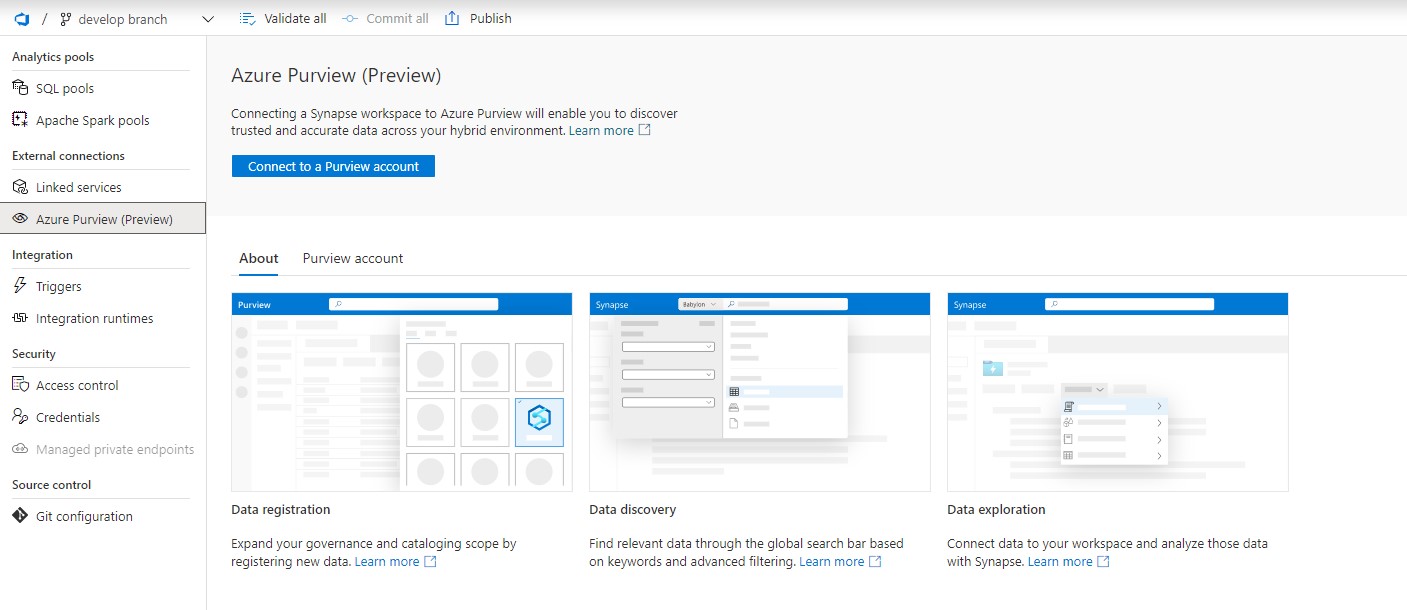
In the Management Hub you will see now a new option called Azure Purview.

Azure Purview Management HUb

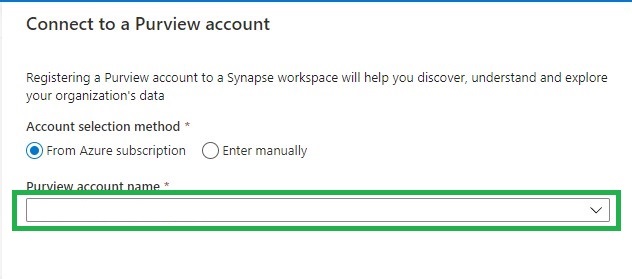
Click on the option  “Connect to a Purview Account”. Please be aware that you need a Contributor role in your Azure Synapse workspace and access to your Azure Purview Account(Purview Reader or Purview Curator).

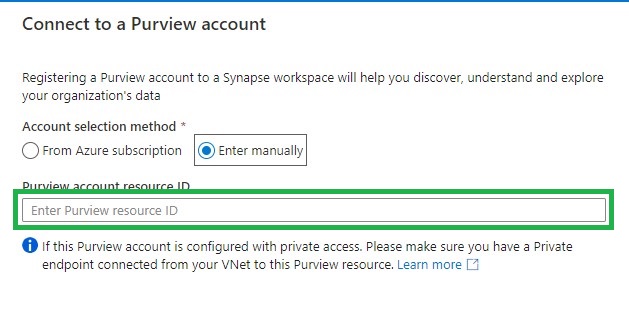
Find the Purview account you want to connect to from the drop down list or add it manually by adding the source ID.

Azure Puriew Connect Resource ID

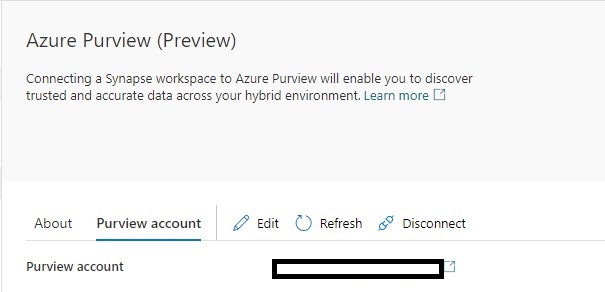
If the connection is successful, you will see the following screen. If not, make sure you have the correct role to connect to your Azure Purview account.

Azure Purview Connected


Data discovery:

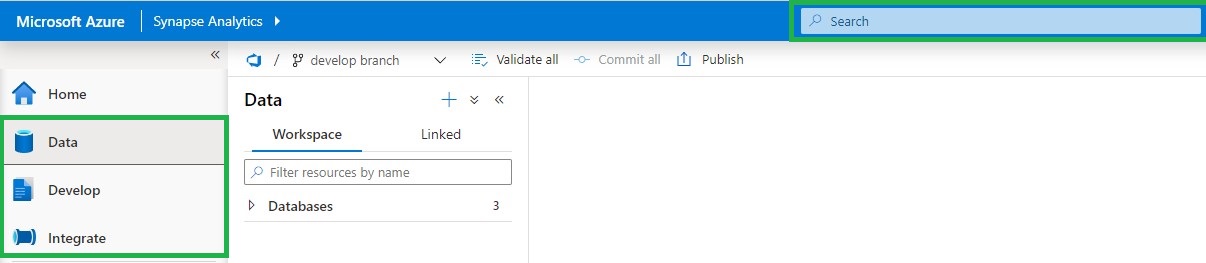
If you select your Data, Develop or Integrate HUB, you will see in the top center a Search bar.

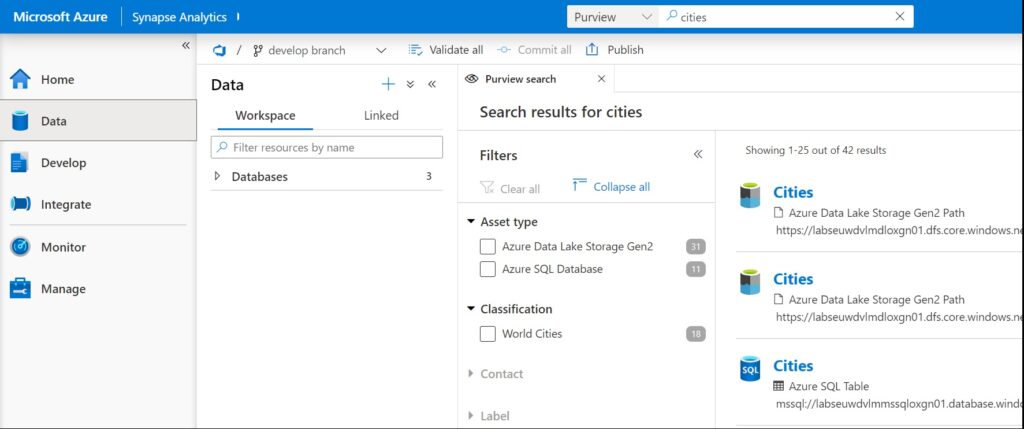
Azure Purview Search

Using Azure Purview in Azure Synapse

To use Azure Purview in Azure Synapse it requires you to have access to the connected Azure Purview account. Azure Synapse will then passes-through the correct Azure Purview permissions.

Purview Reader role

  • Can read all content in Azure Purview

Purview Curator role

  • Can read all content in Azure Purview
  • Can edit assets, classification and glossary terms
  • Can apply classifications and glossary terms to assets.

Azure Purview actions

The following Azure Purview features are available in Azure Synapse Analytics(based on your role):

  • Overview of the metadata
  • View and edit schema of the metadata with classifications, glossary terms, data types, and descriptions
  • View lineage to understand dependencies and do impact analysis. For more information about, see lineage
  • View and edit Contacts to know who is an owner or expert over a dataset
  • Related to understand the hierarchical dependencies of a specific dataset. This experience is helpful to browse through data hierarchy.

Azure Purview Integration

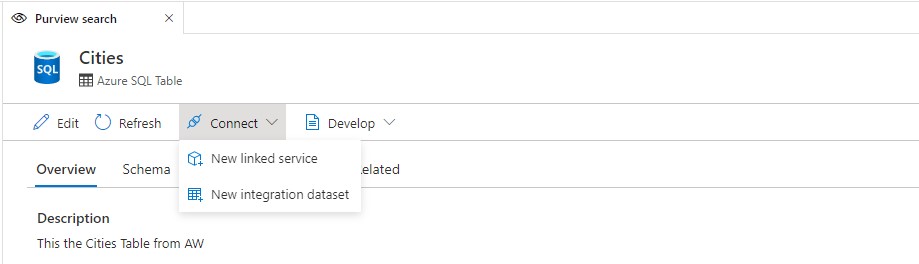
Connect data to Azure Synapse

Add addition to above features, you can also connect directly to the assets you have searched.

Linked Service

  • Creating a new Linked Service will be required to copy data to Synapse or have them in your data hub (for supported data sources like ADLS Gen 2)

Integration Dataset

  • For objects like files, folders, or tables, you can directly create a new Integration Dataset and leverage an existing linked service if already created.

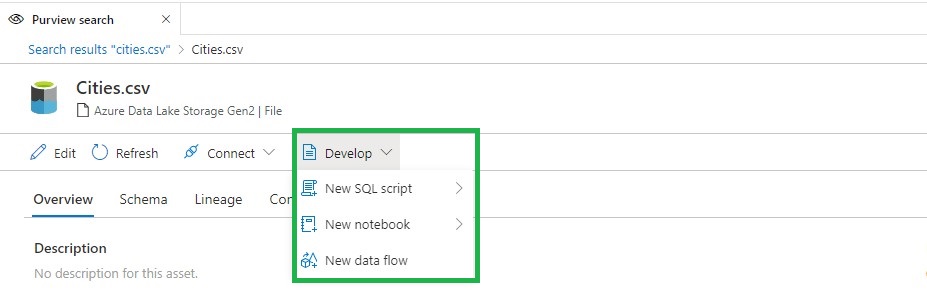
Develop in Azure Synapse

There are three actions that you can perform: New SQL Script, New Notebook, and New Data Flow.

SQL Script

  • View the top 100 rows in order to understand the shape of the data.
  • Create an external table from Synapse SQL database.
  • Load the data into a Synapse SQL database.

Notebook

  • Load data into a Spark DataFrame.
  • Create a Spark Table (if you do that over Parquet format, it also creates a serverless SQL pool table).

Data flow

  • Create an integration dataset that can be used as a source in a data flow pipeline.

Azure Purview Integration Develop

These new functionalities makes the integration between Azure Purview and Azure Synapse Analytics even more Powerful. More details can be found here.

Useful links

Create a Synapse workspace

Create an Azure Purview account

Thank you for reading, please feel free to ask questions and I’m more then happy to answer them.