How Microsoft Purview and Microsoft Fabric work together to empower data discovery and governance
Microsoft Purview is a unified data governance service that helps you manage and govern your on-premises, multi-cloud, and software as a service (SaaS) data. Microsoft Fabric is a new cloud-based data platform that enables you to create, share, and collaborate on data-driven insights with your team. Together, Microsoft Purview and Microsoft Fabric offer a seamless integration that allows you to browse and search Fabric items, access metadata from Fabric items, and apply data policies and classifications to Fabric items.
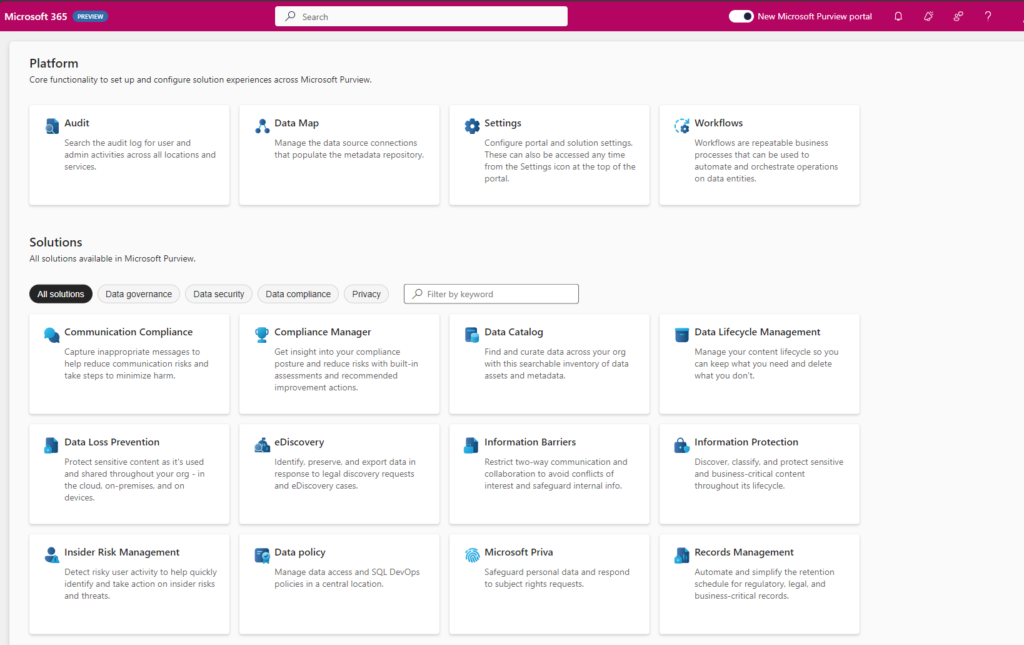
New Portal Experience
A few months ago, Microsoft announced the new portal Experience in Microsoft Purview as it offers a range of exciting new features and capabilities. Data Governance, Risk and Compliance are increasingly integrating into a unified experience. Microsoft Fabric will have a native integration with Microsoft Purview.
Browse and search Fabric items
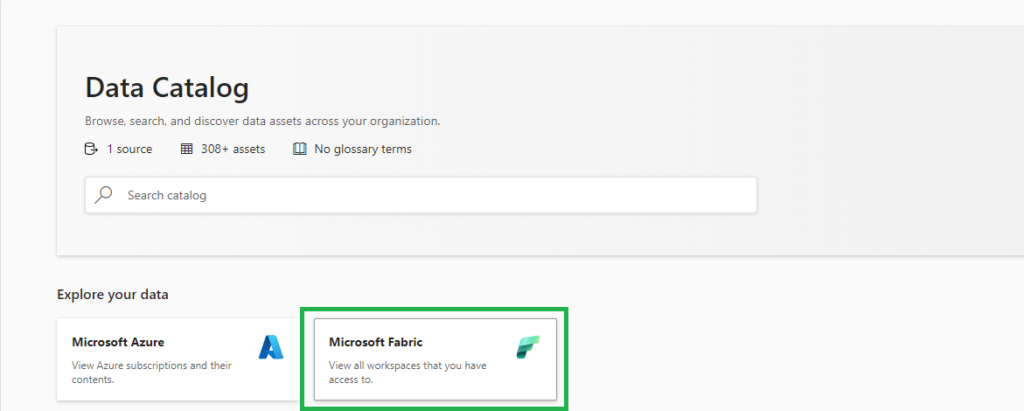
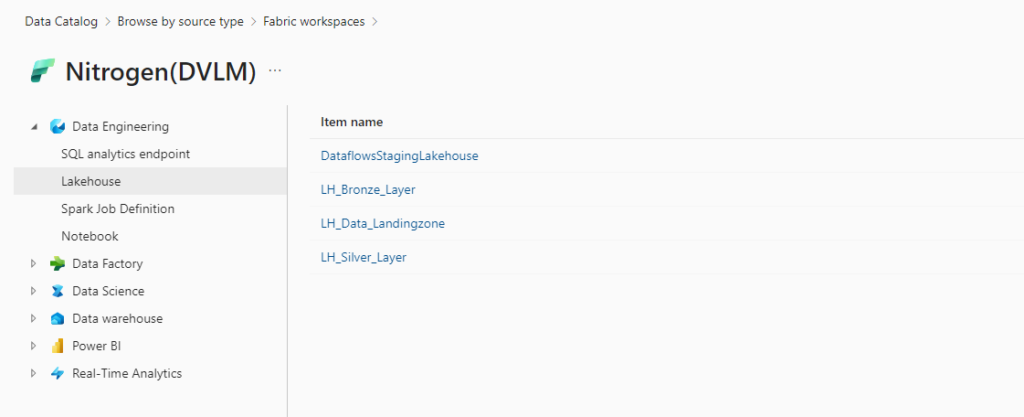
Just like Microsoft Azure, Microsoft Fabric is a new source for Microsoft Purview. Since Microsoft Purview is attached to every Fabric instance by default, you can click on the tile “Microsoft Fabric” on the front page of Microsoft Purview Data Catalog to start browsing your Fabric items. Automatically, any user can see the workspaces and Fabric items based on the permission setting they have in Fabric. You can also use the search bar to find Fabric items by keywords, filters, or facets.
Access metadata from Fabric items
In the coming weeks, Microsoft Purview Enterprise customers can provide broader access to metadata from Fabric items by scanning Fabric. When a Fabric is scanned, Microsoft Purview writes information about Fabric items to the Purview data map, and access to that metadata is governed by Microsoft Purview access control. This allows administrators to give users metadata access for data discovery or governance, without requiring those users to have read permissions on the underlying data sources.
Live view in Microsoft Purview
Resources in live view in the Microsoft Purview Data Catalog automatically have this metadata available:
Name
Properties
Schema
Lineage
Creating a new workspace in Fabric will automatically appear in Microsoft Purview.
Available resources
The following Fabric items will be available in Microsoft Purview as part of this public preview release.
Experiences
Fabric items
Real-Time Analytics
KQL Database
KQL Queryset
Data Science
Experiment
ML Model
Data Factory
Data pipeline
Dataflow Gen2
Data Engineering
Lakehouse
Notebook
Spark Job Definition
SQL analytics endpoint
Data Warehouse
Warehouse
Power BI
Dashboard
Dataflow
Datamart
Dataset
Report
Paginated report*
* Only available by scanning
Conclusion
Microsoft Purview and Microsoft Fabric are two powerful services that work together to empower data discovery and governance. By integrating Microsoft Purview and Microsoft Fabric, you can leverage the benefits of both services, such as:
Browse and search Fabric items in the Microsoft Purview Data Catalog
Access metadata from Fabric items without requiring data access permissions
If you want to learn more about Microsoft Purview and Microsoft Fabric, you can visit the following links:
Get ready for the next enhancement in Microsoft Purview
Get ready for the next enhancement in Microsoft Purview, as it brings a range of exciting new features and capabilities. To ensure the best experience with Purview, it is recommended that you tag your existing Microsoft Purview accounts appropriately.
Mark your Purview accounts with the proper tags
In short, mark each Purview account with the following tags: Name: "Purview Environment," Value: "Production."
In the long story, you have several tag options available to you. The table below outlines the different tags and their purposes:
In all purposes the tag name is "Purview Environment"
Production - This tag signifies that the account is or will be used for cataloging and governance requirements in a production environment. It is a candidate to be selected as the primary account for the tenant.
Pre-production - This tag indicates that the account is or will be used to validate cataloging and governance requirements before making them available in production. It is a candidate to be merged as a domain or can be deleted.
Test - This tag suggests that the account is or will be used for testing capabilities in Microsoft Purview Governance. It is a candidate to be merged as a domain or can be deleted.
Dev - This tag signifies that the account is or will be used to test capabilities or develop custom code and scripts in Microsoft Purview Governance. It is a candidate to be merged as a domain or can be deleted.
Proof Of Concept - This tag indicates that the account is or will be used to test capabilities or develop custom code and scripts in Microsoft Purview Governance. It can be deleted in the future.
Deprecate - This tag is for accounts that were created a while back but are not in use today. They can be deleted in the future.
Create tag
The following instructions will allow you to successfully tag your Purview account(s) with the desired classification:
1. Sign in to the Azure portal using your Azure account credentials.
2. Use the search bar to find and select your Microsoft Purview account.
3. Locate the Tags (edit) section on the left of the Purview account overview page.
4. Click on the Tags (edit) link to open the tags editor.
5. Add a new tag with a Name and Value according to the provided options (e.g., Name: "Purview Environment," Value: "Production").
6. Click on Save to apply the tag to your Purview account.
What's Next!
The next Microsoft Purview enhancement is coming to you in a few weeks. Along with the features you've enjoyed with Microsoft Purview so far, this enhancement will provide these additional capabilities:
Centralized organization-wide data governance that automatically gives you visibility across your Microsoft Cloud.
Configuration and set up is no longer required to capture metadata for Microsoft Cloud - Microsoft Purview is auto-attached to Microsoft Fabric and Azure SQL.
A clean, crisp, and more intuitive user interface to navigate the platform and apps.
These new features will be turned on automatically and added to your existing capabilities.
How can you use our new experience?
These new features will be turned on automatically and seamlessly integrated with your existing capabilities. The new experience will be available once your organization has been enabled. The exact steps to get started will depend on your organization's current structure, and more information will be provided in the coming weeks.
Microsoft Purview Pricing and introduction of Purview Applications
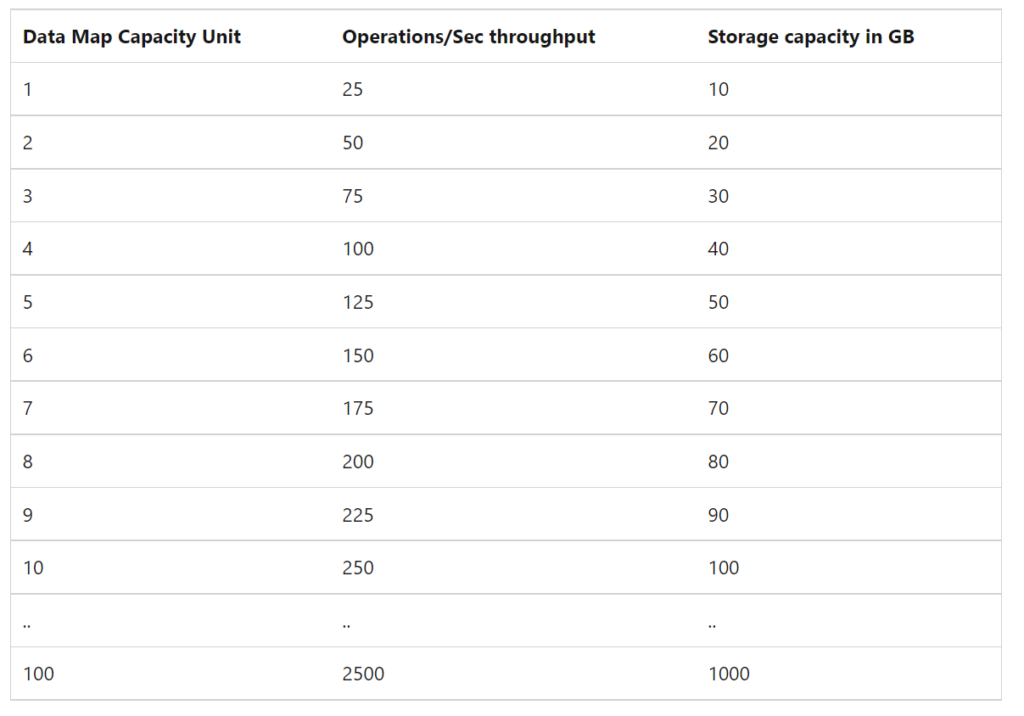
The Microsoft Purview pricing page has been updated. Below I have listed most of the changes. The most important changes are the introduction of the Microsoft Purview Applications and the pricing of the Insights Generation. The standard level of 1 capacity unit of 2 GB metadata storage and 25 operations per sec has been increased to 10 GB.
Post has been updated on April 25th.
Microsoft Purview Data Map
The Microsoft Purview Data Map stores metadata, annotations and relationships associated with data assets in a searchable knowledge graph.
Data Map is billed across three types of activities:
Data Map Population– examples include metadata & lineage extraction or classification based on metadata & content inspection.
Data Map Enrichment– examples include use of resource sets to optimize storage of data lake assets, or aggregation of classifications to generate insights
Data Map Consumption- examples include serving up search results or rendering lineage graph. This also includes the use of Apache Atlas API to build apps on Data Map.
Data Map Population
Automated Scanning, Ingestion & Classification
Data Map population is serverless and billed based on the duration of scans (includes metadata extraction and classification) and ingestion jobs. Automated scans using native connectors trigger both scan and ingestion jobs. Push based updates from a Microsoft Purview client (e.g., lineage push from Azure Data Factory or Azure Synapse Analytics) only trigger ingestion jobs.
Price
For Power BI online
Free for a limited time
For SQL Server on-prem
Free for a limited time
For other data sources
€0.582 per 1 vCore Hour
Data Map Enrichment
Advanced Resource Set
Advanced Resource Set is a built-in feature of the Data Map used to optimize the storage and search of data assets associated with partitioned files in data lakes. Billing for processing the resource set data assets is serverless and based on the duration of the processing, which can vary based on the change in partitioned files and resource set profile configured. In the Management Center you have an option to toggle on or off.
Note: By default, the advanced resource set processing is run every 12 hours for all the systems configured for scanning with resource set toggle enabled.
Price
Advanced Resource Set
€0.194 per 1 vCore Hour
Insights Generation
Insights Generation aggregates metadata and classifications in the raw Data map into enriched, executive-ready reports that can be visualized in the Data Estate Insights application and granular asset level information in business-friendly format that can be exported. Report visualization and export incurs charges from Insights Report Consumption in the Data Estate Insights application.
Price
Report Generation
€0.758 per 1 vCore Hour
Insight Generation is new for me, currently it looks like around €70,00.
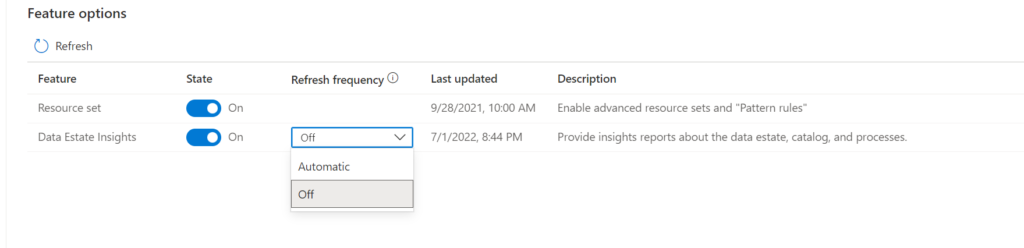
Note: By default, Insights Generation is enabled and provisioning and can be turned off in the Management center of Microsoft Purview governance portal. In the Management Center you have now an option to toggle on or off the Insight Generation. If the toggle is on and the report frequency is off than you can still see the reports with the latest report generation. If set to automatic your reports will refreshed based on your scanning and activities in de Portal. Currently the automatic refresh is weekly.
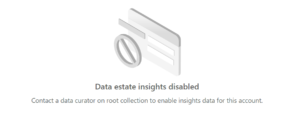
If the toggle is off the Insight Generation activity will you give you the following warning:
Data Map Consumption
Elastic Data Map
By default, a Microsoft Purview account is provisioned with a Data Map of at least 1 Capacity Unit. 1 Capacity Unit supports requests of up to 25 data map operations per second and includes storage of up to 10 GB of metadata about data assets.
Price
Capacity Unit
€0.380 per 1 vCore Hour
Note: The storage size was until last week 2 GB for 1 capacity Unit and has been resized to 10 GB. so that is a major change.
Microsoft Purview Applications
Microsoft Purview Applications are replacing the C0, C1 and D0 options which we had previously. Microsoft Purview Applications are a set of independently adoptable, but highly integrated user experiences built on the Data Map including Data Catalog, Data Estate Insights and more. These applications are used by data consumers, producers, data stewards and officers that enable enterprises to ensure that data is easily discoverable, understood, high quality, and all use is per corporate and regulatory requirements.
Data Catalog
Data Catalog is an application built on Data Map for use by business users, data engineers and stewards to discover data, identify lineage relationships and assign business context quickly and easily.
Price
Search and browse of data assets
Included with the Data Map
Business Glossaries
Included with the Data Map
Lineage Visualization
Included with the Data Map
Self-Service Data Access
Free in preview
Data Estate Insights
Price
Insights Consumption
€0.194 per API call
Note: Insights consumption is billed per API call. One API call returns up to 10,000 rows of tabular result. Like Insight Generation I've no idea yet what this will do with the cost. As soon this is available I will update this article.
Data Access Policies for SQL and Data Lakes(preview)
Data owners can centrally manage thousands of SQL Servers and data lakes to enable quick and easy access to data assets mapped in the Data Map for performance monitors, auditors, and data users.
Price
SQL DevOps access
Free in preview
Data Lake data asset access
Free in preview
Workflows(Preview)
Data owners and stewards can automate commonly used repetitive tasks associated with business processes like glossary curation and approval tracking using workflow management.
Price
Business Workflows
Free in preview
Data Sharing(Preview)
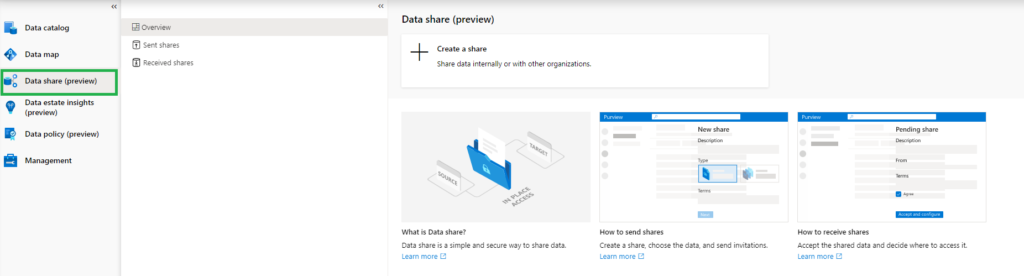
In-place Data Sharing lets users share data easily from within Microsoft Purview governance portal both within and between organizations, providing near real-time access to data without duplication.
Price
In place sharing for Azure Blob Storage and Azure Data Lake Storage (ADLS Gen2) storage accounts
Free
More details on data sharing in Microsoft Purview can be found here.
Pricing Example
Based on the example which is published on the pricing page, I've done a Calculation:
Example Scenario:
Data Map can scale capacity elastically based on the request load. Request load is measured in terms of data map operations per second. As a cost control measure, a Data Map is configured by default to elastically scale up to a peak of 8 times the steady state capacity.
For dev/trial usage:
Data Map (Always on): average of 2 capacity unit x Price per capacity unit per hour x 730 hours per month
Scanning (Pay as you go): Total duration (in minutes) of all scans in a month / 60 min per hour x 32 vCore per scan x €0.582 per vCore per hour
Resource Set: Total duration (in hours) of processing resource set data assets in a month * Price per vCore per hour
The total cost per month for Azure Purview = cost of Data Map + cost of Scanning + cost of Resource Set
Assuming above Scenario that we only use 1 Capacity Unit and use not more then 10 GB of Metadata storage and we scan our data once a week for 2 hours.
Data Map 2 CU x €0.380 X 730 hours = €554
Scanning 4 scans x 4 hours x 32 VCore x €0.582 per vCore per hour = €297
Resource Set 30 days x every 12 hrs x 8 Vcore x €0.194 per vCore per hour €93
In Total €944 including 4 scans, Data Estate Insight excluded. If you leave Microsoft Purview as is and no scanning you base fee will be €277 for 1 CU and Resource Set toggle need to be switch off
Data Estate Insights every week(4) x 8 Vcore x 4 hours x €0.758 = €97
Like always, in case you have questions, leave them in the comments or send me a message.
In my previous blog, I wrote how you can share data within your organization or across organizations. Now it's time to have a look how the lineage will look like.
In this article I will explain the Microsoft Purview Data Sharing Lineage and not the Lineage for Azure Data Share. This can be found here.
Data lineage is the ability to track the flow of data from its source to its destination, including any transformations or processing that occur along the way. Lineage is important for several reasons. First, it can help businesses ensure the accuracy and quality of their data. By tracing the lineage of a particular piece of data, businesses can identify any errors or inconsistencies that may have been introduced during processing.
Lineage is also important for compliance and regulatory purposes. Businesses may be required to track the lineage of certain types of data in order to comply with regulations or to demonstrate the integrity of their data.
Data share assets discovery
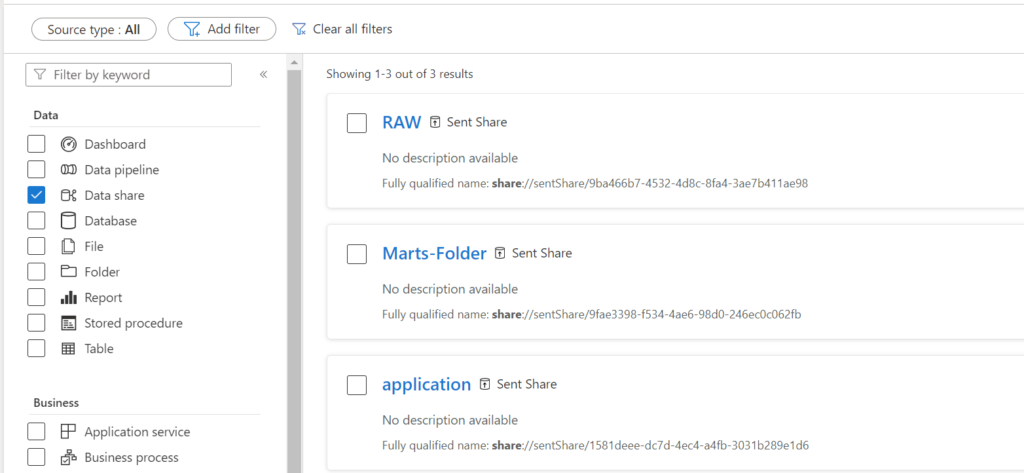
Data share assets can now be discovered in the Microsoft Purview Catalog. The Data share asset label is as of today available as a new filter option.
The Data share assets include sent share and received share assets and users can see the properties such as share metadata, owners, contact information, etc.
Azure Active Directory (AAD) tenant assets can be discovered in the catalog for all the tenants the current user tenant has sent or received data shares, to see the tenant-level Data Sharing Lineage.
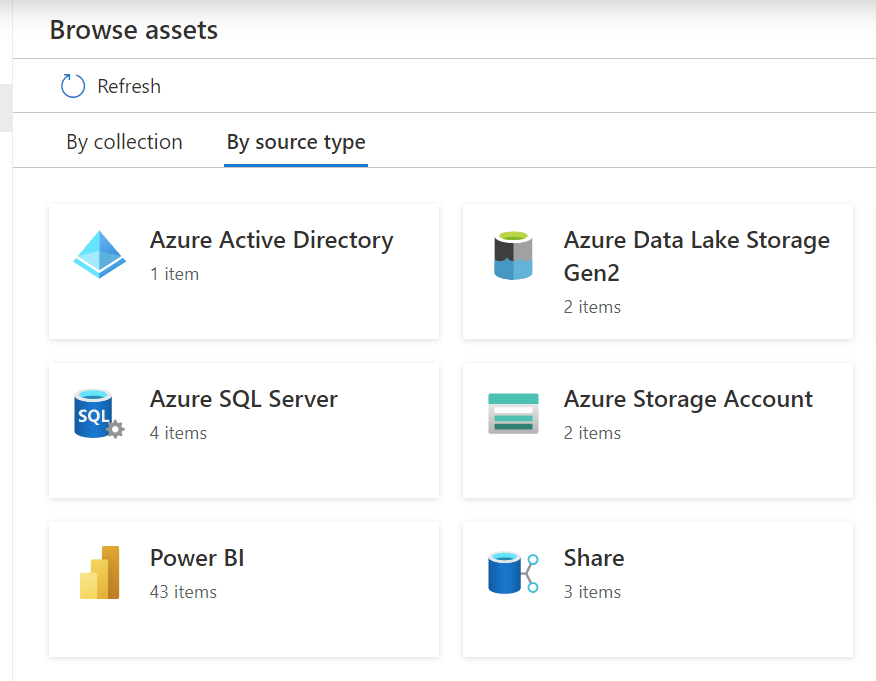
As you can see when browsing all the assets, you will discover 2 new types over here, Azure Active Directory and Share.
Data Share Lineage
Data Sharing lineage aims to provide detailed information for root cause analysis and impact analysis.
Some common scenarios include:
Full view of datasets shared in and out of your organization
Root cause analysis for upstream dataset dependencies
Impact analysis for shared datasets
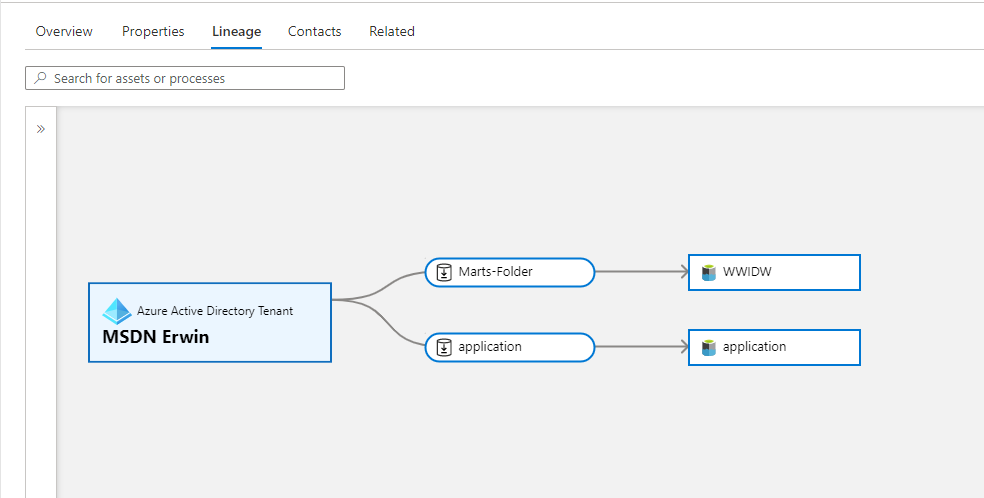
Lineage overview from the Data Receive Share view. As you can see, there is a new asset "Azure Active Directory Tenant", in this case you will see from which tenant the data is coming from.
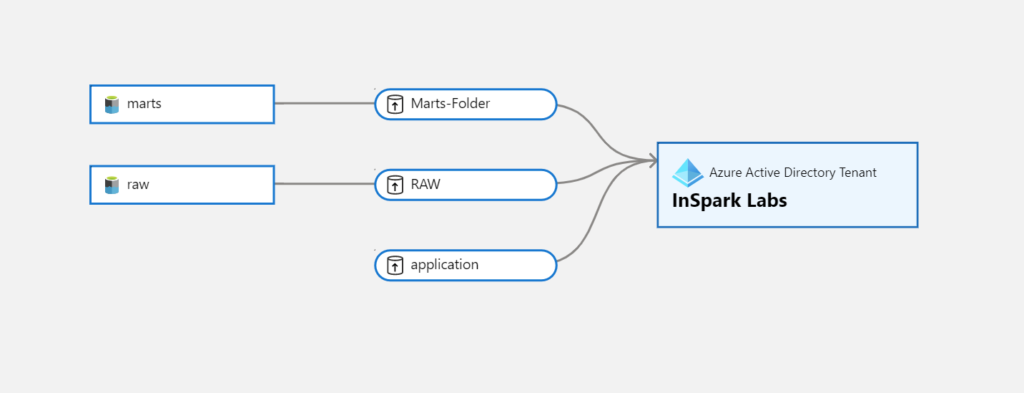
Below you see an overview of the lineage where we created the Share and to which tenant we shared the data to. As you can see, the lines of the AAD tenant are opposite of each other, so you can clearly see what is being shared and what is the receiving location.
Conclusion
Microsoft Purview's lineage capabilities are a powerful tool for businesses that need to track the flow of their data. By providing a complete view of data lineage, Purview can help businesses ensure the accuracy and integrity of their data, comply with regulatory requirements, and improve the efficiency of their data processing workflows.
Thanks for reading and like always, if you have any questions leave them in the comments.
FabCon Atlanta 2026 made one thing unmistakably clear: Microsoft Fabric has crossed the line from promise to production.
This was not a conference full of “what’s coming next.” It was a conference about what is ready.
With roughly 80% of announced capabilities reaching General Availability (GA), Fabric is no longer approaching enterprise readiness. It is an enterprise platform, designed, secured, and governed for the AI era.
What mattered most was not the number of announcements, but which capabilities went GA: centralized security, enterprise networking patterns, OneLake governance, and platform-grade CI/CD. These are not nice-to-haves. These are the foundations enterprises require before scaling analytics and AI responsibly.
Let’s unpack why this matters.
Enterprise AI Starts With Secure, Governed Data
AI amplifies everything, value and risk.
As models become more capable, the importance of controlled data access, policy enforcement, and end-to-end governance becomes non‑negotiable. At FabCon, Microsoft made a clear architectural statement:
OneLake is the enterprise data backbone for AI and security is enforced once and applied everywhere.
This represents a fundamental shift. Not tool-level security. Not fragmented enforcement. But platform-level control.
For enterprises moving beyond experimentation into AI at scale, this distinction is critical.
Network Security: Designed for Enterprise Boundaries
Real enterprises do not operate in open, internet-exposed architectures. They operate in hybrid, regulated, and security-sensitive environments and Fabric is increasingly aligned with that reality.
Fabric’s enterprise networking direction became unmistakable, reinforcing principles such as:
Alignment with Zero Trust networking models
Private endpoints and private links
Outbound access protection for external shortcuts
Workspace IP firewalling
Resource instance rules restricting access to designated Azure resources
Rather than forcing customers into overly permissive designs, Fabric is evolving toward network-aware data platform patterns that fit inside enterprise boundaries.
This matters even more for AI workloads, where sensitive data is accessed by notebooks, agents, pipelines, and downstream applications at scale.
Microsoft is deliberately avoiding security sprawl, but the direction is clear: Fabric is designed to live inside enterprise networks, not around them.
OneLake: One Logical Data Estate, Not Another Copy
OneLake has matured rapidly into the single logical data layer for Microsoft Fabric and by extension, for enterprise AI.
What makes OneLake enterprise-grade is not unification alone, but how that unification is achieved:
Zero-copy shortcuts and mirroring reduce data duplication
Data remains in place while becoming analytics and AI accessible
Enterprises avoid the classic sprawl of unmanaged data copies
Microsoft reinforced that OneLake is not a convenience feature. It is the governed foundation upon which analytics, BI, and AI agents operate.
AI models do not just need data. They need trusted, current, policy-compliant data.
OneLake is how Fabric delivers that trust at scale.
One of the most important GA milestones announced at FabCon was OneLake Security.
For years, enterprises have struggled with an obvious question:
Why does the same dataset require different security definitions for Spark, SQL, and Power BI?
OneLake Security directly addresses this problem.
With OneLake Security:
Access policies are defined once
Enforcement is consistent across Spark, SQL, Power BI, and AI workloads
Governance moves from tool-specific configuration to platform-wide control
This “secure once, enforce everywhere” model is foundational for enterprise AI where the same data is reused across multiple engines, workloads, and autonomous agents.
Additional signals of maturity:
Mirrored databases are already in Preview
Eventhouse integration is coming
OneLake Security APIs are on the roadmap, enabling any engine to integrate with the same security model
This is not incremental improvement. This is platform consolidation.
OneLake Governance: From Discovery to Responsible AI
Enterprise AI rarely fails because the model is weak.
It fails because governance is fragmented or invisible.
Microsoft made it clear that OneLake is not just a storage abstraction, it is a governed data foundation designed for responsible AI adoption at scale.
With key governance capabilities now generally available, governance is no longer an afterthought or an external dependency.
Governance Embedded in the Data Experience
A major step forward is the OneLake Catalog Govern experience, which brings governance signals directly into data discovery and consumption.
Instead of asking users to check governance elsewhere, Fabric surfaces context by default, including:
Clear ownership and accountability
End-to-end lineage across ingestion, transformation, and consumption
Sensitivity labels and policy inheritance across Fabric workloads
This closes a long-standing enterprise gap.
The question is no longer: “Can I find the data?”
It becomes: “Can I safely use this data for this purpose?”
That shift is essential for AI.
Data Sovereignty: Customer Managed Keys at Platform Scale
With Customer Managed Keys (CMK) available across almost every Fabric workload, Microsoft Fabric now meets a core requirement for enterprise data sovereignty. Encryption keys remain fully under customer control, enabling organizations to meet regulatory, contractual, and regional sovereignty requirements without fragmenting the platform.
CMK everywhere removes one of the last structural blockers for adopting Fabric in highly regulated and security‑sensitive environments.
Fabric CI/CD: From Analytics to Platform Engineering
Another strong indicator of Fabric’s enterprise maturity is its evolution toward platform engineering and CI/CD.
At FabCon Atlanta, it became clear that Fabric is no longer optimized solely for interactive development. It now supports:
Source-controlled artifacts
Repeatable, automated deployments
Clear environment separation (dev / test / prod)
Alignment with existing enterprise DevOps practices
The new release of the Fabric CLIv1.5 introduces the deploy command, which wraps the fabric-cicd Python library and exposes it as a single CLI operation. The CLI integrates with fabric-cicd so deploying items from a Git-connected workspace to a target workspace
This is critical for AI scenarios, where experimentation must transition into governed, auditable production pipelines.
With Fabric CI/CD, data and AI assets are treated as first-class software products not ad-hoc analytics outputs.
From Features to Platform: Why GA Changes Everything
Preview features are exciting. GA features are trustworthy.
The fact that the majority of FabCon Atlanta announcements reached GA sends a strong signal to enterprise decision-makers:
Fabric is stable, supported, and ready for mission-critical workloads.
That matters even more in the AI era, where:
Data exposure risks are higher
Regulatory scrutiny is increasing
Operational reliability is non-negotiable
Fabric is no longer positioning itself as “the future.” It is positioning itself as the platform enterprises can standardize on today.
Conclusion: Microsoft Fabric Is Built for Enterprise AI
FabCon Atlanta 2026 marked a clear inflection point.
With enterprise-grade networking, OneLake as a unified data estate, centralized OneLake security, and CI/CD-driven platform engineering, Microsoft Fabric has evolved into a complete enterprise data and AI platform.
Not a collection of tools. Not an analytics add-on.
But a foundation for responsible, scalable AI.
And now that most of these capabilities are generally available, the conversation changes from:
“Is Fabric ready?”
To the only question that still matters:
“How fast can we adopt it responsibly?
This blog focused deliberately on the platform foundations of Microsoft Fabric. FabCon Atlanta 2026 included many more announcements and deep dives that go beyond the scope of this post.
For the complete set of updates, sessions, and demos, watch the full recording here:
In today's world, data is the key to success for businesses. The more data a business has, the better it can make decisions and stay ahead of its competitors. However, data is not always easy to come by, and many businesses struggle with finding and accessing the data they need. This is where Microsoft Purview comes in.
Benefits
There are several benefits for data sharing in Microsoft Purview:
Safe time and resources from the business
Share data, Businesses can control who has access to their data
Secure, Businesses can control who has access to their data
Data sharing scenarios
Microsoft Purview Data Sharing can help with various data sharing scenarios, including:
Collaborate with external business partners while maintaining data security in your own environment.
Outsource data transformation and processing to third party ISVs or data aggregators by sharing raw data and receiving normalized data and analytics results back.
Automate sharing of big data (for example: IoT data, scientific data, satellite and surveillance images or videos, financial market data) in near real time and without data duplication.
Share data between different departments within the organization.
In place Data Sharing/Receiving in Microsoft Purview
Currently in Preview
Requirements:
Or do we need to say current limitations:
Supported Azure Regions: Canada Central, Canada East, UK South, UK West, Australia East, Japan East, Korea South, and South Africa North
Performance: Standard
Redundancy Options: LRS, GRS, RA-GRS
Storage Accounts: ADLS Gen2 or Blob Storage accounts
Source and Target storage account must be in the same region, this can be different from your Purview Account
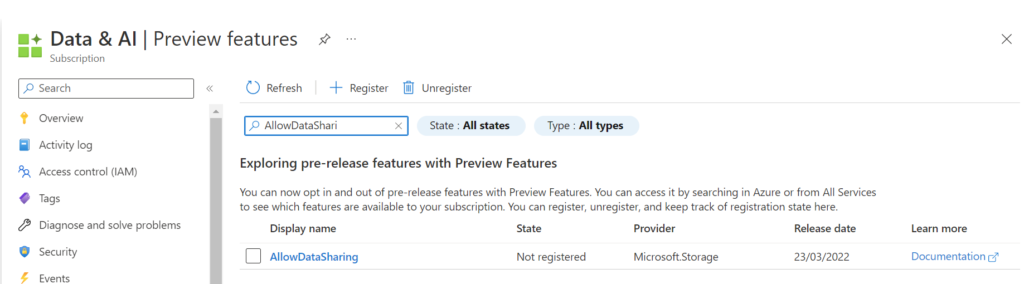
Before we can start we need to register the AllowDataSharing feature on the subscription.
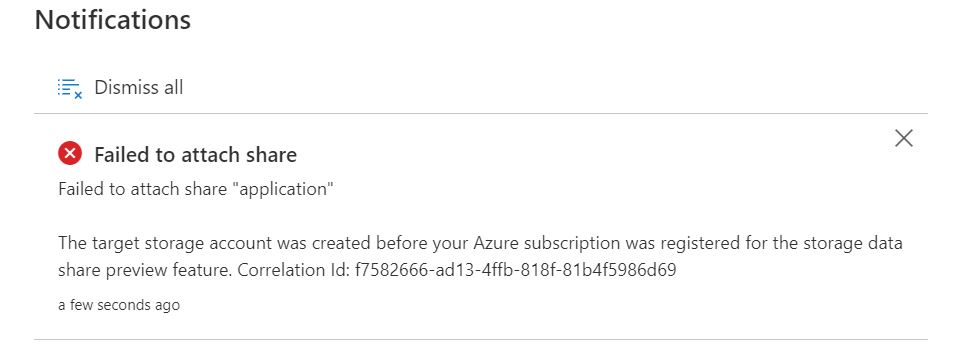
Attention
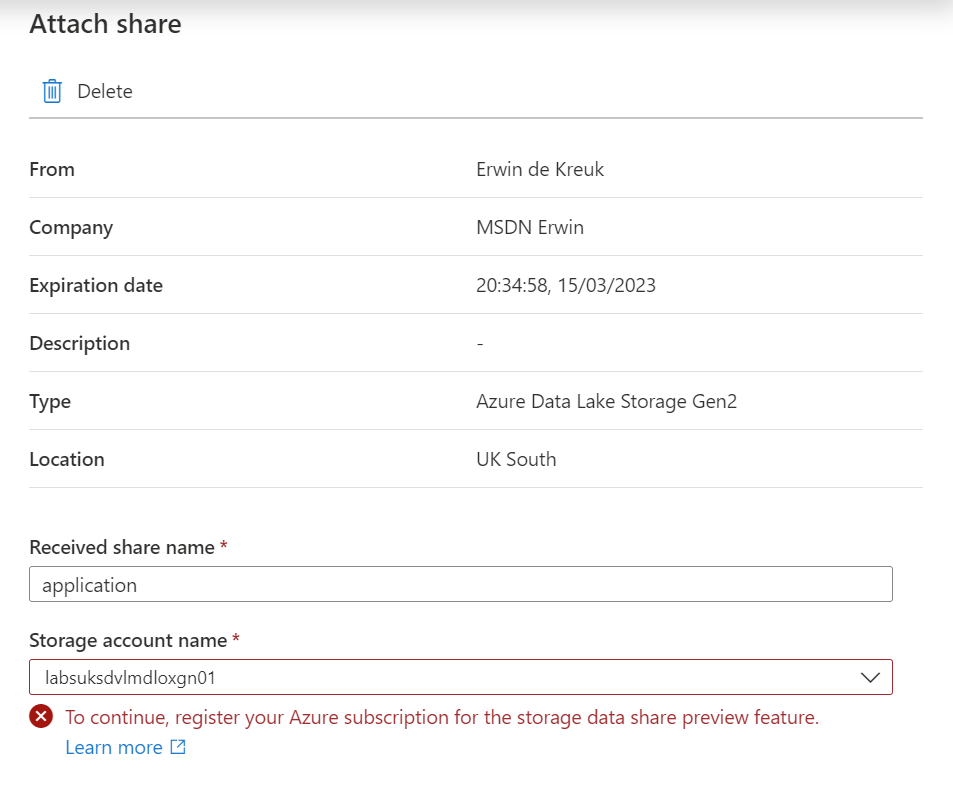
Only storage accounts registered after registration will work. If you did the registration after the storage account creation you will receive the following error message upon creation of the data share:
Create Share
To create a Data Share you must have the Microsoft Purview Collection Role, Data Share Contributors, assigned.
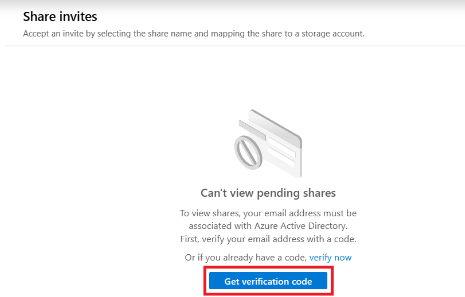
The first time you will start using Data Sharing and you're a Guest user, your account must first be associated with the Azure Active Directory.
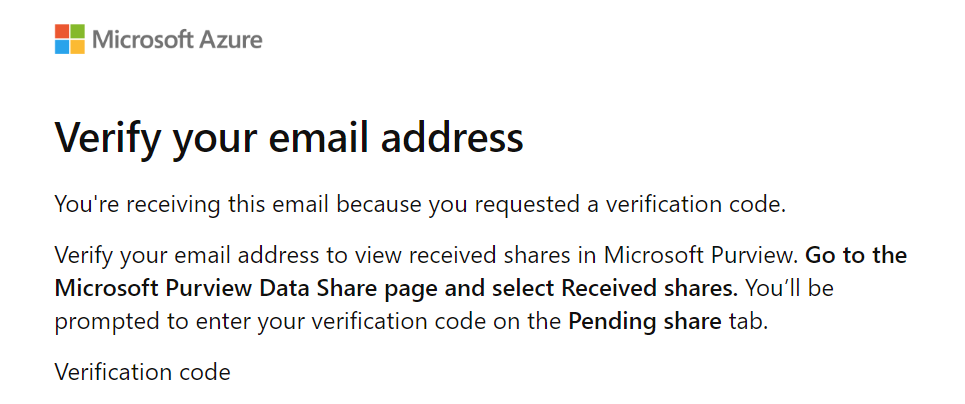
You will receive a email with code, copy/paste the code before you continue.
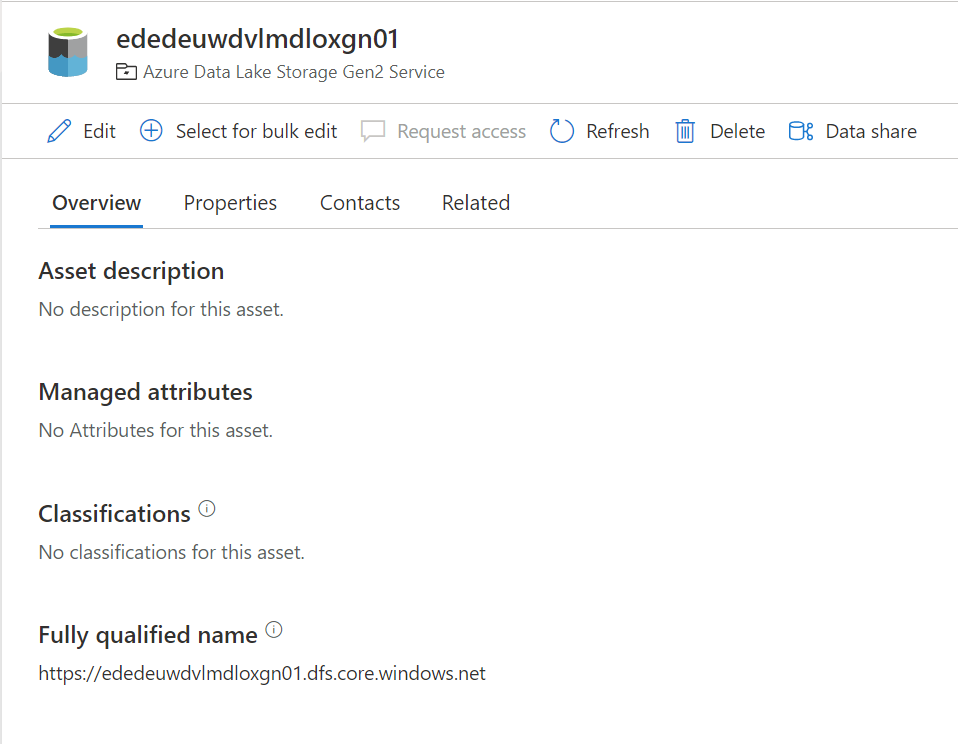
To enable a data Share, select the Azure Storage or Azure Data Lake Storage (ADLS) Gen 2 data asset you would like to share data from.
Click on Data Share.
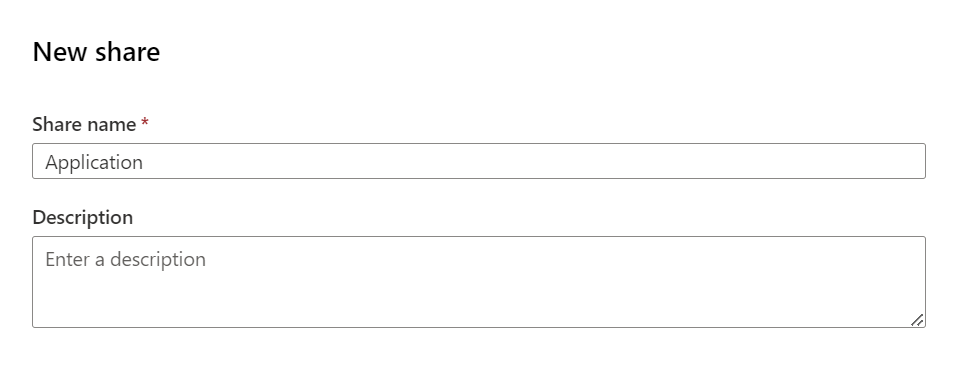
Create a New Share. Specify a name and a description of share contents (optional). Then select Continue.
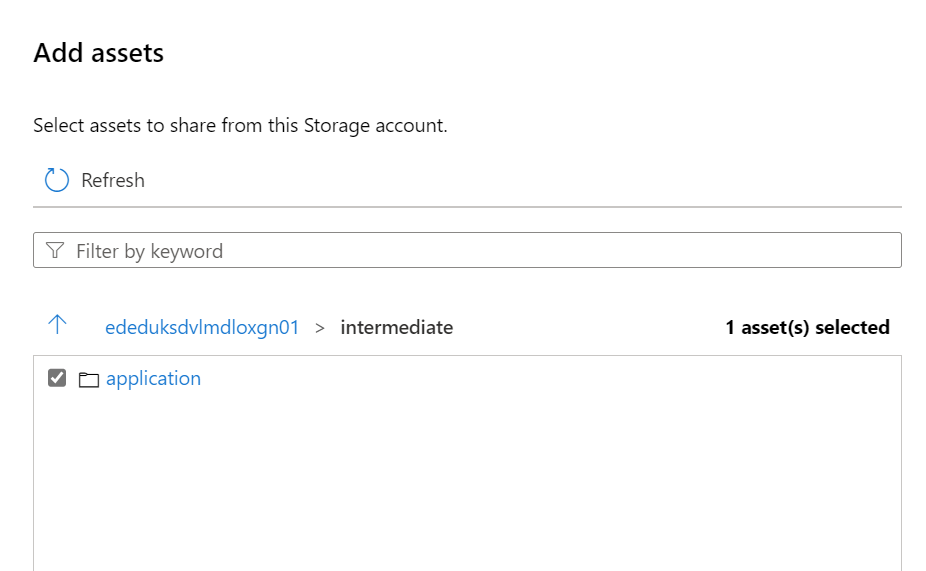
Search for the assets you want to Share and specify the Share name.
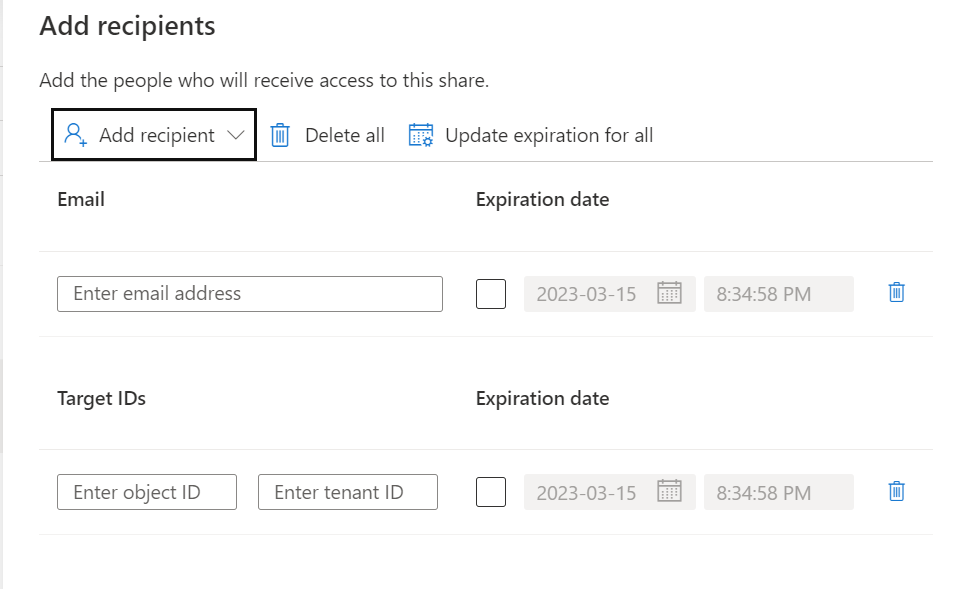
Add the Recipient, in this situation I've selected a user in a different tenant but you can also select in the same tenant, same subscription or different subscription.
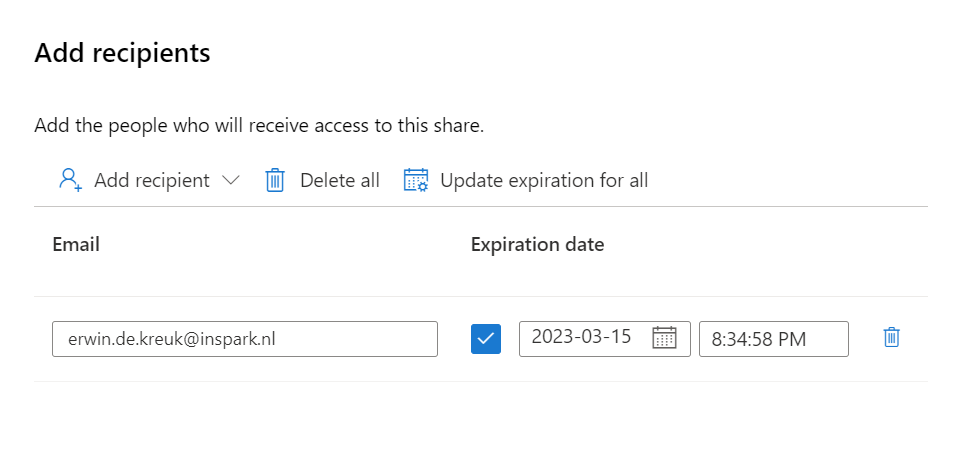
Add the Recipient, in this situation I've selected a user in a different tenant and defined an expiration date of the share, the share will be terminated on this date.
Click on Create and Share, adding more users can be easily done afterwards.
The Share is created, The recipients of your share will receive an invitation and they can view the pending share in their Microsoft Purview account.
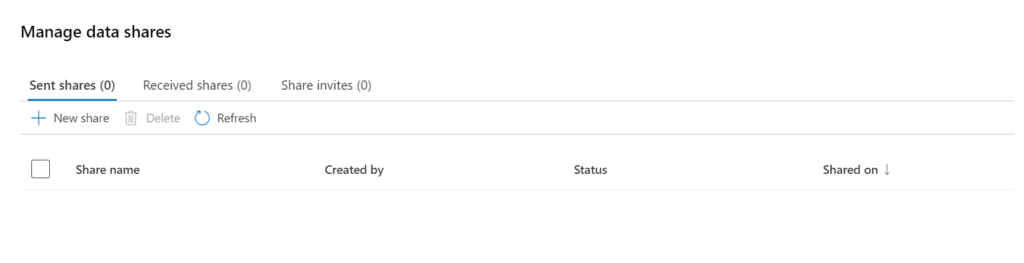
In Purview you will have an overview of all Shares you created:
Receive Share
Now we have setup the Sent Share, we're ready to receive the data. In this situation, it will be a different Purview account in a different Tenant.
All invites which have been shared and not have attached can be found in the Share Invites tab.
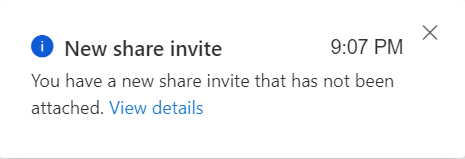
A notification will also be send, that a new Invite has been received.
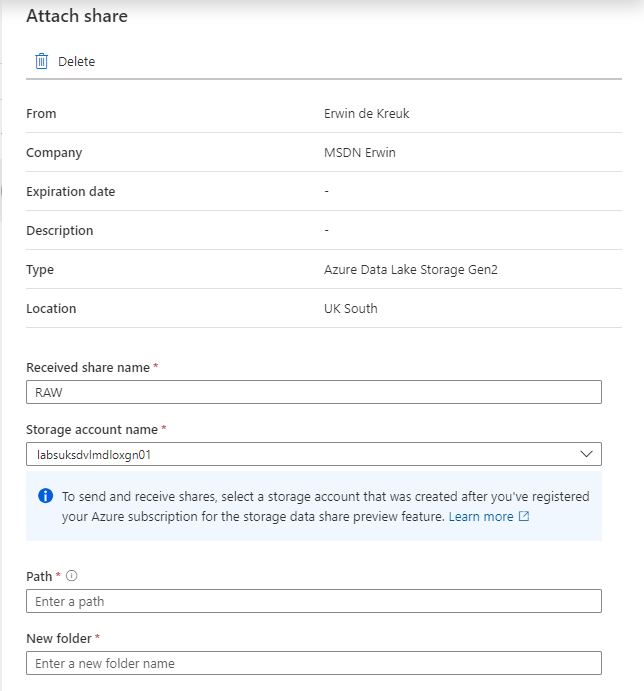
Click on Receive Share to attached to the correct Storage Account, make sure that the AllowDataSharing feature on the Azure Subscription has been registered, otherwise you will receive the message below.
Select the Storage account where you want to receive data or create a new storage.
Received share name: Leave as is or change it as you like it.
Path: New or existing container in Storage Account
Folder: The Folder where you want to receive the data
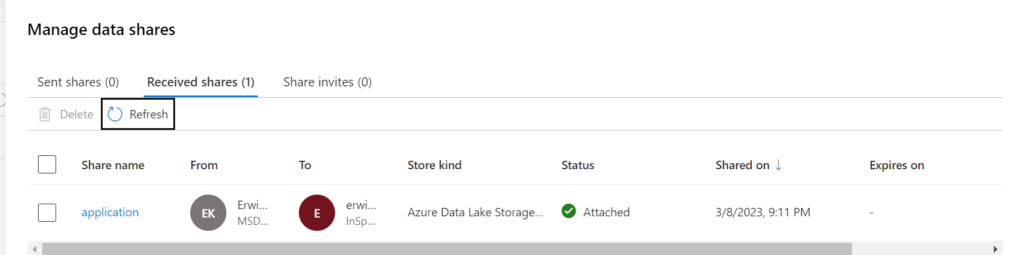
Attach the target to continue. When the storage account is attached you will see that on the Received Share overview.
You can now access the shared data in your storage account.
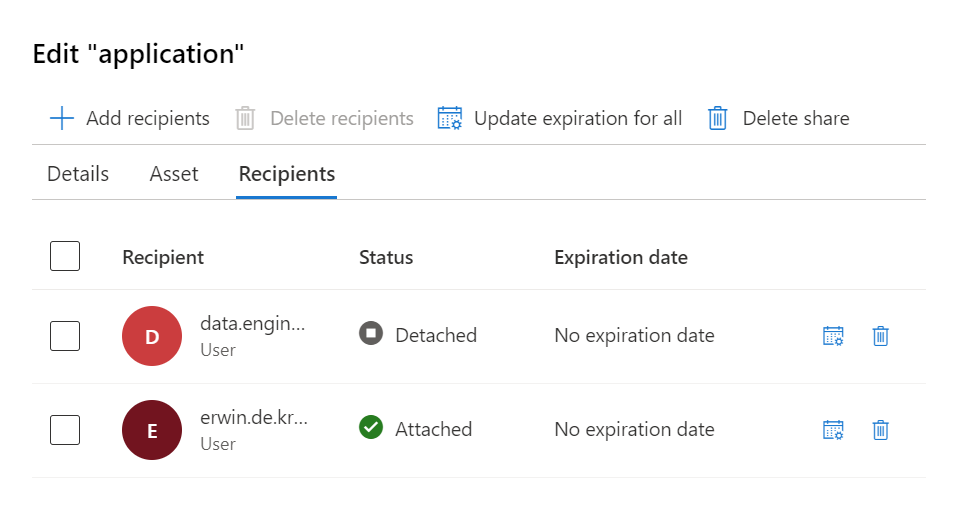
In the Purview account where we create the data Share we can also see that the data is attached.
Great to know, in the receive share the data is read-only, updated data in the sent share will be synced in real-time to the receive share.
In my next blogI will explain, how Microsoft Purview Data Sharing Lineage will work, just as a quick teaser. Have look in you data Assets, you will now find a new data asset:
Conclusion
Data sharing is a crucial component of modern business, and Microsoft Purview makes it easy and secure. By sharing data within and across organizations, businesses can improve collaboration, save time and resources, and stay ahead of their competitors. If you're interested in learning more about Microsoft Purview and its data sharing capabilities, be sure to check it out!
If you want to know more on Data Share Lineage in Microsoft Purview you read my blogon that topic.
Like always, if you have any questions leave them in the comments.