Azure Data Factory: Save a pipeline as a Template

by Feb 8, 2019

Saving a Pipeline

Another great improvement in Azure Data Factory. Saving you template!

How can you save your template?

First of all you need to connect your Azure Data Factory to  a GIT integration. Both Azure DevOps GIT and GitHub are supported. Please follow this link if you don’t have a Git Integration.

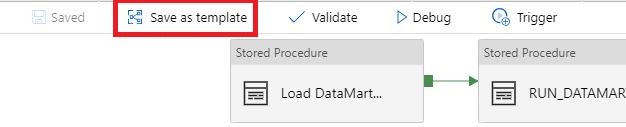
Select the template you want to save:
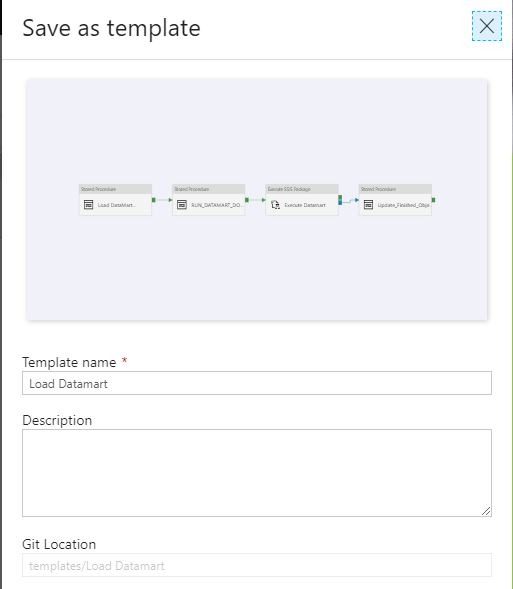
Name your template and save it to a Git Location of your choice:
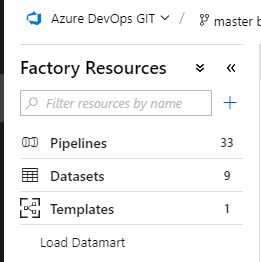
The template you have saved can be found in Factory Resources.
With this new option it will  be easier to share Pipeline Activities with other Azure Data Factory instances.

And most important of saving your template it will save a lot of development time in your new instance.


Happy Saving

Feel free to leave a comment

2 Comments

  1. Mike Kiser

    Great blog!!!! Is there any other way to save a pipeline as a Template without using Git or DevOps?
    Thanks
    Mike KIser

    Reply
    • Erwin

      Hi Mike,

      Yes there’s. When you save the template you have the option to Export the template. The template will be saved on your local hard drive. The next time you want to re-use this template you choose the option Pipeline form Template and in the upper corner you will see the option “Use Local Template”. Select the exported Template and you’re off to go.
      Hope that the answer will save you some time.

      Reply

Leave a Reply

This site uses Akismet to reduce spam. Learn how your comment data is processed.

How to use concurrency in Azure Synapse pipelines?

How to prevent concurrent pipeline execution?Concurrency This week I had a discussion with a colleague about how we can now make sure that a Pipeline does not start when it's already started. He then indicated, have you ever thought of the concurrency option?  I've...

How to enable Microsoft Fabric

Microsoft FabricI got some questions from customers that didn’t know how to enable Microsoft Fabric and that they only see Power BI Items and not the new announced Experiences. In this short blog I will explain how you can easily enable Microsoft Fabric.How to enable...

Azure Purview March Updates

Azure Purview updatesAnnouncements Last week during SQLBITS, quite a few new updates were announced. I would like to include you in these announcements.March updates Support for SAP Business Warehouse (Preview) Blogpost:...

Azure Purview MSIgnite Spring 2021 Announcements

Azure Purview Ignite 2021 AnnoucementPricing This week the Azure Purview announced that they will extend the Azure Purview offer to provision 4 Capacity Units of the Data Map for free till May 31, 2021! Charging will start on June 1, 2021. Great news for customer who...

Are you using Azure DevOps?

Azure DevOpsMore and more users are starting with Azure DevOps. Azure DevOps can be used for up to 5 users free of charge and is therefore a great start to start a project.    Build and Release I will not describe what Azure DevOps can do, because that is too much to...

High Concurrency Notebook Activity in Microsoft Fabric

Microsoft Fabric is a cloud-based platform that provides integrated data engineering and data science solutions. One of the key features of Microsoft Fabric is the support for Apache Spark, a distributed computing framework that enables large-scale data processing and...

Azure Synapse Analytics

Azure Synapse Analytics  Insights for all Azure Synapse provides a breathtaking view of your data across data warehouses and big data analytics systems. Bringing these two worlds together into a single service is challenging as it requires unifying similar...

New Microsoft Azure Certifications

Microsoft Certification by Solution Area Handy overview of the new Microsoft Azure Certifications. More details can be found here Feel free to leave a comment

Calculate the Last Day of the Month using SQL

Calculate the Last DayToday I needed to calculate the last day of the previous month for a Customer.Ever heard from the function EOMONTH? Searching on the web I came across a function I never heard from before EOMONTH, this function can be used as of SQL Server 2012....

Rerun Pipeline activities in Azure Data Factory

Rerun Pipeline activities in ADF! As of today you can rerun or partially, yes you’re reading it correct partially, rerun you Azure Data Factory pipeline.Where you previously had to run the entire Pipeline again, you can now run a part of the Pipeline. This can save a...

Discover more from Erwin | Data & Intelligence

Subscribe to get the latest posts sent to your email.