Azure Data Factory: New functionalities and features

by May 22, 2020

New functionalities and features

Last week, a number of great new functionalities and features were added within Azure Data Factory. I would like to take you in some details in the blog below:
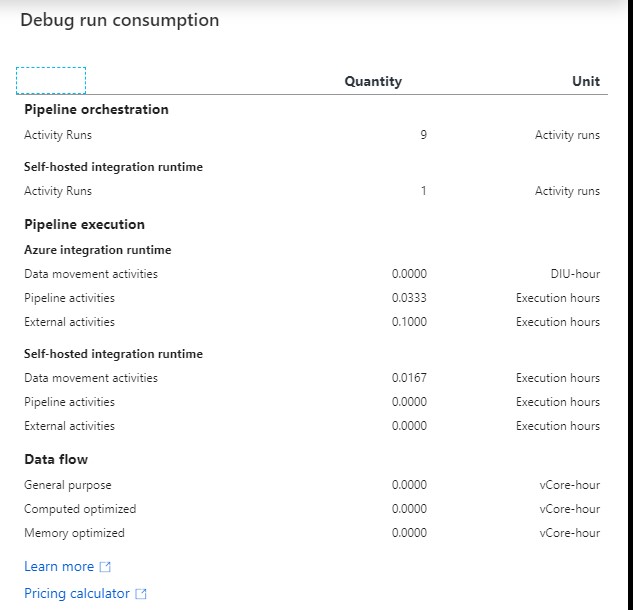
ADF DEBUG Report

Customer key

With this new functionality you can add extra security to your Azure Data Factory environment. Where the data was first encrypted with a randomly generated key from Microsoft, you can now use the customer-managed key feature. With this Bring Your Own Key (BYOK) you can add extra security to your Azure Data Factory environment. If you use the customer-managed key functionality, the data will be encrypted in combination with the ADF system key. You can create your own key or have it generated by the Azure Key Vault API.

You can read more in this Article which I wrote.

Pipeline Consumption Report

Last week the Azure Data Factory added the Pipeline Consumption Report.

The report can be used for your Triggered runs, just go to your Triggered runs and click on the new Icon.
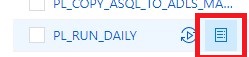
ADFMonitor

The consumption of the selected Pipeline will be displayed. The data shown is only from this Pipeline and not from other Pipelines fired by this Pipeline. Would be a nice addition if the report shows the aggregation of the complete Triggered Run.

For your debug run, click on right site of your Output pane:
ADF DEBUG button

ADF DEBUG Report

The ADF consumption report is only surfacing Azure Data Factory related units. There may be additional units billed from other services that you are using and accessing which are not accounted for here including Azure SQL Database, Synapse Analytics, CosmosDB, ADLS, etc. More detailed can be found here.

Parameters from Execute Pipeline Activity

When calling a Pipeline you first had to add the parameters yourself, now they are automatically taken over from the Pipeline you select. Very handy and saves time again if you use a lot of parameters.

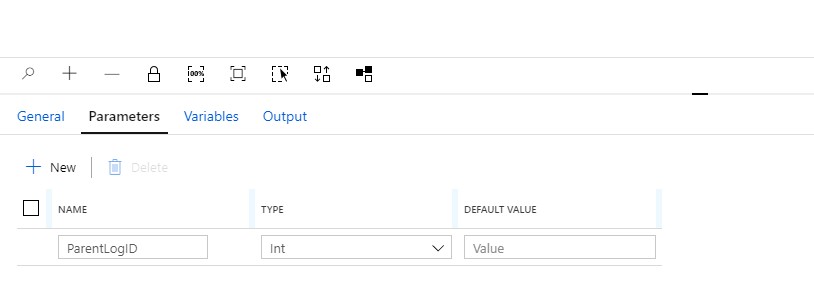
Define a Parameter in one of your Pipelines:

ADF Parameter


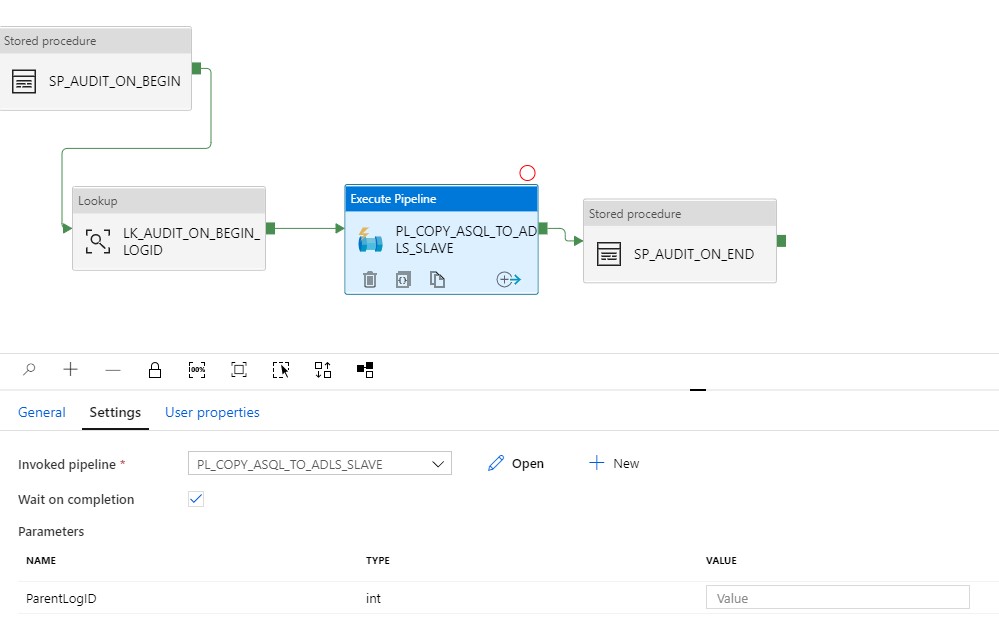
Create another Pipeline and add the Execute Pipeline activity. On the settings tab where you have to select the Pipeline you want to execute, you will discover that the option to add Manually the parameters is not there anymore. But, all the Parameters you had defined in your Pipeline are directly shown. Very handy and it reduces errors.

Old Situation:
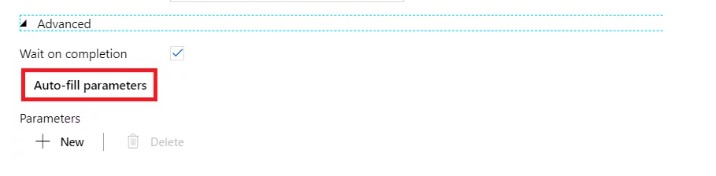
ADF Parameter 3

New Situation:

ADF Parameter Pipeline

General Tab moved to new Properties Pane

Your General tab is now moved to the right site of the Canvas.

ADF Pane General

To edit it your properties, click on the pane icon located in the top-right corner of the canvas.
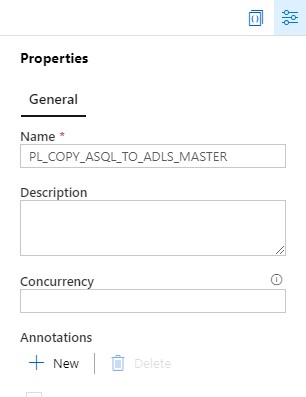
ADF Pane Properties

So these were some nice and useful addition to Azure Data Factory. I am very happy with it and what do you think?
Feel free to leave a comment

0 Comments

Leave a Reply

This site uses Akismet to reduce spam. Learn how your comment data is processed.

Book of News Microsoft Ignite 2019

Microsoft Ignite 2019MSIgnite 2019 has almost come to an end. A lot of new Annoucement have been released and presented.  Would you also like to know which announcements have been made?Microsoft has released during MSIgnite a "Book of News". This book contains all new...

Data Factory Pricing

Data Factory pricingAre you also having problems to understand the Pricing Model for Azure Data Factory? After some research on the internet I came across an article which I wanted to share with you. ADFV2 Pricing ExamplesFeel free to leave a comment

Azure Purview Public Preview Starts billing

Billing for Azure Purview(Public Preview)As of January 20th 2021 0:00 UTC Azure Purview will starts billing.Preview From January 20 ,2021 Azure Purview will start billing. During the Public Preview, you will only be billed if you exceed the 4 capacity units for Azure...

Enable Pattern Rules in Azure Purview

How can I enable Pattern Rules?​Pattern Rules Last night I was preparing for a demo with Azure Purview. As always, I walk through all the activity hubs to see if there are any new options. This time I noticed that the Pattern Rules option was greyed out. Resource Set...

Collection of all ADF Mapping Data Flow videos

ADF Mapping FlowDid you use the Dataflow preview functionality in Azure Data Factory? This has recently be renamed to Mapping Data Flows.  All video's which the ADF team has created, are collected. Start Here: ADF Data Flow: Overview ADF Data Flow: Data Flow...

New Microsoft Azure Certifications

Microsoft Certification by Solution Area Handy overview of the new Microsoft Azure Certifications. More details can be found here Feel free to leave a comment

Azure Purview March Updates

Azure Purview updatesAnnouncements Last week during SQLBITS, quite a few new updates were announced. I would like to include you in these announcements.March updates Support for SAP Business Warehouse (Preview) Blogpost:...

Microsoft Build 2022 Book of News

Microsoft Build 2022MSBuild 2022 has just started. A lot of new Announcement will be released or demonstrated the upcoming days. Like every year or event most of these announcement are added to the Book of News.The book of news can be downloaded from the link below...

Custom comments in Azure Synapse Analytics

Add custom comments to your Azure DevOps and Github commitsFinally ​Finally and secretly hidden, we can now add a Comment to our commits in Azure Synapse Analytics and Azure Data Factory to Azure Dev Ops. How do you activate this custom comment option in your existing...

10 Days of Azure Synapse Analytics

10 Days of Azure Synapse AnalyticsFor the next 10 days, every day a different topic is explained about Azure Synapse Analytics. The shortest and easiest way to see how Azure Synapse Analytics can help you, to make decisions within your data landscape.Day 1...

Discover more from Erwin | Data & Intelligence

Subscribe to get the latest posts sent to your email.