Restore a accidentally deleted Azure SQL Database

by Jul 1, 2021

Help I deleted my Logical Server

​OOPS

Have you ever experienced that you accidentally deleted your Logical Server in Azure?  Because, for example, you made your Pipeline wrong. Surely. And of course you didn’t have a backup in your storage either.
Well I must confess that happened to me recently. It was on my test environment but if you delete a configuration database with your metadata it is quite annoying.
Keep Calm

How to Resolve?

But there is a solution to get the deleted Azure SQL databases back.

You need to take the following steps for this:

  • Recreate the Logical server with the same name and in the same region.
  • Do not re-deploy the deleted databases from your pipeline.
  • After the Logical Server has been created, click Create Database in the Azure Portal
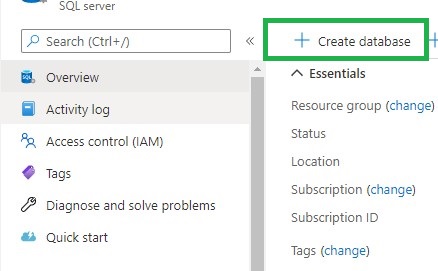
  • Create database
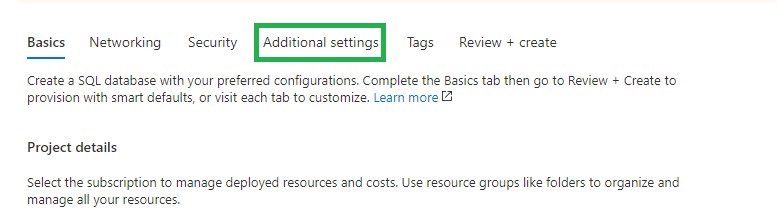
  • Go directly to the tab Additional Settings
  • Additional Settings
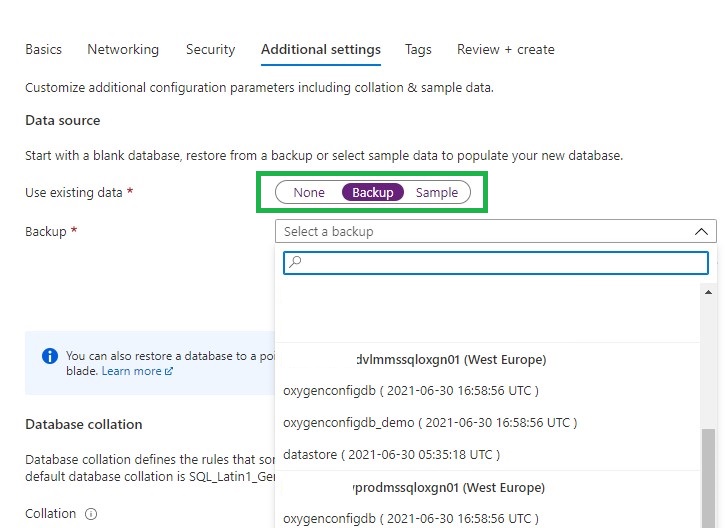
  • Select Backup
  • Select Backup
  • Search for your deleted Logical Server and you will see that you can restore your removed databases.
  • Select the correct database, click on review and create. Your database will now be restored
  • The last thing you need to do is to remove the datetime extension from your database
  • You can now start using your database again and all security roles that were there before are also present.
  • Repeat above steps in case you had more databases attached to the same server.
It’s a fairly simple process, but you just need to know it. And it will ultimately save you a lot of time and frustration.
If you have any questions regarding the above, please let me know.

Feel free to leave a comment

2 Comments

  1. Abdullah Alqahtani

    I can’t remember the area

    Reply
    • Erwin

      Is on the Logical server page or is that not what you mean?

      Reply

Leave a Reply

This site uses Akismet to reduce spam. Learn how your comment data is processed.

Book of News Microsoft Ignite 2019

Microsoft Ignite 2019MSIgnite 2019 has almost come to an end. A lot of new Annoucement have been released and presented.  Would you also like to know which announcements have been made?Microsoft has released during MSIgnite a "Book of News". This book contains all new...

Enable Pattern Rules in Azure Purview

How can I enable Pattern Rules?​Pattern Rules Last night I was preparing for a demo with Azure Purview. As always, I walk through all the activity hubs to see if there are any new options. This time I noticed that the Pattern Rules option was greyed out. Resource Set...

Azure Purview Public Preview Starts billing

Billing for Azure Purview(Public Preview)As of January 20th 2021 0:00 UTC Azure Purview will starts billing.Preview From January 20 ,2021 Azure Purview will start billing. During the Public Preview, you will only be billed if you exceed the 4 capacity units for Azure...

How to enable Microsoft Fabric

Microsoft FabricI got some questions from customers that didn’t know how to enable Microsoft Fabric and that they only see Power BI Items and not the new announced Experiences. In this short blog I will explain how you can easily enable Microsoft Fabric.How to enable...

Calculate Workingdays including Holidays with T-SQL

Calculate Workingdays between 2 Date columnsRecently I have been getting some questions from my customers, can I calculate the number of workdays between 2 dates? Of course my answer was, yes you can. But I do want certain closing dates and holidays of our company not...

Goodbye 2020 Hello 2021

Goodbye 2020 Started to work for InSpark Last year was certainly an eventful year. Started with a new job at InSpark and after 10 weeks we all know what happened, the first intelligent lockdown. The Netherlands was partially locked, but our office was immediately...

Azure Purview March Updates

Azure Purview updatesAnnouncements Last week during SQLBITS, quite a few new updates were announced. I would like to include you in these announcements.March updates Support for SAP Business Warehouse (Preview) Blogpost:...

SQLBits session: Microsoft Purview Data Policy App

SQLBits 2023 Thanks everyone for visiting my session during SQLBits. It's great to see such a full room and that so many people have started using Microsoft Purview.  SLIDES The slides can be downloaded via the link below, so that you can view them again at...

How to check your SQL Server Quota in Azure?

Azure Subscription Usages for SQL Server  Last week we reached our Logical server Quota in Azure. By default you're only allowed to add 20 Logical Servers, but we wanted to have some more for testing purposes.Microsoft Support You can submit a support ticket trough...

High Concurrency Notebook Activity in Microsoft Fabric

Microsoft Fabric is a cloud-based platform that provides integrated data engineering and data science solutions. One of the key features of Microsoft Fabric is the support for Apache Spark, a distributed computing framework that enables large-scale data processing and...

Discover more from Erwin | Data & Intelligence

Subscribe to get the latest posts sent to your email.