Restore a accidentally deleted Azure SQL Database

by Jul 1, 2021

Help I deleted my Logical Server

​OOPS

Have you ever experienced that you accidentally deleted your Logical Server in Azure?  Because, for example, you made your Pipeline wrong. Surely. And of course you didn’t have a backup in your storage either.
Well I must confess that happened to me recently. It was on my test environment but if you delete a configuration database with your metadata it is quite annoying.
Keep Calm

How to Resolve?

But there is a solution to get the deleted Azure SQL databases back.

You need to take the following steps for this:

  • Recreate the Logical server with the same name and in the same region.
  • Do not re-deploy the deleted databases from your pipeline.
  • After the Logical Server has been created, click Create Database in the Azure Portal
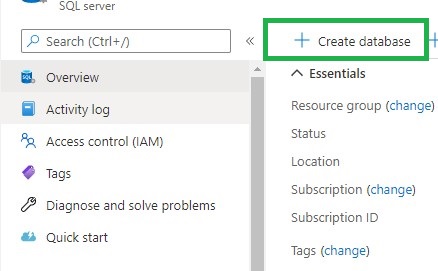
  • Create database
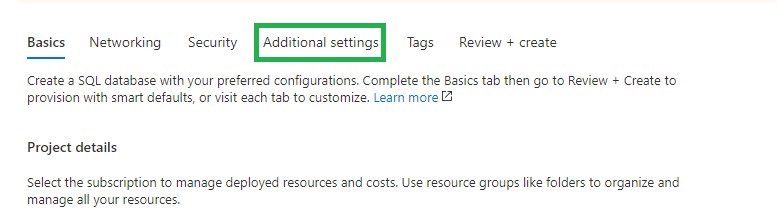
  • Go directly to the tab Additional Settings
  • Additional Settings
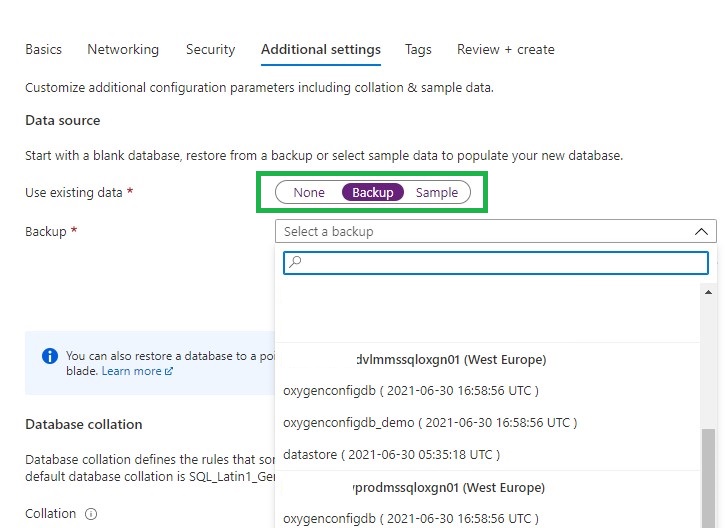
  • Select Backup
  • Select Backup
  • Search for your deleted Logical Server and you will see that you can restore your removed databases.
  • Select the correct database, click on review and create. Your database will now be restored
  • The last thing you need to do is to remove the datetime extension from your database
  • You can now start using your database again and all security roles that were there before are also present.
  • Repeat above steps in case you had more databases attached to the same server.
It’s a fairly simple process, but you just need to know it. And it will ultimately save you a lot of time and frustration.
If you have any questions regarding the above, please let me know.

Feel free to leave a comment

2 Comments

  1. Abdullah Alqahtani

    I can’t remember the area

    Reply
    • Erwin

      Is on the Logical server page or is that not what you mean?

      Reply

Leave a Reply

This site uses Akismet to reduce spam. Learn how your comment data is processed.

LEAP 2018

Lead Enterprise Architect ProgramFrom the 4th of December until the 6th of December I've joined the LEAP (Lead Enterprise Architect Program) 2018 Data/AI from Microsoft NL. Three  days on the Microsoft Campus in Redmond joining business and technical sessions from a...

Service Health Alerts in Azure

Maintenance and Service Healths in AzureI get often questions, is there no maintenance in Azure. Like every data center, the Azure data center also needs maintenance. You can even be notified when a specific service, in a specific data center, has scheduled...

Custom comments in Azure Synapse Analytics

Add custom comments to your Azure DevOps and Github commitsFinally ​Finally and secretly hidden, we can now add a Comment to our commits in Azure Synapse Analytics and Azure Data Factory to Azure Dev Ops. How do you activate this custom comment option in your existing...

Enable Pattern Rules in Azure Purview

How can I enable Pattern Rules?​Pattern Rules Last night I was preparing for a demo with Azure Purview. As always, I walk through all the activity hubs to see if there are any new options. This time I noticed that the Pattern Rules option was greyed out. Resource Set...

Creating Notebook Connections in Microsoft Fabric Just Became a Lot Easier (and Automatable!)

For a long time, creating a Notebook connection in Microsoft Fabric was surprisingly limited. If you wanted a Notebook to run under a Workspace Identity or Service Principal, you only could configure this directly in the DataPipeline UI. In fact, the Connections pane...

SQLBits session: Microsoft Purview Data Policy App

SQLBits 2023 Thanks everyone for visiting my session during SQLBits. It's great to see such a full room and that so many people have started using Microsoft Purview.  SLIDES The slides can be downloaded via the link below, so that you can view them again at...

How to enable Microsoft Fabric

Microsoft FabricI got some questions from customers that didn’t know how to enable Microsoft Fabric and that they only see Power BI Items and not the new announced Experiences. In this short blog I will explain how you can easily enable Microsoft Fabric.How to enable...

Goodbye 2022, Hello 2023

Goodbye 2022​Recap It's that time of year again to reflect on the past year. Also think it's really good, to see what you've done in the past year. It is also the time again to traditionally bake Oliebollen on this day, a Dutch Tradition that we do on New Year's Eve....

Proud to be an ADF Hackathon winner!

Azure Data Factory HackathonAround the clock During the event 'Around the clock Azure SQL and Azure Data Factory' event on Feb 3, 2021, they kicked-off the Azure Data Factory (ADF) Hackathon. Recording of this event can be found here.Winner I submitted a ADF Pipeline...

Calculate the Last Day of the Month using SQL

Calculate the Last DayToday I needed to calculate the last day of the previous month for a Customer.Ever heard from the function EOMONTH? Searching on the web I came across a function I never heard from before EOMONTH, this function can be used as of SQL Server 2012....

Discover more from Erwin | Data & Intelligence

Subscribe to get the latest posts sent to your email.