Use Global Parameters to Suspend and Resume your Analysis Services in ADF

Use Global Parameters to Suspend and Resume your Analysis Services in ADF

Suspend or Resume your Azure Analysis Services in Azure Data Factory

Last week one of my customer asked me if they could start or stop his Azure Analysis Services within Azure Data Factory. After a search on the internet I came across a blog from Joost, I’m using that blog as input for this post. Most of the credits goes to him. For me the focus was more on making it parameterized so that I can reuse these Pipelines for all of my customers. A couple of weeks ago the ADF team released the Global Parameters and in this post I’m going to use these parameters.

Global Parameters

Global parameters are constants across a data factory that can be consumed by a pipeline in any expression. They are useful when you have multiple pipelines with identical parameter names and values.

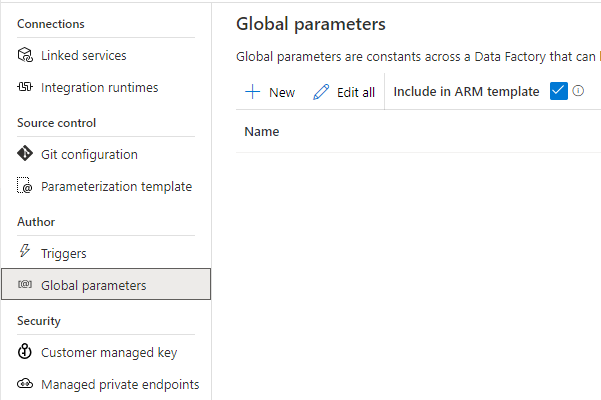
Creation and management of global parameters is done in the management hub.
ADF and GlobalParameter

ADF and GlobalParameter

Create above Global Parameters to build the Pipeline.

The following parameters can now be used across all your Data Factory Activities:

@pipeline().globalParameters.AAS_ResourceGroupName
@pipeline().globalParameters.AAS_ServerName
@pipeline().globalParameters.SubscriptionId

Build Pipeline

Create a new Pipeline PL_ACT_AAS_SUSPEND_GP 

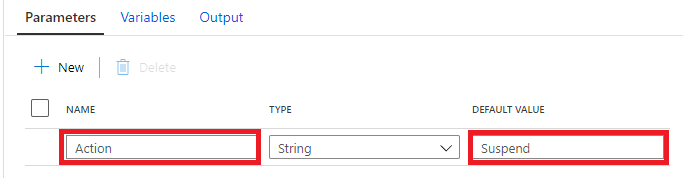
Add a Parameter to the Pipeline Action to easily reuse this Pipeline to Resume our AAS.
ADF and GlobalParameters

Add a Web Activity.

Name = Suspend_AAS  (depends on the Action).

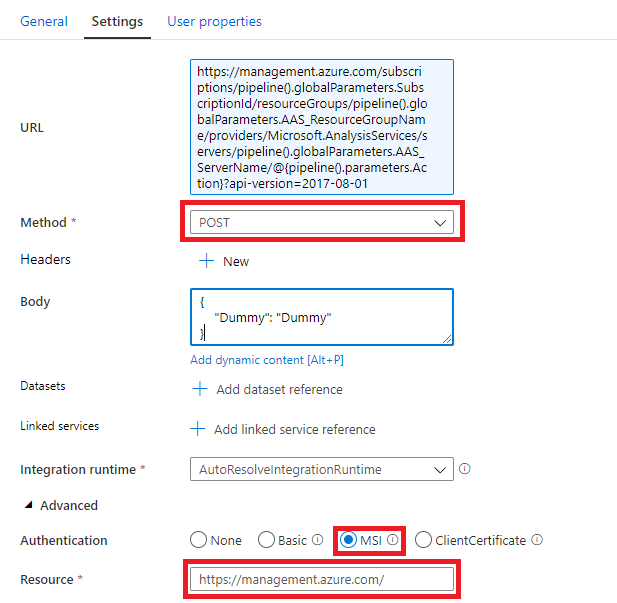
As Joost Mentioned in his blog we first have to define the Rest API Url in the Settings Tab.

https://management.azure.com/subscriptions/<xxx>/resourceGroups/<xxx>/providers/Microsoft.AnalysisServices/servers/<xxx>/<ACTION>?api-version=2017-08-01

The  <xxx> we need to replace with the Global Parameters and the <Action> with the Pipeline Parameter. The final Result will be:

https://management.azure.com/subscriptions/@{pipeline().globalParameters.SubscriptionId}/resourceGroups/@{pipeline().globalParameters.AAS_ResourceGroupName}/providers/Microsoft.AnalysisServices/servers/@{pipeline().globalParameters.AAS_ServerName}/@{pipeline().parameters.Action}?api-version=2017-08-01

Method = POST

Body = Create a dummy json message, it is not used by the Rest API.
ADF and GlobalParameters

Add Azure Data Factory as Contributor to Azure Analysis Services

Before you can debug or test your Pipelines you should add your ADF Instance with Contributor Role to your Azure Analysis Services.

ADF and GlobalParameters

After you have done this, you can Debug your Pipeline.

ADF and GlobalParameters

Error

I got an error because my AAS is already Suspend Or Resumed. We can solve this by adding a check, to check  what the Status of Analysis Services is.

Check Analysis Services Status

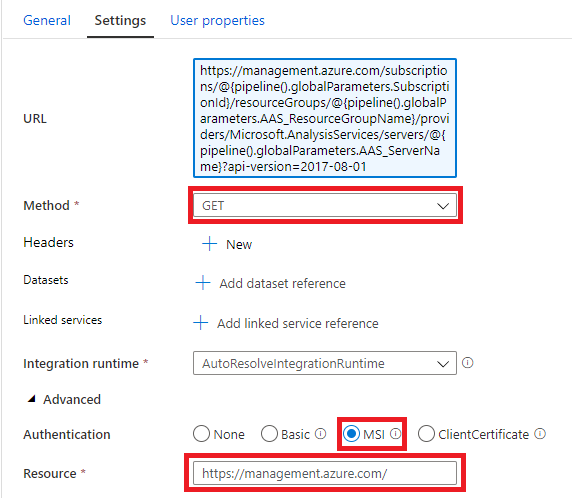
To check if our Analysis Services is already Suspended or Resumed we can at Web Activity to check the Status.

Add a Web Activity to your Pipeline  or make a copy of the existing Web Activity

Name = Check_Status_AAS

URL= Https://management.azure.com/subscriptions/@{pipeline().globalParameters.SubscriptionId}/resourceGroups/@{pipeline().globalParameters.AAS_ResourceGroupName}/providers/Microsoft.AnalysisServices/servers/@{pipeline().globalParameters.AAS_ServerName}?api-version=2017-08-01

Method = GET
ADF and GlobalParameters

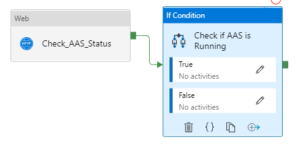
Add IF Condition Activity (Check if AAS is Running)
ADF and GlobalParameters

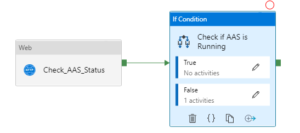
Add an Expression on the If Condition Activity  @bool(startswith(activity(‘Check_AAS_Status’).output.properties.state,’Paused’))

This expression will check if the Analysis Services is Running or not. If we want to to Suspend our Analysis Services we have to add to the Web Activity Suspend_AAS  to False (Cut from the main frame and Paste in the False Activity). In case the Analysis Services is already Suspended we do nothing(True).
ADF and GlobalParameter

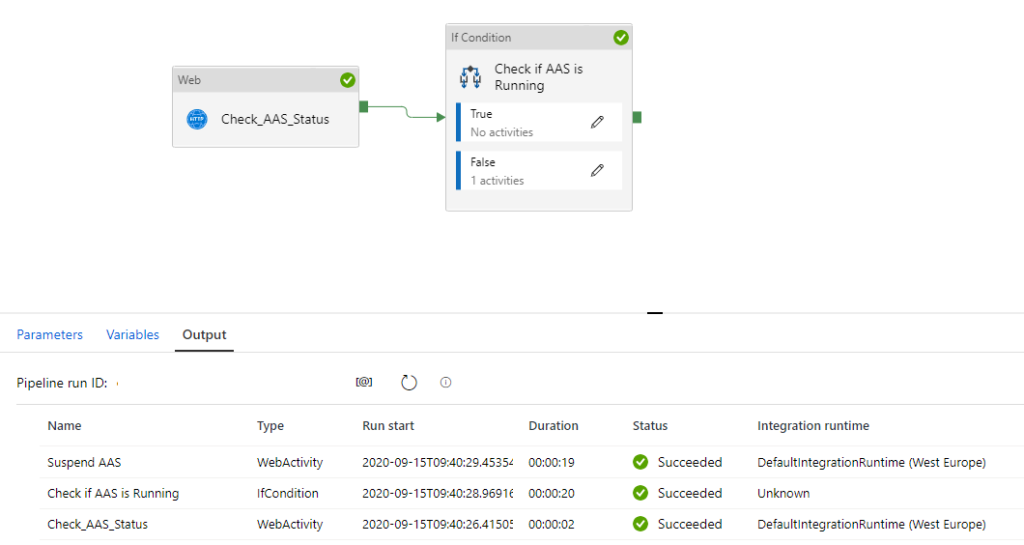
Debug your Pipeline, to see what is happening

Analysis Services was running, Web Activity Suspend AAS is called:
ADF and GlobalParameter

Analysis Services was already Paused/Suspended, no action required:
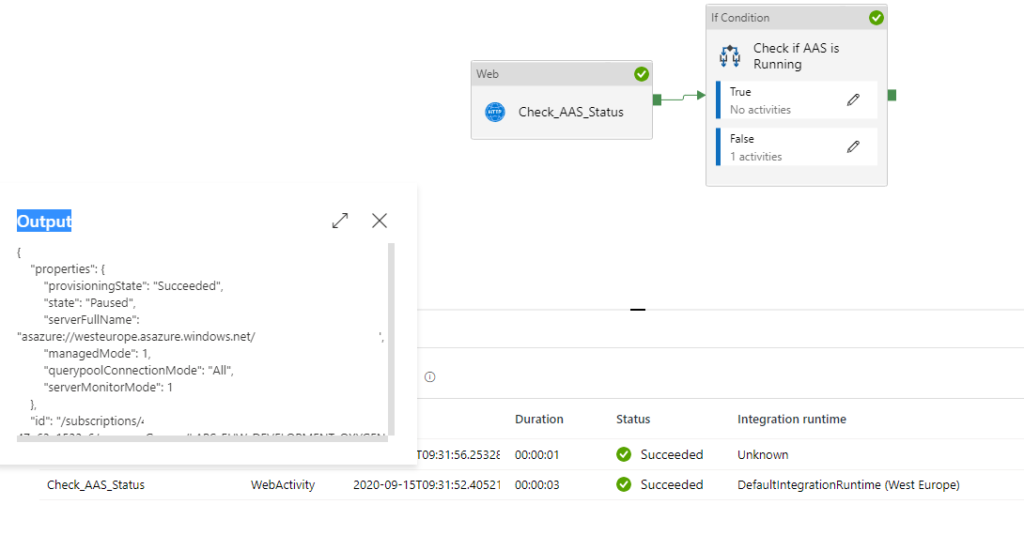
ADF and GlobalParameter

Create Pipeline to Resume your Analysis Services

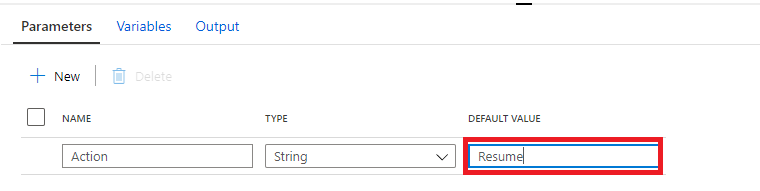
Clone your PL_ACT_AAS_SUSPEND_GP and rename it to PL_ACT_AAS_RESUME_GP. Change your action Parameter to “Resume”.

ADF and GlobalParameter

Within the IF Condition move the Web Activity Suspend AAS from False to True and rename to Resume AAS

Debug to see if everything is working fine:
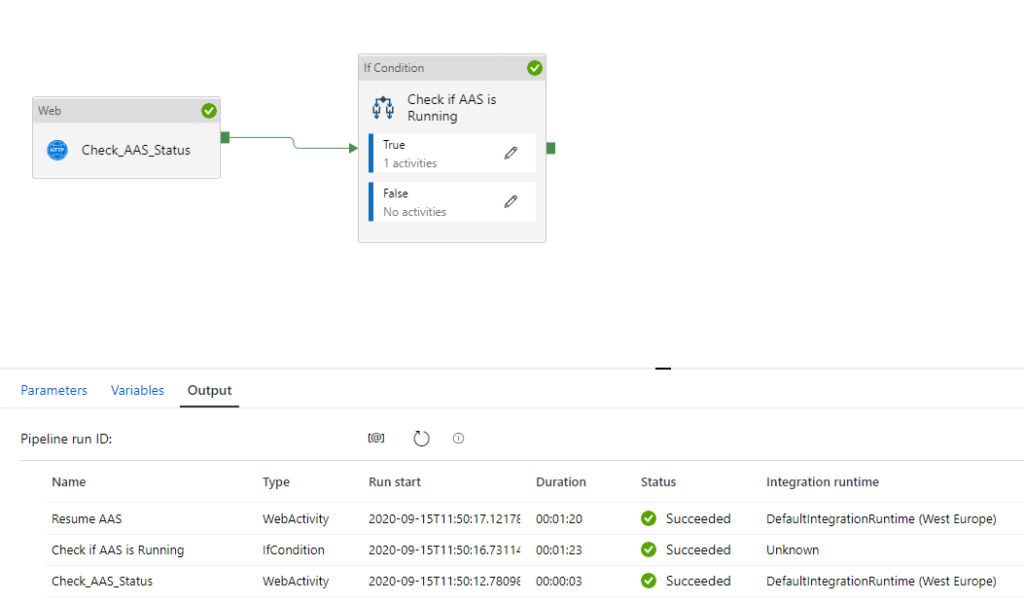
ADF and GlobalParameter

You have now learned how to Suspend and Resume your Azure Analysis Services Dynamically with the use of Global Parameters. Both Pipelines can be easily transferred to different customers.

Please feel free to download the Pipeline Templates here

If you’re already using a database where you store your Meta Data, then you have also the possibility to store the necessary parameters in the database. The only thing you need to do is to add a Lookup Activity to get the parameters from your database(and replace the global parameters with the output from the lookup activity)
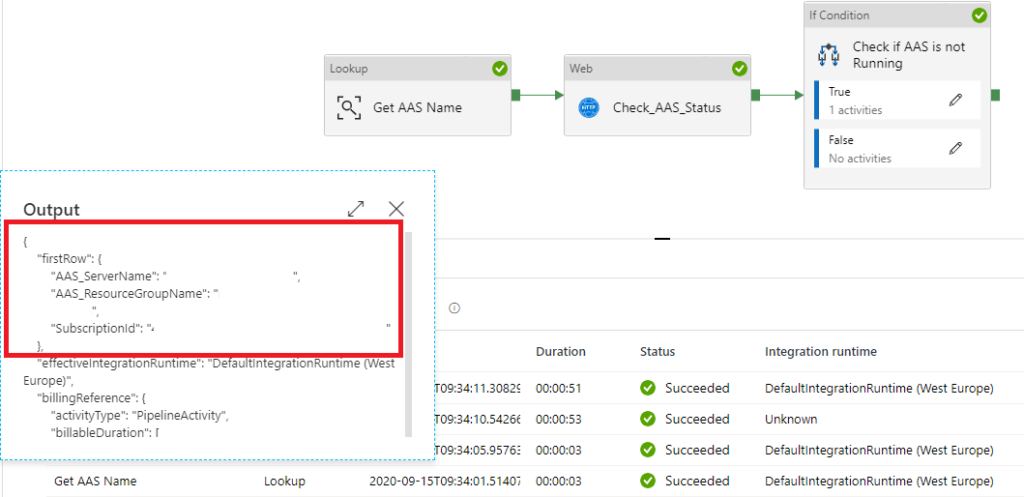
ADF and GlobalParameter


Hopefully this article has helped you a step further. As always, if you have any questions, leave them in the comments.


Based on above article you should now also be able to build a Pipeline to Process your Analysis Services Model with some help from this blog or you download the Pipeline Template from here.
 

Speaking(Virtual) at SQL Saturday #963 Denmark

Speaking(Virtual) at SQL Saturday #963 Denmark

SQL Saturday 963 Denmark

PASS SQLSaturday is a free training event for professionals who use the Microsoft data platform. These community events offer content across data management, cloud and hybrid architecture, analytics, business intelligence, AI, and more.

My first virtual event

I like to interact during my session, so I’m curious if that will work. Last week I recorded my session for SQL Bits and that is quite strange when you look back. I am really looking forward to it, my session starts at 14:30.

The complete schedule can be found here. Are there is still time to register!!

My Session

Session Title:

Azure Key Vault, Azure Dev Ops and Data Factory how do these Azure Services work perfectly together!

Session Details

Can we store our Connectionstrings or BlobStorageKeys or other Secretvalues somewhere else then in Azure Data Factory(ADF)? Yes you can! You can store these valuable secrets in Azure Key Vault(AKV). But how can we achieve this in ADF? And finally how do we deploy our DataFactories in Azure Dev Ops to Test, Acceptance and Production environments with these Secrets ? Can this be setup dynamically? During this session I will give answers on all of these questions. You will learn how to setup your Azure Key Vault, connect these secrets in ADF and finally deploy these secrets dynamically in Azure Dev Ops. As you can see a lot to talk about during this session.

Do I see you on Saturday 26th of September?


SQL SERVER KONFERENZ 2020

SQL SERVER KONFERENZ 2020 Date: 4-5 March Location: KongressCenter Darmstadt   Speaking Dinner The speaker dinner on Tuesday evening was held in Restaurant Sitte. And yes what do you eat when you are in Germany a delicious Schnitzel with baked potatoes. It was a…

Speaking at SQLBits in London (postponed to September 2020)

SQLBits 2020 SQLBits is the largest Microsoft Data Platform conference in Europe taking place between 29nd September and 3rd October2020 at the Excel London. Proud to be speaking I am very proud and happy that one of my sessions was selected for SQLBits. It’s not the…

My virtual session at Data Toboggan

Data Toboggan This Saturday I’ve joined the Data Toboggan to talk about Azure Synapse Analytics.   Azure Synapse Analytics Today I’ve been talking on how to deal with all the different roles in Azure Synapse Analytics during Data Toboggan. An event 100% focussed…

SQLBITS 2022

SQL BITS 2022 What a great time I had Wednesday 9th of March the time had finally come, at 1830 my plane would leave for London City. After all the preparations over the past few weeks, the time was there. After arriving in London City and checking in at the hotel, I…

My Session at TechoramaNL 2019

TechoramaNL 2019 Date: 2 th October Location: Pathé Ede From September 30 th to October 2 nd TechoramaNL was held in the Netherlands for the 2nd time. TechoramaNL is the largest deep knowledge IT conference in the Netherlands with 1500 participants and 120 sessions in…

Data:Scotland

Data: Scotland 2022 Microsoft Purview Scotland’s Data Community Conference happened this year again in Glasgow. This years event was happening in  a sunny Glasgow, more then 400 attendees and more then 50 sessions. It was great to see so many people live again. I…

My sessions at Pass Data Community Summit

A hybrid conference in Seattle and online This year’s PASS Data Community Summit is more than a conference – it’s a homecoming. Reconnect with old friends, build new relationships, gain new skills, and get the world-class training you need to take that next step in…

My Virtual Session DataSaturday #14 Oslo

DATA SATURDAY #14 OSLO This Saturday I’ve been speaking during DataSaturday #4 Oslo. If you want to visit more Datasaturday events please visit the Data Saturdays event page. Azure Purview I presented a session on Azure Purview Microsoft’s answer to Data Governance…

My first Virtual session in 2022 for Dataminds

DataMinds This Tuesday I’ve joined the DataMinds user Group to talk about Azure Purview.   Azure Purview It was the first session of the year for both me and DataMinds. Some great questions during the session, thank you for that. You can find my slides below on…

DataGrillen 2022

DataGrillen 2022 Microsoft Purview When we say: Data, bratwurst and beer, we are of course talking about DataGrillen. After more than 2 years of absence, it was time again in recent days, with speakers from all over the world with almost 50 sessions, good weather and…