My Virtual Session at SQLBits 2020

by Oct 5, 2020

SQL BITS 2020, the greatest data show 

Last week was SQL BITS week.

After the event was moved from April to September, it eventually became a Virtual event. Setting up a Virtual event requires a lot of adjustments in the Organization.
SQL BITS 2020

Recording

All regular sessions had to be recorded in advance so that during the event itself it could not go wrong.
For some of us this was new and others have done it before. In any case, it was new to me, but the organization did everything it could, to help us with various sessions in which everything was explained and in which we could ask all kinds of questions. Thanks for that.

Is it strange to pre-record a session?

Yes, it is, you are trying to find an environment in which you have no ambient noise, a good microphone and a good camera. But you don’t always have an influence on ambient sounds. And presenting to a webcam is strange.

After practicing my session again, I recorded my session in one go and did not edit anything in the session. After all, something can always go wrong or go in a different way in a session, even if you record it in advance. Once you start adjusting or editing that, the end is lost and a lot of time goes into it. But also the charm of  a session is gone. After all, we are data professionals and not movie stars.

My Session

Back to the day itself, half an hour in advance I could log in to my session and must say that it was quite exciting. Would the video start, how do I come across and some more questions where in my head?
But all nerves for nothing, the session started right on time. In the meantime I had created a few polls which you could have the audience answer in between.
But also being able to answer the questions live during the session and sometimes even with a link to some extra information was now easy.SQL BITS Poll
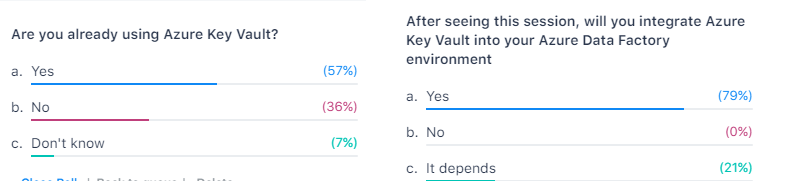
I was delighted to see at the outcome of the last poll, most of the people who attended my session will now start using Azure Key Vault in their day-to-day work. In the end that’s why we do it for(help or advice others).

My presentation can me found here.

Conclusion

I saw a very great event, the quality of the sessions were very high. And there was so much choice, but luckily they will be soon available to watch On-Demand.
A big round of applause to the entire organization, you have organized a fantastic event with a super nice portal, including exhibitor hall, networking, chat rooms and much more. Thank you for having me and see you next year.


Feel free to leave a comment

0 Comments

Leave a Reply

This site uses Akismet to reduce spam. Learn how your comment data is processed.

A new year with a new job

Changing jobsAfter almost 11 years and 4 months I have decided to leave Axians and to start a new adventure in the new year. On January 2, 2020 I will start my day as Lead Data and AI at InsparkThe past years have flown by. I started at Eniac BI, which was...

Goodbye 2020 Hello 2021

Goodbye 2020 Started to work for InSpark Last year was certainly an eventful year. Started with a new job at InSpark and after 10 weeks we all know what happened, the first intelligent lockdown. The Netherlands was partially locked, but our office was immediately...

Azure Purview March Updates

Azure Purview updatesAnnouncements Last week during SQLBITS, quite a few new updates were announced. I would like to include you in these announcements.March updates Support for SAP Business Warehouse (Preview) Blogpost:...

Rerun Pipeline activities in Azure Data Factory

Rerun Pipeline activities in ADF! As of today you can rerun or partially, yes you’re reading it correct partially, rerun you Azure Data Factory pipeline.Where you previously had to run the entire Pipeline again, you can now run a part of the Pipeline. This can save a...

Goodbye 2021, Hello 2022

Goodbye 2021Recap First of all, I would like to wish everyone a very beautiful and healthy 2022. We are now 3 days on the road into the new year and it is always good to look back at what happened last year. It's certainly been an eventful year, topped off with my MVP...

Enable Pattern Rules in Azure Purview

How can I enable Pattern Rules?​Pattern Rules Last night I was preparing for a demo with Azure Purview. As always, I walk through all the activity hubs to see if there are any new options. This time I noticed that the Pattern Rules option was greyed out. Resource Set...

Calculate Workingdays including Holidays with T-SQL

Calculate Workingdays between 2 Date columnsRecently I have been getting some questions from my customers, can I calculate the number of workdays between 2 dates? Of course my answer was, yes you can. But I do want certain closing dates and holidays of our company not...

Parameterize Linked Services in ADF

Parameterize Linked Services For my Azure Data Factory solution I wanted to Parameterize properties in my Linked Services. Not all properties are Parameterized by default through the UI. But there's another way to achieve this.    Linked Service Open your existing...

Service Health Alerts in Azure

Maintenance and Service Healths in AzureI get often questions, is there no maintenance in Azure. Like every data center, the Azure data center also needs maintenance. You can even be notified when a specific service, in a specific data center, has scheduled...

How to check your SQL Server Quota in Azure?

Azure Subscription Usages for SQL Server  Last week we reached our Logical server Quota in Azure. By default you're only allowed to add 20 Logical Servers, but we wanted to have some more for testing purposes.Microsoft Support You can submit a support ticket trough...

Discover more from Erwin | Data & Intelligence

Subscribe to get the latest posts sent to your email.