Using Azure Automation to generate data in your WideWorldImporters database

CASE:

For my test environment I want to load every day new increments into the WideWorldImporters Azure SQL Database with Azure Automation. The following Stored Procedure is available to achieve this.

 EXECUTE DataLoadSimulation.PopulateDataToCurrentDate

@AverageNumberOfCustomerOrdersPerDay = 60,

@SaturdayPercentageOfNormalWorkDay = 50,

@SundayPercentageOfNormalWorkDay = 0,

@IsSilentMode = 1,

@AreDatesPrinted = 1;

For this case I'm going to use Azure Automation to Execute this Stored Procedure on a daily base.

More details on above Stored Procedure can be found here.

In case you don't have a WideWorldImporters database in your Azure environment you can download it from GitHub.

  1. Create an Azure Automation Account
  2. Add module to Azure Automation Account
  3. Adding a SQL Server Credential 
  4. Create a Runbook
  5. Create a Schedule

Create an Azure Automation Account

First of all we need to create an Azure Automation Account in our Azure Environment.

Go to the portal and search for Automation and click op Create
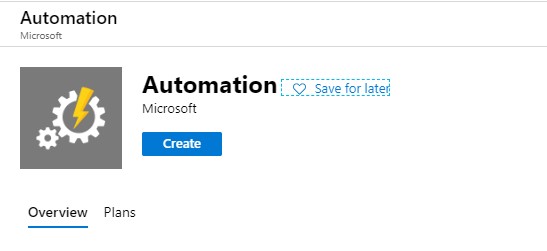
Create Azure Automation

Fill in the details and select the correct subscription and Resource Group.
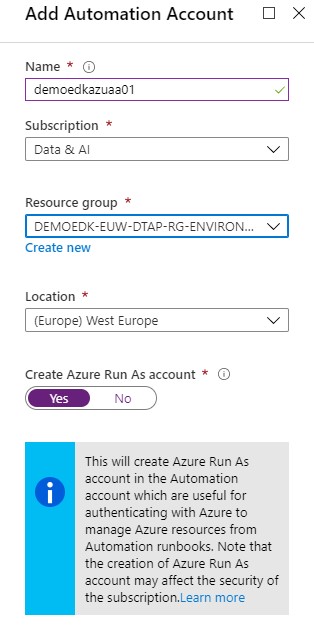
Create Azure Automation

Click on create and wait for the account to be created. The new Automation Account configuration blade will be opened once the provision is completed.

Add module to Azure Automation Account

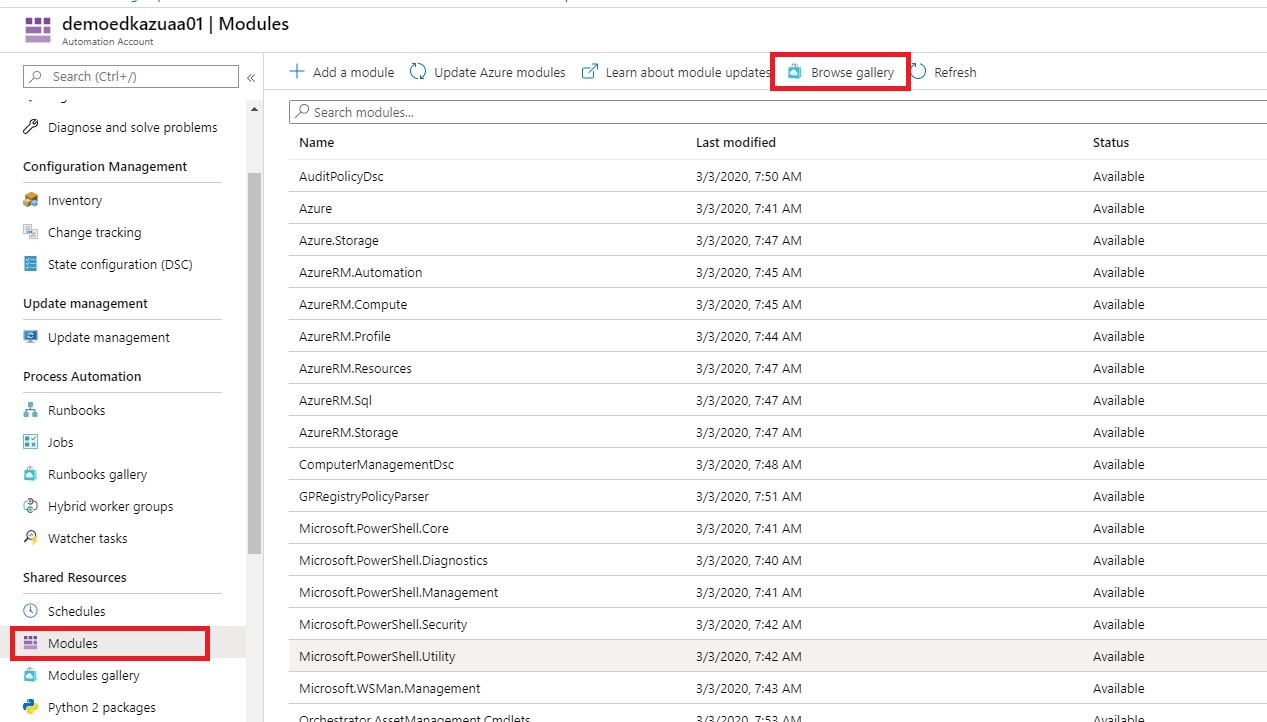
The next step is that we need to add the “SQLSERVER” module to our Automation Account.

Select Modules and Browse Galery.
Create Azure Automation

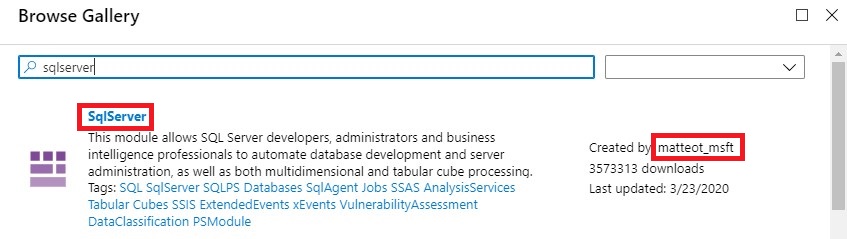
Search for sqlserver Created by matteot_msft.
Create Azure Automation

Then click on Import and OK and wait for the import to complete.

Add SQL Server Credentials

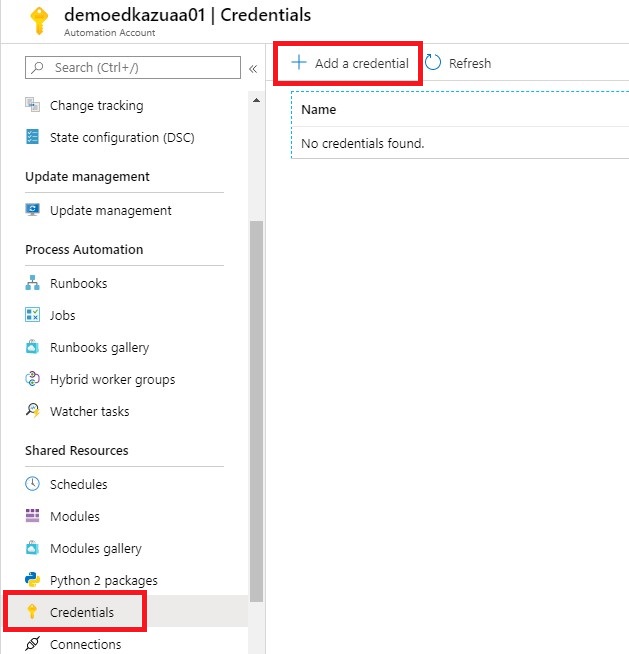
Click on add a Credential, this is a secure way to hold your login name and password that will be used to access the Azure SQL Database.
Create Azure Automation

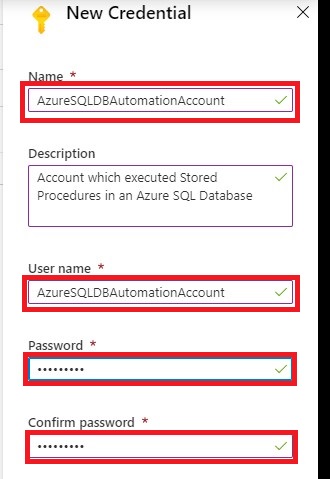
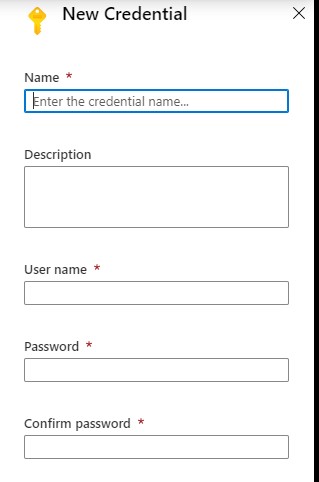
Add a Credential name AzureSQLDBAutomationAccount and define a password.
Create Azure Automation

If this account is not created in your Azure SQL Database, then you need to add this account as well:

[sql]

--Execute in Master Database

create login AzureSQLDBAutomationAccount with password='Your defined Password'           

--Execute in WideworldImporters Database

create user AzureSQLDBAutomationAccount

for login AzureSQLDBAutomationAccount

with default_schema= dbo

--add user to the dabase role

exec sp_addrolemember  N'db_owner' , N'AzureSQLDBAutomationAccount'
[/sql]

Create a Runbook

The next step is to create a Runbook.

You can Import an existing Runbook or Create a new Runbook.

For now we will Create a new RunBook.
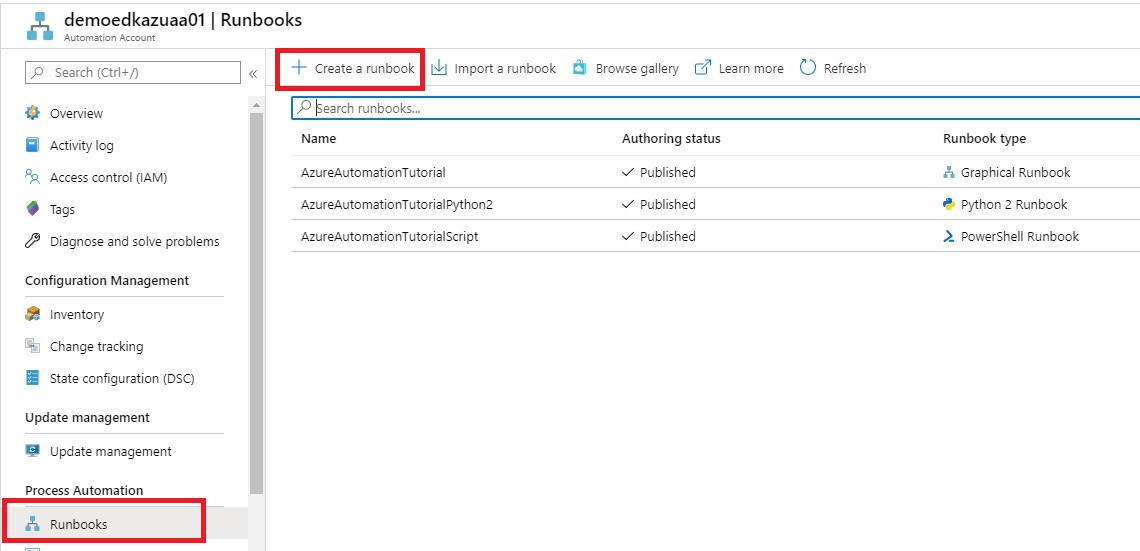
Create Azure Automation

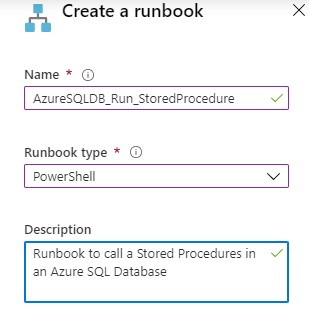
Name = “AzureSQLDB_Run_StoredProcedure”

Runbook Type =”Powershell”
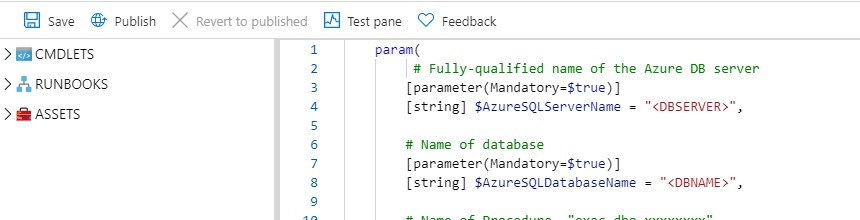
Create Azure Automation

[ps]
param(
# Fully-qualified name of the Azure DB server
[parameter(Mandatory=$true)]

[string] $AzureSQLServerName = 'DBSERVER',

# Name of database
[parameter(Mandatory=$true)]

[string] $AzureSQLDatabaseName = 'DBNAME',

# Name of Procedure 'exec dbo.xxxxxxxx'
[parameter(Mandatory=$true)]

[string] $ProcedureName = 'exec name',

# Credentials for $SqlServerLogin stored as an Azure Automation credential asset
[parameter(Mandatory=$true)]

[string] $SqlCredential
)
$Credential = Get-AutomationPSCredential -Name $SqlCredential
$AzureSQLServerName = $AzureSQLServerName + '.database.windows.net'

$SQLOutput = $(Invoke-Sqlcmd -ServerInstance $AzureSQLServerName -Username $Credential.UserName -Password $Credential.GetNetworkCredential().Password -Database $AzureSQLDatabaseName -Query $ProcedureName -QueryTimeout 65535 -ConnectionTimeout 60 -Verbose) 4>&1

Write-Output $SQLOutput
[/ps]

This a simple Powershell script which can execute a Stored Procedure. More details about the PS Invoke-Sqlcmd can be found here.  You can download the Powershell script from my Github

Save the Runbook and then test the runbook. After you tested your Runbook you can Publish the Runbook
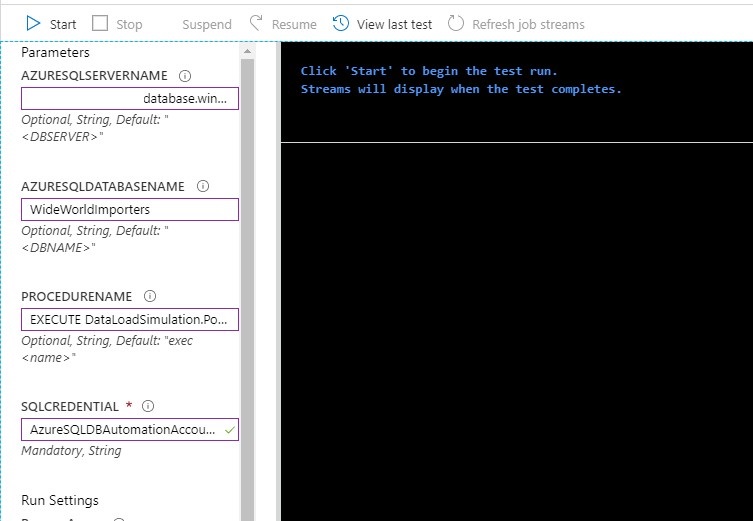
Create Azure Automation

Fill in the requested Parameters as showed in the picture above and click on Start. The requested procedure will be executed.


Create A Schedule

That last step is create a Schedule which will run every day to incremental load your data.

Create Azure Automation


Create Azure Automation

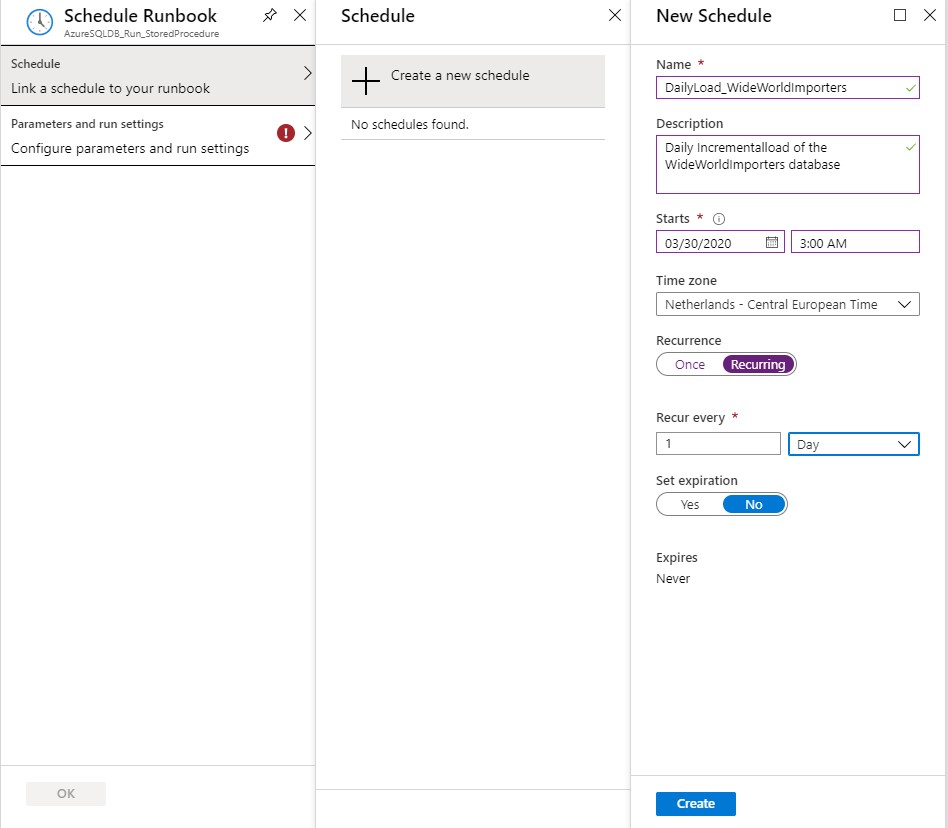
Define a Name, Schedule Start Time and the Recurrence for the Schedule and click on Create
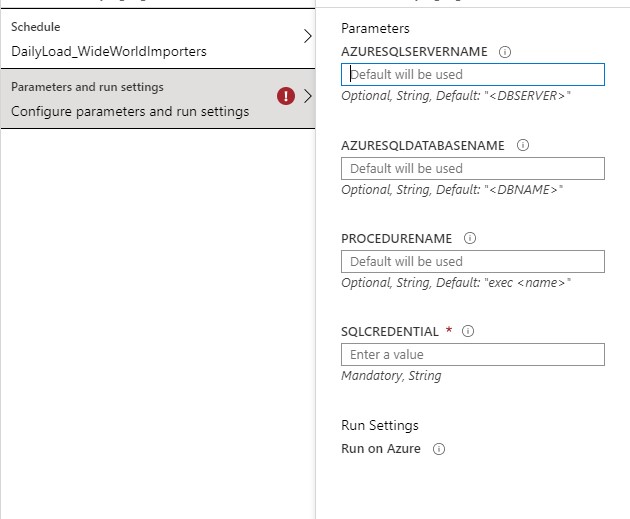
Create Azure Automation


Fill in the requested Parameters and click on Save.

I assume that you have now succeeded in creating an Azure Automation Account with these steps and that you could execute a Stored Procedure in an Azure SQL Database. If you have any questions, leave a message in the comments below. Thanks for reading.

TIP:

To update your database to the current date you have to run this procedure quit  lot of times so create a query where you execute the Procedure 100x times in  a row. The downloaded database has data up to may 2016.

In case you get error regarding the Temporal Tables, check your errors in this blog post. I helped me a lot.


I my next blog I will describe how you easily can extract data(full and Incremental) from your WideWorldImporters Database to Azure Data Lake Gen2 with Azure Data Factory.
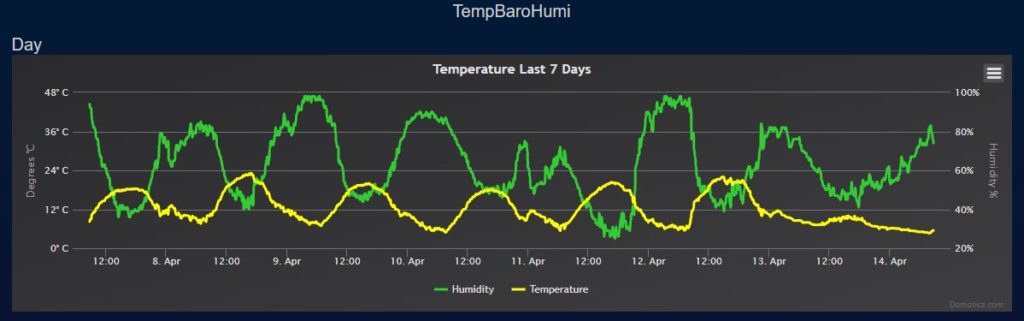
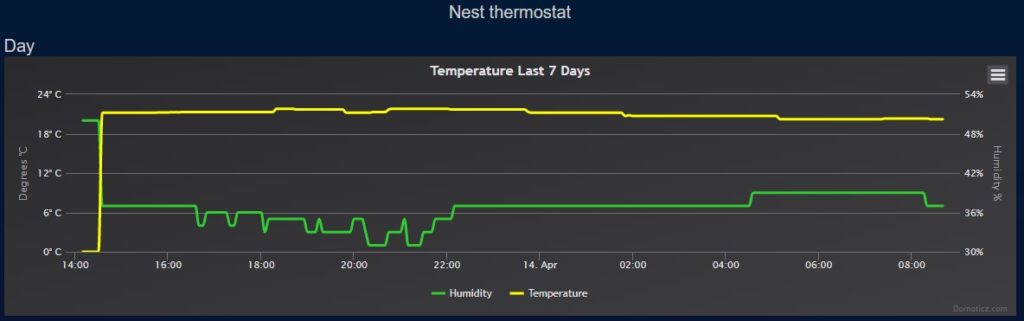
Control my Nest Thermostat on my Domoticz Server running on a Synology DiskStation

Control my Nest Thermostat on my Domoticz Server running on a Synology DiskStation

Erwin

by Erwin | Apr 14, 2020

Control your Nest Thermostat  in Domoticz

Normally I always write Azure related, but today I'm writing about something different, on how I can control my Nest Thermostat on my Domoticz Server (Home automation).

A while ago I have upgraded my  Nest Thermostat to login with Google. What happened after the upgrade, my Nest was not showing any new data anymore in my Domoticz. The reason for that is, Google stopped the developer program “Works with Nest”.​ The new platform will be available by the end of this year . Till then we need a workaround to get our data.

My Domoticz is running the latest Version: 2020.1 on my Synology ds218. After some research on the internet I came across a Nest Api solution build by Roland Breedveld for a Raspberry Pi. You find all the code and the readme here:

To run the code on my Synology I needed to change some of the code and the setup.

Please follow the steps below to get the Nest Api working on your Synology:

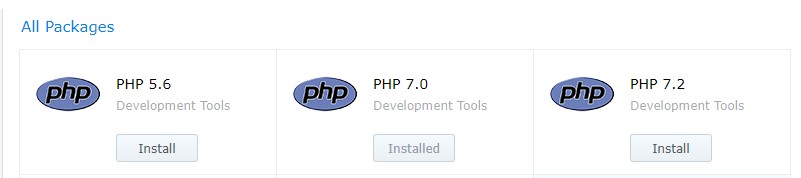
Before you start make sure have installed the PHP and the Git Server Package:

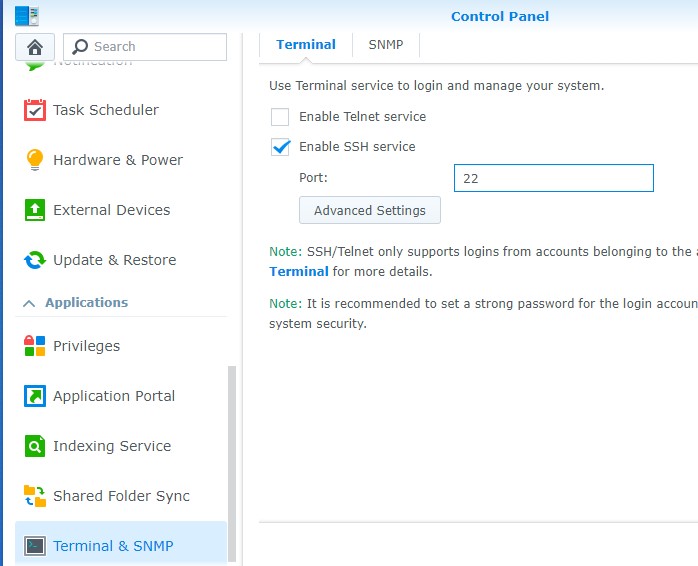
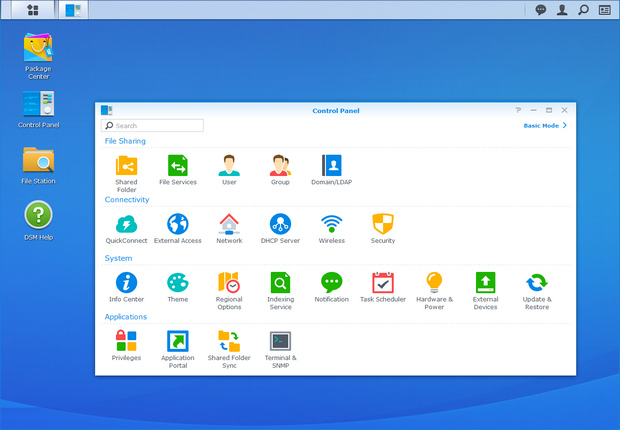
Enable SSH in your Synology Control Panel – Terminal & SNMP

Login in to your Synology with SSH, I’m using Bitwise SSH Client to connect to my Synology.

After you’re logged in, log in to Root

Sudo-i  and Password

Installation

Change to your script location of your Domoticz(in my case and probally for most of the Synology users)

Cd /usr/local/domoticz/var/scripts

git clone https://github.com/rolandbreedveld/nest-api.git

Update

To update it to the latest version:

Cd /usr/local/domoticz/var/scripts/nest-api

git pull

Configuration

Copy nest.auth.php_example to nest.auth.php and change the issue-token and cookie in nest.auth.php
to get both values take these steps: (thanks FilipDem for this info)
READ THESE STEPS CAREFULLY !

  • Open a Chrome browser tab in Incognito Mode (or clear your cache).
  • Open Developer Tools (View/Developer/Developer Tools).
  • Click on Network tab. Make sure Preserve Log is checked.
  • In the Filter box, enter issueToken
  • Go to https://home.nest.com, and click Sign in with Google. Log into your account.
  • One network call (beginning with iframerpc) will appear in the Dev Tools window. Click on it.
  • In the Headers tab, under General, copy the entire Request URL (beginning with https://accounts.google.com, ending with nest.com). This is your $issue_token.
  • In the Filter box, enter oauth2/iframe
  • Several network calls will appear in the Dev Tools window. Click on the last iframe call.
  • In the Headers tab, under Request Headers (be shure it's the request header not the other ones!!), copy the entire cookie value (include the whole string which is several lines long and has many field/value pairs - do not include the Cookie: prefix). This is your $cookies; make sure all of it is on a single line.
    Be shure, the cookie and token values are placed between '' and the row ends with a ;

Create virtual Devices in Domoticz:

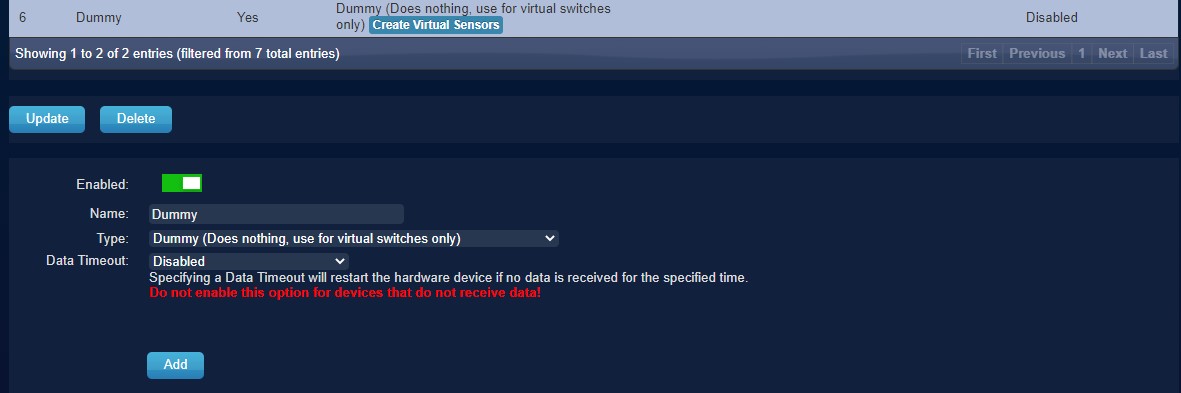
If you don't have created any Dummy Virtual Sensors before make you sure add the dummy Hardware first:

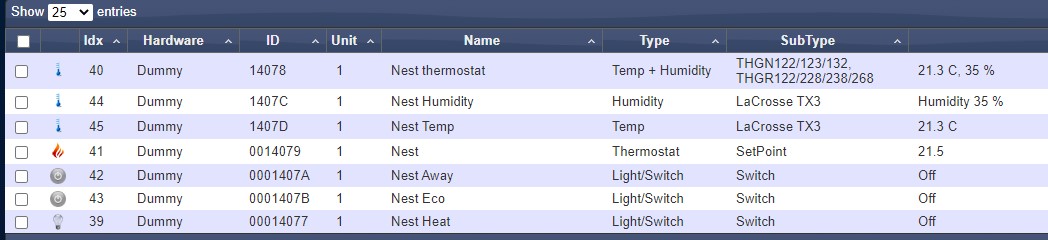
Click on create Virtual Sensors, to add all sensors as below:

  • for Temp : Temperature LaCross TX3
  • for Hum : Humidity LaCross TX3

or if you want the combined virtual device for Tem and Hum :

  • for TempHum : Temp+Hum THGN122/123/132
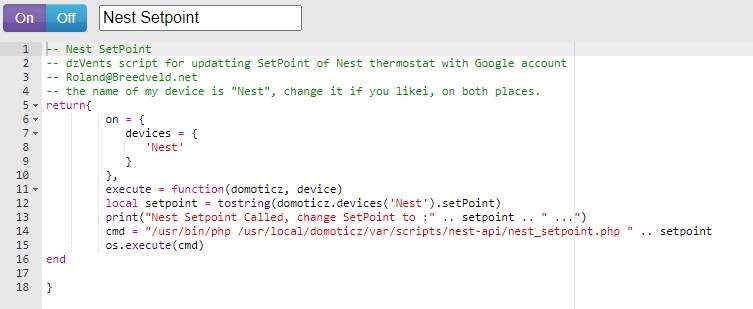
  • for SetPoint : Thermostat SetPoint # I Named this device Nest, To acticate it easy from my iPhone with Siri
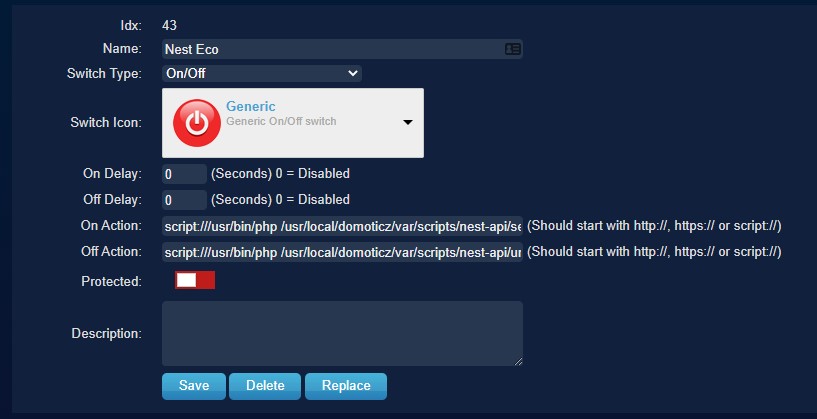
  • for ECOMode : a regular Light/Switch and change the icon tosomething nice
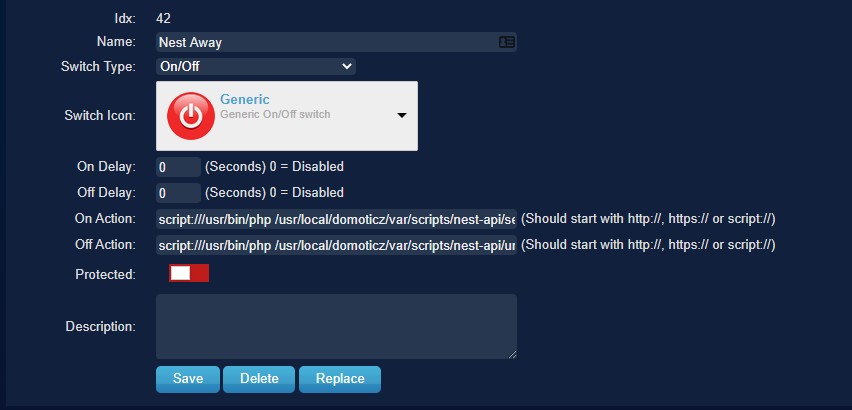
  • for AwayMode : a regular Light/Switch and change the icon tosomething nice
  • for Heat : a regular Light/Switch and change the icon tosomething nice

Nest Devices Configuration

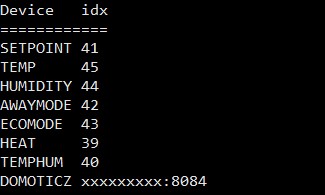
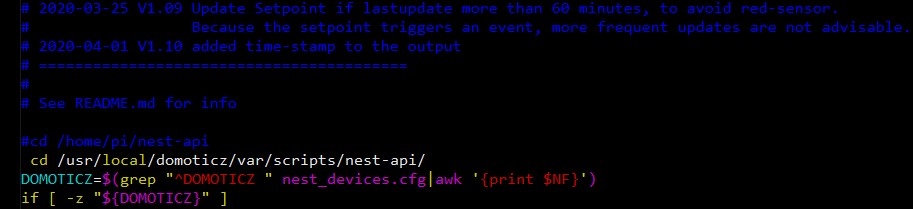
Move file nest_devices.cfg-example to nest_devices.cfg note the idx nrs, as find in the devices tab, and change them below in the nest_devices.cfg file.

Example: SETPOINT 41<<< change this as example for the SETPOINT to your idxremove or place a # for lines you don't want to use.

Domoticz => Your Domoticz server and port  (8080;8084)

Edit in Domoticz the ECO Mode switch:

On Action: script:///usr/bin/php /usr/local/domoticz/var/scripts/nest-api /set_nest_eco_mode.php

Off Action: script:///usr/bin/php /usr/local/domoticz/var/scripts/nest-api /unset_nest_eco_mode.php

Edit in Domoticz the Away Mode switch:

On Action: script:///usr/bin/php /usr/local/domoticz/var/scripts/nest-api /set_nest_away_mode.php

Off Action: script:///usr/bin/php /usr/local/domoticz/var/scripts/nest-api /unset_nest_away_mode.php

Domoticz Events

In the Domoticz event gui, create a new event->dzvents->device
cut-and-paste the content of the example file dzVents_script_Nest_Setpoint.txt in it.
My setpoint device is called "Nest", so you perhaps you need to change it.
Better don't use spaces in the device names if you call them from dzvents event's.
I had a couple of times problems with this, removing the spaces solved it.

Domoticz Settings

In the Domoticz configuration add 127.0.0.* and your ip (or range) to local networks.

Schedule

Add the following cron-entry, to get every 5 minutes the last values from Google: (crontab -e)

*/5 * * * *  root /usr/local/domoticz/var/scripts/nest-api/get_nest.sh >/dev/null 2>&1

Schedule with Logging enabled

*/5 * * * *  root /usr/local/domoticz/var/scripts/nest-api/get_nest.sh >/var/log/nest-api.log 2>&1

In the file get_nest.sh change the location to /usr/local/domoticz/var/scripts/nest-api(or to your Domiticz Directory)

You can create a schedule to run for every minute, but I don't know if Google has limitation's how much call's per hour are allowed, 5 minutes is save I think, also Domoticz stores it's data every 5 minutes, so it only effects the user interface.
I you are using logging for a longer time you need to avoid the log-file became to big, by activate log-rotating:

Of course you can schedule it every minute, but I don't know if Google has limitation's how much call's per hour are allowed, 5 minutes is save I think, also Domoticz stores it's data every 5 minutes, so it only effects the user interface.

Log-Rotating

I you are using logging for a longer time you need to avoid the log-file became to big, by activate log-rotating:

  • create a file: /etc/logrotate.d/nest-api :
    /var/log/nest-api.log {
    weekly
    missingok
    rotate 52
    compress
    notifempty
    create 640 root root
    sharedscripts
    }
  • If nest-api not is running as root change the create row to:
    create 640 user-name group-name

In case you do a 2nd schedule somewhere else, like in the Nest itself, they can conflict with each other when running exactly on the same time.
This will result as a 5 minutes toggle of values or states, you can simple solve it to add a little delay in the cron:

  • */5 * * * * sleep60; root /usr/local/domoticz/var/scripts/nest-api/get_nest.sh >/dev/null 2>&1

If you get this error:
PHP Fatal error: Uncaught exception 'UnexpectedValueException' with message 'Response to login request doesn't contain required access token. Response: {"error":"USER_LOGGED_OUT","detail":"No active session found."}' in /home/pi/nest-api/nest.class.php:1100

You have to regenerate the cookie and token again, see steps above, for some reason the token and cookie stopped working after running fine for 2 months in my case.

Errors

Check for common error message the original Readme

Most of the above blog corresponds to the original Readme, I only made the adjustments everywhere that where necessary for an installation on a Synology.

I'm happy that my Nest Thermostat is working again on my Domoticz, hopefully this blog helped you as well.


Using a Google Nest Api to load data to Domoticz running on a Synology Using a Google Nest Api to load data to Domoticz running on a Synology

In a couple of weeks I will write a blog about how I get the data from Domoticz and load it into Azure and create Power BI Reports on it. Let me know in the comments if you're interested in such a blog. 


Feel free to leave a comment

Updated competency exams and certifications Data Platform and Data Analytics for 2020

Erwin

by Erwin | Mar 20, 2020

Retiring and new exams and certifications as of June 30 2020

A lot of Exams and certifications for Data Platform and Data Analytics are retiring on June 30 2020. All retired Exams and certifications will remain eligible for competency attainment and renewal until June 30 2021, if taken before they are retired. What does that mean for Data Platform and Data Analytics competencies ?

Data Analytics

Competency Option(s) Level Exams retiring June 30 2020 New qualifying exams Remarks
 
Data Analytics Specialist option

AND

Learning Partner option

Silver/Gold Exam 70-767: Implementing a SQL Data Warehouse

Exam 70-768: Developing SQL Data Models

Microsoft Certified: Azure Data Scientist Associate

Microsoft Certified: Azure Data Engineer Associate

Other new exams will be made available to partners before June 30 2020. Please continue to check Partner Center.
Power BI option Silver/Gold Exam 70-778: Analyzing and Visualizing Data with Microsoft Power BI New exams will be made available to partners before June 30 2020. Please continue to check Partner Center


Data Platform


Competency Option(s) Level Exams retiring June 30 2020 New qualifying exams Remarks
SQL Server Specialist option

AND

Learning Partner option

Silver/Gold Exam 70-761: Querying Data with Transact-SQL

Exam 70-762: Developing SQL Databases Exam 70-764: Administering a SQL Database Infrastructure

Exam 70-765: Provisioning SQL Databases

Microsoft Certified: Azure Data Engineer Associate New exams will be made available to partners before June 30 2020. Please continue to check Partner Center

Feel free to leave a comment

SQL SERVER KONFERENZ 2020

SQL SERVER KONFERENZ 2020

SQL SERVER KONFERENZ 2020

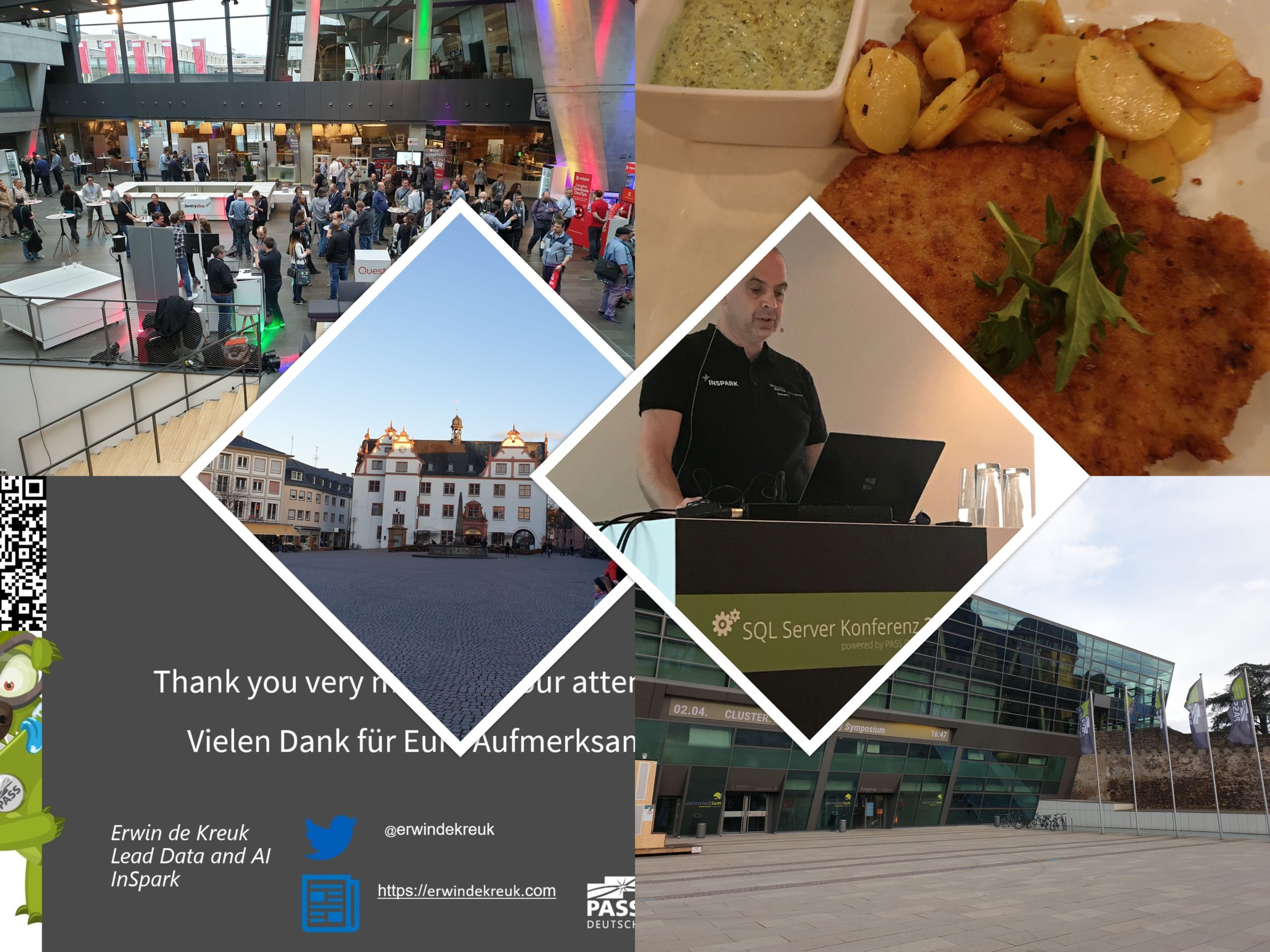
Date: 4-5 March

Location: KongressCenter Darmstadt


Speaking Dinner

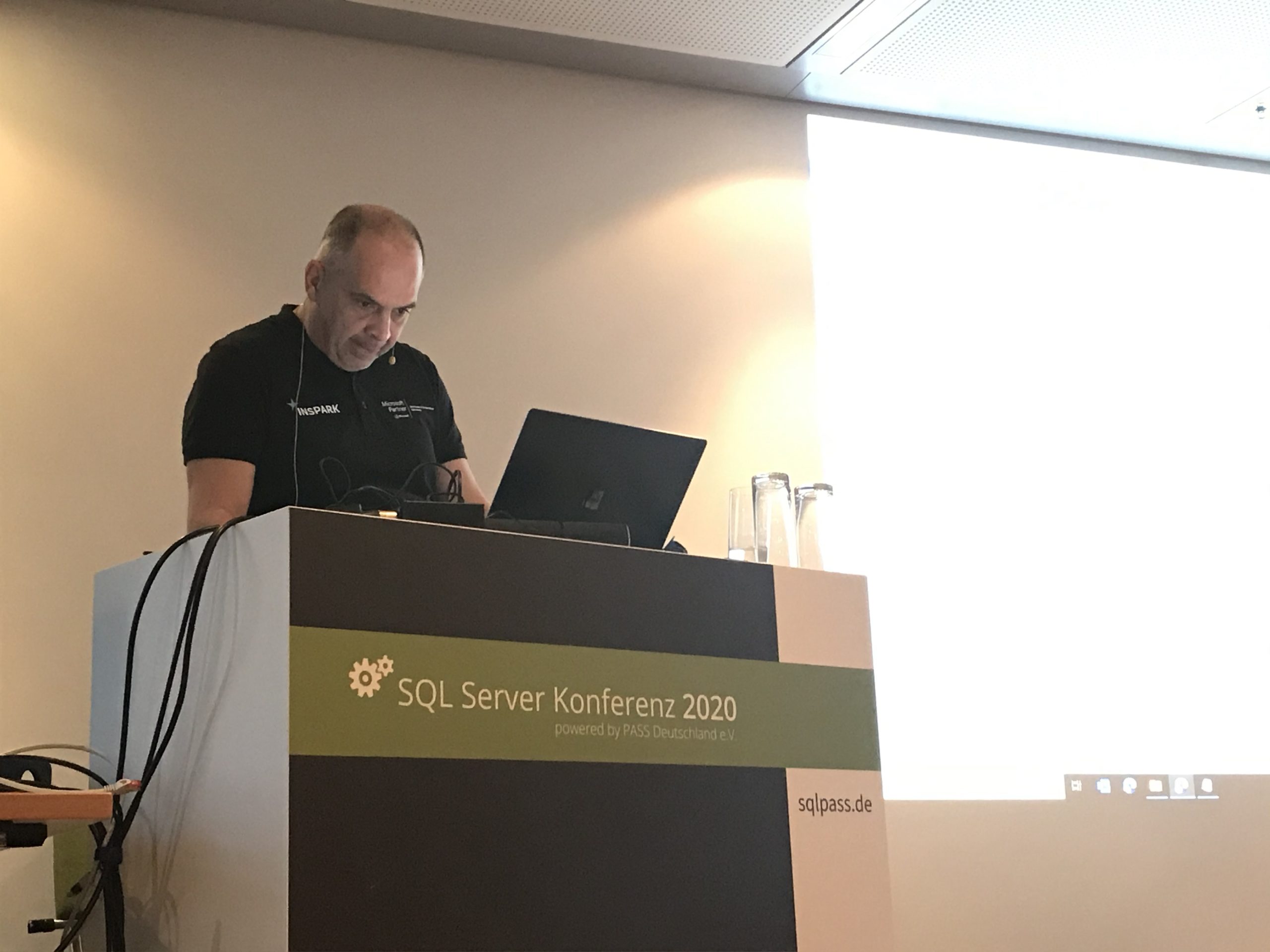
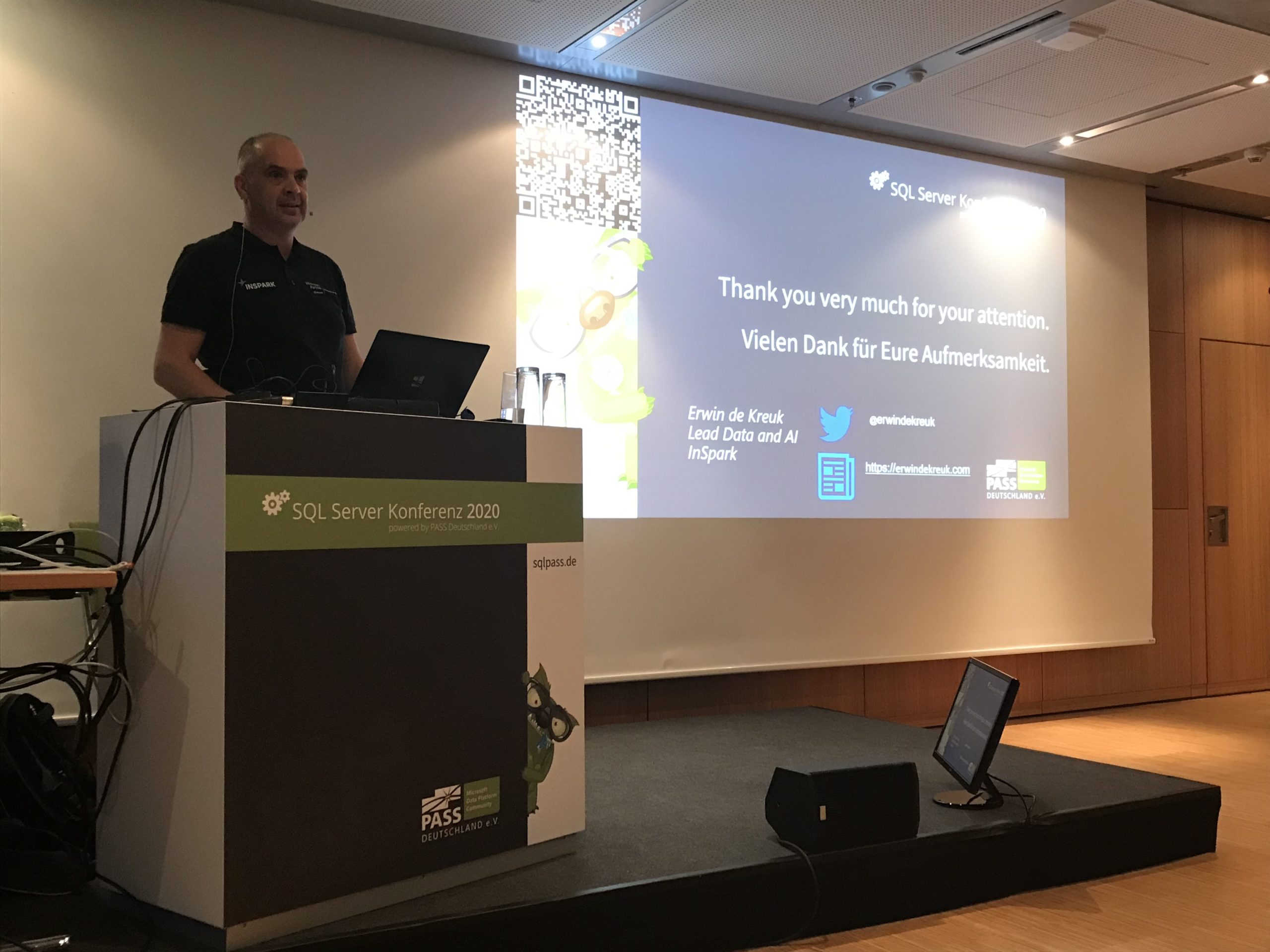
The speaker dinner on Tuesday evening was held in Restaurant Sitte. And yes what do you eat when you are in Germany a delicious Schnitzel with baked potatoes. It was a nice evening that we closed in the bar of the Hotel.

Event

The event started on Wednesday with a Keynote in which many speakers participated. After the Keynote it was time for the sessions. The agenda was very well filled with 30 sessions on Wednesday and 36 sessions on Thursday, 6 tracks at the same time and a high diversity of different topics (mix of English and German sessions). Both days lunch was taken care of to perfection. The evening ended on Wednesday with a Monster Party.

Thank you

Thanks again to the organisation and the crew, and of course all sponsors because without sponsors it is almost impossible to organise such a big event. As usual, it was another top event and I am already looking forward to next year.

The presentations of SQL SERVER KONFERENZ 2020 and sample code can be found here.

SQLBITS 2022

SQL BITS 2022 What a great time I had Wednesday 9th of March the time had finally come, at 1830 my plane would leave for London City. After all the preparations over the past few weeks, the time was there. After arriving in London City and checking in at the hotel, I...

My first Virtual session in 2022 for Dataminds

DataMinds This Tuesday I've joined the DataMinds user Group to talk about Azure Purview.   Azure Purview It was the first session of the year for both me and DataMinds. Some great questions during the session, thank you for that. You can find my slides below on...

My Virtual Session at SQLBits 2020

SQL BITS 2020, the greatest data show  Last week was SQL BITS week. After the event was moved from April to September, it eventually became a Virtual event. Setting up a Virtual event requires a lot of adjustments in the Organization. Recording All regular sessions...

SQLBits session: Microsoft Purview Data Policy App

SQLBits 2023 Thanks everyone for visiting my session during SQLBits. It's great to see such a full room and that so many people have started using Microsoft Purview.   SLIDES The slides can be downloaded via the link below, so that you can view them again at...

DataSaturday NL 2019

Recording of my session on DataSaturdayNL 2019 Can we store our Connectionstrings or BlobStorageKeys or other Secretvalues somewhere else then in Azure Data Factory(ADF)? Yes you can! You can store these valuable secrets in Azure Key Vault(AKV). But how can we achieve...

My sessions at Pass Data Community Summit

A hybrid conference in Seattle and online This year's PASS Data Community Summit is more than a conference – it's a homecoming. Reconnect with old friends, build new relationships, gain new skills, and get the world-class training you need to take that next step in...

October=Speaking Month

$variable({"type":"content","value":{"name":"post_title","settings":{"before":"","after":""}}})$ DataSaturday Holland and DataMinds in Belgium Like last year I have been selected again this year for both events to speak. Cool to be able to speak at 3 different events...

Datatoboggan 2021(Video)

Recording of my session during Data Toboggan 2021 Azure Purview Microsoft's answer to Data Governance and Data Lineage

Watch the MS Ignite sessions on-demand

MS Ignite Sessions MS Ignite 2020 was this year a virtual event. Most of the sessions were live in the evenings and the other sessions were available at different times in different time zones. Compliments to the MS Ignite team for organizing such a great event Most...

My Session at TechoramaNL 2019

TechoramaNL 2019 Date: 2 th October Location: Pathé Ede From September 30 th to October 2 nd TechoramaNL was held in the Netherlands for the 2nd time. TechoramaNL is the largest deep knowledge IT conference in the Netherlands with 1500 participants and 120 sessions in...

Speaking at SQLBits in London (postponed to September 2020)

Speaking at SQLBits in London (postponed to September 2020)

SQLBits 2020

SQLBits is the largest Microsoft Data Platform conference in Europe taking place between 29nd September and 3rd October2020 at the Excel London.

Proud to be speaking

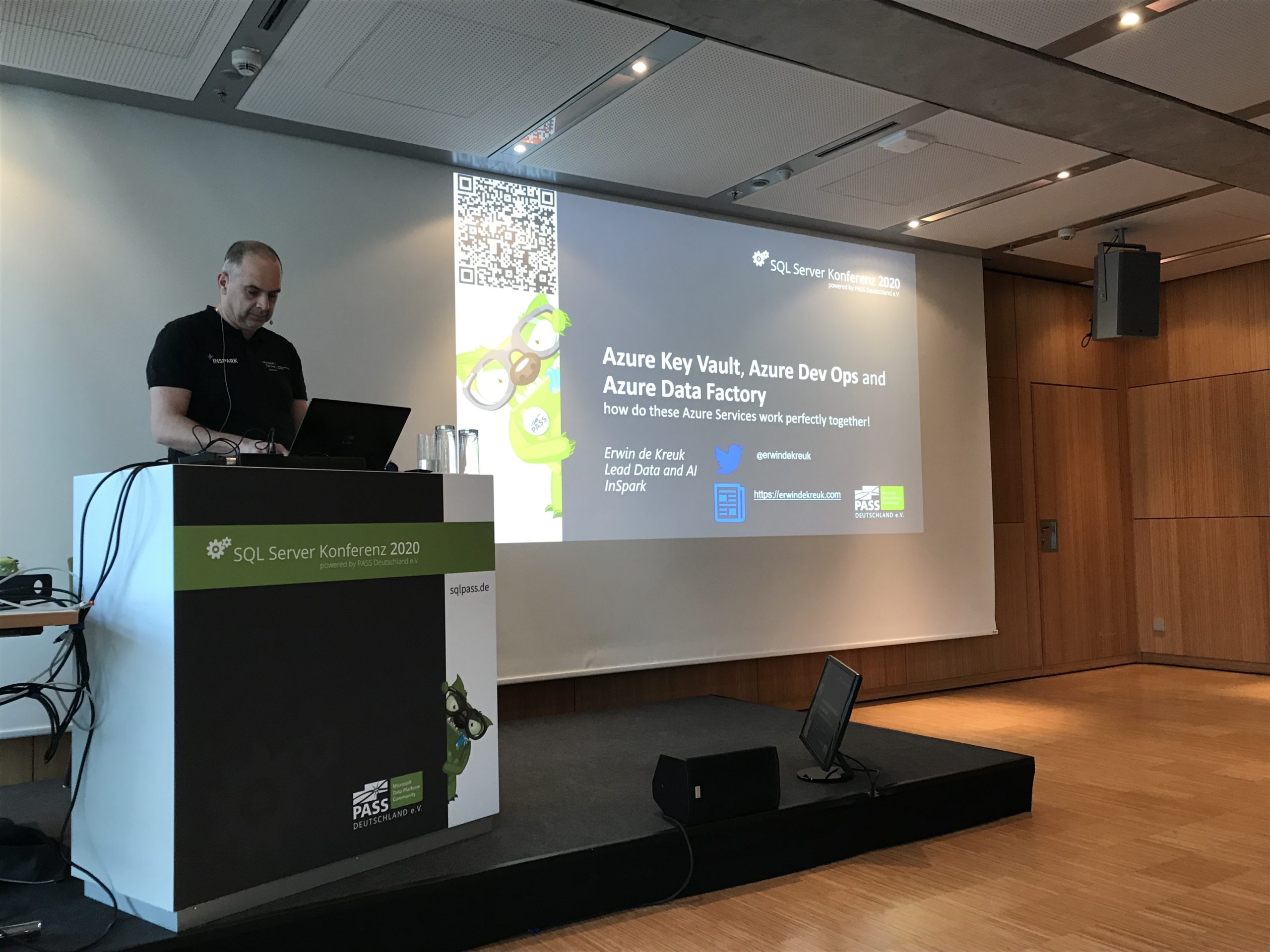
I am very proud and happy that one of my sessions was selected for SQLBits. It's not the first time I will go to SQLBits, but it is the first time I can speak there. Super cool and I am also very proud of it. Great to see so many known people, but also to get to know new people from the #sqlfamily. I will be speaking on Friday October 2nd

The complete schedule can be found here. Tickets are still available here

My Session

Session Title:

Azure Key Vault, Azure Dev Ops and Data Factory how do these Azure Services work perfectly together!

Session Details

Can we store our Connectionstrings or BlobStorageKeys or other Secretvalues somewhere else then in Azure Data Factory(ADF)? Yes you can! You can store these valuable secrets in Azure Key Vault(AKV). But how can we achieve this in ADF? And finally how do we deploy our DataFactories in Azure Dev Ops to Test, Acceptance and Production environments with these Secrets ? Can this be setup dynamically? During this session I will give answers on all of these questions. You will learn how to setup your Azure Key Vault, connect these secrets in ADF and finally deploy these secrets dynamically in Azure Dev Ops. As you can see a lot to talk about during this session.

Do I see you in ExCel London?


Datatoboggan 2021(Video)

Recording of my session during Data Toboggan 2021 Azure Purview Microsoft's answer to Data Governance and Data Lineage

Speaking at SQLBits in London (postponed to September 2020)

SQLBits 2020 SQLBits is the largest Microsoft Data Platform conference in Europe taking place between 29nd September and 3rd October2020 at the Excel London. Proud to be speaking I am very proud and happy that one of my sessions was selected for SQLBits. It's not the...

Speaking(Virtual) at SQL Saturday #963 Denmark

SQL Saturday 963 Denmark PASS SQLSaturday is a free training event for professionals who use the Microsoft data platform. These community events offer content across data management, cloud and hybrid architecture, analytics, business intelligence, AI, and more. My...

My Virtual Session DataSaturday #1 Pordenone

$variable({"type":"content","value":{"name":"post_title","settings":{"before":"","after":""}}})$ DATA SATURDAY #1 PORDENONE This Saturday I've been speaking during DataSaturday #1 Pordenono. The first ever DataSaturday after Pass has retired. If you want to visit more...

Data Saturday #1 Pordenone(Video)

Recording of my session during Data Saturday #1 Pordenone Azure Purview Microsoft's answer to Data Governance and Data Lineage  

My Virtual session DataWeekender 4.2

DataWeekender 4.2 This Saturday I've joined the Van and Spoke at DataWeekender Azure Purview I presented a session on Azure Purview Microsoft's answer to Data Governance and Data Lineage You can find my slides below on Slideshare: Data weekender4.2 azure purview erwin...

My First Blog Post SQLSatHolland 790

Yeah, my first blog is LIVE After a good talk with Reza Rad from RADACAD during SQLSatHolland, I decided to start my first blog!Knowledge sharing is very important, it gives me a lot of energy. But it also gives others people in the community energies to pick up new...

DataMinds 2018

An event in the Footbal Arena from Gent! Two days after SQLSatholland it was time for DataMinds Connects, which was held in beautiful Belgian Ghent. The location for this event was in the stadium of KAA Gent. Because the organization of SQLSatHolland and DataMinds...

SQL SERVER KONFERENZ 2020

SQL SERVER KONFERENZ 2020 Date: 4-5 March Location: KongressCenter Darmstadt   Speaking Dinner The speaker dinner on Tuesday evening was held in Restaurant Sitte. And yes what do you eat when you are in Germany a delicious Schnitzel with baked potatoes. It was a...

Video: Learn Live Use Data Factory pipelines in Microsoft Fabric

Below you find the recording form the session for Learn Live which I did together with Javier. Use Data Factory pipelines in Microsoft Fabric Use Data Factory pipelines in Microsoft Fabric - Training | Microsoft Learn   After you have followed above learning path you...