Azure Synapse Analytics Code Repository has arrived
Azure Synapse Analytics Code repository
I just opened my Azure Synapse Analytics Workspace and got a great surprise, the option Git Configuration is available as of today.
After a long wait, today the Git Configuration option became available in Azure Synapse Analytics.
The setup isn’t much different from Azure Data Factory, which can be found in this link.
The difference is that we no longer use an adf_publish branch but a workspace_publish branch. Which makes sense if you want to use both Azure Services side by side. In this blog I do quick walkthrough with the Azure Dev Ops Configuration enabled.
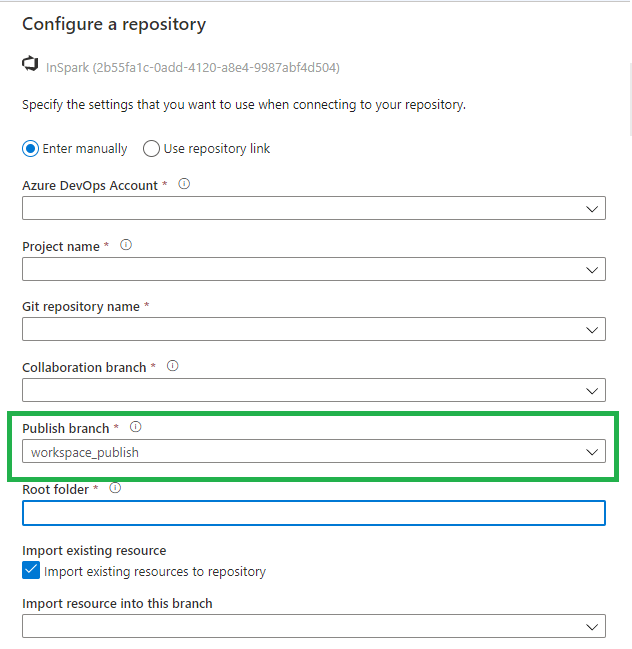
Once we have configured everything, we can walk through the Git Configuration options within Azure Synapse Analytics. I’m sure there will be a lot of them, but below is a list of the ones I noticed first.
Synapse live
After you published your code, it will be available in Synapse Live, like in Azure Data Factory you develop everything in Azure DevOps branches.

Notebooks
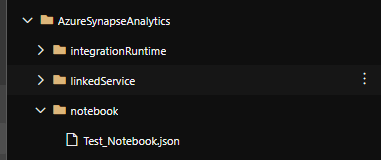
After creating a Notebook, we have the option Commit, after you have committed it will be directly saved within your current working branch.

SQL Scripts
Like Notebooks, After creating a SQL Script, we can Commit, after you have committed it will be directly saved within your current working branch.


Pipelines
Also here we have now a Commit option.

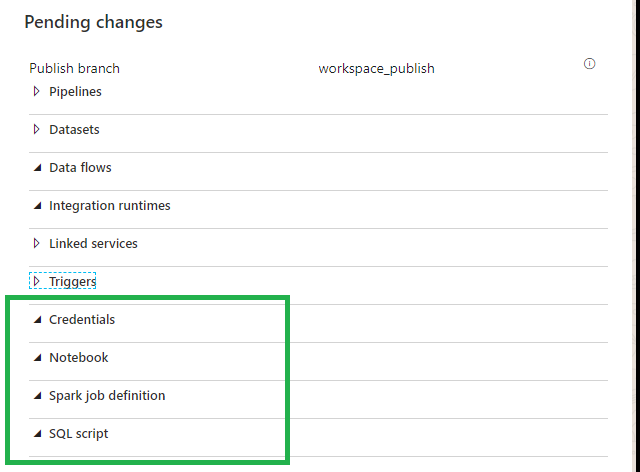
Workspace_publish
Beside the Notebooks and the SQL Scripts we can also store the Credentials and Spark Job definitions in Azure Dev Ops
Differences
So as we can see the main differences between Azure Data Factory and Azure Synapse Analytics are:
Workspace_publish branch instead of adf_publish branch.
Commit instead of Save.
Azure Data Factory Pipelines
By moving your code from Azure Data Factory to Azure Synapse Analytics in Azure Dev Ops your Azure Data Factory Configuration will be available in Azure Synapse Analytics.
I added my ADF code to Azure Synapse in Azure Dev Ops and it looks the same.
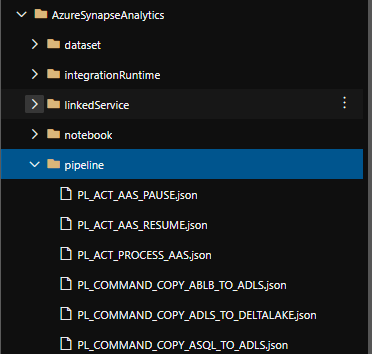
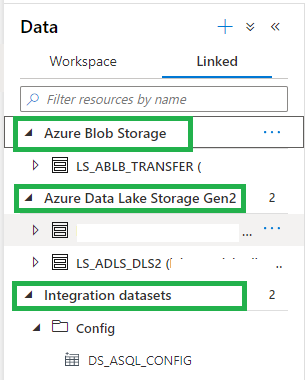
After Refreshing the Azure Synapse Analytics Workspace, in the Data Hub we see the Integration Datasets(ADF DataSets) and the Linked Storage accounts.
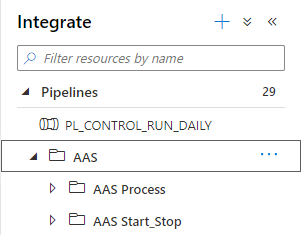
And in the Integrate Hub, we see all our Pipelines. And the same is working for our triggers
It looks like that we can reuse our code quite easily. I haven’t tested everything yet but I wanted to share this with you as quick as possible. I’m sure a easier way to migrate from Azure Data Factory to Azure Synapse will be on his way, you can use above as a start.
Integration Runtimes
Does everything work as in Azure Data Factory, NO at this moment you can’t use the Azure SSIS Integration Runtime and the shared Self Hosted Integration Runtime? But hopefully this will take not that long before it will arrive.
Thank you for reading, this was a quick overview of the first changes I discovered. Please feel free to leave comment if you have discovered more.
Do you want to become more familiar with the various possibilities of Azure Synapse Analytics, please read the following articles which I published a while ago:
✅ Creating your Azure Synapse Analytics Workspace
✅ Exploring the new Azure Synapse Analytics Studio

Feel free to leave a comment
2 Comments
Leave a Reply
Discover more from Erwin | Data & Intelligence
Subscribe to get the latest posts sent to your email.

thanks for sharing such valuable information with us. it’s hard to come by well-informed people in this particular topic, but you explained this really good..
thanks for valuable info
gcp training in hyderabad