All sessions of SQLBits 2020 have been made available to everyone and can now be viewed via their Youtube channel. To make it easier to find a recording of your choice, a number of playlists have been created:
Creating an Azure Data Factory Instance, let's get started
Many blogs nowadays are about which functionalities we can use within Azure Data Factory. But how do we create an Azure Data Factory instance in Azure for the first time and what should you take into account? In this article I will take you step by step on how to get started.
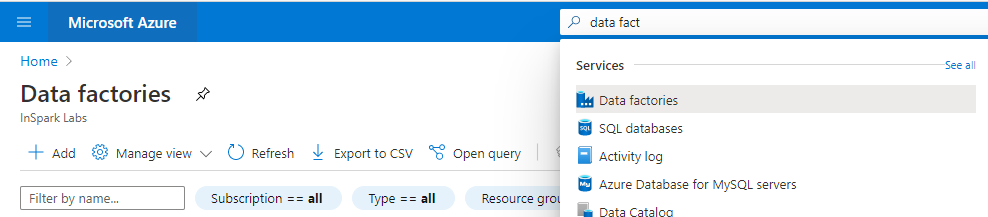
First we have to login in the Azure Portal.
Search for Data Factories and select the Data Factory service.
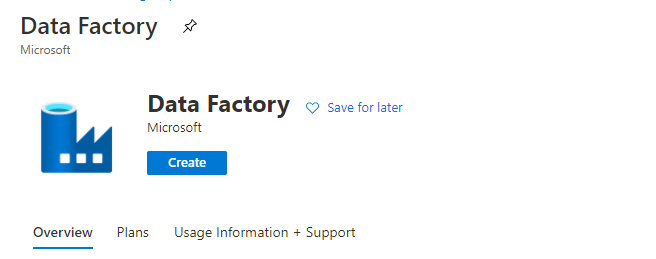
Secondly we have to create a Data Factory Instance.
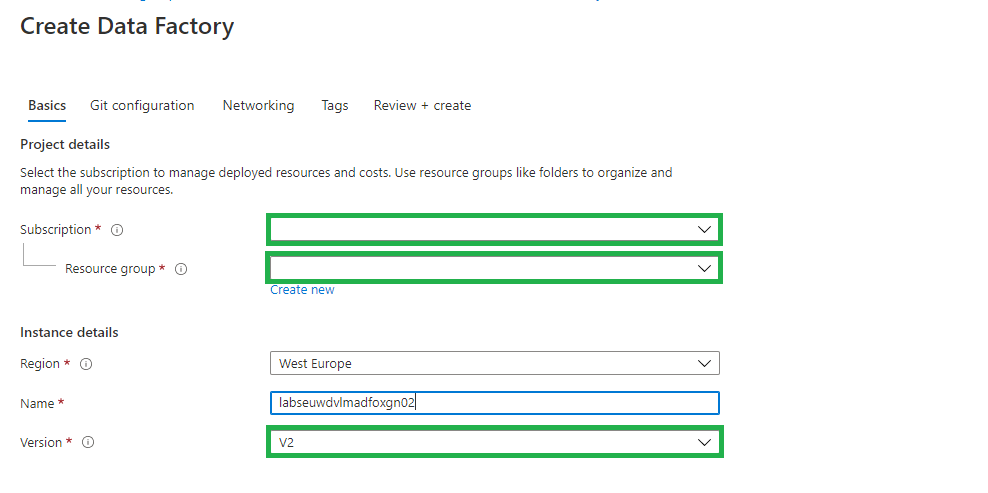
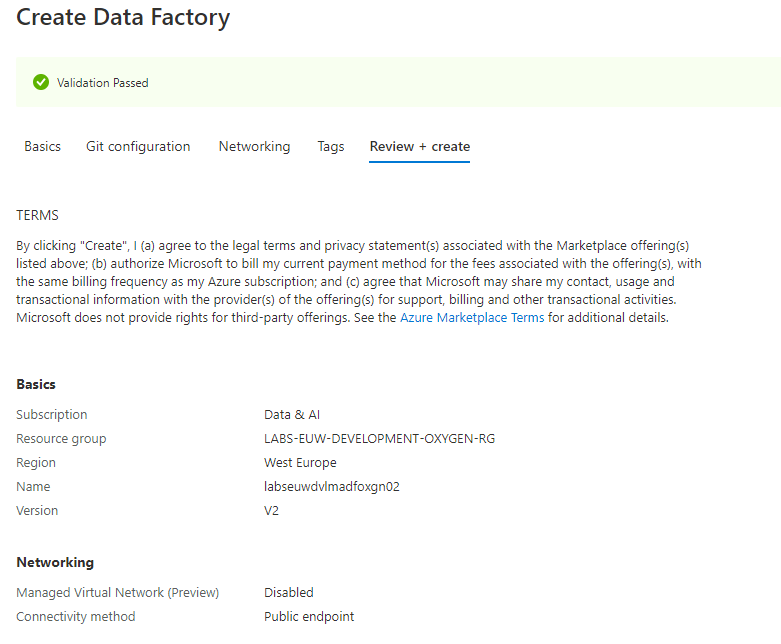
Fill in the required fields:
Subscription => Select your Azure subscription in which you want to create the Data Factory.
Resource Group =>Select Use existing, and select an existing resource group from the list or click on Create new, and enter the name of a resource group(a new Resource Group will be created)
Region => Select the desired Region/Location, this is where your Azure Data Factory meta data will be stored and has nothing to do where you create your compute or store your Data Stores.
Name = > Create a unique name in Azure.
Version => Always select V2 here, this contains the very latest developments and functionalities. V1 is only used for migration from another V1 instance.
Select Next: Git configuration
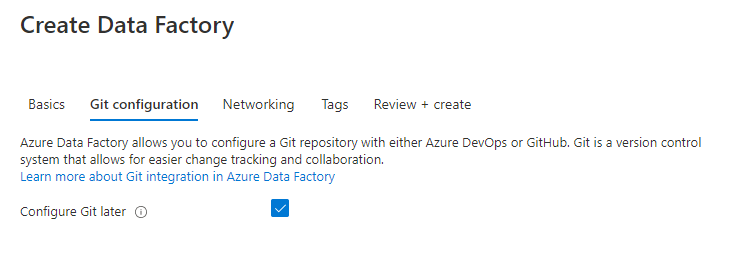
Enable the option to configure Git later, we will configure this later in Azure Data Factory.
Select Next: Networking:
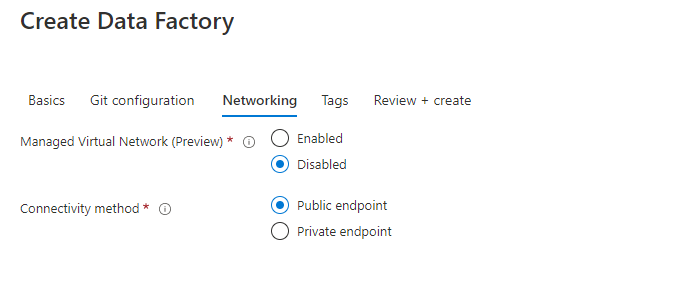
Leave the options as is. I will explain the Connectivity Method in one of my next articles.
Select Next: Review + Create:
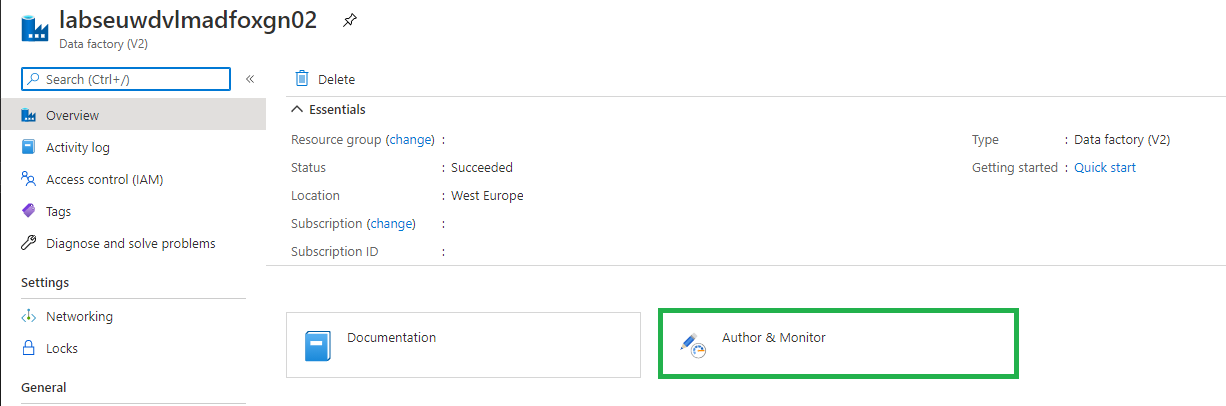
Your Azure Data Factory Instance will be created. Once you have created your Azure Data Factory, it is ready to use and you can open it from selected Resource Groups above:
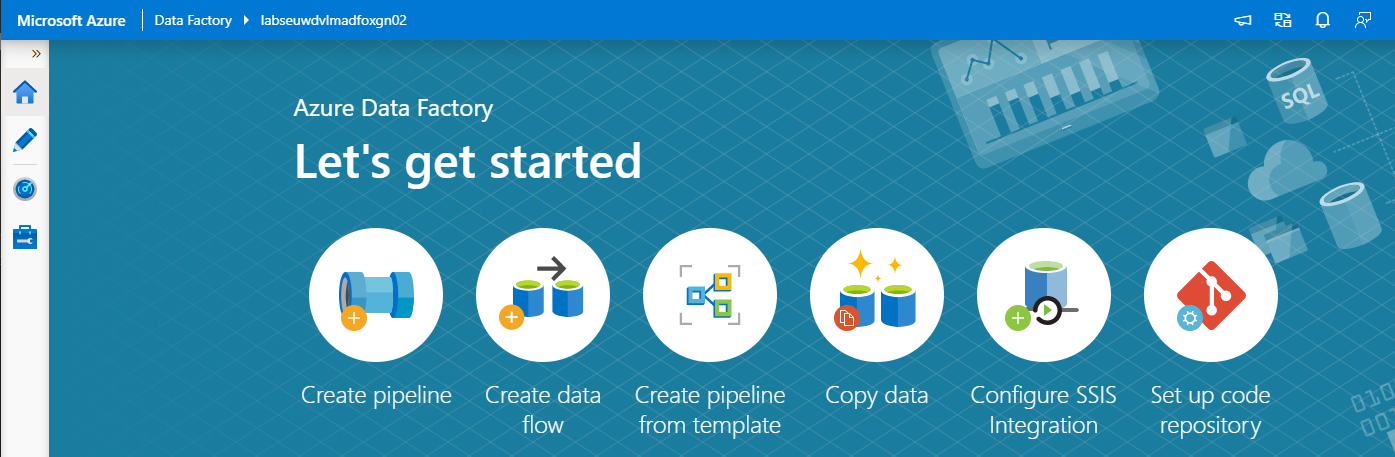
Select Author & Monitor:
Encrypt your Azure Data Factory with customer-managed keys
Azure Data Factory encrypts data at rest, including entity definitions and any data cached while runs are in progress. By default, data is encrypted with a randomly generated Microsoft-managed key that is uniquely assigned to your data factory. But you also Bring Your Own Key (BYOK) more details can be find in my previous written article "Azure Data Factory: How to assign a Customer Managed Key"
Please be aware that you have to assign this key on an empty Azure Data Factory Instance.
Roles for Azure Data Factory
Data Factory Contributor role:
Assign the built-in Data Factory Contributor role, must be set on Resource Group Level if you want the user to create a new Data Factory on Resource Group Level otherwise you need to set it on Subscription Level.
User can:
Create, edit, and delete data factories and child resources including datasets, linked services, pipelines, triggers, and integration runtimes.
Deploy Resource Manager templates. Resource Manager deployment is the deployment method used by Data Factory in the Azure portal.
Manage App Insights alerts for a Data Factory.
Create support tickets.
Reader Role:
Assign the built-inreader role on the Data Factory resource for the user.
User can:
View and monitor the selected Data Factory, but user can not edit or change it.
More on how to assign roles and permissions can be found here.
Thanks for reading, I my next blog I will describe how to Set up your Code Repository.
After the event was moved from April to September, it eventually became a Virtual event. Setting up a Virtual event requires a lot of adjustments in the Organization.
Recording
All regular sessions had to be recorded in advance so that during the event itself it could not go wrong. For some of us this was new and others have done it before. In any case, it was new to me, but the organization did everything it could, to help us with various sessions in which everything was explained and in which we could ask all kinds of questions. Thanks for that.
Is it strange to pre-record a session?
Yes, it is, you are trying to find an environment in which you have no ambient noise, a good microphone and a good camera. But you don't always have an influence on ambient sounds. And presenting to a webcam is strange.
After practicing my session again, I recorded my session in one go and did not edit anything in the session. After all, something can always go wrong or go in a different way in a session, even if you record it in advance. Once you start adjusting or editing that, the end is lost and a lot of time goes into it. But also the charm of a session is gone. After all, we are data professionals and not movie stars.
My Session
Back to the day itself, half an hour in advance I could log in to my session and must say that it was quite exciting. Would the video start, how do I come across and some more questions where in my head? But all nerves for nothing, the session started right on time. In the meantime I had created a few polls which you could have the audience answer in between. But also being able to answer the questions live during the session and sometimes even with a link to some extra information was now easy.
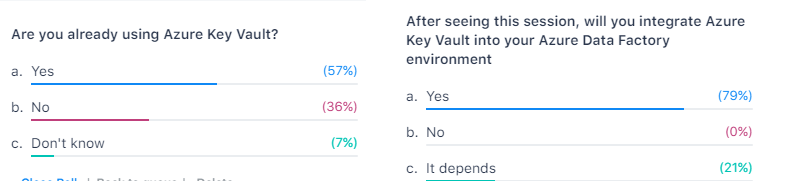
I was delighted to see at the outcome of the last poll, most of the people who attended my session will now start using Azure Key Vault in their day-to-day work. In the end that's why we do it for(help or advice others).
I saw a very great event, the quality of the sessions were very high. And there was so much choice, but luckily they will be soon available to watch On-Demand. A big round of applause to the entire organization, you have organized a fantastic event with a super nice portal, including exhibitor hall, networking, chat rooms and much more. Thank you for having me and see you next year.
Most of the sessions were live in the evenings and the other sessions were available at different times in different time zones. Compliments to the MS Ignite team for organizing such a great event
Most of the sessions are ready to watch on demand. If you have not done this yet, here is the link to be able to do this.
PASS SQLSaturday is a free training event for professionals who use the Microsoft data platform. These community events offer content across data management, cloud and hybrid architecture, analytics, business intelligence, AI, and more.
My first virtual event
I like to interact during my session, so I'm curious if that will work. Last week I recorded my session for SQL Bits and that is quite strange when you look back. I am really looking forward to it, my session starts at 14:30.
The complete schedule can be found here. Are there is still time to register!!
My Session
Session Title:
Azure Key Vault, Azure Dev Ops and Data Factory how do these Azure Services work perfectly together!
Session Details
Can we store our Connectionstrings or BlobStorageKeys or other Secretvalues somewhere else then in Azure Data Factory(ADF)? Yes you can! You can store these valuable secrets in Azure Key Vault(AKV). But how can we achieve this in ADF? And finally how do we deploy our DataFactories in Azure Dev Ops to Test, Acceptance and Production environments with these Secrets ? Can this be setup dynamically? During this session I will give answers on all of these questions. You will learn how to setup your Azure Key Vault, connect these secrets in ADF and finally deploy these secrets dynamically in Azure Dev Ops. As you can see a lot to talk about during this session.
TechoramaNL 2019 Date: 2 th October Location: Pathé Ede From September 30 th to October 2 nd TechoramaNL was held in the Netherlands for the 2nd time. TechoramaNL is the largest deep knowledge IT conference in the Netherlands with 1500 participants and 120 sessions in...
Data, Bratwurst and Beer An event that started 5 years ago as a small event, that has grown into an event with 200 participants, 50+ sessions, 5 tracks, 2 days and a BBQ in a small place in Germany, called Lingen. William Durkin and Ben Weissman are the main...
Unleashing the Potential of Metadata-Driven ELT Framework in Synapse Analytics and Microsoft Fabric Today, I had the opportunity to speak at the Data Community Austria Day 2024, a full day of sessions dedicated to data enthusiasts and professionals. The event was held...
$variable({"type":"content","value":{"name":"post_title","settings":{"before":"","after":""}}})$ DataSaturday Holland and DataMinds in Belgium Like last year I have been selected again this year for both events to speak. Cool to be able to speak at 3 different events...
$variable({"type":"content","value":{"name":"post_title","settings":{"before":"","after":""}}})$ DATA SATURDAY #1 PORDENONE This Saturday I've been speaking during DataSaturday #1 Pordenono. The first ever DataSaturday after Pass has retired. If you want to visit more...
Yeah, my first blog is LIVE After a good talk with Reza Rad from RADACAD during SQLSatHolland, I decided to start my first blog!Knowledge sharing is very important, it gives me a lot of energy. But it also gives others people in the community energies to pick up new...
The Data Factory home page has been redesigned for a modern and more accessible (WCAG 2.1) experience. The new design is more fluid with better contrast and reflow capabilities. Thank you to the complete product team for this great experience The new and refreshing...
Data Toboggan This Saturday I've joined the Data Toboggan to talk about Azure Synapse Analytics. Azure Synapse Analytics Today I've been talking on how to deal with all the different roles in Azure Synapse Analytics during Data Toboggan. An event 100% focussed...
All sessions of SQLBits 2020 have been made available to everyone and can now be viewed via their Youtube channel. To make it easier to find a recording of your choice, a number of playlists have been created: Developer SQLBits 2020 - Developer sessions High...