Enable Pattern Rules in Azure Purview

by Sep 28, 2021

How can I enable Pattern Rules?

​Pattern Rules

Last night I was preparing for a demo with Azure Purview. As always, I walk through all the activity hubs to see if there are any new options. This time I noticed that the Pattern Rules option was greyed out.
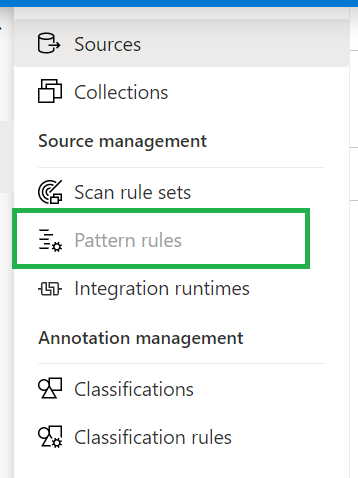

Azure_purview_pattern_rules

Resource Set

To enable this Pattern Rules you need to enable the option Advanced Resource Sets in the Management Activity tab.
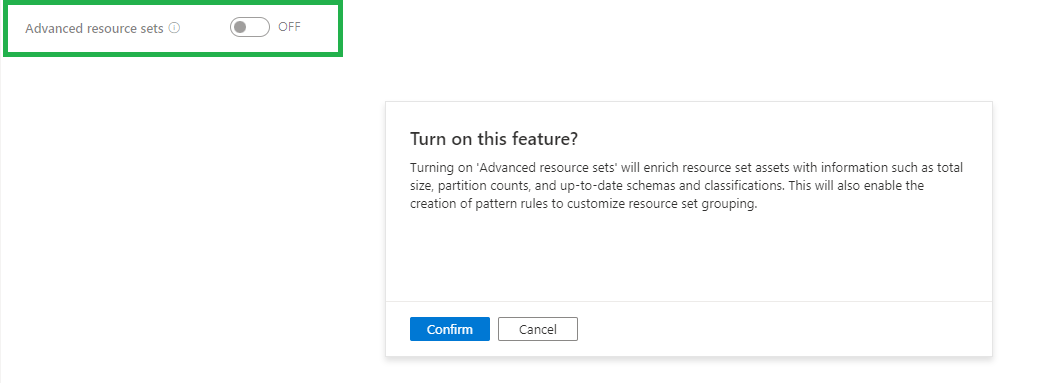
Azure_purview_advanced_resource_set

The Resource set was already present in my Purview Account which was created before August 19th, so it was surprise for me that the pattern rules where greyed out for me.
My Demo Purview account was created after August 19th and there differences between the 2 versions and available options/features. What has changed Azure Purview after August 19th can be read in my previously written blog.

Once you have enabled this feature, the Azure Purview team recommends waiting an hour before scanning in new Data Lake data.  After scanning your Data Lake data manual or scheduled, you will see the Resource Sets.

Azure_purview_resource_set

When advanced resource sets feature is on, asset and classification insights will only update twice a day(every 12 hours).

More details on how to create Resource Set Pattern Rules, can be found here.

Costs

When you have enabled Advanced Resource Set feature you will be charged €0.18 per 1 vCore Hour(Free in preview). Billing for processing the resource set data assets is serverless and based on the duration of the processing, which can vary based on the change in partitioned files and resource set profile configured.

If you have any questions regarding the above, please let me know.

Feel free to leave a comment

0 Comments

Leave a Reply

This site uses Akismet to reduce spam. Learn how your comment data is processed.

Creating Notebook Connections in Microsoft Fabric Just Became a Lot Easier (and Automatable!)

For a long time, creating a Notebook connection in Microsoft Fabric was surprisingly limited. If you wanted a Notebook to run under a Workspace Identity or Service Principal, you only could configure this directly in the DataPipeline UI. In fact, the Connections pane...

A new year with a new job

Changing jobsAfter almost 11 years and 4 months I have decided to leave Axians and to start a new adventure in the new year. On January 2, 2020 I will start my day as Lead Data and AI at InsparkThe past years have flown by. I started at Eniac BI, which was...

Calculate Workingdays including Holidays with T-SQL

Calculate Workingdays between 2 Date columnsRecently I have been getting some questions from my customers, can I calculate the number of workdays between 2 dates? Of course my answer was, yes you can. But I do want certain closing dates and holidays of our company not...

Service Health Alerts in Azure

Maintenance and Service Healths in AzureI get often questions, is there no maintenance in Azure. Like every data center, the Azure data center also needs maintenance. You can even be notified when a specific service, in a specific data center, has scheduled...

Updated competency exams and certifications Data Platform and Data Analytics for 2020

Retiring and new exams and certifications as of June 30 2020 A lot of Exams and certifications for Data Platform and Data Analytics are retiring on June 30 2020. All retired Exams and certifications will remain eligible for competency attainment and renewal until June...

ADF: Get Metadata Activity stopped working

Meta Data ActivityToday my pipelines in Azure Data Factory (ADF) suddenly stopped working. The output structure was not found. Quit strange while these pipelines have been running for weeks.    Invalid Template After debugging my Pipeline I found out the...

High Concurrency Notebook Activity in Microsoft Fabric

Microsoft Fabric is a cloud-based platform that provides integrated data engineering and data science solutions. One of the key features of Microsoft Fabric is the support for Apache Spark, a distributed computing framework that enables large-scale data processing and...

Restore a accidentally deleted Azure SQL Database

Help I deleted my Logical Server​OOPS Have you ever experienced that you accidentally deleted your Logical Server in Azure?  Because, for example, you made your Pipeline wrong. Surely. And of course you didn't have a backup in your storage either.Well I must confess...

Azure Data Factory: New functionalities and features

New functionalities and featuresLast week, a number of great new functionalities and features were added within Azure Data Factory. I would like to take you in some details in the blog below:Customer key With this new functionality you can add extra security to your...

Azure Synapse Analytics Code Repository has arrived

Azure Synapse Analytics Code repository‎I just opened my Azure Synapse Analytics Workspace and got a great surprise, the option Git Configuration is available as of today‎.    After a long wait, today the Git Configuration option became available in Azure Synapse...

Discover more from Erwin | Data & Intelligence

Subscribe to get the latest posts sent to your email.