Table of Contents
FMD Framework – Metadata-Driven Data Integration for Microsoft Fabric
What is the FMD Framework?
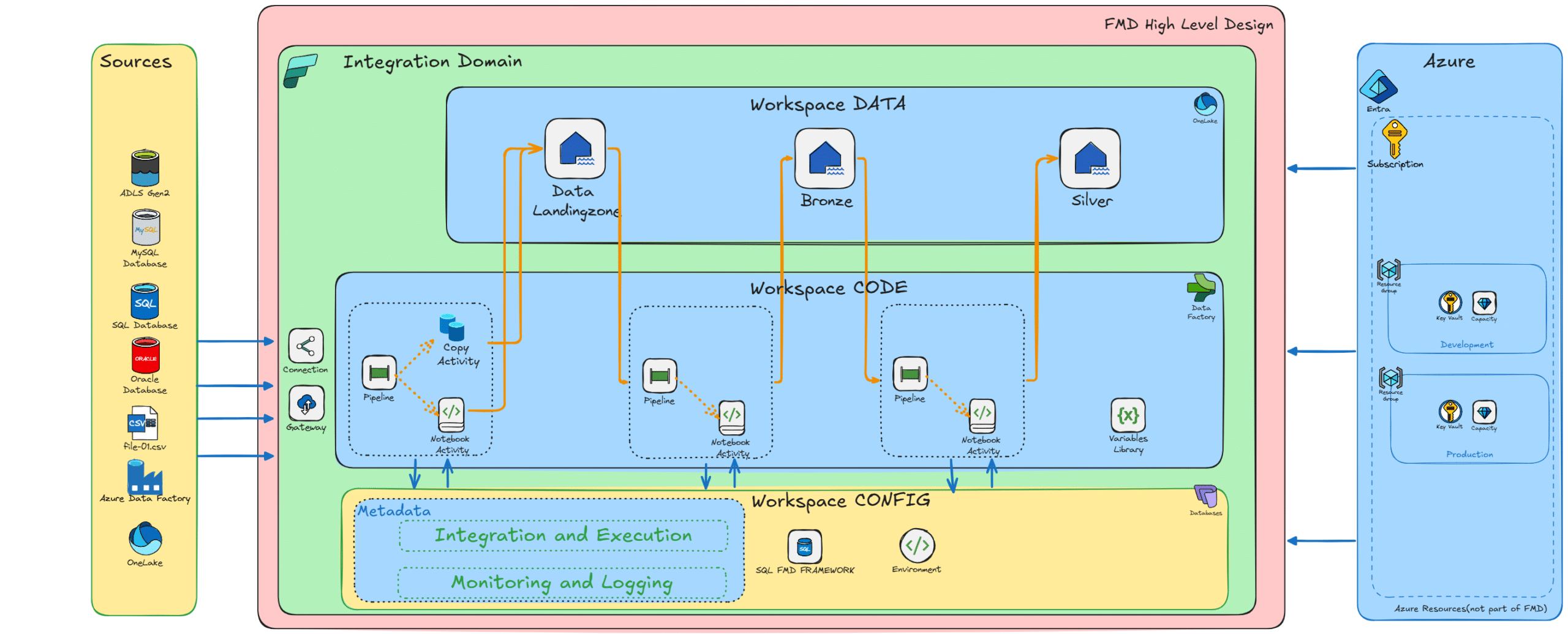
FMD Framework is a metadata-driven framework for Microsoft Fabric that enables organizations to build scalable, governed, and automated data platforms. The FMD Framework leverages metadata to drive ingestion, transformation, and orchestration, reducing engineering effort while improving consistency, auditability, and speed of delivery. Designed for modern lakehouse architectures, the FMD Framework provides a reusable and standardized approach to enterprise data integration on Microsoft Fabric.
Key Benefits of the FMD Framework
- Metadata-driven by design The FMD Framework uses configuration tables to control ingestion, transformation, and orchestration—eliminating repetitive code while ensuring consistency.
- Fabric-native architecture Built entirely on Microsoft Fabric components such as Fabric SQL Database, Lakehouses, Data Pipelines, and Notebooks, the FMD Framework keeps your platform unified.
- Automated deployment with Fabric CLI The FMD Framework supports automated, end-to-end deployment using Microsoft Fabric CLI (fab), enabling consistent provisioning across environments.
- Reusable and scalable patterns The FMD Framework standardizes data engineering patterns, making it easier to onboard new data sources and scale across business domains.
- Governance and observability Centralized metadata ensures auditability, lineage tracking, and operational transparency across the entire data platform.
FMD Framework Architecture
The FMD Framework architecture is based on a modular and metadata-driven design that separates data, code, and orchestration. This separation improves maintainability, scalability, and security across environments.
Core Principles
- Metadata controls execution logic
- Pipelines dynamically adapt based on configuration
- Separation of concerns between data, code and orchestration
- Built for enterprise-scale Microsoft Fabric environments
FMD Framework Data Layers (Medallion Architecture)
Landing Zone
- Raw data ingestion into Fabric Lakehouse
- File-based or structured ingestion
- Minimal transformation
Bronze Layer
- Data standardization and deduplication
- Structural normalization into Delta tables
- Preparation for downstream processing
Silver Layer
- Historical tracking and data validation
- Slowly Changing Dimension (SCD) patterns
- Data quality and transformation logic
Gold Layer (Business Domains)
- Business-ready datasets and semantic models
- Fact and dimension modeling
- Optimized for reporting and analytics
FMD Framework Workspaces & Separation of Concerns
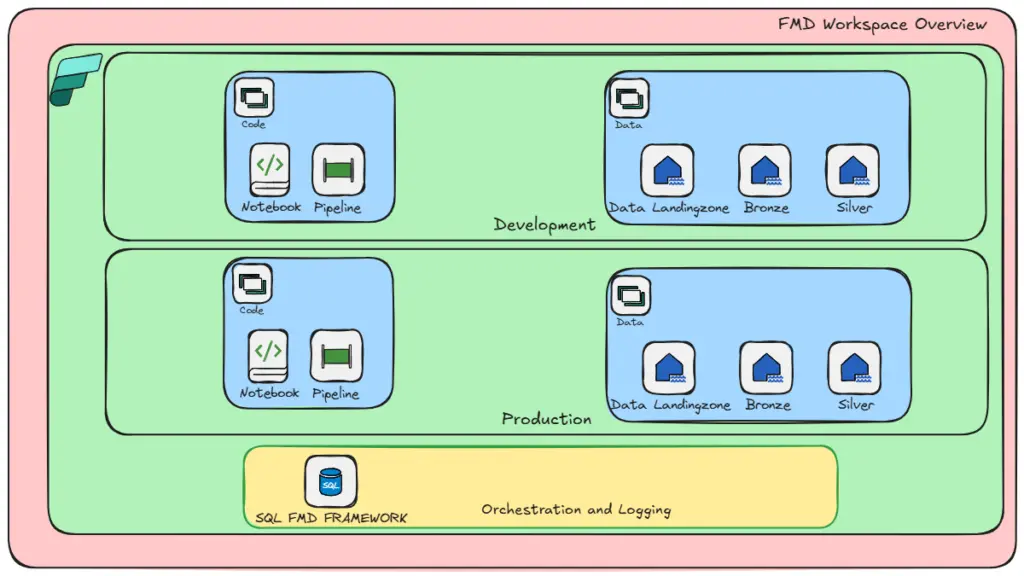
The FMD Framework enforces a clear separation between configuration, data, and code across Microsoft Fabric environments.
Configuration Workspace
- Central Fabric SQL Database
- Metadata model and configuration tables
- Logging, monitoring, and audit data
Data Workspaces
- Landing, Bronze, and Silver Lakehouses
- Environment-specific data storage
Code Workspaces
- Data Pipelines
- Notebooks and Spark artifacts
- Orchestration logic
This separation allows the FMD Framework to scale across environments such as DEV, TEST, and PROD with minimal duplication

FMD Framework Business Domains & Gold Layer
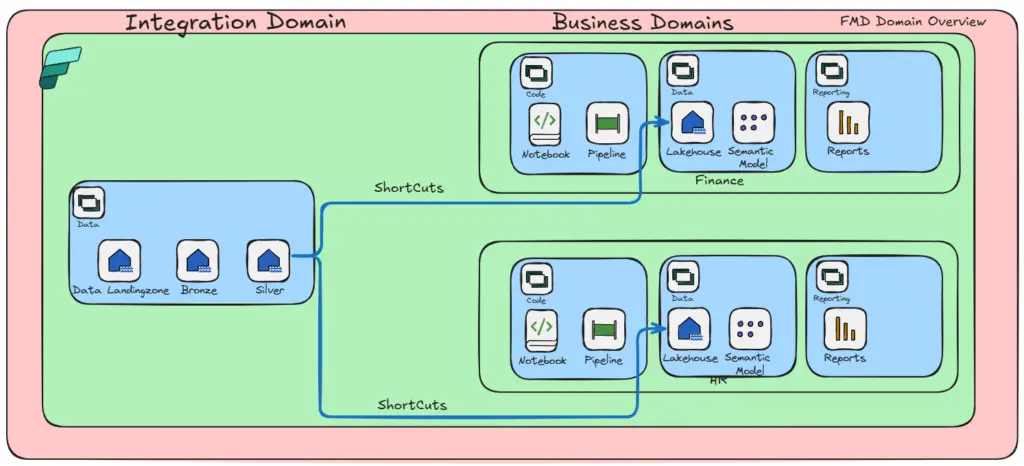
The FMD Framework supports domain-driven data architectures, enabling organizations to organize analytics around business domains.
Domain-Driven Design
- Separate workspaces per domain (e.g., Sales, HR, Finance)
- Independent pipelines and data models
- Scalable ownership model for data teams
Gold Layer Examples
The FMD Framework provides templates to:
- Build dimension tables (e.g., DimCustomer, DimEmployee)
- Build fact tables (e.g., FactSales, FactPayroll)
- Extend data models with custom business logic

FMD Framework Metadata Model
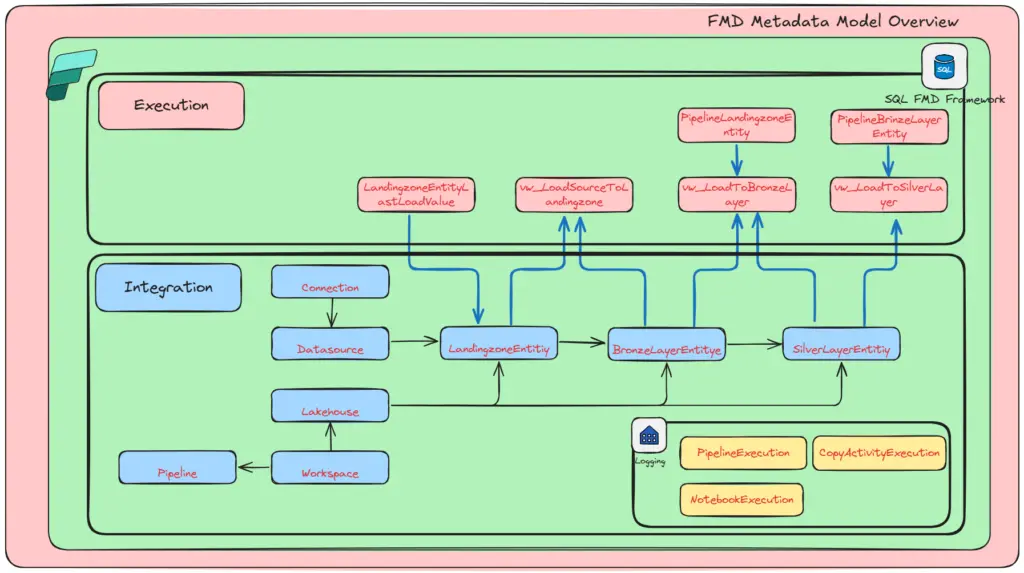
At the core of the FMD Framework is a centralized metadata model stored in Fabric SQL Database.
Key Metadata Entities
- Connection – defines data connections and sources
- DataSource – logical grouping of systems and domains
- LandingzoneEntity – ingestion configuration
- BronzeLayerEntity – transformation rules and schema
- SilverLayerEntity – downstream processing metadata
- Execution tables – logging, load tracking, and orchestration
This metadata-driven approach allows the FMD Framework to dynamically execute pipelines without code changes. More details can be found in WIKI

FMD Framework Orchestration & Processing Patterns
The FMD Framework provides a metadata-driven orchestration model that dynamically controls pipeline execution and data processing across Microsoft Fabric.
Orchestration Model
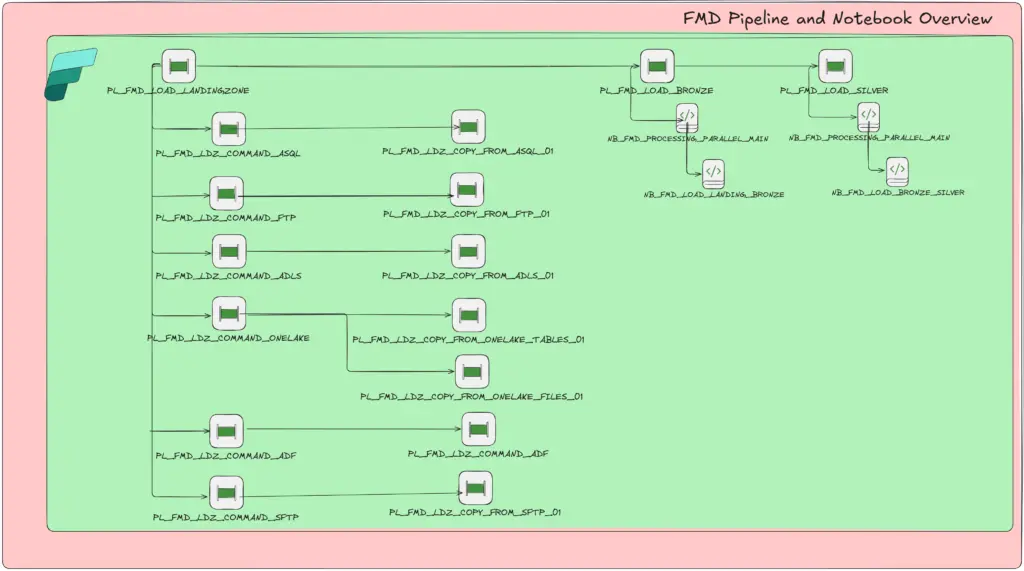
Within the FMD Framework, orchestrator pipelines determine what to execute based on metadata lookups. These pipelines dynamically trigger child pipelines and notebooks to process data through the standard Landing → Bronze → Silver progression. This approach ensures consistent, scalable, and automated execution without hardcoding logic.
Supported Processing Activities
The FMD Framework standardizes execution patterns by using a consistent set of supported Fabric activities, including:
- Lookup – retrieve metadata and configuration
- Copy – perform data ingestion and movement
- Get Metadata – inspect source and file information
- Delete – manage lifecycle of intermediate data
- Script / Stored Procedure – execute database logic and transformations
These activities enable the FMD Framework to support diverse data sources while maintaining a unified orchestration model.
Bulk Onboarding Pattern
The FMD Framework includes automation for rapid onboarding of new data sources:
- PL_TOOLING_POST_ASQL_TO_FMD extracts table metadata from SQL-based sources
- Populates the FMD metadata model automatically
- Eliminates manual configuration effort
- Accelerates onboarding of large numbers of tables
This bulk onboarding capability allows the FMD Framework to scale efficiently across enterprise environments, reducing time-to-value for new integrations.

FMD Framework Logging & Observability
The FMD Framework includes built-in logging and observability capabilities, providing full visibility into pipeline execution, data movement, and notebook processing across Microsoft Fabric. Out-of-the-box audit tables capture execution details across all core components of the FMD Framework:
- audit.PipelineExecution – tracks start, end, and failure status for each pipeline run
- audit.CopyActivityExecution – captures execution details for individual copy activities
- audit.NotebookExecution – logs execution status for notebooks and Spark workloads
These audit tables provide a centralized foundation for monitoring, troubleshooting, and operational insight.
Monitoring & Integration
With the FMD Framework, you can easily integrate these audit logs into your broader monitoring strategy:
- Connect audit tables to your enterprise monitoring solutions
- Build custom dashboards and reporting in Fabric
- Create semantic models for operational insights and analytics
- Enable proactive alerting and performance tracking
This approach ensures the FMD Framework delivers not just data integration, but also enterprise-grade observability and operational control.
FMD Framework Supported Sources & Integration Patterns
The FMD Framework supports a wide range of enterprise data sources and integration patterns, enabling flexible and scalable data ingestion across Microsoft Fabric environments.
Supported Data Sources
- SQL Server (on-premises, cloud, and Azure SQL)
- Azure Data Lake Storage Gen2 (ADLS Gen2)
- SFTP / FTP file-based ingestion
- Azure Data Factory integrations
- Oracle databases
- OneLake tables and files within Microsoft Fabric
- APIs via custom notebooks for advanced integration scenarios
Extensibility
The FMD Framework is designed to be extensible, allowing you to easily add new connectors and integration patterns based on your organization’s needs.
More data sources and integration capabilities will be added as the FMD Framework continues to evolve.
When to Use the FMD Framework
The FMD Framework is ideal when:
- You want to standardize data integration across teams
- You need scalable and reusable pipeline patterns
- You are building a Microsoft Fabric-native data platform
- Governance, lineage, and auditability are critical
- You want to reduce manual pipeline development
FMD Framework GitHub & Resources
To explore the FMD Framework in detail, including deployment and configuration: To deploy the framework:
- Review the Deployment Guide – Walks through prerequisites and setup steps, can be found in the GitHub repository.
Conclusion: Why the FMD Framework Matters
The FMD Framework represents a shift toward metadata-driven data engineering on Microsoft Fabric. By separating configuration from execution and standardizing patterns across the platform, the FMD Framework enables organizations to build scalable, governed, and future-proof data solutions. Whether you are modernizing an existing data platform or building a new one on Microsoft Fabric, the FMD Framework provides the foundation for automation, consistency, and enterprise-grade data integration.
Video's
- Fabric Metadata Driven Framework July 2026 Release Notes

- Bringing Column-Level Lineage from Microsoft Fabric to Microsoft Purview with FMD
- Fabric Metadata Driven Framework update May 2026
- FMD Framework Update April 2026: Identity Improvements, SCD2 Fixes & Stability Enhancements
- FMD Framework March 2026 Update: Data Lineage, Notebook Automation & Ingestion Improvements

- Fabric Metadata Driven Framework July 2026 Release Notes
- Reassigning Microsoft Fabric Capacities in Bulk: Don’t Let an Expiring Trial Catch You by Surprise

- Bringing Column-Level Lineage from Microsoft Fabric to Microsoft Purview with FMD
- My first experience: Building a Fabric App

- Fabric Metadata Driven Framework update May 2026
0 Comments